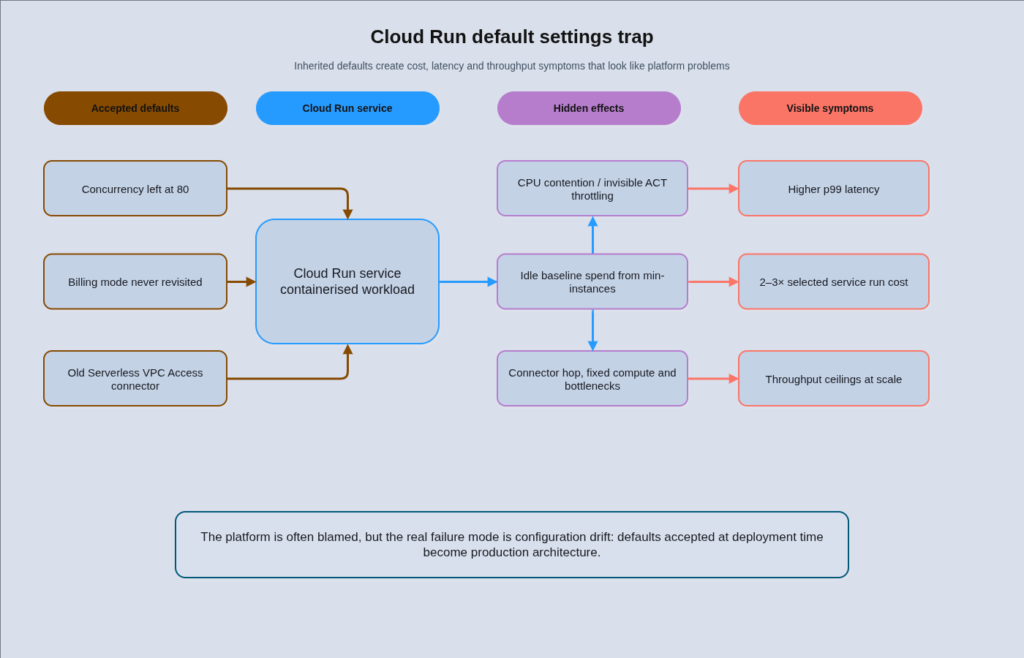
Most Cloud Run deployments are running with their default concurrency setting of 80, their billing mode unchanged from the install default, and their VPC connectivity wired through a Serverless VPC Access connector that was provisioned two years ago. Each of those defaults is wrong for a different reason, and together they are responsible for the majority of the performance surprises and unexplained cost spikes that teams blame on the platform itself. Cloud Run enterprise patterns have matured considerably since the service launched, but the operational knowledge to extract real value from them has not kept pace. The result is a platform that enterprise teams either underutilise or mischarge, while simultaneously arguing about whether it is “ready for serious workloads.”
The traditional approach to Cloud Run adoption makes this worse. Teams deploy a containerised service, accept the defaults, set a generous max-instances ceiling as a safety net, and move on. The concurrency setting gets ignored because traffic looks fine in dashboards. The billing mode never gets revisited because request-based is “the serverless option.” The Serverless VPC Access connector stays in place because removing it means downtime. None of this causes an immediate incident, but it creates a steady drain: unnecessary cold starts from misconfigured concurrency, idle baseline costs from the wrong combination of billing mode and min-instances, and throughput ceilings from connector bottlenecks that only become visible at scale. In illustrative fleet modelling, these defaults can push selected services to 2-3 times their necessary run cost, although the exact figure depends heavily on traffic shape, memory size, concurrency settings, min-instances configuration, and regional pricing. Nobody has a clear picture of why because no single line item looks alarming.
The good news is that the platform has changed substantially. Direct VPC Egress went generally available in 2024 and is now the recommended VPC integration path. Worker Pools are now generally available, covering the pull-based queue patterns that previously required awkward workarounds. Compute Flexible Committed Use Discounts now cover Cloud Run at 28% for a one-year term or 46% for three years, replacing the old flat 17% Cloud Run-specific CUDs. DZ BANK, Germany’s second-largest bank by assets, adopted a Cloud Run-first strategy for its migration from 55,000 on-premises CPUs and reported 90% cost savings and 70% toil reduction on migrated workloads. This is not a toy platform. The question is whether your team is configured to get the same results.
How the Platform Has Changed Since You Last Evaluated It
The “Cloud Run isn’t ready for enterprise” objection is almost always based on the 2021 or 2022 version of the platform. The surface area has expanded significantly since then. Multi-container services with up to ten sidecars per service reached general availability in November 2023, covering OpenTelemetry collector, Envoy proxy, and similar patterns that previously required a service mesh on Kubernetes. The maximum request timeout increased to 60 minutes, which resolves the most common objection for batch-adjacent workloads. Cloud Run now supports NVIDIA L4 and RTX PRO 6000 Blackwell GPUs for inference workloads, narrowing the gap with GKE for AI serving patterns. Cloud Run Service Health, which enables automatic regional failover via Cloud Load Balancing, is another addition that makes multi-region deployments substantially less manual to operate.
The platform has also attracted serious regulated-industry adoption. Commerzbank runs Cloud Run as the foundation of its Big Data and Advanced Analytics serverless stack, with custom Org Policies to enforce compliance requirements at scale and VPC Service Controls for data perimeter enforcement. The fact that a German Tier 1 bank is running Cloud Run as a core platform primitive, with custom governance layered on top, should resolve most enterprise readiness objections. The surface area gaps that remain, which are real and worth knowing, relate to stateful workloads, service mesh requirements, and workloads that exceed the 8 vCPU or 32 GiB per-instance limits.
For teams evaluating Cloud Run against GKE Autopilot today, our earlier guide on Cloud Run vs App Engine vs GKE covered the high-level compute choice across GCP’s three managed runtimes. This post goes deeper on the production patterns that determine whether Cloud Run actually delivers on its operational promise.
Concurrency: The Parameter That Changes Everything
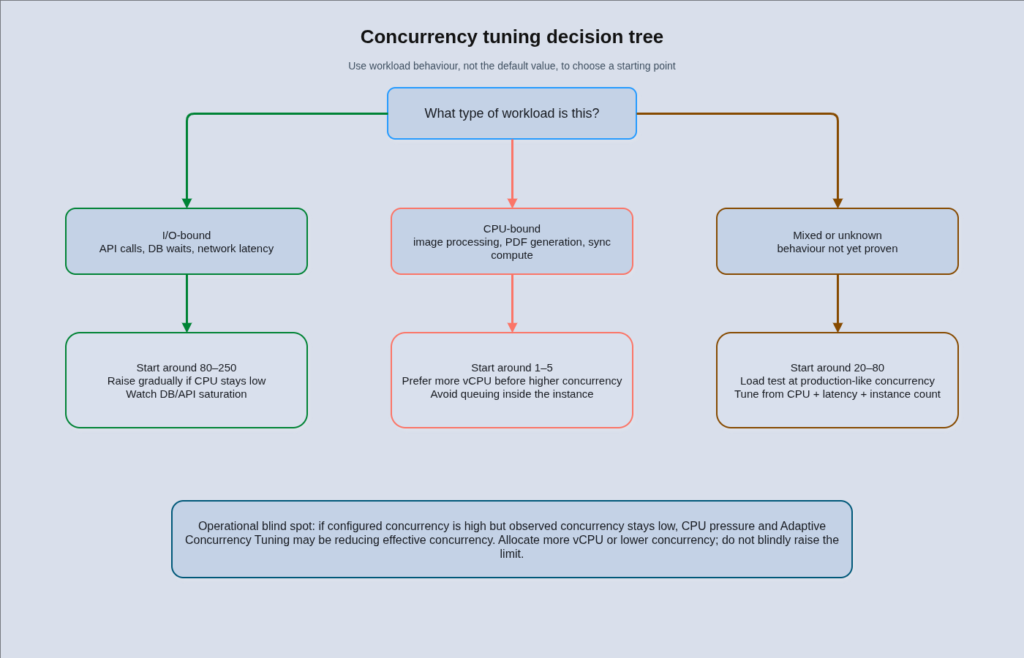
Per-instance concurrency is the single most consequential tuning parameter on Cloud Run, and it is also the most commonly misunderstood. The default value is 80, which means a single container instance will accept up to 80 simultaneous requests before the autoscaler spins up a new instance. That number is appropriate for some workloads and wildly wrong for others, and the consequences of getting it wrong in either direction are significant.
Cloud Run scales on two signals simultaneously: concurrency utilisation and CPU utilisation, with default targets of 60% for each. Whichever signal demands more instances wins. This matters because it means raising concurrency does not automatically reduce instance count if CPU is the binding constraint. A service with concurrency set to 200 on a CPU-bound workload will still spin up aggressively because CPU hits 60% long before concurrency approaches its limit. The correct response to high CPU on a CPU-bound service is not higher concurrency, it is more vCPU per instance or lower concurrency so each instance handles fewer simultaneous requests.
There is also an undocumented behaviour called Adaptive Concurrency Tuning (ACT) that affects every Cloud Run service. When an instance’s CPU exceeds 90% over a one-second window, Cloud Run silently lowers the effective maximum concurrent requests for that instance by one. When CPU stays under 70% for a second while concurrency is at its limit, it raises it back. The practical consequence is that your configured concurrency is an upper bound, not a guarantee. If your monitoring shows consistently lower concurrency than your configured ceiling, ACT is almost certainly the cause, and the right response is to allocate more vCPU rather than to increase the concurrency limit. ACT metrics are not externally observable, which makes this a genuine operational blind spot.
Getting the concurrency setting right requires understanding what your workload is actually doing. An I/O-bound Go or Node.js service handling database queries and external API calls can comfortably run at 80-250 concurrent requests because threads or goroutines sit idle during network wait time. A synchronous Python service running Flask with gunicorn has one thread per worker that blocks on I/O, so effective concurrency is workers multiplied by threads per worker, typically in the range of 5-20 per container. A CPU-bound service doing image processing, PDF generation, or any form of synchronous computation should be configured at concurrency 1-5, because each request saturates a CPU core and additional concurrent requests only create queuing latency inside the instance.
The most common misconfiguration seen in production is leaving concurrency at the default 80 on CPU-bound services. The result is sustained CPU contention, rising p99 latency as requests queue inside the container, and ACT silently throttling effective concurrency in a way that is invisible to the team. The second most common is setting concurrency to 1 on I/O-bound services. This forces a new instance for every concurrent request, multiplying cold starts and inflating instance count for workloads that are perfectly capable of sharing an instance.
Billing Mode and Min-Instances: Where Most Cost Problems Live
Cloud Run offers two billing modes with meaningfully different cost profiles. Request-based billing (the default) charges only during request processing plus startup and shutdown time, at 100ms granularity. Instance-based billing charges for the entire instance lifetime at a 1-minute minimum but at approximately 25% lower CPU rates and 20% lower memory rates. Choosing the wrong mode for your traffic pattern is the most reliable way to overpay for Cloud Run at scale.
The expensive failure mode is a specific combination that appears repeatedly across enterprise Cloud Run deployments: min-instances set to one or more, combined with instance-based billing, on a low-traffic service. With request-based billing, a warm min-instance costs roughly £2.50-8 per month in idle charges (the memory-time component at idle rates, with CPU throttled). With instance-based billing, that same warm instance pays full CPU and memory rates 24 hours a day, 7 days a week. Across a fleet of 30 development and staging services with min-instances set to three and instance-based billing enabled, you can accumulate £1,000-1,500 per month in baseline costs that have nothing to do with actual request volume.
The break-even calculation for instance-based billing is around 75% sustained utilisation. Below that point, request-based billing wins. Above it, the lower per-unit rates of instance-based billing make up for the idle-time cost. Google’s Recommender surfaces this analysis automatically, and it is worth running after any period of stable traffic, typically after six weeks or more on a given service.
Min-instances are justified on revenue-critical synchronous paths where cold start latency has a measurable business cost. A 3-second cold start on a checkout flow or authentication service has quantifiable conversion impact. The same cold start on an internal admin tool does not. The practical rule is to set min-instances to roughly the count needed for your baseline traffic, not your peak. Cloud Run preferentially routes new requests to warm instances, so sizing min-instances at baseline load produces good steady-state utilisation and costs less than sizing it at peak.
Startup CPU Boost carries no separate feature charge and Google notes it can reduce startup time by up to 50% on many runtimes, including Spring Boot. It should be enabled on every customer-facing service that uses min-instances, because it reduces the warm-instance overhead period and means fewer requests encounter the post-startup ramp. For Java workloads specifically, combining Startup CPU Boost with -XX:TieredStopAtLevel=1 to disable the C2 compiler tier and enabling Spring lazy initialisation can reduce cold start times from 10-15 seconds to around 2 seconds without switching to GraalVM native compilation.
For Cloud Run services that handle pull-based queue consumption, distributed AI inference pipelines, or long-running background tasks, Worker Pools are the correct primitive. Using request-driven Services or Jobs for these patterns creates unnecessary architectural friction. Google states that Worker Pools can be approximately 40% cheaper than request-driven Services or Jobs for long-running background tasks, a platform pricing comparison confirmed in Google’s case study with Estée Lauder on its Jo Malone London AI Scent Advisor pipeline. Treat this as a directional platform pricing comparison rather than an independently audited cost-reduction figure.
Direct VPC Egress: Replace Your Connectors
If your Cloud Run services still use Serverless VPC Access connectors for private network access, this is probably the highest-value configuration change available to you right now. Direct VPC Egress reached general availability in mid-2024 and is now the recommended path for all new Cloud Run-to-VPC connectivity.
The architectural difference matters more than it sounds. A Serverless VPC Access connector is a pool of managed VMs (ranging from e2-micro to e2-standard-4 instances) that proxy outbound traffic from your Cloud Run service into your VPC. It adds a network hop, bills as Compute Engine instances whether or not they are handling traffic, and does not scale down once it has scaled up. A standard 2-10 instance connector in an f1-micro configuration starts at around £11/month. A 10-instance e2-standard-4 connector providing higher throughput costs closer to £1,000/month, and that cost is constant regardless of whether your service is receiving traffic.
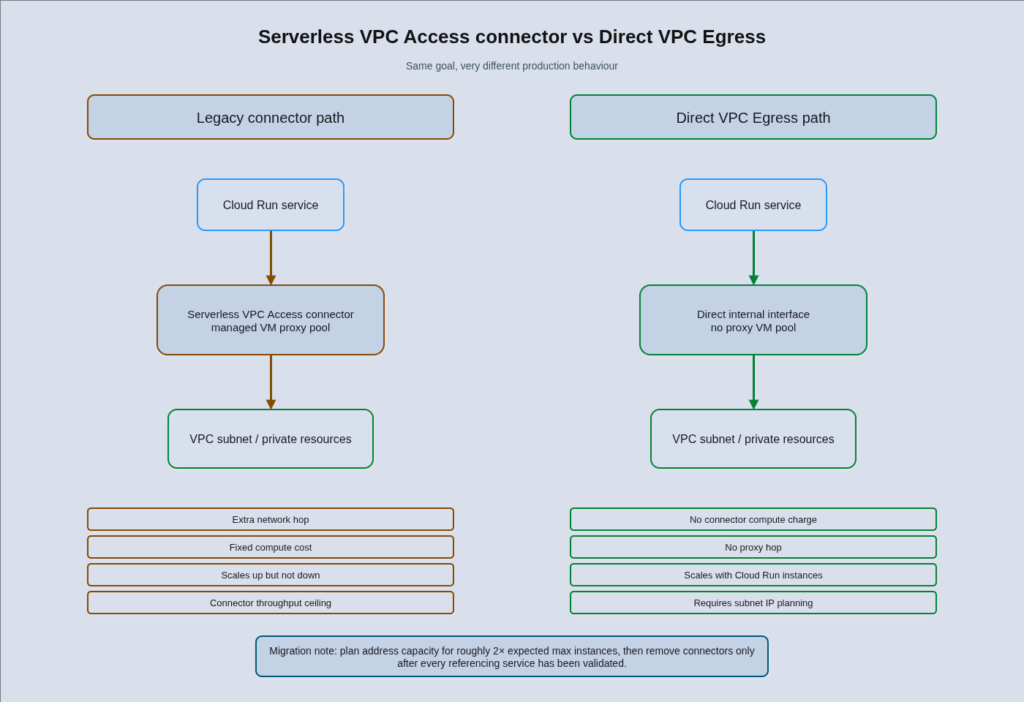
Direct VPC Egress works differently: your Cloud Run instances are assigned internal IP addresses directly from your VPC subnet on a secondary network interface. There is no proxy hop and no compute overhead. You pay for egress data only, and the network cost scales to zero with the service. The throughput ceiling per instance is 1 Gbps, compared to the per-connector aggregate that can become a bottleneck at scale.
Google states that Direct VPC Egress delivers approximately twice the throughput of Serverless VPC Access connectors and the default Cloud Run internet egress path, with a documented limit of up to 1 Gbps per instance for egress to VPC destinations. The connector approach introduces higher latency variance and a throughput step during scale-out events that Direct VPC Egress avoids entirely.
The main reason to keep a connector is IP address conservation. Direct VPC Egress currently uses approximately two IP addresses per running instance for the instance lifetime plus up to 20 minutes after shutdown. For services with very high instance counts, this can create subnet exhaustion. Plan for your subnet to have available addresses equal to at least twice your expected maximum instance count. A /23 subnet is a reasonable allocation for high-scale services.
DZ BANK decommissioned more than 30 Serverless VPC Access connectors as part of their Cloud Run-first migration, saving 4-6 hours per week of platform-team toil in connector management and the associated compute cost. This is documented in Google’s Cloud Run-first approach case study.
For context on GCP private networking more broadly, our guide to GCP networking at enterprise scale covers Shared VPC, Network Connectivity Center, and Private Service Connect, all of which interact with Direct VPC Egress deployments.
Multi-Region Architecture: The Global Load Balancer Pattern
Cloud Run does not provide native multi-region routing. Regional resilience and global traffic distribution require a Global External Application Load Balancer with Serverless Network Endpoint Groups, one per region, pointing at the Cloud Run service in each region. This is also the correct foundation for the multi-region patterns covered in our guide to multi-region cloud architecture at enterprise scale.
The architecture involves deploying the same Cloud Run service independently to each target region, creating a Serverless NEG per region that references the regional service, attaching all NEGs to a single global backend service, and fronting everything with a Global External Application Load Balancer using an anycast IP. Traffic from users worldwide hits the nearest Google edge PoP and routes to the closest healthy regional NEG. This requires Premium Network Tier. Standard Tier is single-region only and will not produce the expected behaviour.
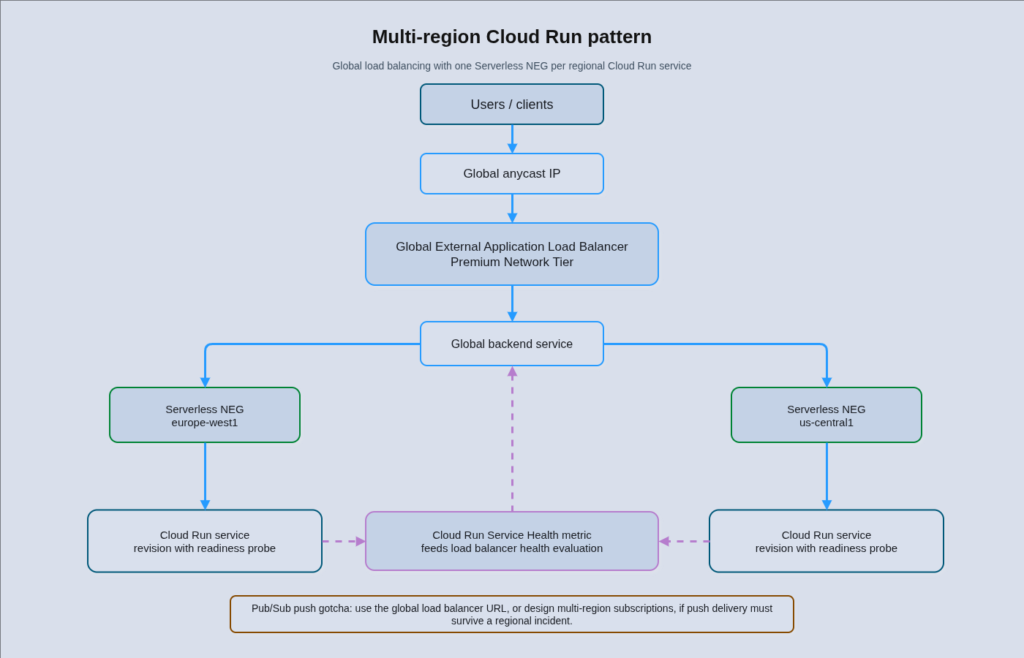
Regional failover can be automated through Cloud Run Service Health, which aggregates the readiness state of all instances in a regional service into a Cloud Monitoring metric consumed by the load balancer. When a regional service becomes unhealthy, the load balancer diverts traffic to a healthy region automatically. The limitation worth knowing is that revisions without readiness probes are treated as “healthy unknown” rather than unhealthy, so configure probes explicitly on every revision that participates in a multi-region deployment.
Revision-level traffic splitting, which Cloud Run supports natively with weighted routing across named revisions, is a separate mechanism from regional failover. Traffic splitting at the revision level enables canary deployments and blue-green rollouts within a single region. Deploying a new revision with traffic set to zero and then routing a percentage incrementally is a straightforward pattern that Cloud Run handles without any additional infrastructure.
One common gotcha: Pub/Sub push subscriptions deliver to a regional Cloud Run URL by default, not the global load balancer URL. If you are using Pub/Sub push delivery, configure the push endpoint to use the global LB URL to participate in regional failover, or implement multi-region subscription patterns to ensure message delivery continues during a regional incident.
Cloud Run vs GKE Autopilot: A Decision Worth Making Deliberately
The Cloud Run vs GKE Autopilot decision is one that most enterprise teams make once, often early in their GCP adoption, and then do not revisit. It is worth thinking about explicitly rather than letting it be determined by inertia or by whichever service a team member had familiarity with.
Cloud Run is the right choice for stateless HTTP and gRPC services, event-driven workers, and scheduled jobs where traffic is variable and scale-to-zero materially reduces cost. Its operational model is close to zero: deployments happen in seconds, revision management is built in, and there is nothing to upgrade or patch at the cluster level. The platform handles instance scheduling, health checks, and capacity management entirely. For teams without deep Kubernetes expertise or with limited platform-team capacity, this operational simplicity is often the primary argument.
GKE Autopilot is the right choice when you have concrete Kubernetes requirements: StatefulSets for services that need persistent local identity, DaemonSets for node-level instrumentation, Custom Resource Definitions and Operators for workloads like Kafka or PostgreSQL managed through the Kubernetes API, or a service mesh requirement that Anthos Service Mesh provides on Autopilot. It is also the right choice for sustained high-throughput workloads where reserved-capacity pricing across a stable node pool, combined with three-year Compute CUDs, produces a lower total cost than Cloud Run’s per-request model.
Cloud Run now supports up to ten containers per service through its multi-container sidecar model, which covers the OpenTelemetry collector, Envoy, and similar patterns. If you have seen older references describing Cloud Run as single-container only, that limitation was resolved in November 2023. GKE Autopilot supports StatefulSets and DaemonSets; Cloud Run does not. GKE Autopilot’s scale-to-zero story requires separate consideration: the cluster control plane remains active (billed at cluster management fees), and node capacity scales to zero only when no workloads are scheduled, which is a different cost model from Cloud Run’s true per-request billing.
Our detailed analysis of GKE Autopilot right-sizing with VPA covers the Autopilot cost optimisation patterns that apply once you have made the decision to run on Kubernetes. For the decision itself, the clearest heuristic is: start on Cloud Run and escalate to GKE Autopilot only when you hit a concrete Kubernetes API requirement. Container images are portable between the two, so the migration cost when you do need to move is lower than the operational overhead of running GKE for workloads that do not need it.
Real-World Case Studies
Company Name and Industry: DZ BANK, Financial Services (Germany)
Scale Context: Migration from approximately 55,000 on-premises CPUs; over 30 Serverless VPC Access connectors previously deployed
Challenge: DZ BANK needed to migrate the majority of its in-house developed applications (approximately 90% of its stack) to GCP without building a large Kubernetes platform engineering practice for routine containerised services.
Solution Implemented: A Cloud Run-first policy for containerised applications, with GKE used selectively for workloads requiring Kubernetes-specific capabilities. Direct VPC Egress replaced all Serverless VPC Access connectors. Cloud SQL, Secret Manager, and Cloud Load Balancing for the service layer. VPC Service Controls and CMEK for compliance.
Measurable Outcomes:
- 90% cost reduction on migrated workloads compared to on-premises baseline
- 70% reduction in platform-team toil, including 4-6 hours per week saved from decommissioning 30+ VPC connectors
Company Name and Industry: Commerzbank, Financial Services (Germany)
Scale Context: Tier 1 bank with a stated target of 85% of decentralised applications in the cloud by the end of their Strategy 2024 programme
Challenge: Commerzbank needed to run Cloud Run as a core platform primitive for its Big Data and Advanced Analytics serverless stack while meeting stringent German banking compliance requirements, including controlling which Cloud Run features and configurations were permissible at scale across development teams.
Solution Implemented: Cloud Run as the foundation of the serverless analytics stack, combined with Custom Org Policies to enforce bank-grade security constraints on Cloud Run deployments (image sources, ingress settings, VPC configuration). VPC Service Controls for data perimeter enforcement. Cloud Run used in combination with Pub/Sub for security telemetry workflows.
Measurable Outcomes:
- Compliance-controlled Cloud Run adoption at bank scale without blocking development teams
- Automated enforcement of 15+ Cloud Run configuration constraints through custom Org Policies, eliminating manual security review for routine deployments
Source: https://cloud.google.com/blog/topics/financial-services/commerzbank-cloud-run-custom-org-policies
Company Name and Industry: Estée Lauder Companies, Consumer Goods and Beauty
Scale Context: Enterprise-scale AI inference pipeline for the Jo Malone London AI Scent Advisor; chained large language model and tool-call pipeline with long-running per-request processing requirements
Challenge: The AI Scent Advisor pipeline required handling long-running inference jobs that did not fit neatly into the request-response model of standard Cloud Run services, while maintaining the operational simplicity of a serverless platform.
Solution Implemented: Cloud Run Worker Pools (GA 2025) as the production primitive for the chained inference pipeline, with Worker Pools consuming from a managed queue and processing multi-step AI workflows without per-request timeout constraints.
Measurable Outcomes:
- Significantly lower compute cost compared to request-driven Cloud Run services for the same workload profile. Google states Worker Pools can be approximately 40% cheaper than request-driven Services or Jobs for long-running background tasks, framed as a platform pricing comparison.
- Production AI inference pipeline at enterprise scale on a serverless primitive, avoiding the operational overhead of a dedicated Kubernetes cluster for this workload
Source: https://cloud.google.com/blog/products/serverless/cloud-run-worker-pools-at-estee-lauder-companies
Cost Analysis
Cloud Run pricing in 2026 follows two parallel tracks. Request-based billing charges per vCPU-second and per GiB-second consumed during active request processing plus startup and shutdown periods, at 100ms granularity. The Tier 1 rate is approximately £0.000019 per vCPU-second active (roughly £0.068 per vCPU-hour). Instance-based billing applies full rates for the entire instance lifetime at a 1-minute minimum but at approximately 25% lower CPU rates. A generous monthly free tier covers 180,000 vCPU-seconds, 360,000 GiB-seconds, and 2 million requests per billing account, which means small services or development workloads often have no Cloud Run compute cost at all.
The committed use discount options changed materially in mid-2024. The original Cloud Run-specific CUDs offered a flat 17% discount for either one-year or three-year terms, with no benefit to committing longer. Compute Flexible CUDs, introduced in 2024, cover Cloud Run (with instance-based billing or Jobs), GKE Autopilot, and Compute Engine in a single commitment across regions and projects. The one-year rate is 28% off; the three-year rate is 46% off. For teams running Cloud Run with instance-based billing at meaningful scale, the switch from legacy CUDs to Compute Flex CUDs is a straightforward cost improvement. Our guide on automating GCP Committed Use Discount analysis covers how to model and validate CUD coverage across your GCP spend.
As a practical cost comparison: a web API service handling 10 million requests per month with 400ms average duration, 1 vCPU, and 512 MiB memory at concurrency 20 costs approximately £11-14 per month in a Tier 1 region. The same service at concurrency 1 (effectively a single-threaded design) costs approximately £65-82 per month for the same request volume, because each request occupies the instance for its full duration without sharing capacity. This is the clearest numerical illustration of why concurrency tuning matters.
Hidden costs worth accounting for in a Cloud Run total cost of ownership include Direct VPC Egress data charges (same per-GB egress pricing as standard VPC traffic), Cloud Load Balancing charges for multi-region deployments (approximately £0.015 per GB processed), and the per-request charge of £0.32 per million requests above the free tier. Connector compute costs should be removed from the baseline calculation once Direct VPC Egress is in place.
Decision Framework
The three questions that should drive most Cloud Run architecture decisions map neatly onto the three configuration areas covered in this post.
First: is your workload I/O-bound or CPU-bound? I/O-bound services benefit from high concurrency (80-250) and request-based billing. CPU-bound services need low concurrency (1-5), more vCPU per instance, and careful capacity planning to avoid ACT silently throttling performance. Mixed workloads sit in the middle and require load testing to find the right concurrency ceiling.
Second: what does your traffic pattern look like over a 24-hour period? Spiky or highly variable traffic with meaningful periods near zero is the strongest case for Cloud Run’s request-based billing and scale-to-zero behaviour. Sustained high-traffic services, particularly those running background processing at a predictable rate, should evaluate instance-based billing and, at sufficient scale, Compute Flex CUDs. Services on a human business-hours pattern sit in between and may benefit from scheduled min-instance scaling.
Third: does your workload require Kubernetes-specific capabilities? If the honest answer is no, run it on Cloud Run. If the answer is yes, specifically StatefulSets, DaemonSets, CRDs, service mesh requirements, or block storage, move it to GKE Autopilot. Do not treat “we might need Kubernetes later” as a reason to run GKE today. Container images are portable and migration is straightforward when the need arises.
Implementation Roadmap
Phase 1: Configuration Baseline (Months 1-2)
Before changing anything, establish a measurement baseline. Enable Cloud Run request metrics per-service (instance count, concurrent requests, CPU utilisation, latency by percentile) and create a dashboard that shows all three dimensions together. This baseline is what you compare against after tuning.
For each existing service, run a load test at production-like concurrency and capture CPU utilisation at the configured concurrency ceiling. Services showing CPU above 70% before concurrency saturates are CPU-bound and need lower concurrency or more vCPU. Services showing CPU well below 60% while staying under concurrency are I/O-bound and may be able to absorb higher concurrency with better utilisation.
Audit all services for the billing mode and min-instance combination. Flag any service with min-instances above zero and instance-based billing that is not a revenue-critical production service. This is your quickest cost win.
Phase 2: Direct VPC Egress Migration and Concurrency Tuning (Months 3-5)
Migrate VPC-connected services to Direct VPC Egress. The process involves creating an appropriately sized subnet (plan for 2x expected maximum instances in available IP addresses), updating the Cloud Run service configuration to use Direct VPC, and verifying connectivity before removing the connector. Connectors should not be decommissioned until all services that referenced them have been migrated and validated.
Apply concurrency tuning to the services identified in Phase 1. Start conservatively: for CPU-bound services, set concurrency to 2-5 and monitor. For I/O-bound services, test incrementally above 80. Accept that the first round of tuning will be approximate; the second round after two to four weeks of production data will be more precise.
Phase 3: Cost Optimisation and Multi-Region (Months 6-12)
At this point, billing mode is optimised, concurrency is tuned, and VPC connectivity is efficient. Run Google’s Recommender to validate the billing mode recommendation per service. For services that justify instance-based billing at sustained utilisation, evaluate Compute Flex CUDs at the billing account level.
Multi-region deployment should be scoped to the services where a regional outage would breach your SLO budget. Not every Cloud Run service needs multi-region coverage. For those that do, implement the Global External Application Load Balancer with Serverless NEGs as described above, and configure Cloud Run Service Health for automated regional failover.
What Is Coming on the Platform
Cloud Run announced several features at Cloud Next 2026 that are currently in preview and worth tracking. SSH access into running Cloud Run container instances is expected to improve production debugging significantly, removing one of the remaining operational advantages of Kubernetes for teams that rely on shell access for incident investigation. Cloud Run instance bindings are a preview capability that provides structured access to Cloud Run instance metadata for cost attribution and observability use cases.
The direction on GPU support continues to expand. L4 and RTX PRO 6000 GPUs are available for inference workloads with min-instances set to avoid cold start on GPU instances. The long cold start time on GPU instances (often 60 seconds or more for large model loading) makes min-instances effectively mandatory for latency-sensitive inference, and the per-GPU billing makes this the most cost-sensitive configuration decision on the platform.
Worker Pools represent the platform’s clearest signal about where enterprise adoption is heading. Pull-based queue consumption, distributed AI pipeline orchestration, GitHub Actions runner replacement, and Redis-queue-backed task processing are all patterns that Work Pools now cover cleanly. Teams that have been routing these patterns through request-driven Services with awkward timeout workarounds should migrate.
Strategic Recommendations
For teams currently running Cloud Run with default settings: the concurrency audit and billing mode review described in Phase 1 of the implementation roadmap typically identify 20-40% cost savings within the first month, with no application changes required. Start there.
For teams evaluating Cloud Run for the first time: the regulated-industry adoption by DZ BANK and Commerzbank resolves most enterprise readiness concerns. The platform is viable for production workloads at bank scale. The operational simplicity relative to GKE is a genuine advantage for teams without large platform engineering capacity. Start with Cloud Run for stateless workloads and add GKE only when a concrete Kubernetes requirement emerges.
For teams choosing between Cloud Run and GKE Autopilot for a new platform: the right answer for most organisations in 2026 is Cloud Run for the majority of services, with GKE Autopilot as the escalation path for stateful systems and Kubernetes-dependent tooling. This is also Google’s documented recommendation. Building the discipline to escalate to GKE only when genuinely needed, rather than pre-emptively, is the configuration decision with the highest long-term operational impact.
Useful Links
- Google Cloud Run documentation
- Cloud Run pricing calculator and pricing details
- Direct VPC Egress GA announcement
- Cloud Run cost optimisation best practices (official)
- What’s new for Cloud Run at Next ’26
- DZ BANK Cloud Run-first case study
- Commerzbank custom Org Policies for Cloud Run
- Estée Lauder Worker Pools case study
- Compute Flexible CUDs documentation
- Min-instances configuration guide