
Most teams enable GuardDuty Malware Protection for S3, check it off the security backlog, and assume their buckets are now protected. They are not. The service scans uploaded objects and reports what it finds. It does not block access to unscanned files, quarantine infected objects, or delete anything. Without deliberate configuration on your side, a user can read a just-uploaded file the moment the PUT completes: before a single byte has been scanned. This post covers the three things you must build to make the service actually secure: tag-based access control to block unscanned object access, an EventBridge-driven quarantine pipeline for confirmed threats, and a Terraform configuration that wires it together without requiring a full GuardDuty detector.
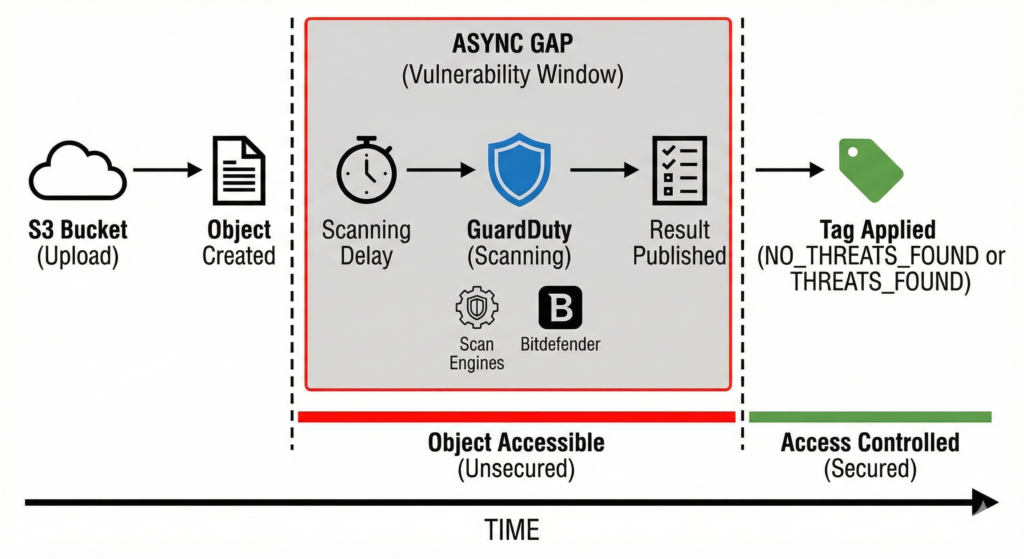
The Async Gap Is a Security Boundary, Not a Minor Caveat
When an object lands in a protected bucket, GuardDuty receives an S3 Object Created event via EventBridge, downloads a copy to an isolated VPC over PrivateLink, runs it through dual scan engines (an internal AWS engine using YARA and ML models, plus Bitdefender), then publishes the result. That pipeline takes time. Small objects complete in seconds; large files and periods of S3 throttling introduce unpredictable delays, and AWS publishes no SLA for scan latency.
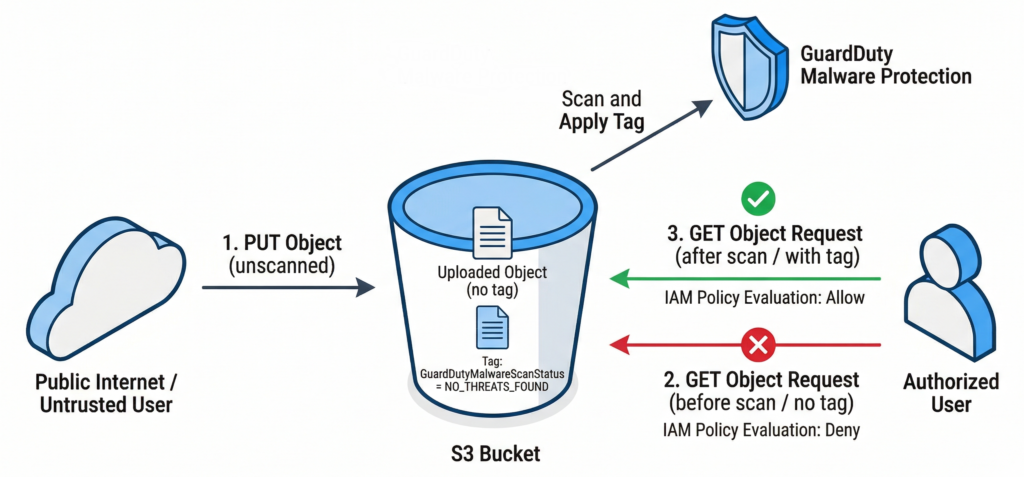
During that window, the object is fully accessible to any principal with s3:GetObject. In a user upload pipeline: file sharing, document ingestion, customer submission workflows: that window is exactly when legitimate downstream consumers are most likely to read the file. The async gap is not a minor caveat you can document and move on from; it is a genuine security boundary that you must close with bucket policy.
The service applies the object tag GuardDutyMalwareScanStatus with one of five values after scanning completes: NO_THREATS_FOUND, THREATS_FOUND, UNSUPPORTED, ACCESS_DENIED, or FAILED. The correct architecture is to deny all object reads until that tag is present and clean, which is exactly what tag-based access control (TBAC) enforces.
Building the Security Stack
Step 1: Deploy the IAM Role
Unlike the EC2 variant, Malware Protection for S3 does not use a service-linked role. You create the IAM role yourself, trusting the service principal malware-protection-plan.guardduty.amazonaws.com. The minimum permissions required are EventBridge rule management on the auto-created DO-NOT-DELETE-AmazonGuardDutyMalwareProtectionS3* rules, S3 object read, S3 tagging (if enabled), and KMS decrypt for SSE-KMS buckets.
resource "aws_iam_role" "guardduty_malware_scan" {
  name = "guardduty-malware-protection-s3"

  # Requires: data "aws_caller_identity" "current" {} defined in your configuration
  assume_role_policy = jsonencode({
    Version = "2012-10-17"
    Statement = [{
      Effect    = "Allow"
      Principal = { Service = "malware-protection-plan.guardduty.amazonaws.com" }
      Action    = "sts:AssumeRole"
      Condition = {
        StringEquals = { "aws:SourceAccount" = data.aws_caller_identity.current.account_id }
      }
    }]
  })
}

resource "aws_guardduty_malware_protection_plan" "uploads" {
  role = aws_iam_role.guardduty_malware_scan.arn

  protected_resource {
    s3_bucket {
      bucket_name     = aws_s3_bucket.uploads.id
      # Scope scanning to untrusted upload prefixes only -- reduces cost significantly
      object_prefixes = ["uploads/", "incoming/", "submissions/"]
    }
  }

  actions {
    tagging {
      status = "ENABLED"
    }
  }
}
Note that this resource is independent from aws_guardduty_detector_feature. The S3 malware protection plan operates in standalone mode without a GuardDuty detector, which is useful for teams that want object scanning without enrolling in the full GuardDuty data-source stack. The tradeoff is that findings do not surface in Security Hub or generate Object:S3/MaliciousFile alerts in detector mode; you rely entirely on EventBridge for response.
Step 2: Lock the Bucket with TBAC
Two Deny statements are required. The first blocks read access to any object that does not carry the NO_THREATS_FOUND tag. The second prevents any non-GuardDuty principal from self-applying the scan status tag, closing the obvious bypass:
{
  "Version": "2012-10-17",
  "Statement": [
    {
      "Sid": "NoReadUnlessClean",
      "Effect": "Deny",
      "NotPrincipal": {
        "AWS": "arn:aws:sts::ACCOUNT_ID:assumed-role/guardduty-malware-protection-s3/GuardDutyMalwareProtection"
      },
      "Action": ["s3:GetObject", "s3:GetObjectVersion"],
      "Resource": "arn:aws:s3:::your-uploads-bucket/*",
      "Condition": {
        "StringNotEquals": {
          "s3:ExistingObjectTag/GuardDutyMalwareScanStatus": "NO_THREATS_FOUND"
        }
      }
    },
    {
      "Sid": "OnlyGuardDutyCanTagScanStatus",
      "Effect": "Deny",
      "NotPrincipal": {
        "AWS": "arn:aws:sts::ACCOUNT_ID:assumed-role/guardduty-malware-protection-s3/GuardDutyMalwareProtection"
      },
      "Action": ["s3:PutObjectTagging", "s3:PutObjectVersionTagging"],
      "Resource": "arn:aws:s3:::your-uploads-bucket/*",
      "Condition": {
        "ForAnyValue:StringEquals": {
          "s3:RequestObjectTagKeys": ["GuardDutyMalwareScanStatus"]
        }
      }
    }
  ]
}
Deploy this policy before any objects arrive in the bucket. Objects uploaded before TBAC is in place are already accessible and will remain so until rescanned or removed.
Step 3: EventBridge-Driven Quarantine
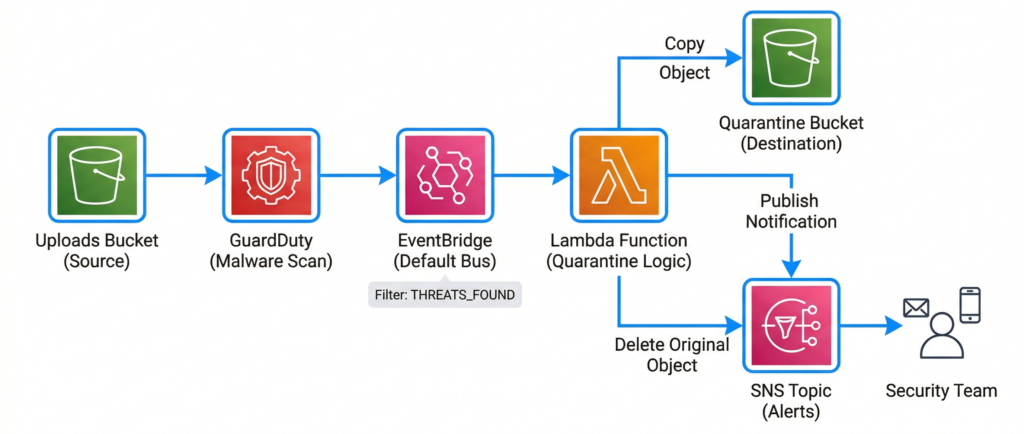
Tagging alone handles the access control side. For confirmed threats, you need an automated response. GuardDuty publishes scan results to the default EventBridge bus under detail-type: "GuardDuty Malware Protection Object Scan Result". Filter on THREATS_FOUND and route to a Lambda function that copies the object to a quarantine bucket, deletes the original, and publishes to SNS for security team notification:
import boto3
import json
import os

s3 = boto3.client('s3')
sns = boto3.client('sns')

QUARANTINE_BUCKET = os.environ['QUARANTINE_BUCKET']
SNS_TOPIC_ARN = os.environ['SNS_TOPIC_ARN']

def handler(event, context):
    detail = event['detail']
    scan_result = detail['scanResultDetails']['scanResultStatus']

    if scan_result != 'THREATS_FOUND':
        return

    s3_details = detail['s3ObjectDetails']
    source_bucket = s3_details['bucketName']
    object_key = s3_details['objectKey']
    version_id = s3_details.get('versionId')
    quarantine_key = f"quarantined/{object_key}"

    # Idempotency check: skip if already quarantined
    try:
        s3.head_object(Bucket=QUARANTINE_BUCKET, Key=quarantine_key)
        print(f"Object already quarantined: {quarantine_key}")
        return
    except s3.exceptions.ClientError as e:
        if e.response['Error']['Code'] != '404':
            raise

    copy_source = {'Bucket': source_bucket, 'Key': object_key}
    if version_id:
        copy_source['VersionId'] = version_id

    try:
        # Copy to quarantine BEFORE deleting original
        s3.copy_object(
            CopySource=copy_source,
            Bucket=QUARANTINE_BUCKET,
            Key=quarantine_key,
            TaggingDirective='COPY'
        )
    except Exception as e:
        print(f"Copy failed, aborting delete: {e}")
        raise

    delete_params = {'Bucket': source_bucket, 'Key': object_key}
    if version_id:
        delete_params['VersionId'] = version_id
    s3.delete_object(**delete_params)

    sns.publish(
        TopicArn=SNS_TOPIC_ARN,
        Subject=f"Malware detected: s3://{source_bucket}/{object_key}",
        Message=json.dumps(detail, indent=2)
)For objects over 5 GB, the Lambda copy call must use multipart; factor this into your timeout and memory configuration. GuardDuty uses at-least-once delivery on EventBridge events, so ensure your Lambda is idempotent.
Enterprise Considerations
Three production constraints require explicit planning. First, each account must independently create the IAM role and protection plan: the delegated GuardDuty administrator cannot enable S3 malware protection on member-account buckets from the management account. Multi-account rollout requires CloudFormation StackSets or an account-factory pattern that injects these resources during provisioning. There is no organisation-wide auto-enable equivalent to other GuardDuty protection plans.
Second, S3 objects have a hard limit of 10 object tags. If your objects already carry 10 tags from metadata pipelines or cost allocation policies, GuardDuty cannot apply GuardDutyMalwareScanStatus and TBAC will permanently block access to those objects. Audit your tag usage before deploying TBAC.
Third, client-side encrypted objects (CSE-KMS) are scanned as opaque encrypted blobs. The service returns a scan result rather than UNSUPPORTED, which means infected CSE-encrypted objects pass through with a misleading clean status. Treat CSE buckets as out of scope for this control and compensate with network-layer or application-layer scanning.
Prefix filtering is the primary cost lever. Scanning is priced at $0.09 per GB plus $0.215 per 1,000 objects, following an 85% price reduction in February 2025. Scope protection plans to uploads/ and incoming/ prefixes rather than entire buckets. Internal system data, logs, and pipeline artefacts rarely need malware scanning. Reviewed alongside your wider AWS Well-Architected review automation, prefix-scoped scanning can keep costs proportionate to actual risk coverage.
When to Consider Alternatives
The native service covers most workloads well after the 2025 price cut. The ceiling of 25 protected buckets per account per Region becomes a constraint at scale, and the lack of scheduled rescanning for existing objects is a gap for compliance programmes requiring periodic full-bucket sweeps. Solutions like bucketAV (Sophos-powered) or Cloud Storage Security address both limitations but introduce self-hosted infrastructure to manage. The native service’s zero-operational overhead and deep EventBridge integration make it the default starting point; third-party tools are supplements for specific regulatory gaps, not general replacements.
Key Takeaways
Enabling the service alone leaves a security gap: TBAC bucket policies that block access to unscanned and infected objects must be deployed before objects arrive. The IAM role is customer-managed and must trust malware-protection-plan.guardduty.amazonaws.com with eight distinct permission sets. EventBridge-driven Lambda automation is required to quarantine confirmed threats, since the service never moves or deletes objects itself. The 10-tag object limit and client-side encryption are genuine architectural risks that require explicit treatment in your threat model.
Useful Links
- GuardDuty Malware Protection for S3 documentation
- How Malware Protection for S3 works
- Tag-based access control with Malware Protection for S3
- IAM role policy requirements
- Monitoring scans with EventBridge
- Terraform resource: aws_guardduty_malware_protection_plan
- GuardDuty Malware Protection for S3 pricing
- AWS Security Blog: Using GuardDuty Malware Protection to scan S3 uploads
- aws-samples/guardduty-malware-protection reference implementation
- GuardDuty Malware Protection for S3 quotas