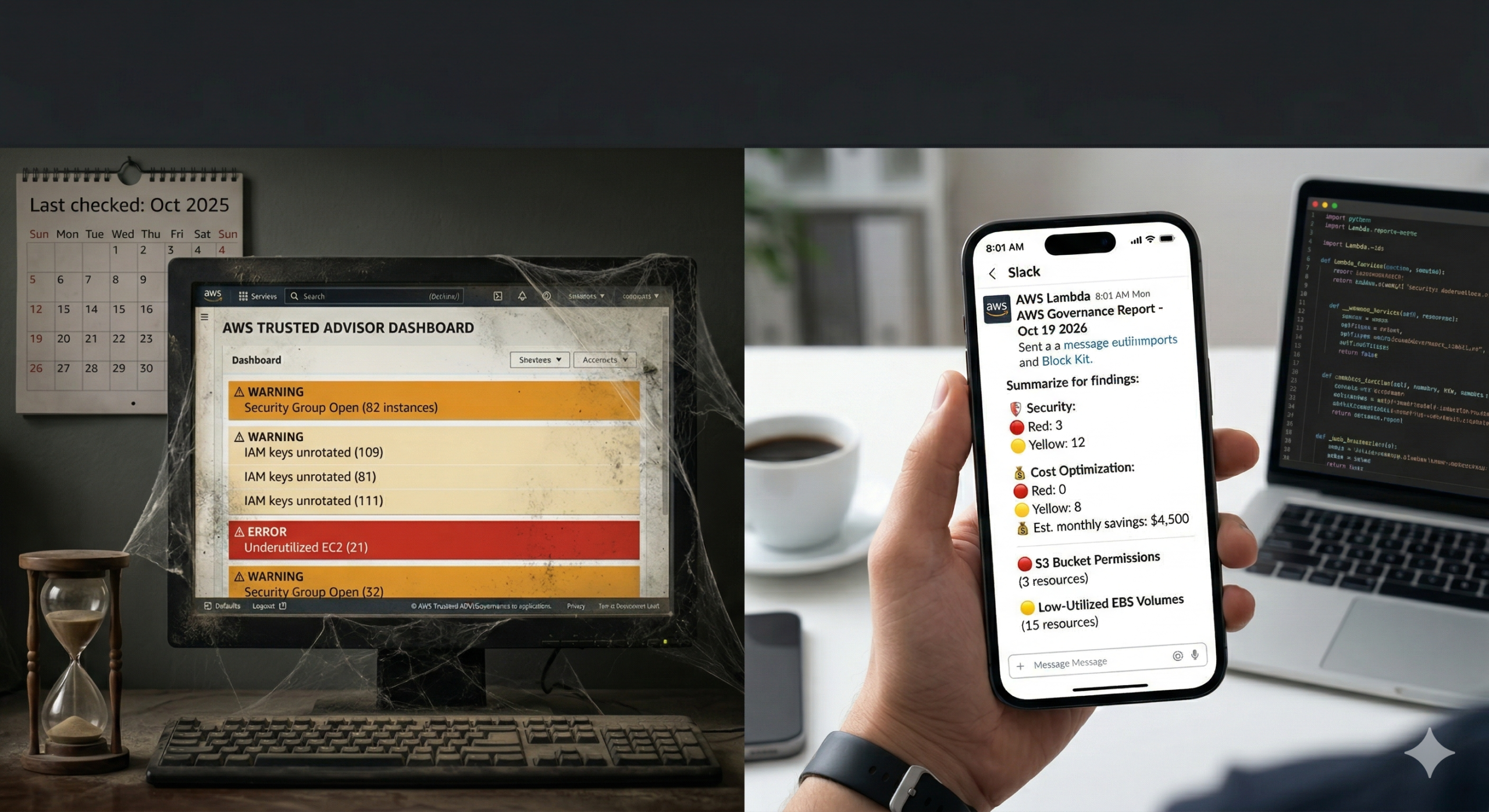
Trusted Advisor is running checks on your infrastructure right now. Security groups open to the internet. IAM access keys that haven’t rotated in 90 days. EC2 instances averaging 3% CPU across a long weekend. Cost savings your FinOps team hasn’t actioned because nobody told them.
Most AWS teams treat it as a dashboard they visit when something goes wrong. Findings accumulate in amber and red, and the checks become background noise. The tool is doing its job. The delivery isn’t.
A weekly governance report, pushed automatically to the right Slack channel and distribution list every Monday morning, converts passive findings into an active accountability loop. This tip shows you how to build one, including three technical gotchas that cause most Trusted Advisor automation examples to silently produce empty reports.
Before You Start: Support Tier and API Choice
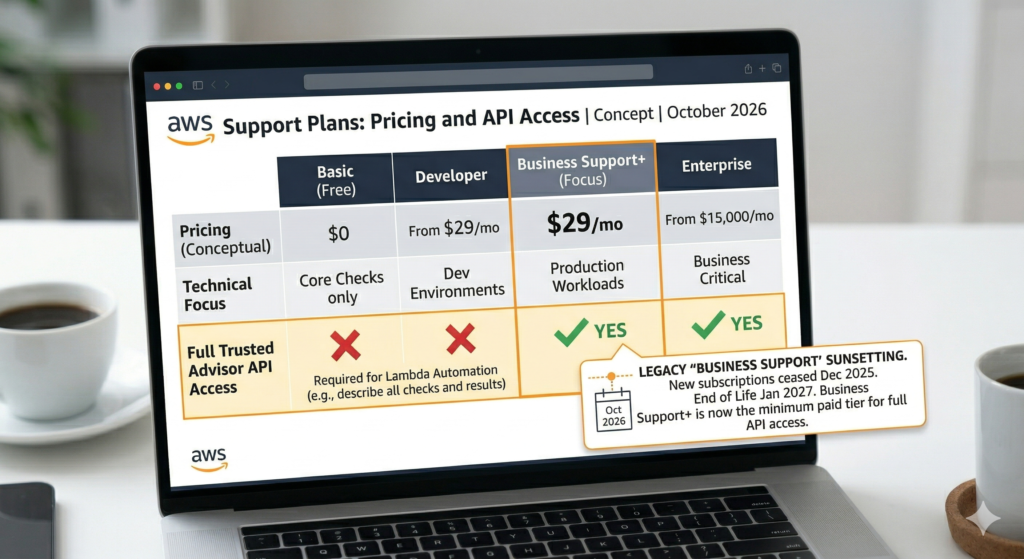
Full Trusted Advisor API access requires Business Support+ or higher. On Basic or Developer plans, API calls return AccessDeniedException. The minimum paid tier is now Business Support+ at $29/month. Classic Business Support stopped accepting new subscriptions in December 2025 and will be discontinued in January 2027.
There are also two distinct boto3 clients for Trusted Advisor. The legacy Support API (boto3.client('support')) has been available since 2013 and remains fully functional, but must target us-east-1 regardless of where your Lambda runs, no other region accepts Trusted Advisor calls. The newer Trusted Advisor API (boto3.client('trustedadvisor')), launched November 2023, supports six regions and a recommendation-centric model aggregating findings from Cost Explorer, Compute Optimizer, and Security Hub alongside standard checks. Use the new API for greenfield automation; the example below uses the legacy API since its method names are more established and most existing code references it.
The Lambda Function
Two verified gotchas to flag in the code below. First, the describe_trusted_advisor_check_result method is singular, check_result, not check_results. Second, category names use American spelling: cost_optimizing with a z. Using British spelling returns empty results without raising an error, which is exactly the kind of silent failure that makes a governance report look like clean infrastructure.
import boto3
import json
import os
import urllib.request
from datetime import datetime

def lambda_handler(event, context):
    # Support API must target us-east-1 regardless of Lambda region
    support = boto3.client('support', region_name='us-east-1')

    checks = support.describe_trusted_advisor_checks(language='en')['checks']

    # American spelling required - 'cost_optimising' silently returns nothing
    target_categories = {'security', 'cost_optimizing', 'service_limits'}
    priority_checks = [c for c in checks if c['category'] in target_categories]

    findings = []

    for check in priority_checks:
        # Singular method name: describe_trusted_advisor_check_result
        result = support.describe_trusted_advisor_check_result(
            checkId=check['id'],
            language='en'
        )['result']

        if result['status'] not in ('warning', 'error'):
            continue

        active_resources = [
            r for r in result.get('flaggedResources', [])
            if not r.get('isSuppressed', False)
            and r['status'] in ('warning', 'error')
        ]

        if not active_resources:
            continue

        findings.append({
            'category': check['category'],
            'name': check['name'],
            'status': result['status'],
            'resourceCount': len(active_resources),
            # estimatedMonthlySavings only populated for cost_optimizing checks
            'estimatedSavings': result
                .get('categorySpecificSummary', {})
                .get('costOptimizing', {})
                .get('estimatedMonthlySavings', 0)
        })

    send_slack_report(findings)
    send_email_report(findings)

    return {'statusCode': 200, 'findingsCount': len(findings)}


def send_slack_report(findings):
    """Post Block Kit summary to Slack. Store webhook in SSM, not environment variables."""
    ssm = boto3.client('ssm')
    webhook_url = ssm.get_parameter(
        Name='/governance/slack-webhook-url',
        WithDecryption=True
    )['Parameter']['Value']

    by_category = {}
    for f in findings:
        by_category.setdefault(f['category'], []).append(f)

    blocks = [{
        'type': 'header',
        'text': {
            'type': 'plain_text',
            'text': f"AWS Governance Report - {datetime.now().strftime('%d %b %Y')}"
        }
    }, {'type': 'divider'}]

    labels = {
        'security': ':shield: Security',
        'cost_optimizing': ':moneybag: Cost Optimisation',
        'service_limits': ':warning: Service Limits'
    }

    for cat, items in by_category.items():
        red = sum(1 for i in items if i['status'] == 'error')
        yellow = sum(1 for i in items if i['status'] == 'warning')
        savings = sum(i['estimatedSavings'] for i in items)

        summary = f"Red: {red}  Yellow: {yellow}"
        if savings > 0:
            summary += f"  Est. monthly savings: ${savings:,.0f}"

        blocks.append({
            'type': 'section',
            'text': {'type': 'mrkdwn', 'text': f"*{labels.get(cat, cat)}*\n{summary}"}
        })

        for item in items[:3]:
            icon = ':red_circle:' if item['status'] == 'error' else ':yellow_circle:'
            blocks.append({
                'type': 'section',
                'text': {
                    'type': 'mrkdwn',
                    'text': f"{icon} {item['name']} ({item['resourceCount']} resource(s))"
                }
            })

    payload = json.dumps({'blocks': blocks}).encode('utf-8')
    req = urllib.request.Request(
        webhook_url,
        data=payload,
        headers={'Content-Type': 'application/json'}
    )
    urllib.request.urlopen(req, timeout=5)


def send_email_report(findings):
    """SES sends HTML. SNS email subscriptions deliver plain text only - use SES here."""
    ses = boto3.client('ses', region_name='eu-west-1')

    rows = ''.join(
        f"<tr><td>{f['category']}</td><td>{f['name']}</td>"
        f"<td style='color:{'red' if f['status'] == 'error' else 'darkorange'}'>"
        f"{f['status'].upper()}</td>"
        f"<td>{f['resourceCount']}</td>"
        f"<td>{'$' + f'{f[\"estimatedSavings\"]:,.0f}' if f['estimatedSavings'] else '-'}</td></tr>"
        for f in findings
    )

    html = f"""<html><body>
    <h2>AWS Governance Report - {datetime.now().strftime('%d %B %Y')}</h2>
    <table border='1' cellpadding='5' cellspacing='0'>
      <tr><th>Category</th><th>Check</th><th>Status</th>
          <th>Resources</th><th>Est. Savings/mo</th></tr>
      {rows}
    </table>
    <p><a href='https://console.aws.amazon.com/trustedadvisor'>
    Open Trusted Advisor Console</a></p>
    </body></html>"""

    ses.send_email(
        Source=os.environ['REPORT_SENDER'],
        Destination={'ToAddresses': [os.environ['REPORT_RECIPIENT']]},
        Message={
            'Subject': {'Data': f"AWS Governance Report {datetime.now().strftime('%d %b %Y')}"},
            'Body': {'Html': {'Data': html}}
        }
)Scheduling with EventBridge Scheduler
Use EventBridge Scheduler rather than EventBridge Rules. AWS has labelled scheduled Rules as legacy in the console and documentation. Scheduler adds timezone support, configurable retries, and dead-letter queues. The cron expression uses a six-field format specific to EventBridge – the ? is required in day-of-month when day-of-week is specified:
aws scheduler create-schedule \
  --name weekly-governance-report \
  --schedule-expression "cron(0 8 ? * MON *)" \
  --schedule-expression-timezone "UTC" \
  --target '{
    "RoleArn": "arn:aws:iam::ACCOUNT_ID:role/scheduler-invoke-ta-lambda",
    "Arn": "arn:aws:lambda:eu-west-1:ACCOUNT_ID:function:ta-weekly-report"
  }' \
--flexible-time-window '{"Mode": "OFF"}'IAM Permissions
The support and trustedadvisor IAM namespaces are completely independent. Granting permissions to one does nothing for the other, and neither supports resource-level restrictions – both require Resource: "*".
{
  "Version": "2012-10-17",
  "Statement": [
    {
      "Effect": "Allow",
      "Action": [
        "support:DescribeTrustedAdvisorChecks",
        "support:DescribeTrustedAdvisorCheckResult",
        "support:DescribeTrustedAdvisorCheckSummaries"
      ],
      "Resource": "*"
    },
    {
      "Effect": "Allow",
      "Action": ["ses:SendEmail", "ses:SendRawEmail"],
      "Resource": "arn:aws:ses:*:ACCOUNT_ID:identity/*"
    },
    {
      "Effect": "Allow",
      "Action": ["ssm:GetParameter"],
      "Resource": "arn:aws:ssm:*:ACCOUNT_ID:parameter/governance/*"
    }
  ]
}Enterprise Considerations
Multi-account coverage requires deploying this Lambda as a StackSet across member accounts. Trusted Advisor Priority, which aggregates findings across an organisation, requires Enterprise Support. For most organisations on Business Support+, per-account deployment is the practical path. The cost optimisation findings: idle load balancers, unassociated Elastic IPs, low-utilisation EC2 instances feed naturally into the FinOps cost governance framework for prioritising which remediation work to schedule first. Idle EBS volumes are a consistently high-value finding; the pattern for actioning them is covered in detail in our AWS EBS volume optimisation guide.
Separating urgent findings from weekly digest is worth doing. Service limit checks approaching 100% warrant same-day alerting rather than waiting for Monday. Route error-status service limit findings to an SNS topic with immediate notification, and use the weekly report for warning-status items. This pairs well with the custom CloudWatch alarm patterns for building a layered alerting posture. Trusted Advisor also publishes service limit metrics to CloudWatch under the AWS/TrustedAdvisor namespace, so existing dashboards can surface quota pressure without any additional code.
Suppressing accepted-risk findings keeps reports actionable. Use refresh_trusted_advisor_check before the Lambda runs to ensure findings reflect the current state, and handle InvalidParameterValue for auto-refreshed checks that don’t accept manual refresh requests.
The new standalone Trusted Advisor API (boto3.client('trustedadvisor')) is worth evaluating for new builds. It supports six regions, native paginators, and programmatic suppression via batch_update_recommendation_resource_exclusion. For teams already using this approach to automate governance reviews, combining Trusted Advisor findings with Well-Architected review automation gives a more complete picture across all six pillars.
Key Takeaways
describe_trusted_advisor_check_resultis singular andcost_optimizinguses American spelling. Both produce silent failures if wrong- The Support API must target
us-east-1; deploy your Lambda anywhere but hardcode the client region - SES is required for formatted HTML email reports; SNS email subscriptions deliver plain text only
- EventBridge Scheduler replaces EventBridge Rules as the recommended scheduling service
- The
supportandtrustedadvisorIAM namespaces are independent – grant both if using both APIs
Useful Links
- AWS Trusted Advisor API Reference
- Get started with the Trusted Advisor API
- AWS Trusted Advisor check reference
- Manage access to AWS Trusted Advisor (IAM)
- EventBridge Scheduler schedule types
- TrustedAdvisorPublicAPI – boto3 documentation
- describe_trusted_advisor_checks – boto3 documentation
- Auto-remediate Trusted Advisor deviations – AWS Blog
- aws/Trusted-Advisor-Tools – GitHub
- AWS Support Plans