Ask any platform engineer who has completed a Terraform to OpenTofu migration how long it took, and you will hear two answers. The first: “About ten minutes to swap the binary and run tofu init.” The second, usually delivered with a slightly different expression: “About six weeks to actually finish it.” That gap between the two answers is where most migration guides stop being useful, and where most enterprise migrations run into trouble.
The technical core of the migration is genuinely simple. OpenTofu reads Terraform state files natively. The HCL syntax is identical. The provider ecosystem overlaps almost entirely. For a single-stack greenfield project, the migration really is a ten-minute task. The complexity emerges when you map that simple operation across the reality of an enterprise Terraform estate: multiple backends, CI/CD pipelines built around the Terraform binary, Terraform Cloud workspaces with variable sets and Sentinel policies, or Terraform Enterprise agent pools integrated into regulated deployment workflows. The migration is not hard. It is just longer and more dimensional than the simplified guides suggest.
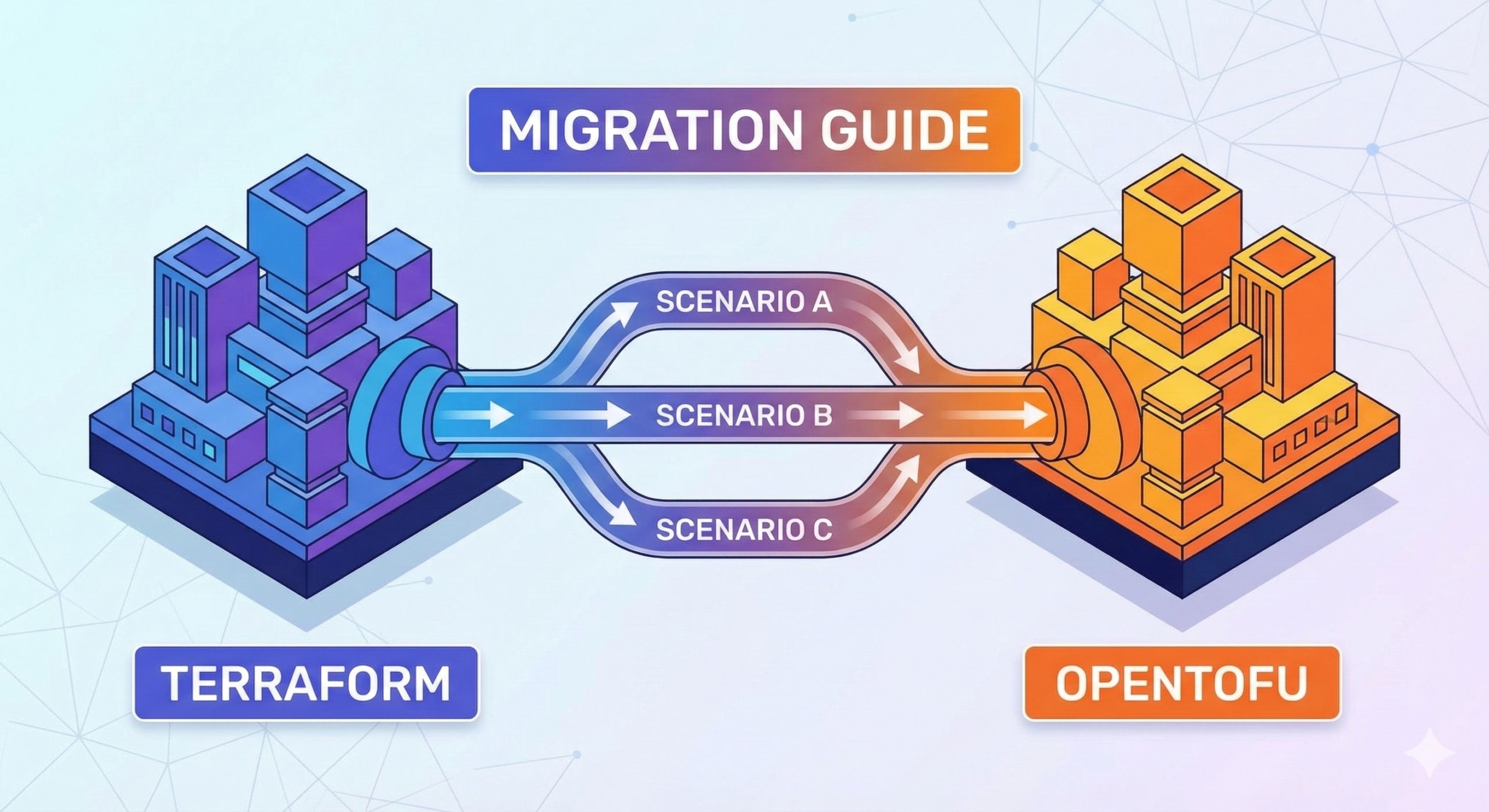
This post covers the full migration in three phases, each independently deliverable. Phase One addresses the universal foundation: pre-migration assessment, binary installation, and parity verification regardless of your backend. Phase Two branches into the three distinct scenarios that enterprise teams actually face: open-source Terraform with S3, GCS, or Azure blob backends; Terraform Cloud (now HCP Terraform); and Terraform Enterprise. Phase Three previews the OpenTofu-specific capabilities waiting on the other side of the migration – the features that make the switch worthwhile beyond licensing neutrality alone.
Last week’s OpenTofu greenfield guide covered the decision framework for new projects. This post is for teams who have already decided to move and want a migration path that does not break production.
Pre-Migration Assessment: The Work That Prevents Surprises
Every migration guide instructs you to install the binary and run tofu init. Few of them cover the assessment work that should happen before you touch a single command. Skipping the assessment is where migrations create incidents.
Terraform version audit. OpenTofu’s compatibility story differs meaningfully depending on where you are. If your estate runs Terraform 1.5.x or earlier, OpenTofu is a near-perfect drop-in replacement – it forked at that point and the codebases remained nearly identical. For Terraform 1.6.x through 1.8.x, the official OpenTofu guidance is to migrate to the matching OpenTofu minor version first, then upgrade to the current OpenTofu release in a separate step. This matters in practice because attempting to jump directly from Terraform 1.8.x to OpenTofu 1.11 in one operation can produce unexpected plan output. Run terraform version across all your working directories and note which stacks are running which versions.
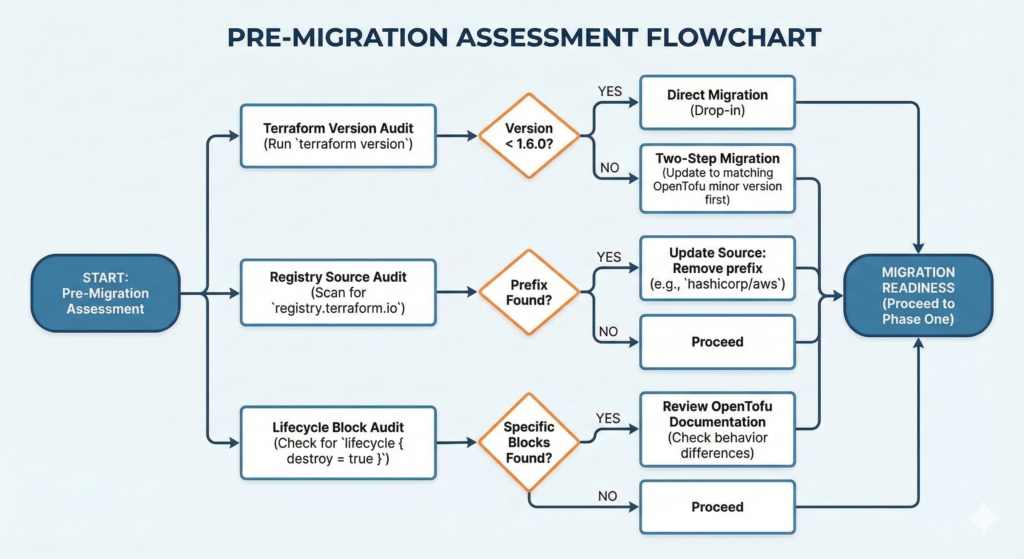
Registry source audit. This is the most commonly missed pre-migration step. If your configurations use fully qualified provider sources referencing registry.terraform.io explicitly, you will need to update them. A provider declared as source = "registry.terraform.io/hashicorp/aws" instructs the tool to fetch from HashiCorp’s registry, which creates a licensing question when used with OpenTofu. The fix is to drop the registry prefix entirely and use source = "hashicorp/aws", allowing OpenTofu to resolve it from registry.opentofu.org by default. Scan your entire codebase before starting:
# Find all explicit registry.terraform.io references
grep -r "registry.terraform.io" --include="*.tf" .

# Find all required_providers blocks for review
grep -r -A 5 "required_providers" --include="*.tf" .
Lifecycle block audit. If any of your configurations use lifecycle { destroy = true } or the removed block with specific arguments, check these against current OpenTofu documentation. There have been minor divergences in how these blocks behave between the two tools in certain versions.
Provider compatibility check. The vast majority of Terraform providers work identically with OpenTofu – the provider protocol is the same, and providers are distributed through both registries. The exception is providers that have been removed from the OpenTofu registry for licensing reasons, or highly custom internal providers built against specific Terraform SDK versions. Run terraform providers in each stack and cross-reference against registry.opentofu.org before proceeding.
State backup – non-negotiable. Before any migration work begins, create a timestamped backup of all state:
# For local state
cp terraform.tfstate terraform.tfstate.pre-migration-$(date +%Y%m%d)

# For remote S3 state (with versioning enabled - verify this first)
aws s3 cp s3://your-state-bucket/path/to/terraform.tfstate \
  s3://your-state-bucket/backups/terraform.tfstate.$(date +%Y%m%d-%H%M%S)

# Pull a local copy of remote state regardless of backend type
terraform state pull > state-backup-$(date +%Y%m%d).json
If your S3 bucket does not have versioning enabled, enable it before proceeding. The cost is negligible and the protection is absolute.
Phase One: Binary Installation and Parity Verification
This phase is identical regardless of which backend scenario applies to you. Do not proceed to Phase Two until every step here completes cleanly.
Install OpenTofu alongside Terraform, not instead of it. The migration is reversible at every stage, but only if Terraform is still available. Keep both binaries present until you are confident the migration is complete and the team is fully transitioned.
# macOS
brew install opentofu

# Linux (Debian/Ubuntu) - official install script
curl --proto '=https' --tlsv1.2 -fsSL https://get.opentofu.org/install-opentofu.sh \
  | sh -s -- --install-method standalone

# Verify both are available
terraform version
tofu version

# For teams managing multiple OpenTofu versions across projects
# tofuenv mirrors tfenv and handles version pinning
git clone https://github.com/tofuutils/tofuenv.git ~/.tofuenv
echo 'export PATH="$HOME/.tofuenv/bin:$PATH"' >> ~/.bashrc
Version pinning in configuration. Update the required_version constraint in your Terraform configuration block to allow OpenTofu. OpenTofu uses identical version syntax:
terraform {
  required_version = ">= 1.6.0"

  required_providers {
    aws = {
      # Drop registry.terraform.io prefix if present
      source  = "hashicorp/aws"
      version = "~> 5.0"
    }
  }
}
Note that OpenTofu preserves the terraform {} block name for backward compatibility. You do not need to rename it.
Run tofu init with the upgrade flag. This downloads providers from the OpenTofu registry, regenerating the lock file:
tofu init -upgrade
The -upgrade flag is important here. Without it, OpenTofu may attempt to reuse a lock file generated by Terraform, which can reference provider binaries from HashiCorp’s registry. The upgrade flag forces re-resolution from the OpenTofu registry.
The parity check – the most important step in Phase One. Before running tofu apply, generate plans from both tools against the same state and compare them. Any difference in plan output indicates a divergence that needs investigation before you proceed:
# Generate plan from current Terraform installation
terraform plan -out=tf-plan.bin
terraform show -json tf-plan.bin > tf-plan.json

# Generate plan from OpenTofu
tofu plan -out=tofu-plan.bin
tofu show -json tofu-plan.bin > tofu-plan.json

# Compare resource changes only
diff \
  <(jq '.resource_changes' tf-plan.json) \
  <(jq '.resource_changes' tofu-plan.json)
The expected output is silence – no diff. If you see differences, stop and investigate before proceeding. Common causes include provider version mismatches between the two lock files and lifecycle block behaviour differences in specific OpenTofu versions.
Write the state with tofu apply. Even when there are no infrastructure changes planned, running tofu apply on a clean plan updates the state file metadata to reference OpenTofu as the managing tool. This is the moment of commitment for this stack:
tofu apply
# Expected: No changes. Your infrastructure matches the configuration.
Phase One is now complete for this stack. Repeat across all stacks before moving to Phase Two. The temptation is to proceed to Phase Two after completing one or two stacks – resist it. Completing Phase One consistently across all stacks gives you a clean baseline and surfaces any outliers before the more complex backend work begins.
Phase Two: Backend and Pipeline Migration
This is where the three scenarios diverge. The Phase One work is identical; Phase Two is not.
Scenario A: Open-Source Terraform with S3, GCS, or Azure Blob Backends
This is the most common enterprise configuration and the most straightforward Phase Two. If your state lives in S3, GCS, or Azure Blob Storage and you are managing it with open-source Terraform CLI, there is no backend migration required. OpenTofu uses the same backend types with the same configuration syntax.
The primary Phase Two task is the CI/CD pipeline. This is where the real work lives. GitHub Actions users have access to the official opentofu/setup-opentofu action, which mirrors hashicorp/setup-terraform:
# Before (GitHub Actions)
- name: Setup Terraform
  uses: hashicorp/setup-terraform@v3
  with:
    terraform_version: 1.8.0

- name: Terraform Init
  run: terraform init

- name: Terraform Plan
  run: terraform plan

- name: Terraform Apply
  run: terraform apply -auto-approve

# After (GitHub Actions)
- name: Setup OpenTofu
  uses: opentofu/setup-opentofu@v1
  with:
    tofu_version: 1.11.0

- name: OpenTofu Init
  run: tofu init

- name: OpenTofu Plan
  run: tofu plan

- name: OpenTofu Apply
  run: tofu apply -auto-approve
For GitLab CI, the OpenTofu container image is available at ghcr.io/opentofu/opentofu and drops in as a direct replacement for the HashiCorp image:
# GitLab CI - updated
image: ghcr.io/opentofu/opentofu:1.11.0

stages:
  - validate
  - plan
  - apply

plan:
  stage: plan
  script:
    - tofu init
    - tofu plan -out=planfile
  artifacts:
    paths:
      - planfile

apply:
  stage: apply
  script:
    - tofu init
    - tofu apply planfile
  when: manual
  dependencies:
    - plan
The CI/CD migration for Scenario A teams is primarily a find-and-replace exercise across pipeline files. The effort correlates directly with how many pipelines reference the Terraform binary. Teams with a centralised platform engineering function managing a shared pipeline library can complete this in a single pull request. Teams with pipelines distributed across dozens of application repositories should plan for a phased rollout across squads rather than a single coordinated switch.
The IaC enterprise patterns guide in our Terraform series Part 6 covers module registry patterns that remain unchanged through this migration – worth reviewing for teams managing module libraries alongside the binary migration.
Scenario B: Terraform Cloud (HCP Terraform)
Terraform Cloud migration requires an additional step that Scenario A does not: you must pull the state out of Terraform Cloud before you can move it to an alternative backend. Terraform Cloud does not allow direct state migration to an external backend through a backend reconfiguration alone.
The process is a two-stage handoff. First, pull state from each Terraform Cloud workspace to a local file. Second, push that state to your chosen replacement backend.
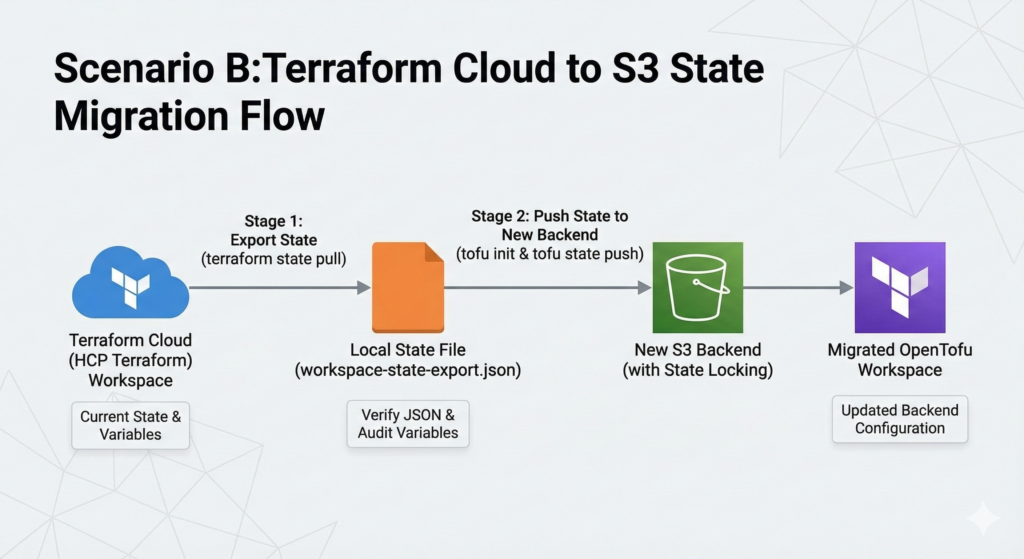
# Stage 1: Export state from Terraform Cloud
# Set your TFC token
export TF_TOKEN_app_terraform_io="your-tfc-token"

# Pull state from the workspace (run from within the workspace directory)
terraform state pull > workspace-state-export.json

# Verify the export is valid JSON and non-empty
jq '.resources | length' workspace-state-export.json
Once you have the exported state, reconfigure the backend block in your configuration to point to your new backend and initialise OpenTofu with the migration flag:
# Remove or comment out the cloud block
# terraform {
#   cloud {
#     organization = "my-org"
#     workspaces {
#       name = "my-workspace"
#     }
#   }
# }

# Replace with your target backend
terraform {
  required_version = ">= 1.6.0"

  backend "s3" {
    bucket         = "my-opentofu-state"
    key            = "prod/terraform.tfstate"
    region         = "eu-west-2"
    encrypt        = true
    # Note: OpenTofu 1.10+ supports S3 native locking
    # without DynamoDB - use use_lockfile = true instead
    dynamodb_table = "opentofu-state-locks"
  }
}
# Initialise OpenTofu with the new backend
# It will prompt you to provide the state - point it at your export
tofu init

# Push the exported state to the new backend
tofu state push workspace-state-export.json

# Verify
tofu state list
tofu plan
The workspace-level variables stored in Terraform Cloud need to be migrated alongside state. Variable sets in Terraform Cloud have no direct equivalent in standard backends, they become environment variables or tfvars files in your new setup. Audit your variable sets before starting:
# List all workspace variables via TFC API
curl -H "Authorization: Bearer $TF_TOKEN_app_terraform_io" \
  "https://app.terraform.io/api/v2/workspaces/YOUR_WORKSPACE_ID/vars" \
  | jq '.data[].attributes | {key: .key, sensitive: .sensitive, category: .category}'
Sensitive variables cannot be read back through the API, this is by design. If your team does not have these values documented in a secrets manager, recovering them from Terraform Cloud will require manual intervention before you can migrate. This is frequently the longest-duration item in a TFC migration and should be assessed during the pre-migration phase, not discovered mid-migration.
For teams using Sentinel policies in Terraform Cloud, there is no direct OpenTofu equivalent built into the tool itself. Sentinel policy enforcement needs to move to your CI/CD pipeline through alternative mechanisms. Open Policy Agent (OPA) is the most common replacement, and the policy logic is typically translatable from Sentinel to Rego with moderate effort.
Scenario C: Terraform Enterprise (Self-Hosted)
Terraform Enterprise presents a different migration profile to both Scenario A and Scenario B. Because TFE is self-hosted, you control the binary versions deployed to your agent pools. The binary migration and the backend migration are largely separable. You can migrate the CLI without necessarily migrating away from the TFE platform, because TFE can execute OpenTofu workloads.
The current TFE versions (v202401 onwards) support OpenTofu as a configurable runtime. Check your TFE release version and review HashiCorp’s documentation for your specific release to confirm OpenTofu runtime support. If your TFE version supports it, you can configure individual workspaces to use OpenTofu by updating the Terraform version setting to reference the OpenTofu binary path on your agent pool nodes.
For teams choosing to migrate away from TFE entirely rather than just updating the runtime, the state migration process mirrors Scenario B. Pull state from TFE workspaces via API, reconfigure backends, and push state to the new backend through OpenTofu. The same variable set and Sentinel policy migration considerations apply.
The agent pool migration is the key operational difference from Scenario B. TFE agents are long-running processes that execute plan and apply operations on your behalf. Updating the agent image to include the OpenTofu binary, and then configuring workspaces to use it, allows for a gradual migration where individual workspaces move at different paces rather than requiring a coordinated cutover. This is the recommended approach for large TFE estates.
Phase Three: What Comes Next
Completing the migration means your infrastructure is running under OpenTofu, but it does not mean you have finished extracting value from the switch. It is worth being precise here about what is genuinely OpenTofu-exclusive versus what both tools now support, because the landscape has shifted since OpenTofu first shipped these features.
Native state encryption remains OpenTofu-only. Introduced in OpenTofu 1.7, it allows you to encrypt state files before they leave the execution environment using either a passphrase or a cloud KMS key. Terraform has no equivalent built-in capability – encryption at rest in Terraform depends entirely on the backend’s own encryption settings, which means the state file is readable in plaintext by anything with backend access. OpenTofu’s encryption block closes that gap natively:
terraform {
  encryption {
    key_provider "pbkdf2" "my_passphrase" {
      passphrase = var.state_encryption_passphrase
    }
    method "aes_gcm" "my_method" {
      keys = key_provider.pbkdf2.my_passphrase
    }
    state {
      method = method.aes_gcm.my_method
    }
  }
}
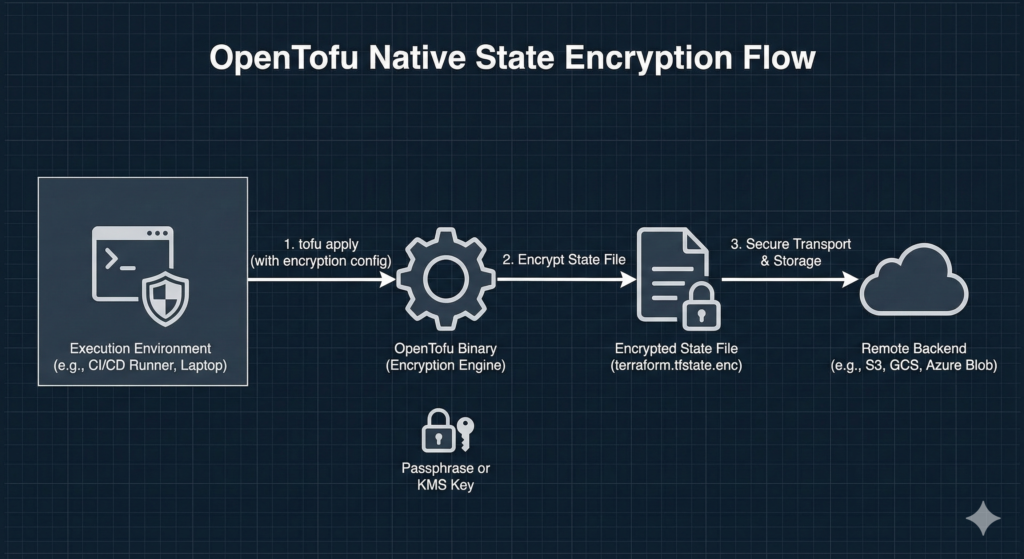
Ephemeral resources and S3 native state locking are worth understanding with more precision. OpenTofu shipped both features first – ephemeral resources in OpenTofu 1.10, S3 native locking also in 1.10. However, Terraform subsequently shipped equivalent implementations in its own 1.10 and 1.11 releases. Both tools now support these features. If you have recently evaluated Terraform and concluded it lacked ephemeral values or S3 native locking, that assessment may be based on older information. The honest position is that native state encryption is where OpenTofu currently has no Terraform equivalent, and that remains the strongest technical differentiator for teams with state security requirements.
A dedicated post covering state encryption configuration in production context, including KMS key provider setup for AWS, Azure, and GCP, will follow.
Pitfalls That Actually Catch Teams Out
Several failure patterns appear consistently across enterprise migrations.
The provider lock file mismatch is the most common cause of unexpected plan output after the binary swap. If the .terraform.lock.hcl file was generated by Terraform and references provider hashes from the HashiCorp registry, tofu init -upgrade regenerates it from the OpenTofu registry. The provider binaries are functionally identical, but the hashes differ. In environments where lock files are committed to version control and the CI/CD pipeline validates lock file integrity, this produces a pipeline failure on the first run. Update your CI/CD validation step to expect the lock file to change as part of the migration, or regenerate the lock file as a discrete pre-migration commit.
The workspace variable recovery gap in TFC migrations was mentioned above, but it is worth reinforcing: sensitive variables set in Terraform Cloud workspaces cannot be exported through the API. Teams without a secrets management practice that predates Terraform Cloud will discover this problem only when they attempt to run their first apply against the new backend. Audit variable sets before you begin the migration, not during it.
The alias shortcut creates drift over time. Some teams create a shell alias alias terraform='tofu' rather than updating pipeline files, wrapper scripts, and documentation. This works in the short term and creates confusion six months later when someone new to the team attempts to run Terraform directly, or when a new pipeline is written against the old binary. The alias is useful as a transitional tool for individual workstations; it is not a substitute for updating pipelines. Track both as separate workstreams with separate completion criteria.
The Sentinel-to-OPA migration is almost always underestimated. Teams that have built substantial Sentinel policy libraries in Terraform Cloud frequently discover during TFC migration planning that their policy library represents months of accumulated work that has no direct equivalent in OpenTofu’s native toolchain. Budget the Sentinel migration as a project in its own right, not an afternoon task appended to the IaC migration.
Who Should Migrate Now and Who Should Wait
The migration case is straightforward for three categories of team. Greenfield teams starting new projects should begin with OpenTofu, the greenfield decision guide covers this in detail. Teams with regulatory or contractual requirements for open-source tooling in their IaC layer have a clear mandate. Teams building internal developer platforms or infrastructure tooling that could conceivably be construed as competing with HashiCorp products face BSL compliance questions that OpenTofu eliminates.
The case is less urgent but still reasonable for teams using open-source Terraform with standard backends who prefer the governance model and feature roadmap of a Linux Foundation project over an IBM-owned commercial product. The migration cost is low, the risk is low, and the long-term positioning is better.
Waiting is defensible for teams with extensive Sentinel policy libraries that would require significant rewrite, teams mid-way through a major Terraform version upgrade where adding a tool migration introduces unnecessary variables, and teams on Terraform Enterprise with active support contracts that are not yet approaching renewal. The BSL does not currently restrict internal enterprise use of Terraform for managing your own infrastructure. The migration is a strategic choice, not an immediate legal obligation for most organisations.
Useful Links
- OpenTofu Official Migration Guide
- OpenTofu Terraform 1.8.x Migration Guide
- opentofu/setup-opentofu GitHub Action
- OpenTofu State Encryption Documentation
- tofuenv Version Manager
- OpenTofu Cloud/TFC Migration Documentation
- OpenTofu Registry
- Open Policy Agent (OPA) for Policy-as-Code
- OpenTofu 1.11.0 Release Notes
- OpenTofu GitHub Repository