The days of treating backup as an afterthought are long gone. In 2025, backup strategy sits firmly in the realm of business continuity, security architecture, and cost optimisation. The question facing architects and cloud teams today isn’t whether to implement comprehensive backup strategies – it’s how to choose between the increasingly sophisticated native AWS tools and the compelling third-party alternatives that promise to solve all your headaches.
The landscape has shifted dramatically. Ransomware attacks have grown more sophisticated, compliance requirements have tightened, and organisations are demanding backup solutions that don’t just protect data but actively defend against threats. Meanwhile, AWS has significantly matured its native backup offerings, whilst third-party vendors have developed cloud-native solutions that integrate seamlessly with AWS infrastructure.
So where does that leave architects designing backup strategies in 2025? Let’s explore the current state of play, examine what’s actually working in production environments, and provide a framework for making informed decisions about your backup architecture.
The State of AWS Native Backup in 2025
AWS Backup: No Longer the Compromise Choice
AWS Backup has evolved from a basic service-agnostic backup tool into a genuine enterprise-grade platform. The service now protects over 15 AWS services – from the obvious candidates like EC2 and RDS to more specialised services like FSx, DocumentDB, and Neptune.
What’s particularly compelling about AWS Backup in 2025 is its centralised management approach. Rather than managing separate backup configurations across multiple AWS services, teams can implement unified policies through a single console. This isn’t just about convenience – it’s about reducing the operational complexity that leads to backup gaps and compliance failures.
The recent introduction of multi-party approval for logically air-gapped vaults addresses one of the biggest criticisms of cloud backups: what happens when your AWS account is compromised? This feature requires designated approval teams to authorise recovery operations, essentially creating a human firewall around your most critical backups.
However, AWS Backup isn’t without constraints. The minimum backup frequency remains at one hour for most services, which won’t meet sub-hour RPO requirements for mission-critical applications. Cross-region encrypted backups require customer-managed KMS keys, adding another layer of complexity to your key management strategy.
Beyond AWS Backup: The Native Toolkit
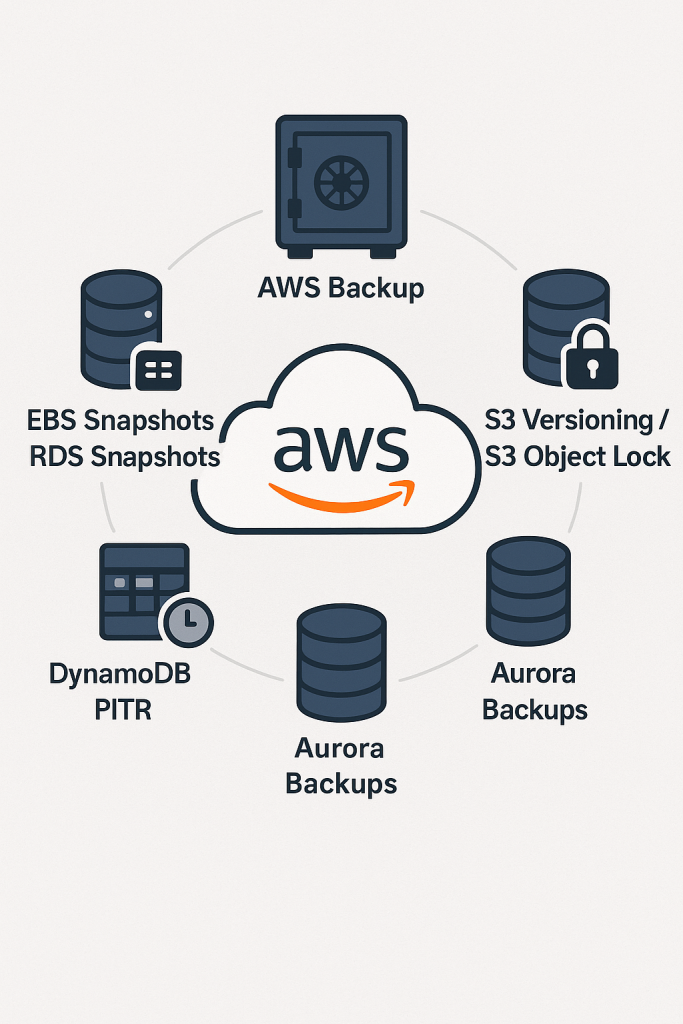
AWS Backup doesn’t operate in isolation. The broader AWS native backup ecosystem includes:
EBS Snapshots with Fast Snapshot Restore (FSR) – For organisations requiring immediate volume restoration, FSR eliminates the traditional snapshot-to-volume initialisation period. The trade-off? You’ll pay £0.75 per hour per snapshot per availability zone.
RDS Automated Backups vs Manual Snapshots – Automated backups provide point-in-time recovery, whilst manual snapshots offer more control over retention periods and cross-region replication.
S3 Versioning and Cross-Region Replication – Often overlooked as backup tools, these features provide robust protection for object storage with minimal operational overhead.
The key insight here is that effective AWS native backup strategies typically combine multiple services rather than relying on a single solution.
The Multi-Layer Defence Architecture
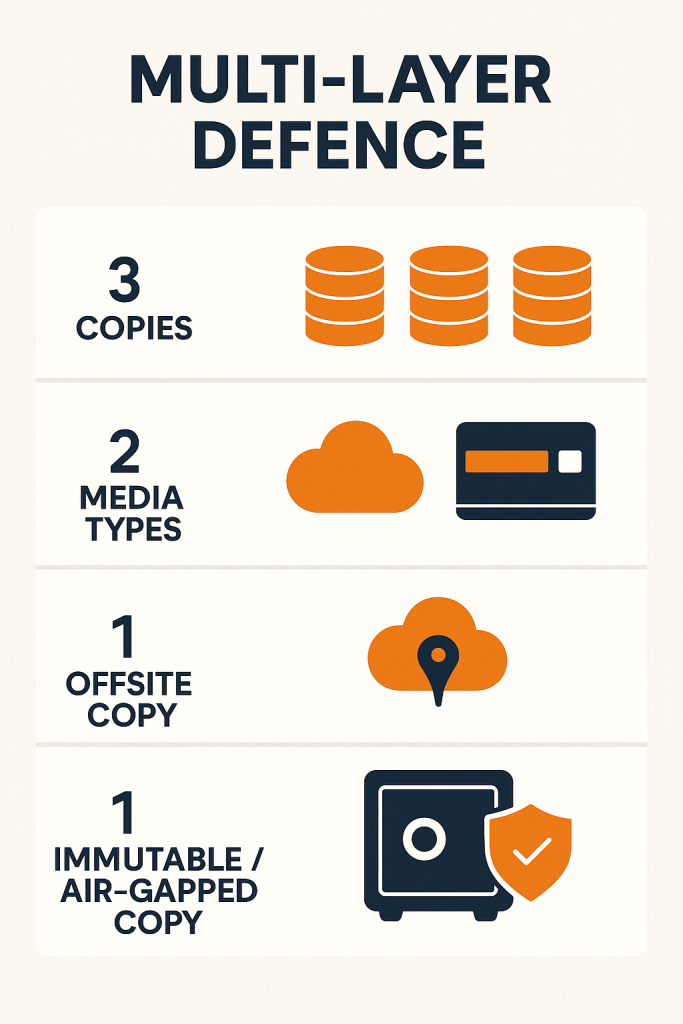
Modern backup architecture in 2025 follows what security professionals call a defence in depth approach. The traditional 3-2-1 backup rule (3 copies, 2 different media, 1 offsite) has evolved into the 3-2-1-1 rule, with that final “1” representing an immutable, air-gapped copy.
Cross-Region and Cross-Account Patterns
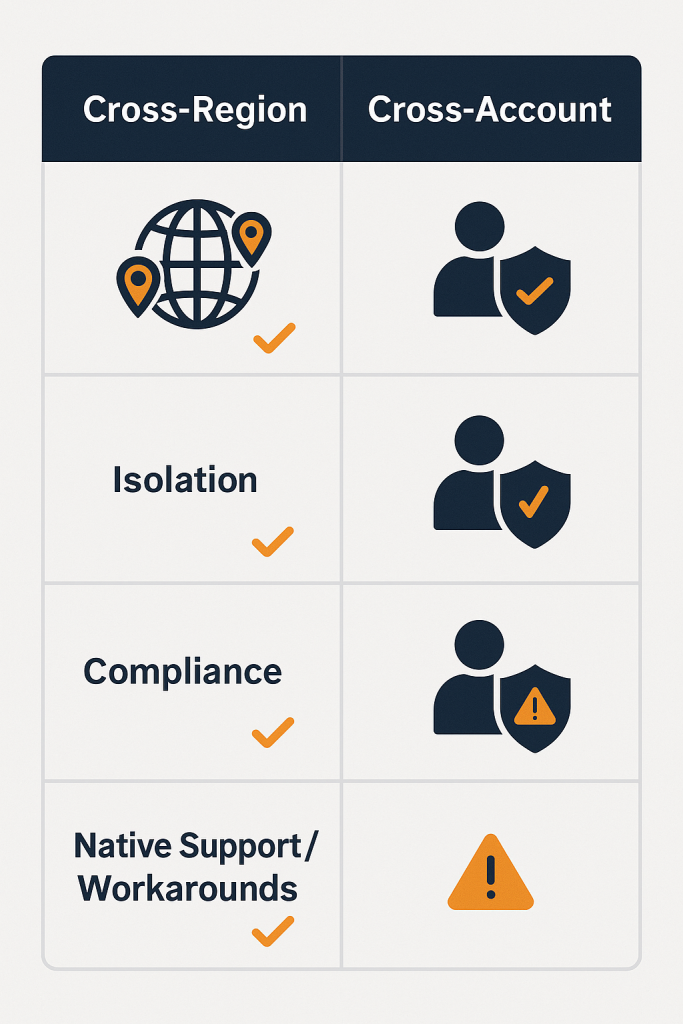
The most resilient AWS backup architectures implement both cross-region and cross-account replication. Think of this as insurance against both natural disasters and account compromise. However, there’s an architectural gotcha that catches many teams: AWS Backup doesn’t support simultaneous cross-account AND cross-region copying for certain database services including RDS, Aurora, DocumentDB, and Neptune.
This constraint requires architects to implement two-step processes or Lambda-based automation for complex replication scenarios. It’s not insurmountable, but it does add operational complexity that teams need to plan for.
Cost Optimisation Through Storage Tiering
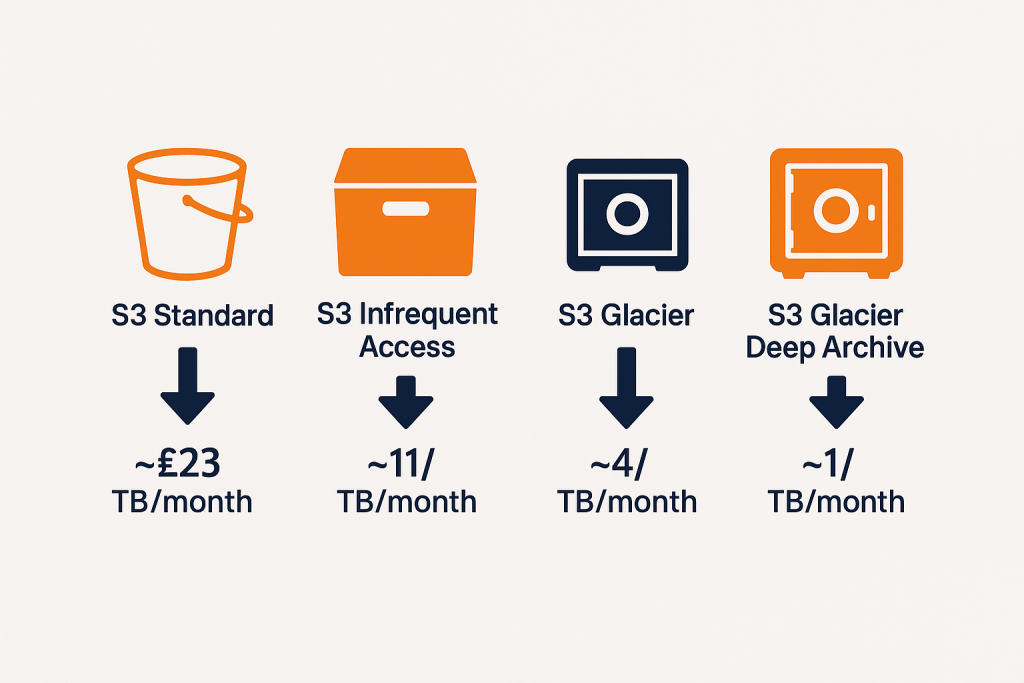
One of the most compelling aspects of AWS native backup strategies is the sophisticated cost optimisation available through S3 storage classes. Data can automatically transition from S3 Standard (around £23/TB/month) through various tiers down to S3 Glacier Deep Archive (approximately £1/TB/month).
S3 Intelligent-Tiering deserves particular attention. This storage class automatically moves data between access tiers based on changing access patterns, potentially delivering up to 95% cost savings for infrequently accessed backup data whilst maintaining rapid retrieval when needed.
The Third-Party Advantage
Enterprise Vendors Go Cloud-Native
The enterprise backup vendors haven’t been sitting still. Veeam, Commvault, and Rubrik have all developed sophisticated cloud-native solutions that complement their traditional enterprise platforms.
Veeam’s 2025 enhancements include protection for Redshift Serverless and enhanced AWS Organisations-based access controls. More importantly, Veeam maintains operational consistency across hybrid and multi-cloud environments – a significant advantage for organisations with complex infrastructure landscapes.
Commvault’s Cloud Rewind provides AWS time machine capabilities, enabling rapid recovery from sophisticated attacks. This isn’t just about restoring data – it’s about restoring entire environments to known-good states.
Rubrik’s Zero Trust Data Security combines immutable backups with anomaly detection and sensitive data discovery. The platform can identify unusual data access patterns that might indicate a security breach and automatically trigger additional protection measures.
Cloud-Native Specialists
Alongside the traditional enterprise vendors, a new generation of cloud-native backup providers has emerged:
N2WS delivers one-click disaster recovery with complete environment restoration capabilities. The service leverages native AWS snapshot technology for maximum efficiency whilst providing operational simplicity that appeals to smaller teams.
Druva’s 100% SaaS platform eliminates infrastructure management overhead entirely. For organisations looking to reduce operational complexity, this approach offers compelling advantages.
Clumio’s true air-gap architecture provides protection through logically separated backup infrastructure hosted in isolated AWS accounts. This approach addresses the “what if AWS is compromised” scenario that keeps security professionals awake at night.
The Open Source Alternative
Open source backup solutions have gained credibility through improved AWS integration and professional support options. Restic offers fast, efficient, secure backups with native S3 support and block-level deduplication. Bacula Enterprise provides advanced scalability supporting thousands of computers and petabytes of data.
These solutions appeal to cost-conscious organisations requiring enterprise-scale capabilities without vendor licensing overhead. However, they do require internal expertise to implement and maintain effectively.
Making the Strategic Choice: A Decision Framework
Feature Capabilities: Where Each Approach Excels
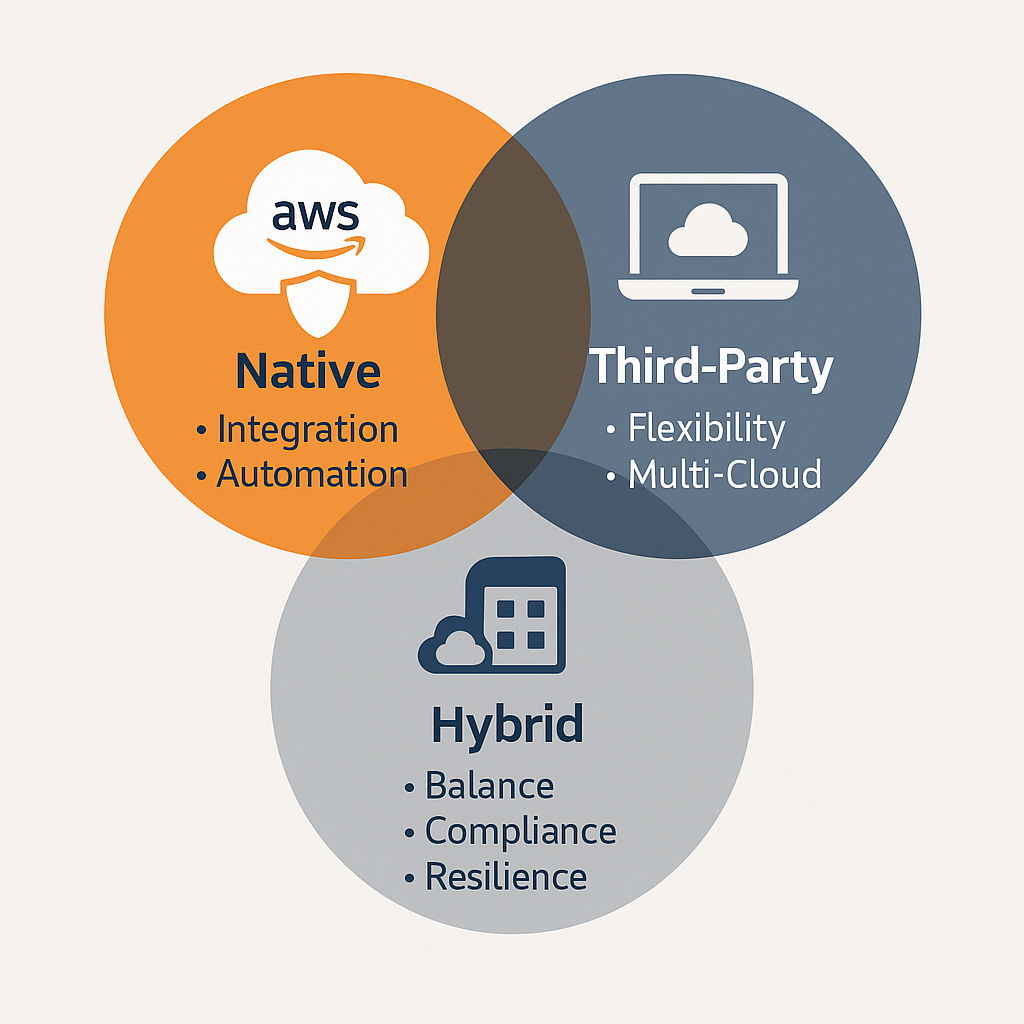
AWS native tools excel in:
- Deep service integration with comprehensive AWS API support
- Seamless IAM security model alignment
- Cost-effective storage for standard backup requirements
- Simplified vendor management (single AWS relationship)
Third-party solutions provide:
- Single-pane-of-glass management across complex environments
- Advanced ransomware protection with threat detection
- Cross-cloud consistency supporting multi-cloud strategies
- Specialised features like application-aware backups
The Real Cost Conversation
Cost comparisons require looking beyond simple storage pricing. Whilst AWS Backup offers competitive base costs at approximately £0.05/GB/month for warm storage, organisations must factor in:
- Data transfer charges that scale with backup frequency
- API call fees that can surprise teams with high-frequency backup schedules
- Operational overhead for managing multiple service-specific configurations
Third-party solutions often provide more predictable pricing models with consolidated billing, though licensing costs vary significantly based on deployment architecture and feature requirements.
Operational Complexity: The Hidden Factor
AWS native solutions require deep expertise across multiple AWS services. Teams need to understand the nuances of service-specific backup configurations, write automation scripts for complex scenarios, and maintain knowledge across a broad range of AWS tools.
Third-party solutions offer pre-built automation and standardised processes but introduce additional vendor relationships and potential integration complexity with existing AWS security models.
The key question for architects: does your team have the bandwidth and expertise to manage native AWS complexity, or would operational efficiency gains from third-party solutions provide better value?
Vendor Lock-In: A Nuanced Risk Assessment
Both approaches create dependencies, but of different types:
AWS native tools create dependency on AWS-specific APIs and backup formats. However, AWS emphasises data portability and standard format usage, making migration theoretically possible though operationally complex.
Third-party solutions may introduce proprietary backup formats and management dependencies but often provide multi-cloud strategies that reduce single-vendor risk.
Consider your organisation’s risk tolerance and long-term strategic direction when evaluating these trade-offs.
Security Architecture: Zero Trust and Quantum Preparedness
Implementing Zero Trust Principles
Zero trust backup architectures implement “never trust, always verify” principles throughout backup infrastructure. This approach combines:
- Encryption strategies using AWS KMS with role-based access controls
- PrivateLink integration for controlled inter-VPC communication
- Network micro-segmentation through Security Groups and VPC configurations
- Identity-based controls implementing least-privilege access
Ransomware Protection Strategies
Modern ransomware protection requires more than just immutable storage. The most effective strategies combine:
Immutable backup implementations using S3 Object Lock with legal hold capabilities and Write-Once-Read-Many (WORM) storage configurations.
Air-gapped architectures utilising cross-account backup storage with separate access controls and network isolation. This prevents lateral movement during sophisticated attacks.
Anomaly detection that can identify unusual data access patterns and automatically trigger additional protection measures.
Looking Ahead: Quantum Computing Preparedness
Whilst not an immediate concern for most organisations, quantum computing represents a future threat to current encryption standards. Forward-thinking teams are beginning to assess post-quantum cryptography (PQC) requirements for long-term backup retention scenarios.
Implementation Roadmap: Practical Steps for Different Organisation Sizes
For Small to Medium Enterprises
Start with AWS Backup for core workloads to establish foundational data protection capabilities whilst maintaining cost efficiency. Implement automated backup policies aligned with business requirements and gradually expand to third-party solutions as complexity and advanced feature requirements emerge.
This evolutionary approach balances immediate protection needs with long-term architectural flexibility.
For Large Enterprises
Consider hybrid approaches that combine AWS Backup for standard workloads with third-party solutions for mission-critical applications requiring advanced protection capabilities. Focus on:
- Comprehensive backup architecture planning
- Multi-vendor strategies to avoid single points of failure
- Investment in automation and monitoring capabilities
For Multi-Cloud Organisations
Prioritise third-party solutions that provide consistency across cloud platforms and centralised backup management capabilities. Emphasise cloud-agnostic approaches and vendor selection criteria that prioritise strong multi-cloud integration.
The Future of AWS Backup Strategies
The backup landscape continues to evolve rapidly. Key trends shaping 2025 and beyond include:
Increased automation driven by machine learning and AI capabilities for anomaly detection and predictive recovery planning.
Enhanced security integration with broader cybersecurity platforms for comprehensive threat response.
Sustainability considerations as organisations factor environmental impact into technology decisions, favouring solutions that optimise storage efficiency.
Regulatory compliance automation with backup solutions providing built-in compliance monitoring and reporting capabilities.
Key Takeaways
The choice between AWS native tools and third-party backup solutions isn’t binary – the most successful implementations often combine both approaches strategically.
Choose AWS native tools when:
- Your team has strong AWS expertise and bandwidth for custom automation
- Cost optimisation is a primary concern for standard workloads
- Simplified vendor relationships align with organisational preferences
- Deep AWS service integration is required
Choose third-party solutions when:
- Operational efficiency and unified management are priorities
- Advanced ransomware protection is required for critical applications
- Multi-cloud consistency is important for your strategy
- Specialised features like application-aware backups are needed
Consider hybrid approaches when:
- Your organisation has diverse backup requirements across different application tiers
- Risk mitigation through multiple backup strategies is important
- You want to balance cost optimisation with advanced capabilities
The most important step is to move beyond reactive backup strategies towards proactive, security-focused approaches that integrate backup planning with broader business continuity and cybersecurity initiatives.
Remember: the best backup strategy is one that your team understands, can operate effectively, and tests regularly. Technical sophistication means nothing if your team can’t execute recovery procedures reliably when they’re needed most.
Useful Links
- AWS Backup User Guide – Comprehensive documentation for AWS native backup services
- AWS Backup Feature Availability – Current service support matrix
- AWS Backup Audit Manager – Compliance monitoring capabilities
- Cross-Region Backup with AWS Backup – Multi-region backup configuration
- Veeam Backup for AWS – Third-party enterprise solution overview
- AWS Disaster Recovery Architecture Guide – Comprehensive DR planning
- Ransomware Risk Management on AWS – Security-focused backup strategies
- AWS Well-Architected Reliability Pillar – Architectural best practices including backup strategies
- S3 Storage Classes and Pricing – Cost optimisation through storage tiering
- AWS Marketplace Backup Solutions – Third-party solution directory