In the ever-expanding universe of AWS, few decisions have more impact on your application’s performance, scalability and cost than selecting the right database service. The right choice can propel a project forward—while the wrong one can lead to costly refactoring down the road.
Let’s cut through the AWS marketing speak and compare the key database options, with practical guidance on when to use each one.
The Database Landscape: More Options Than a Café Menu
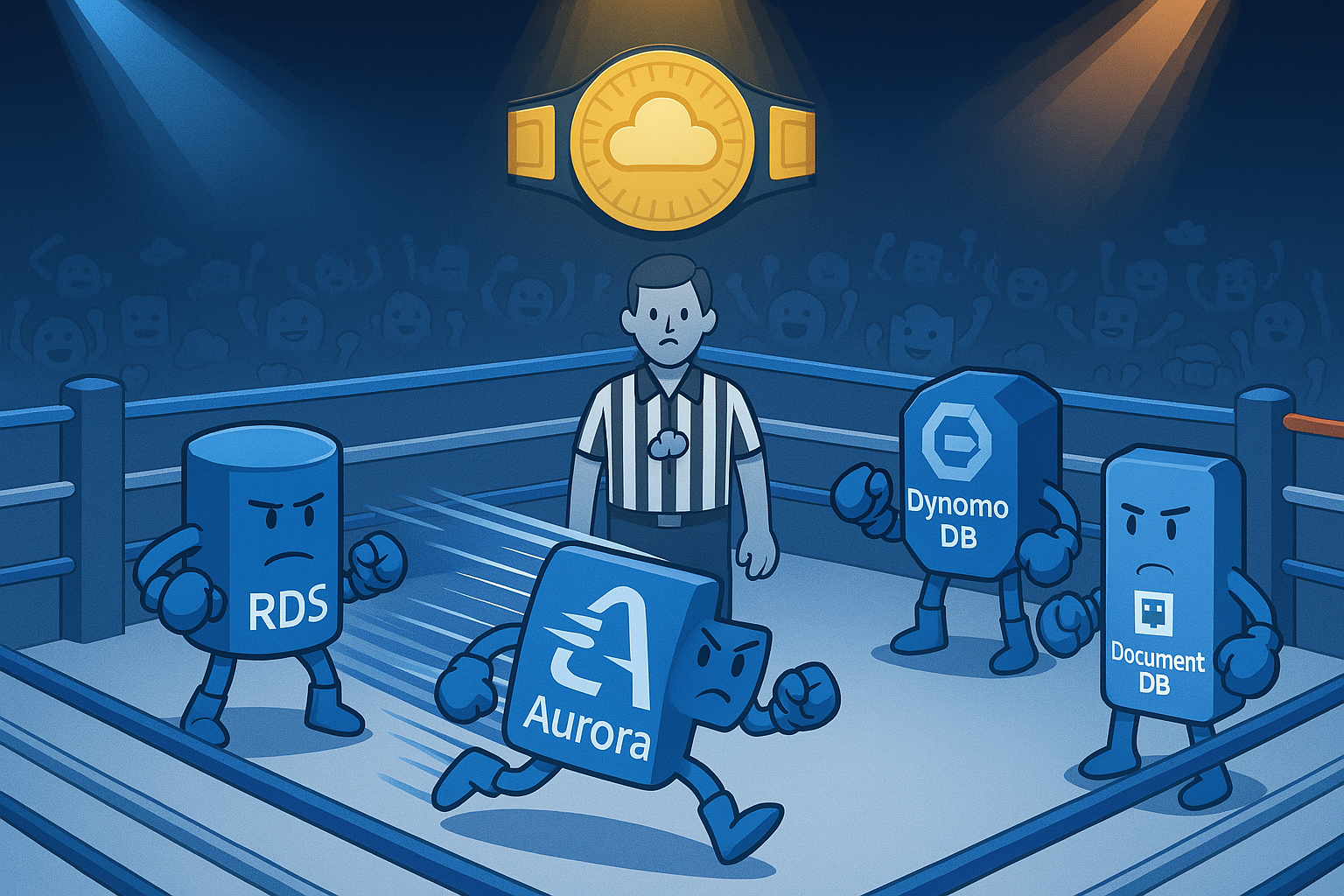
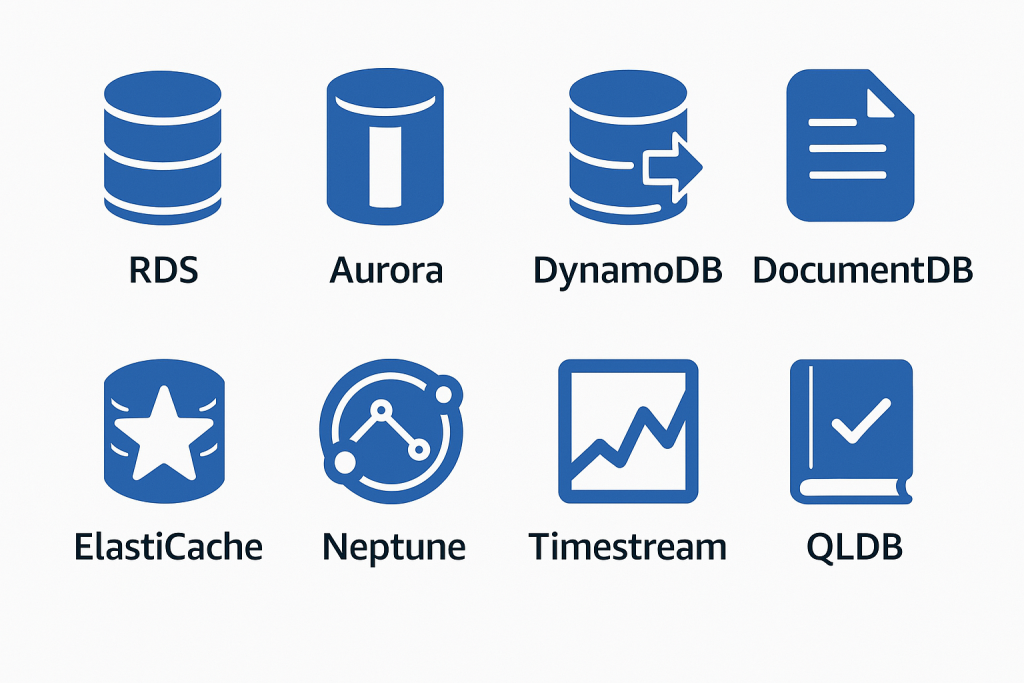
AWS offers an impressive array of database services, each optimised for specific use cases:
- Amazon RDS: Managed relational databases (MySQL, PostgreSQL, MariaDB, Oracle, SQL Server)
- Amazon Aurora: AWS-optimised versions of MySQL and PostgreSQL
- Amazon DynamoDB: Fully managed NoSQL key-value and document database
- Amazon DocumentDB: MongoDB-compatible document database
- Amazon ElastiCache: Redis and Memcached-compatible in-memory datastore
- Amazon Neptune: Graph database service
- Amazon Keyspaces: Cassandra-compatible wide-column store
- Amazon Timestream: Time series database
- Amazon QLDB: Immutable ledger database
Rather than shallow-diving into all of them, let’s focus on the most commonly used options and explore when each shines—and when each falls short.
Amazon RDS: The Reliable Workhorse
RDS remains the go-to choice for organisations with existing SQL expertise and applications that rely on relational data structures. It provides managed instances of familiar database engines, handling the heavy lifting of patching, backups, and high availability.
When to Choose RDS:
- You need full SQL functionality and ACID compliance
- Your application relies on complex joins and transactions
- You have existing SQL expertise in your team
- You’re migrating from on-premises relational databases
Implementation Best Practices:
- Right-size from the start: Unlike DynamoDB, RDS instances have fixed capacity. Monitor your metrics during testing to choose appropriate instance sizes.
- Multi-AZ for production: Always enable Multi-AZ deployments for production workloads to protect against availability zone failures.
- Leverage read replicas strategically: For read-heavy workloads, deploy read replicas to offload queries from your primary instance.
- Set appropriate backup windows: Configure automated backups during off-peak hours.
- Use parameter groups deliberately: Create custom parameter groups to optimise database performance for your specific workload.
Example:
Consider a financial services company running their customer transaction database on an aging on-premises SQL Server cluster. Moving to RDS SQL Server allows them to maintain compatibility with existing applications while eliminating hardware management. A successful migration process typically involves:
- Assessing database size and performance requirements
- Setting up Database Migration Service (DMS) for minimal downtime
- Implementing Multi-AZ for high availability
- Configuring encryption at rest for compliance requirements
The typical result? Around 40% reduction in database-related infrastructure costs and elimination of quarterly patching cycles.
Amazon Aurora: The Performance Powerhouse
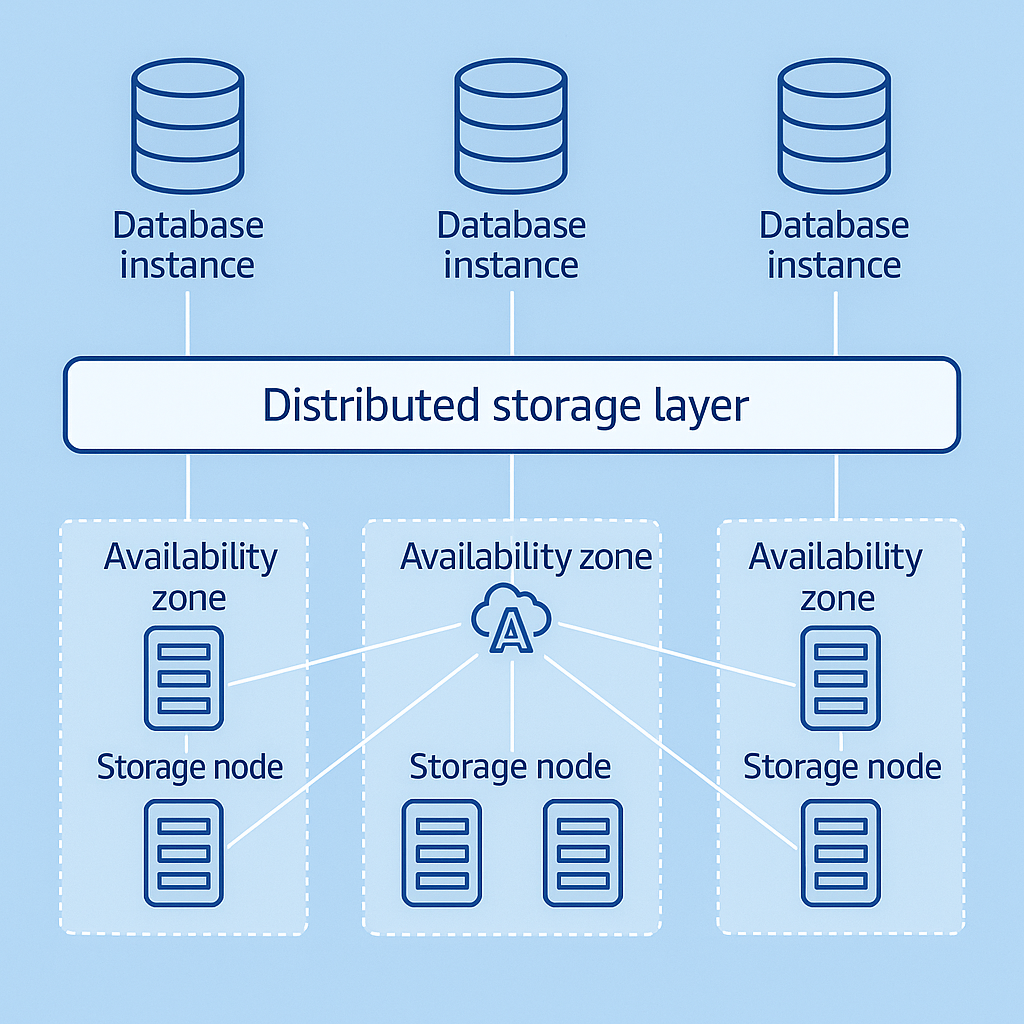
Aurora represents AWS’s re-engineering of MySQL and PostgreSQL to leverage cloud infrastructure. It offers significant performance improvements over standard RDS, with automatic storage scaling and advanced replication.
When to Choose Aurora:
- You need better performance than standard RDS
- Your workload requires high throughput
- You want built-in, low-latency replication
- Cost is less of a concern than performance
Implementation Best Practices:
- Evaluate Serverless v2 for variable workloads: Aurora Serverless v2 can scale from virtually zero to hundreds of thousands of transactions in seconds.
- Use Global Database for multi-region applications: When users are distributed globally, Aurora Global Database provides cross-region replication with minimal latency.
- Leverage backtrack for quick recovery: Aurora’s backtrack feature allows you to “rewind” your database to a previous point in time without restoring from backup.
- Optimise cluster parameters: Fine-tune buffer cache sizes and query execution plans for your specific workload.
- Monitor Performance Insights: Use this built-in tool to identify performance bottlenecks and optimization opportunities.
Example:
Imagine an e-commerce platform experiencing timeout issues during flash sales with their standard RDS MySQL deployment. Migration to Aurora could provide:
- 3x throughput improvement for write operations
- Ability to scale read capacity instantly by adding serverless readers
- Simplified disaster recovery with cross-region replication
- Significant reduction in timeout errors during peak shopping periods
Amazon DynamoDB: The Scalability Champion
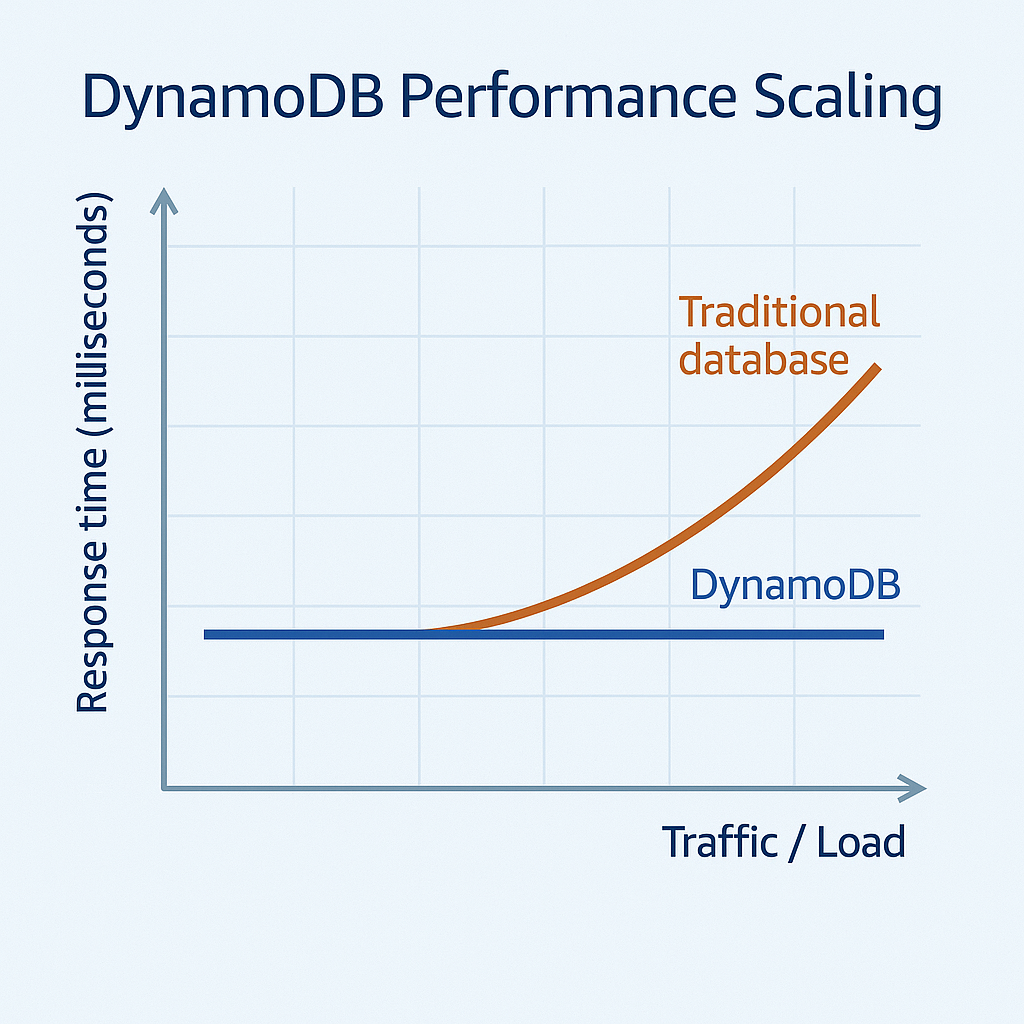
When unlimited scale and predictable single-digit millisecond performance matter most, DynamoDB stands out from the crowd. This fully managed NoSQL database service handles massive throughput requirements with minimal management overhead.
When to Choose DynamoDB:
- Your application needs consistent, single-digit millisecond response times
- You have unpredictable or extremely high throughput requirements
- Your access patterns are relatively simple (few complex joins)
- You need automatic scaling without capacity planning
Implementation Best Practices:
- Design your access patterns first: With DynamoDB, you must design your table structure and keys based on how you’ll query the data—not the other way around.
- Use sparse indexes strategically: Global Secondary Indexes are powerful but come with additional costs. Use them sparingly.
- Implement TTL for temporary data: Use Time-To-Live for session data, logs, or other temporary items to automatically purge old data.
- Consider On-Demand capacity for variable workloads: If your traffic is unpredictable, On-Demand pricing can be more cost-effective than provisioned capacity.
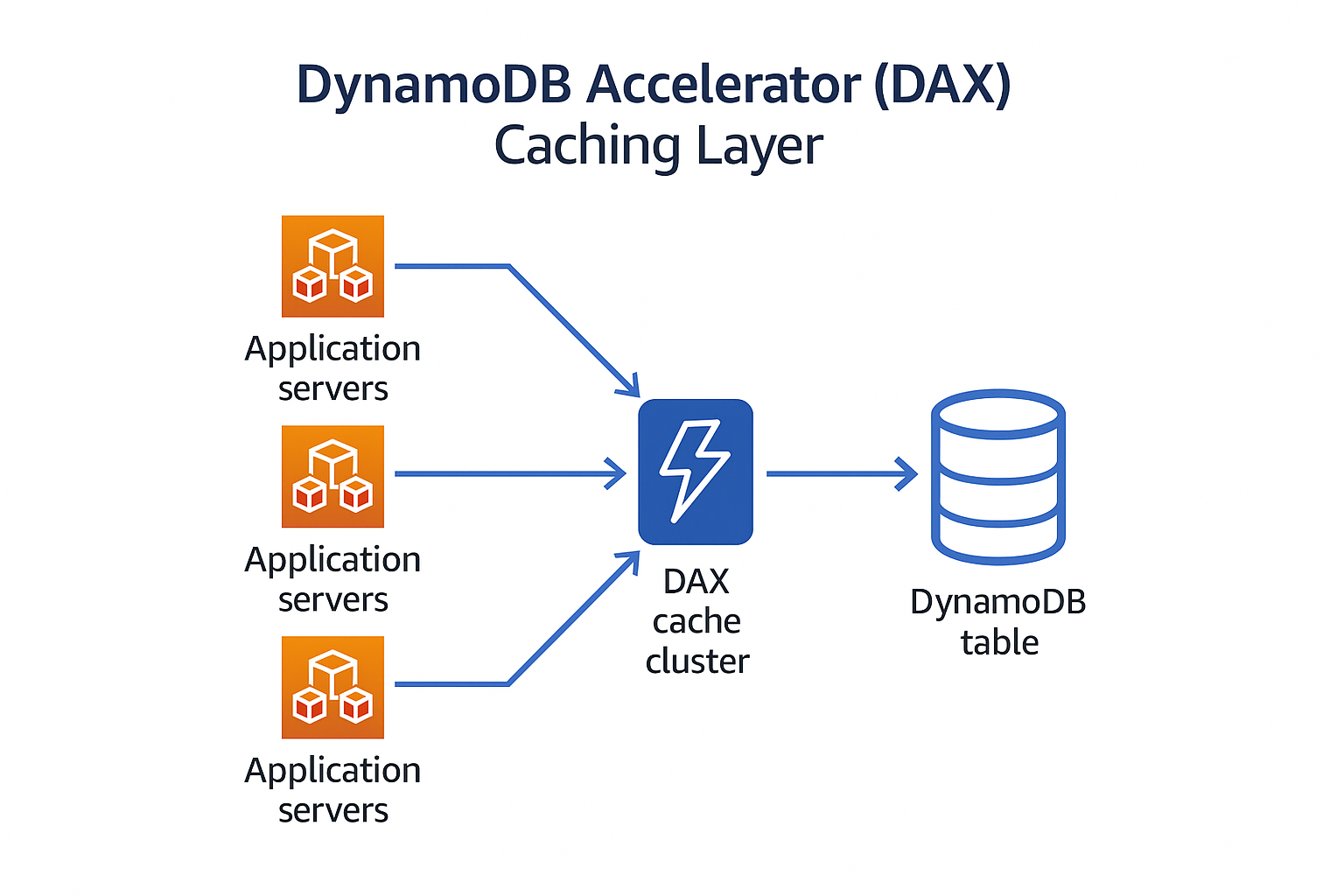
- Use DAX for read-heavy workloads: DynamoDB Accelerator can reduce response times from milliseconds to microseconds.
Example:
Consider an IoT platform struggling with time-series data from millions of connected devices. A relational database often can’t handle the write volume during peak periods. By implementing DynamoDB with a composite key structure (deviceId as partition key, timestamp as sort key), organizations can achieve:
- Consistent 5ms response times regardless of data volume
- Ability to scale to millions of writes per second
- Predictable costs with auto-scaling
- Simplified data lifecycle management using TTL
Amazon DocumentDB: The MongoDB Alternative
For organisations heavily invested in MongoDB but looking for a fully managed service, DocumentDB offers a compelling option. It provides MongoDB compatibility with AWS’s managed database benefits.
When to Choose DocumentDB:
- You’re already using MongoDB and want a managed service
- Your data has a document-oriented structure that changes frequently
- You need flexible schema design
- You want MongoDB compatibility without MongoDB operations
Implementation Best Practices:
- Right-size your cluster: Start with an appropriate instance size based on your workload.
- Use appropriate index strategies: As with MongoDB, indexing is critical for performance.
- Implement connection pooling: This reduces the overhead of establishing new connections.
- Configure cluster parameters appropriately: Adjust memory parameters based on your workload characteristics.
- Monitor query performance: Use CloudWatch to identify slow-running queries.
The Hybrid Approach: Using Multiple Database Services
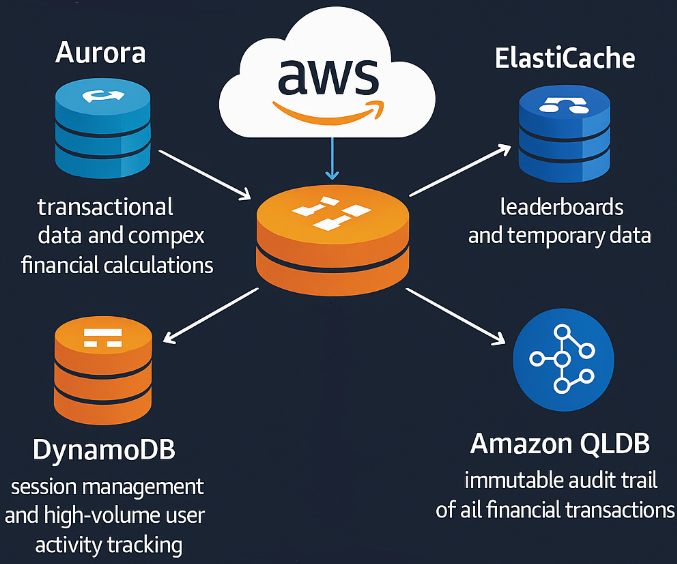
One of the most powerful strategies I’ve seen implemented is using multiple AWS database services together, each handling the workload it’s best suited for.
Example:
A well-designed fintech application might implement:
- Aurora PostgreSQL for transactional data and complex financial calculations
- DynamoDB for session management and high-volume user activity tracking
- ElastiCache (Redis) for leaderboards and temporary data
- Amazon QLDB for immutable audit trail of all financial transactions
This approach allows each component of the application to use the most appropriate database service, optimising both performance and cost.
Migration Strategies: Getting There from Here
Moving to a new database platform is rarely as simple as exporting and importing data. Here’s a proven approach:
- Assessment: Thoroughly analyze your current database usage, including query patterns, transaction volumes, and peak loads.
- Proof of concept: Build a small-scale version of your target architecture to validate assumptions.
- Schema conversion: Use AWS Schema Conversion Tool (SCT) for relational database migrations.
- Data migration: Use AWS Database Migration Service (DMS) for minimal-downtime migrations.
- Application modifications: Update your application code to work with the new database service.
- Testing: Rigorously test performance and functionality before cutover.
- Cutover planning: Develop a detailed plan for the final cutover with rollback options.
Cost Considerations: Beyond the Price Per GB
Database costs go far beyond storage. Consider:
- Instance/capacity costs: The primary cost driver for most deployments
- I/O costs: Especially important for DynamoDB and provisioned IOPS on RDS
- Data transfer: Moving data between regions or to the internet
- Backup and snapshot storage: Often overlooked in initial calculations
- Feature-specific costs: Global tables, backtrack, performance insights
| Cost Factor | RDS | Aurora | DynamoDB | DocumnetDB |
| Instance\Capacity | £££ Per instance-hour | £££ | ££ | ££ |
| Storage | ££ Per GB-month | £££ Higher than RDS | £ Per GB-month | ££ Per GB-month |
| I/O Operations | ££ PIOPS charges | ££ Included in storage | £££ Included in RCU/WCU | ££ I/O rate charges |
| Backup Storage | £ Free backup to 100% | £ Free backup to 100% | £ Point-in-time recovery | £ Free backup to 100% |
| Data Transfer | ££ Cross-region costs | ££ Global DB premium | £££ Global Tables cost | ££ Cross-region costs |
| Advanced Features | ££ Multi-AZ, Read Replicas | £££ Serverless, Backtrack | £££ DAX, Global Tables | ££ Elastic clusters |
Making the Decision: A Framework
When advising clients on database selection, I use this framework:
- Identify non-negotiable requirements: ACID compliance, specific SQL features, throughput needs
- Assess team skills: Existing expertise with specific database technologies
- Consider growth trajectory: Both data volume and traffic patterns
- Evaluate operational model: Desired level of management overhead
- Calculate total cost of ownership: Including license, operational, and migration costs
Conclusion: There’s No Perfect Database – Only the Right One for Your Needs
The “best” AWS database service depends entirely on your specific requirements, constraints, and goals. By understanding the strengths and limitations of each option, you can make an informed decision that serves your application and business needs.
In my experience, the most successful cloud database implementations come from teams who are willing to:
- Challenge their assumptions about database requirements
- Consider purpose-built databases for specific workloads
- Implement a testing regimen that accurately reflects production conditions
- Continuously monitor and optimize their database choices as requirements evolve