When building your applications in AWS, the Virtual Private Cloud (VPC) is where it all begins. Think of a VPC as your own private section of the AWS cloud – a logically isolated network that gives you complete control over your virtual networking environment. However, many organisations struggle to properly architect their VPCs, leading to security vulnerabilities, operational inefficiencies, and scalability challenges.
Throughout my career working with cloud infrastructure, I’ve seen how a well-designed VPC can set the foundation for a robust, secure and scalable cloud environment. Conversely, a poorly designed VPC can create technical debt that becomes increasingly difficult to resolve as your cloud footprint grows.
In this post, we’ll explore the key components of AWS VPCs, review best practices for designing them, and examine some common architecture patterns that work well in real-world scenarios.
Building Blocks of Your VPC
When you’re designing an AWS cloud environment, understanding how the different VPC components work together creates the foundation for a secure and scalable architecture. Let’s walk through these components and see how they interact in real-world scenarios.
Creating Your Network Space with Subnets
Think of subnets as separate neighbourhoods within your VPC city. Each subnet resides in a specific Availability Zone and serves different purposes in your architecture. The beauty of this approach is how it lets you create clear security boundaries.
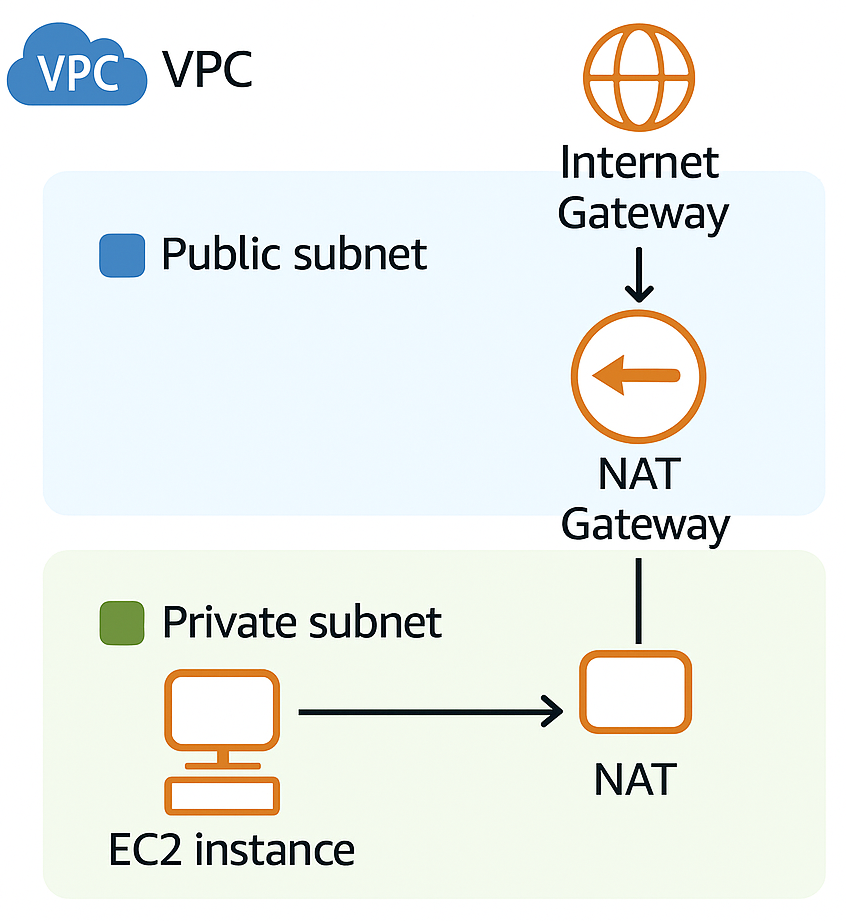
In a typical setup, you’ll create public subnets for components that need to communicate directly with the internet. Your load balancers, bastion hosts, and public-facing web servers might live here. These subnets connect to an Internet Gateway, allowing two-way communication with the outside world.
Meanwhile, your private subnets provide a secure haven for resources that should remain protected—application servers, databases, and internal services. These resources can still reach out to the internet when needed (through NAT Gateways), but the outside world can’t initiate connections to them. This simple public/private pattern creates an effective security boundary that’s easy to understand yet powerful in practice.
Connecting to the World with Internet Gateways
Your Internet Gateway serves as the main doorway between your VPC and the internet. Without it, your resources simply cannot communicate with the outside world. What makes the IGW particularly useful is that it handles the network address translation for your instances with public IPs, essentially mapping your private addresses to public ones that can communicate across the internet.
The IGW doesn’t require elaborate configuration—you simply attach it to your VPC and set up routes to direct traffic through it. Because it’s a managed service, you don’t need to worry about its availability or scaling capabilities. AWS handles that for you.
Enabling Outbound Access with NAT Gateways
NAT Gateways solve a common problem: how do you allow private resources to access the internet without exposing them to inbound connections? They act like one-way doors, allowing your protected resources to reach external services while maintaining their security posture.
Picture a scenario where your application servers need to download updates or connect to external APIs. The NAT Gateway provides this functionality while maintaining your security boundaries. It’s worth noting that NAT Gateways are more robust than the older DIY approach of NAT instances—they offer better availability and automatically scale to handle your traffic needs.
Remember that NAT Gateways are zone-specific resources. For a production environment, you’ll want to place one in each AZ where you have private subnets. This approach ensures that if one zone experiences issues, your resources in other zones can still access external services.
Directing Traffic with Route Tables
Route tables work as the traffic directors of your VPC, determining where packets should go based on their destination. Every subnet requires a route table association, though you can use the same route table for multiple subnets when the routing needs match.
The magic happens in how you configure these routes. Your VPC automatically includes routes for internal communication, but you’ll add specific routes to direct other traffic appropriately. For instance, you might send internet-bound traffic from public subnets to the Internet Gateway, while private subnets route their external traffic to a NAT Gateway.
As your network grows more complex—perhaps connecting to on-premises systems via VPN or Direct Connect—your route tables become increasingly important. They determine whether traffic flows through transit gateways, virtual private gateways, or other networking constructs.
Creating Security Boundaries with Security Groups and NACLs
These two security mechanisms complement each other beautifully, working at different layers to protect your resources.
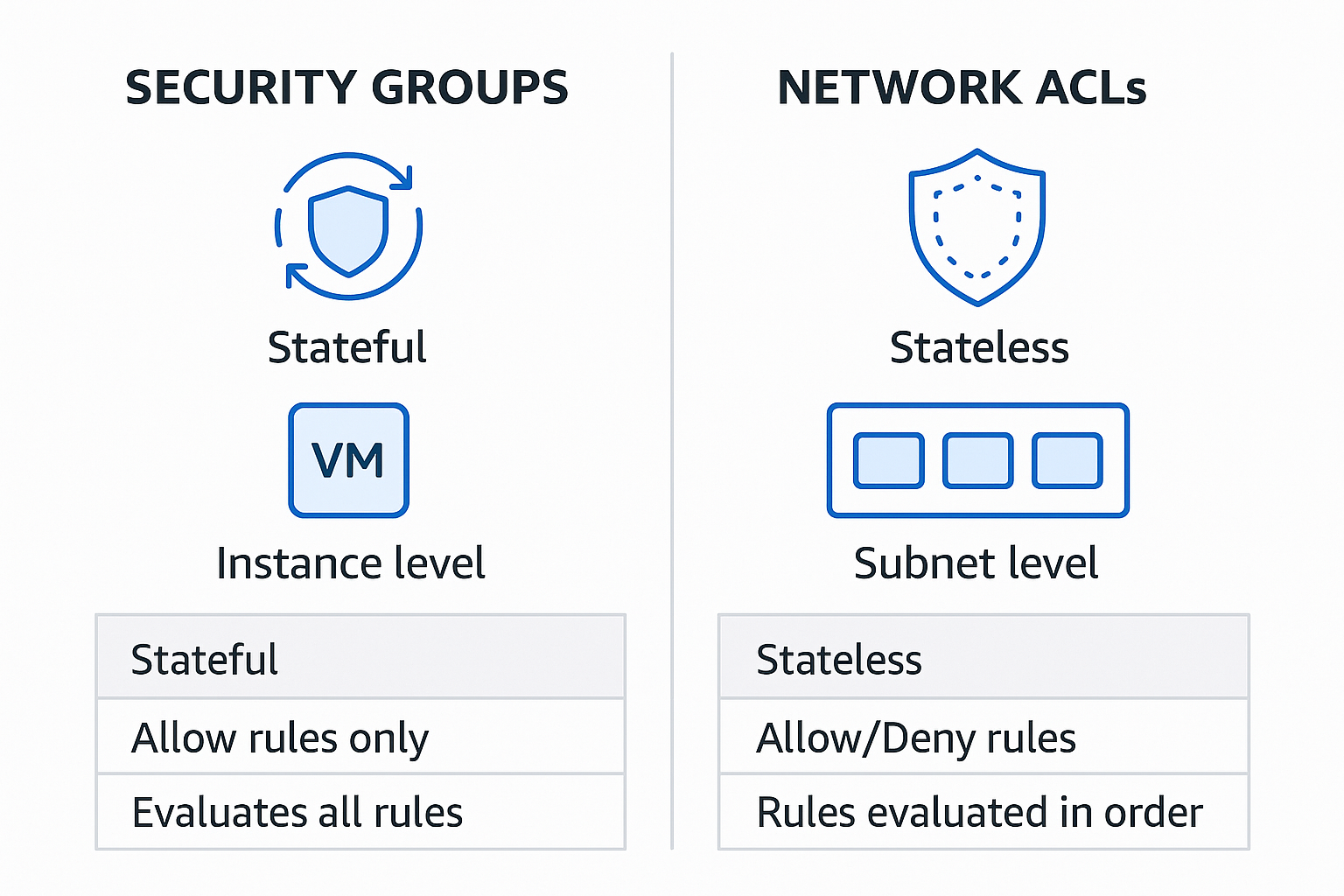
Security Groups operate at the instance level, acting as virtual firewalls that control traffic to and from your resources. Their stateful nature makes them convenient—if you allow an outbound connection, the corresponding inbound response is automatically permitted. This makes them intuitive to use while still providing robust protection.
Network ACLs provide broader subnet-level protection. Because they’re stateless, you need explicit rules for both inbound and outbound traffic. While this requires more configuration, it allows for more granular control when needed. In practice, many teams use NACLs as a coarse-grained outer barrier, blocking obviously malicious traffic, while relying on Security Groups for the finer-grained access control.
Securing AWS Service Access with VPC Endpoints
VPC Endpoints represent one of the most significant advancements in AWS networking, allowing your resources to connect to AWS services privately, without traversing the public internet. This capability is essential for creating truly secure environments where even service traffic stays within the AWS network.
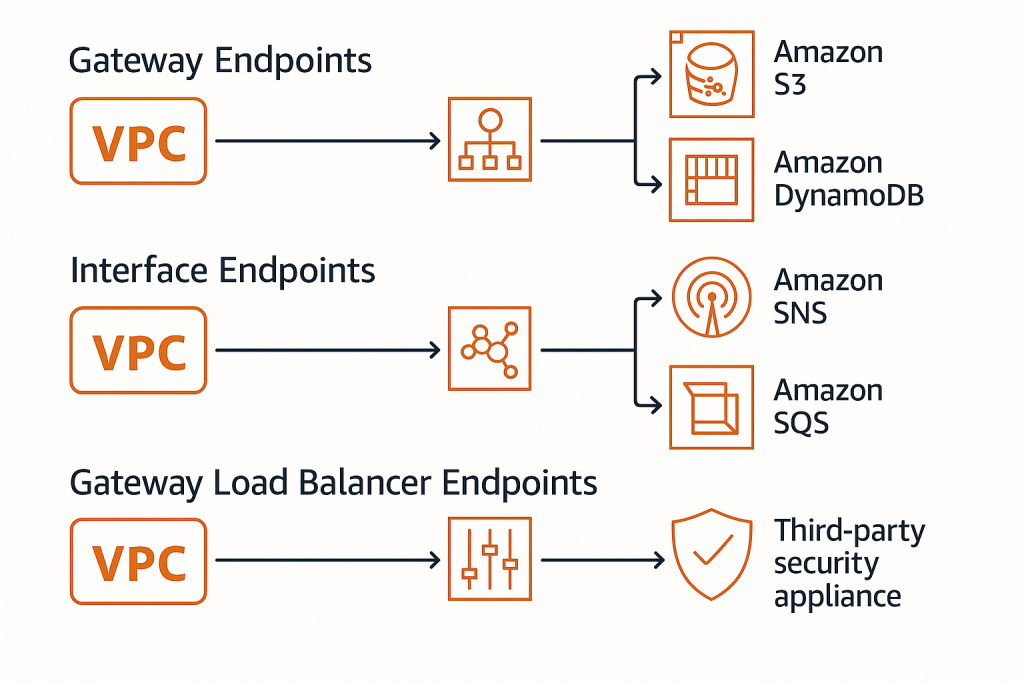
There are three distinct types of endpoints, each serving different needs:
Gateway Endpoints provide private connections to S3 and DynamoDB. They work by adding entries to your route tables that direct traffic for these services through the gateway. These endpoints are free to use, making them an easy win for enhancing security while reducing NAT gateway costs. They’re particularly valuable when you’re working with large volumes of data, as they keep all that traffic within the AWS network.
Interface Endpoints extend this private connectivity to a wide range of AWS services beyond just S3 and DynamoDB. They create elastic network interfaces with private IPs in your subnets, essentially giving AWS services private addresses within your VPC. Services like SNS, SQS, CloudWatch, and dozens of others can be accessed this way. These endpoints do carry a cost, but they provide significant security benefits by keeping traffic off the public internet and can even work with private link to connect to your own services.
Gateway Load Balancer Endpoints are the newest addition, designed specifically for routing traffic to security appliances for inspection. They’re particularly useful when you need to implement third-party security tools like next-generation firewalls, IDS/IPS systems, or other network virtual appliances. These endpoints help you create sophisticated security architectures where traffic can be inspected before reaching its destination, effectively implementing a defence-in-depth approach.
A well-designed endpoint strategy dramatically reduces your attack surface by minimising the need for internet access. In high-security environments, you can even create completely private VPCs that have no internet connectivity whatsoever, while still allowing access to the AWS services your applications need.
Crafting a Thoughtful VPC Design
Let’s explore some guiding principles that will help you create VPCs that are not just functional, but truly exemplary. These practices have emerged from years of cloud implementations and represent approaches that stand the test of time.
Planning Your IP Address Space
The IP addressing scheme you choose at the outset will impact your cloud journey for years to come. Think of it as city planning—you need to allocate space wisely to accommodate growth and change.
Start by selecting a CIDR block that gives you room to grow. A /16 block (providing 65,536 addresses) is often a good starting point for many organisations. Within this space, you’ll want to carve out logical subdivisions for different purposes. Your web tier might occupy one range, application servers another, and databases yet another.
The key is thinking ahead. If you anticipate connecting to other networks—perhaps additional VPCs or your on-premises data centre—you’ll want to ensure your addressing scheme doesn’t create conflicts. Using standard RFC 1918 private address spaces (10.0.0.0/8, 172.16.0.0/12, or 192.168.0.0/16) provides flexibility, but you’ll need to coordinate across your organisation to avoid overlaps.
I’ve seen organisations that started with too small a CIDR block eventually find themselves backed into a corner, unable to expand without significant rearchitecting. Being generous with your address space from the beginning pays dividends as your cloud footprint grows.
Embracing Multi-AZ Architectures
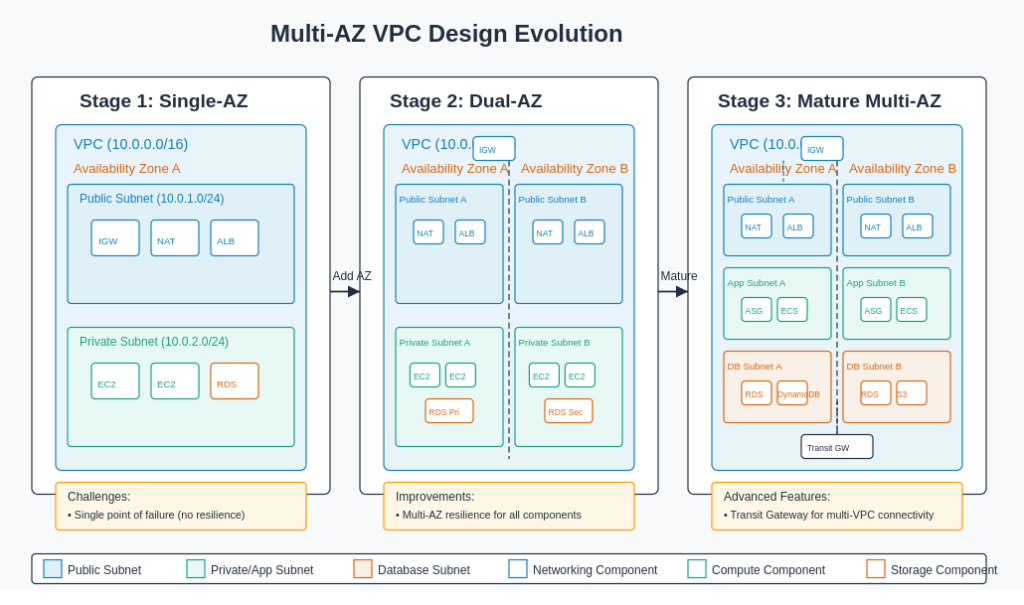
AWS has built its infrastructure with the expectation that any single component can fail. Your architecture should embrace this reality by spreading across multiple Availability Zones.
This approach is more than just theoretical disaster planning—it’s about creating systems that remain operational during routine maintenance and unexpected issues alike. When you design each tier of your application to span multiple AZs, you build in resilience from the ground up.
This pattern extends to your VPC components as well. Deploying NAT Gateways in each AZ where you have private resources ensures that a zone failure won’t cut off your systems from external services. Similarly, choosing regional services over zonal ones often provides inherent redundancy without additional work on your part.
The beauty of a well-designed multi-AZ architecture is that it handles failures gracefully, often without end users ever noticing an issue. In the cloud, this level of resilience is achievable without the enormous costs it would require in traditional infrastructure.
Implementing Thoughtful Network Segmentation
Network segmentation is a fundamental security principle that’s equally important in the cloud. By dividing your network into logical segments, you create natural security boundaries that limit the blast radius of any potential compromise.
In practical terms, this means creating separate subnets for different application tiers or functions. Your web servers, application servers, and databases each operate with different security requirements and traffic patterns. By placing them in dedicated subnets, you can apply appropriate security controls to each group.
This approach also extends to environment separation. Many organisations create entirely separate VPCs for production and non-production workloads. This clear boundary prevents development activities from accidentally impacting production systems and can simplify compliance by clearly delineating regulated environments.
When implemented thoughtfully, network segmentation becomes an elegant expression of your security policies in network architecture form.
Selecting the Right Connectivity Options
As your cloud environment grows, connecting various networks becomes increasingly important. AWS offers several approaches, each with different characteristics that make them suitable for different scenarios.
VPC Peering provides a straightforward way to connect two VPCs. The traffic flows directly between the peered VPCs without going through an intermediary, which provides both performance and security benefits. However, peering creates point-to-point connections that don’t scale well when you need to connect many VPCs in a mesh pattern.
Transit Gateway addresses this limitation by acting as a central hub. All your VPCs connect to the Transit Gateway, which then intelligently routes traffic between them. This hub-and-spoke model dramatically simplifies management when you have many VPCs or need to connect to multiple on-premises locations. The trade-off is a slight increase in latency and additional cost.
For hybrid architectures, Direct Connect provides dedicated private connections between AWS and your data centre. These connections offer consistent performance, enhanced security, and can be more cost-effective than transferring large volumes of data over the internet. Many organisations pair Direct Connect with VPN as a backup for a robust hybrid connectivity solution.
VPNs create encrypted tunnels over the internet, providing secure connectivity without the cost of dedicated connections. They’re ideal for scenarios where security matters more than guaranteed bandwidth, or as backup connectivity options.
Common VPC Architecture Patterns
Public-Private Web Application
This is perhaps the most common pattern, suitable for traditional web applications:
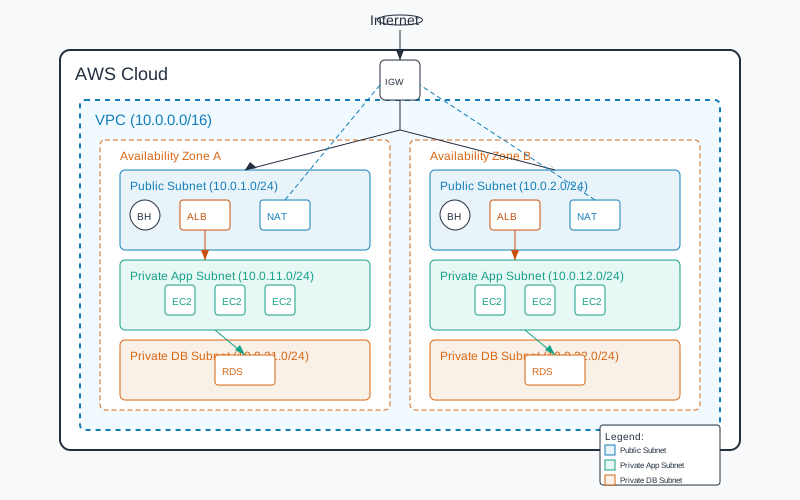
Components:
- Public subnets containing Application Load Balancers and bastion hosts
- Private subnets housing application servers
- Isolated private subnets for databases
- NAT Gateways for outbound internet access from private subnets
- Internet Gateway for inbound/outbound traffic to public subnets
This architecture provides a strong security boundary while maintaining the functionality needed for web applications. The load balancer in the public subnet receives traffic from the internet, but application servers and databases remain protected in private subnets.
Secure Multi-Tier Enterprise Application
For enterprise applications requiring enhanced security:
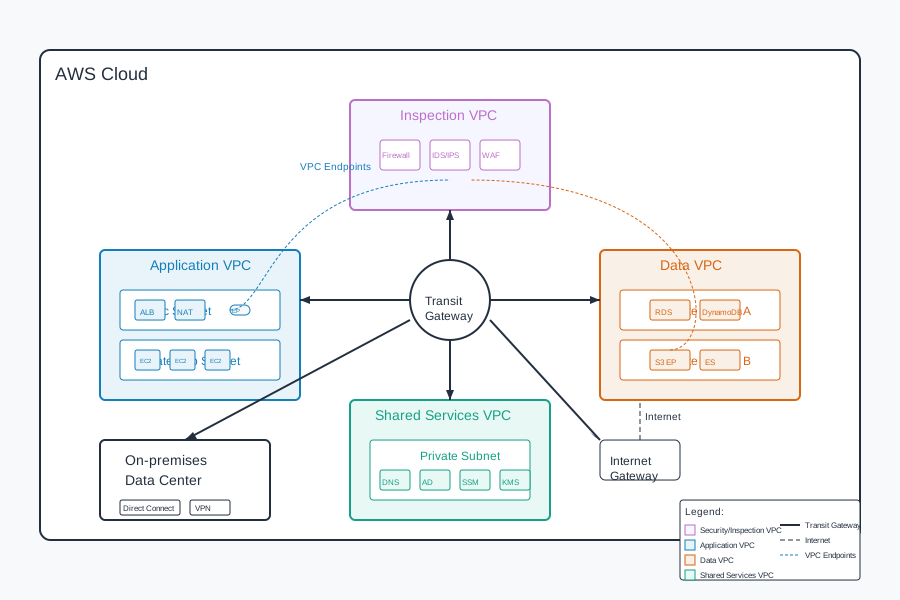
Components:
- Transit Gateway connecting multiple VPCs and on-premises networks
- Inspection VPC with security appliances for traffic monitoring
- Separate VPCs for different application components
- VPC Endpoints for private AWS service access
- Direct Connect for secure hybrid connectivity
This pattern supports strict regulatory requirements and provides deep defence in depth. It’s particularly well-suited for applications handling sensitive data that need to maintain strong isolation between components.
Microservices Architecture
For modern containerised applications:
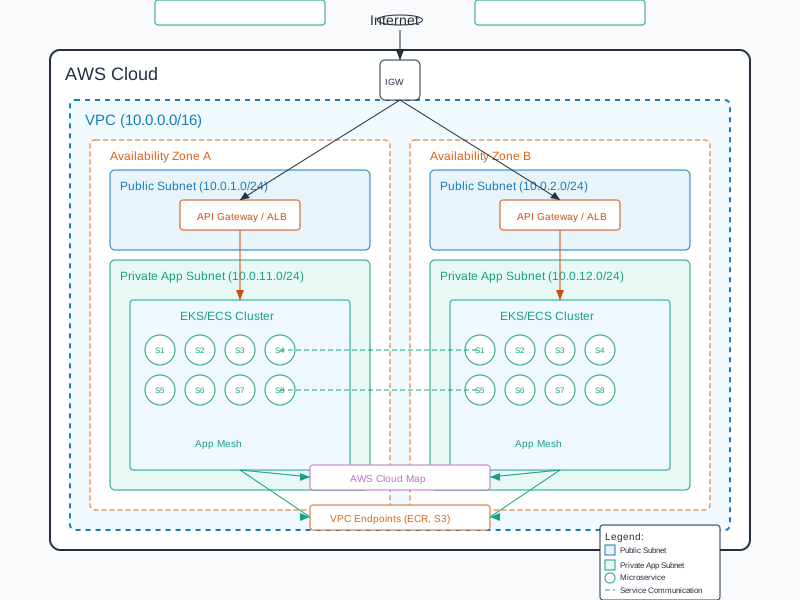
Components:
- EKS clusters or ECS services spanning multiple AZs
- Service discovery mechanisms (AWS Cloud Map)
- Application Mesh for service-to-service communication
- Centralized ingress through ALB or API Gateway
- Private ECR repositories accessed via VPC Endpoints
This design works well for development teams that need to deploy and scale components independently. The containerised services can communicate securely while maintaining proper isolation.
Implementation Considerations
Cost Optimisation
While designing your VPC architecture, consider these cost factors:
NAT Gateways incur hourly charges and data processing fees. Use them judiciously – one per AZ is usually sufficient.
VPC Endpoints have hourly charges. Calculate whether the cost of endpoints versus data transfer charges through NAT Gateways makes sense for your usage patterns.
Transit Gateway pricing is based on attachments and data processing. For simpler architectures, VPC Peering might be more cost-effective.
Operational Excellence
To ensure smooth operations:
Implement proper tagging strategies for all VPC resources to facilitate management and cost allocation.
Use Infrastructure as Code (IaC) tools like AWS CloudFormation or Terraform to provision and manage VPC resources, ensuring consistency and enabling version control.
Set up VPC Flow Logs to capture network traffic information for monitoring, troubleshooting, and security analysis.
Regularly review and audit your VPC configurations to identify unused resources or security vulnerabilities.
Monitoring and Troubleshooting
Effective monitoring is essential:
Enable VPC Flow Logs to capture information about IP traffic going to and from network interfaces.
Use Amazon CloudWatch to set alarms for network utilization and throughput.
Implement dashboards that visualize your network traffic patterns.
Consider advanced network analysis tools for deeper insights into traffic flows and potential security issues.
Conclusion
A well-designed AWS VPC forms the foundation of a secure, scalable, and efficient cloud infrastructure. By following the best practices outlined in this post and adopting architecture patterns that align with your specific requirements, you can create a robust network environment that supports your applications whilst maintaining proper security controls.
Remember that VPC design decisions made early in your cloud journey can have long-lasting implications. Taking the time to properly plan your VPC architecture will pay dividends as your cloud footprint grows and evolves.
As you implement your VPC, start with security and compliance requirements first, then work backward to design a network that meets those needs whilst enabling the functionality your applications require. This approach ensures that your foundation is solid, allowing you to build with confidence.