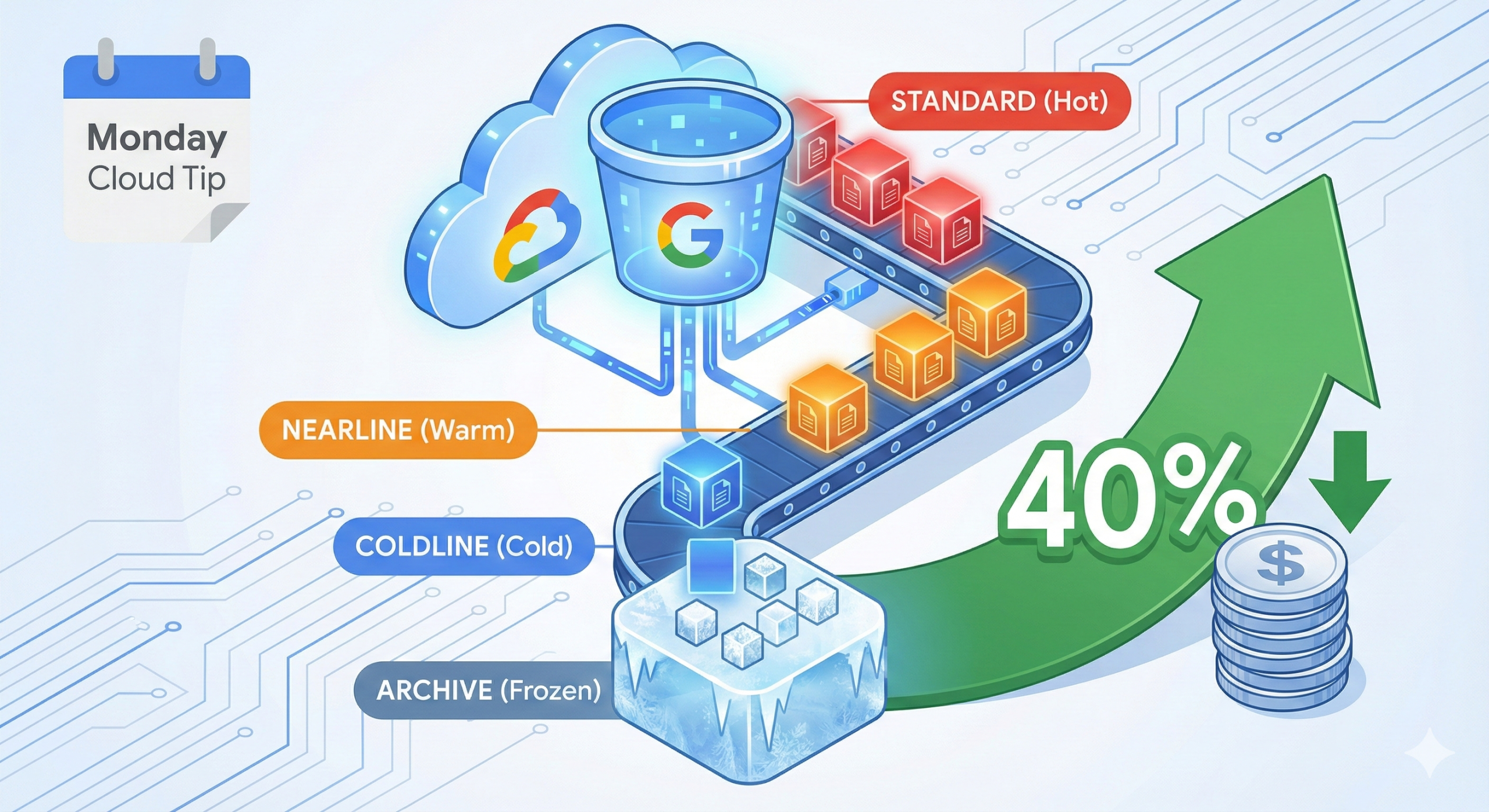
Cloud Storage buckets silently drain budgets when organisations treat all data equally. A 2024 analysis of enterprise GCP deployments revealed that 63% of object storage costs stem from data sitting in Standard storage class when Nearline or Coldline would suffice. The typical enterprise overpays by 40% monthly because lifecycle policies remain manual or non-existent.
The Storage Class Problem
Most teams create buckets, upload objects, and forget about them. Six months later, logs nobody accesses consume Standard storage at £0.016/GB/month when Coldline at £0.003/GB/month would handle the workload perfectly. The mathematics become brutal at scale: a mere 10TB of stale Standard storage costs £1,920 annually versus £360 in Coldline.
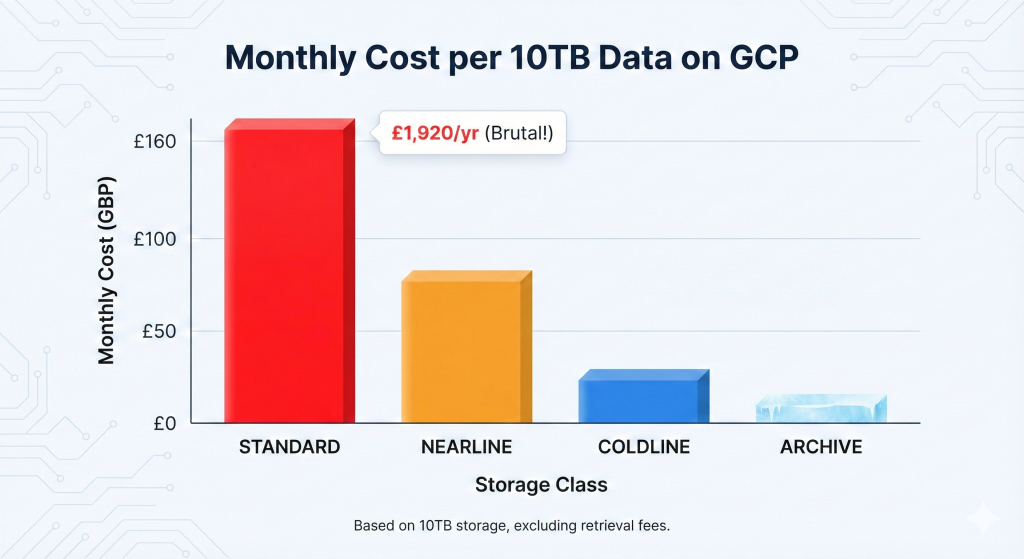
Manual storage class transitions fail because engineers lack visibility into access patterns and the operational overhead discourages regular reviews. The result? Predictable waste that compounds monthly.
The Automated Solution
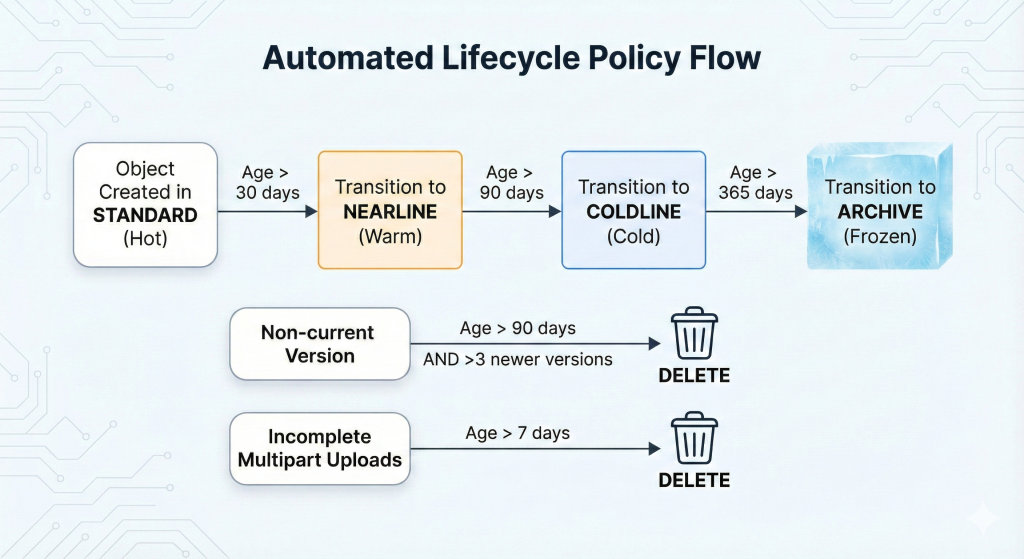
Cloud Storage lifecycle management policies eliminate manual intervention whilst optimising costs automatically. These policies transition objects between storage classes or delete them based on age, modification date, or version state without human oversight.
This approach builds on our comprehensive guide to GCP automated cost optimisation, applying automated governance to reduce waste systematically. Implementation delivers immediate 30-50% cost reduction for most enterprise storage footprints.
Implementation with Terraform
Production environments require infrastructure-as-code approaches for repeatability and audit trails. This Terraform configuration creates a bucket with comprehensive lifecycle rules:
#HCL

resource "google_storage_bucket" "optimised_storage" {
  name          = "enterprise-logs-optimised"
  location      = "EUROPE-WEST2"
  force_destroy = false

  # Enable versioning for compliance
  versioning {
    enabled = true
  }

  # Lifecycle rules for cost optimisation
  lifecycle_rule {
    # Transition to Nearline after 30 days
    condition {
      age = 30
      matches_storage_class = ["STANDARD"]
    }
    action {
      type          = "SetStorageClass"
      storage_class = "NEARLINE"
    }
  }

  lifecycle_rule {
    # Transition to Coldline after 90 days
    condition {
      age = 90
      matches_storage_class = ["NEARLINE"]
    }
    action {
      type          = "SetStorageClass"
      storage_class = "COLDLINE"
    }
  }

  lifecycle_rule {
    # Move to Archive after 365 days
    condition {
      age = 365
      matches_storage_class = ["COLDLINE"]
    }
    action {
      type          = "SetStorageClass"
      storage_class = "ARCHIVE"
    }
  }

  lifecycle_rule {
    # Delete non-current versions after 90 days
    condition {
      days_since_noncurrent_time = 90
      num_newer_versions          = 3
    }
    action {
      type = "Delete"
    }
  }

  lifecycle_rule {
    # Delete failed multipart uploads after 7 days
    condition {
      age = 7
      matches_prefix = ["tmp/", "uploads/incomplete/"]
    }
    action {
      type = "Delete"
    }
  }

  # Labels for cost allocation
  labels = {
    environment = "production"
    team        = "platform"
    cost-centre = "infrastructure"
  }
}
This configuration implements a cascading storage class strategy whilst maintaining compliance through versioning and managing failed uploads that often escape detection.
gcloud CLI Implementation
For existing buckets requiring immediate lifecycle policies, the gcloud CLI provides rapid deployment. Create a JSON lifecycle configuration file:
#JSON

{
  "lifecycle": {
    "rule": [
      {
        "action": {
          "type": "SetStorageClass",
          "storageClass": "NEARLINE"
        },
        "condition": {
          "age": 30,
          "matchesStorageClass": ["STANDARD"]
        }
      },
      {
        "action": {
          "type": "SetStorageClass",
          "storageClass": "COLDLINE"
        },
        "condition": {
          "age": 90,
          "matchesStorageClass": ["NEARLINE"]
        }
      },
      {
        "action": {
          "type": "SetStorageClass",
          "storageClass": "ARCHIVE"
        },
        "condition": {
          "age": 365,
          "matchesStorageClass": ["COLDLINE"]
        }
      },
      {
        "action": {"type": "Delete"},
        "condition": {
          "daysSinceNoncurrentTime": 90,
          "numNewerVersions": 3
        }
      }
    ]
  }
}
Apply the lifecycle policy:
#bash

# Apply lifecycle configuration to bucket
gsutil lifecycle set lifecycle-config.json gs://enterprise-logs-optimised

# Verify lifecycle configuration
gsutil lifecycle get gs://enterprise-logs-optimised
This approach suits rapid deployment scenarios or organisations not yet using infrastructure-as-code practices.
Python Automation for Dynamic Policies
Enterprise environments with diverse data retention requirements benefit from programmatic lifecycle management. This Python script using the Cloud Storage client library creates tailored policies based on bucket metadata:
#python

from google.cloud import storage
from datetime import datetime, timedelta

def configure_lifecycle_policy(bucket_name, data_classification):
    """
    Configure lifecycle policy based on data classification.

    Args:
        bucket_name: GCS bucket name
        data_classification: 'hot', 'warm', or 'cold'
    """

    client = storage.Client()
    bucket = client.bucket(bucket_name)

    # Define lifecycle rules based on classification
    policies = {
        'hot': [
            {'age': 90, 'storage_class': 'NEARLINE'},
            {'age': 365, 'storage_class': 'COLDLINE'}
        ],
        'warm': [
            {'age': 30, 'storage_class': 'NEARLINE'},
            {'age': 180, 'storage_class': 'COLDLINE'},
            {'age': 730, 'storage_class': 'ARCHIVE'}
        ],
        'cold': [
            {'age': 7, 'storage_class': 'NEARLINE'},
            {'age': 30, 'storage_class': 'COLDLINE'},
            {'age': 90, 'storage_class': 'ARCHIVE'}
        ]
    }

    rules = []
    for policy in policies[data_classification]:
        rule = storage.bucket.LifecycleRuleDelete(age=policy['age'])
        rule = storage.bucket.LifecycleRuleSetStorageClass(
            storage_class=policy['storage_class'],
            age=policy['age']
        )
        rules.append(rule)

    # Add version cleanup rule
    rules.append(
        storage.bucket.LifecycleRuleDelete(
            number_of_newer_versions=5,
            days_since_noncurrent_time=90
        )
    )

    bucket.lifecycle_rules = rules
    bucket.patch()

    print(f"Lifecycle policy configured for {bucket_name} ({data_classification})")

    return bucket

# Example usage
configure_lifecycle_policy('enterprise-logs-optimised', 'warm')
Enterprise Considerations
Security policies require careful integration with lifecycle management. Organisations subject to GDPR or data residency requirements must ensure Archive storage class maintains regional constraints. Configure buckets with uniform bucket-level access to prevent object-level ACL conflicts during transitions.
Cost modelling requires understanding retrieval patterns. Nearline storage costs £0.008/GB/month with £0.008/GB retrieval charges. Coldline reduces storage to £0.003/GB/month but increases retrieval to £0.040/GB. Archive offers £0.001/GB/month storage with £0.040/GB retrieval plus £0.040/GB early deletion fees for objects younger than 365 days. The decision framework from our GCP cost optimisation guide helps determine appropriate transitions based on access frequency.
Compliance frameworks often mandate minimum retention periods. Financial services organisations typically require seven-year retention for transaction records whilst maintaining quarterly access capability. Healthcare data under NHS Digital guidance requires different retention schedules by data type. Lifecycle policies must align with these regulatory requirements through careful age conditions and storage class selections.
Monitoring lifecycle transitions prevents unexpected behaviour. Cloud Storage emits logs when lifecycle actions execute. Configure Log Analytics to track transitions:
#bash

# Create log sink for lifecycle events
gcloud logging sinks create lifecycle-monitor \
    storage.googleapis.com/projects/PROJECT_ID/buckets/lifecycle-logs \
    --log-filter='protoPayload.methodName="storage.objects.lifecycle"'
```
Alternative Approaches
Object Lifecycle Management integrates with Cloud Storage Insights for data-driven policy creation. Insights analyses access patterns across buckets and recommends lifecycle policies based on actual usage. This approach suits organisations uncertain about appropriate transition ages, providing empirical evidence for policy decisions.
Autoclass represents Google’s managed alternative, automatically transitioning objects between storage classes based on access patterns without explicit lifecycle rules. Autoclass works well for unpredictable workloads but offers less control over transition timing and incurs management fees. Organisations with well-understood data lifecycles achieve better cost optimisation through explicit lifecycle policies combined with our FinOps framework approach.
Key Takeaways
Automated lifecycle management delivers immediate 30-50% storage cost reduction without operational overhead. Organisations managing 100TB of Standard storage save approximately £153,600 annually by implementing cascading transitions to Nearline, Coldline, and Archive classes based on access patterns.
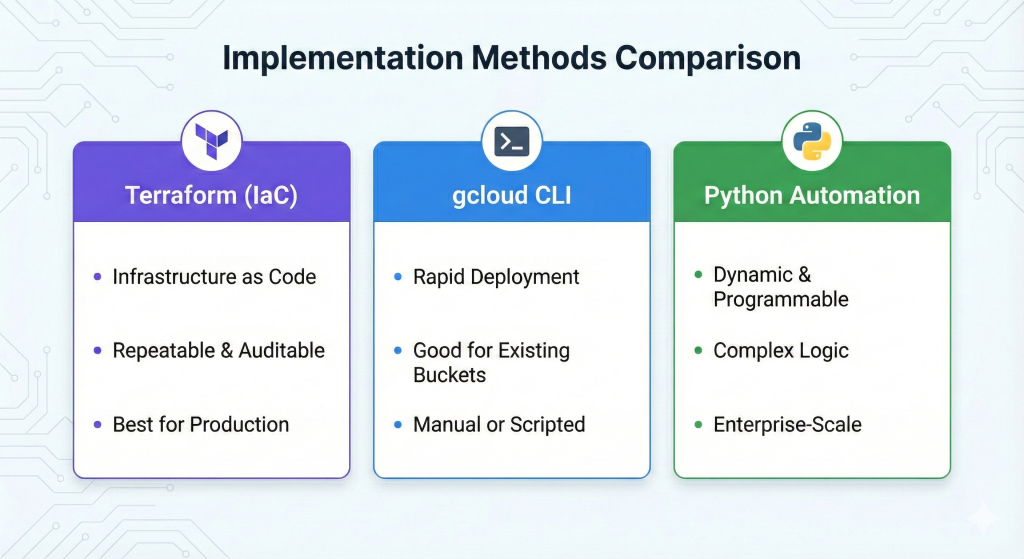
Implementation through Terraform ensures repeatability and audit compliance whilst gcloud CLI provides rapid deployment for existing infrastructure. Python automation enables sophisticated policy management for diverse data classifications across enterprise environments. The combination of automated transitions, version clean-up, and failed upload deletion eliminates three common sources of storage waste simultaneously.
Lifecycle policies require initial investment in access pattern analysis and retention requirement documentation but deliver returns within weeks. The automated approach scales across thousands of buckets without proportional operational cost increases.
Useful Links
1. Google Cloud Storage Lifecycle Management Documentation
2. Cloud Storage Pricing Calculator
3. Storage Class Comparison Guide
4. Terraform Google Cloud Storage Provider
5. Cloud Storage Python Client Library
6. GCP Autoclass Feature Guide
7. FinOps Foundation Storage Optimisation Resources
8. Google Cloud Architecture Center