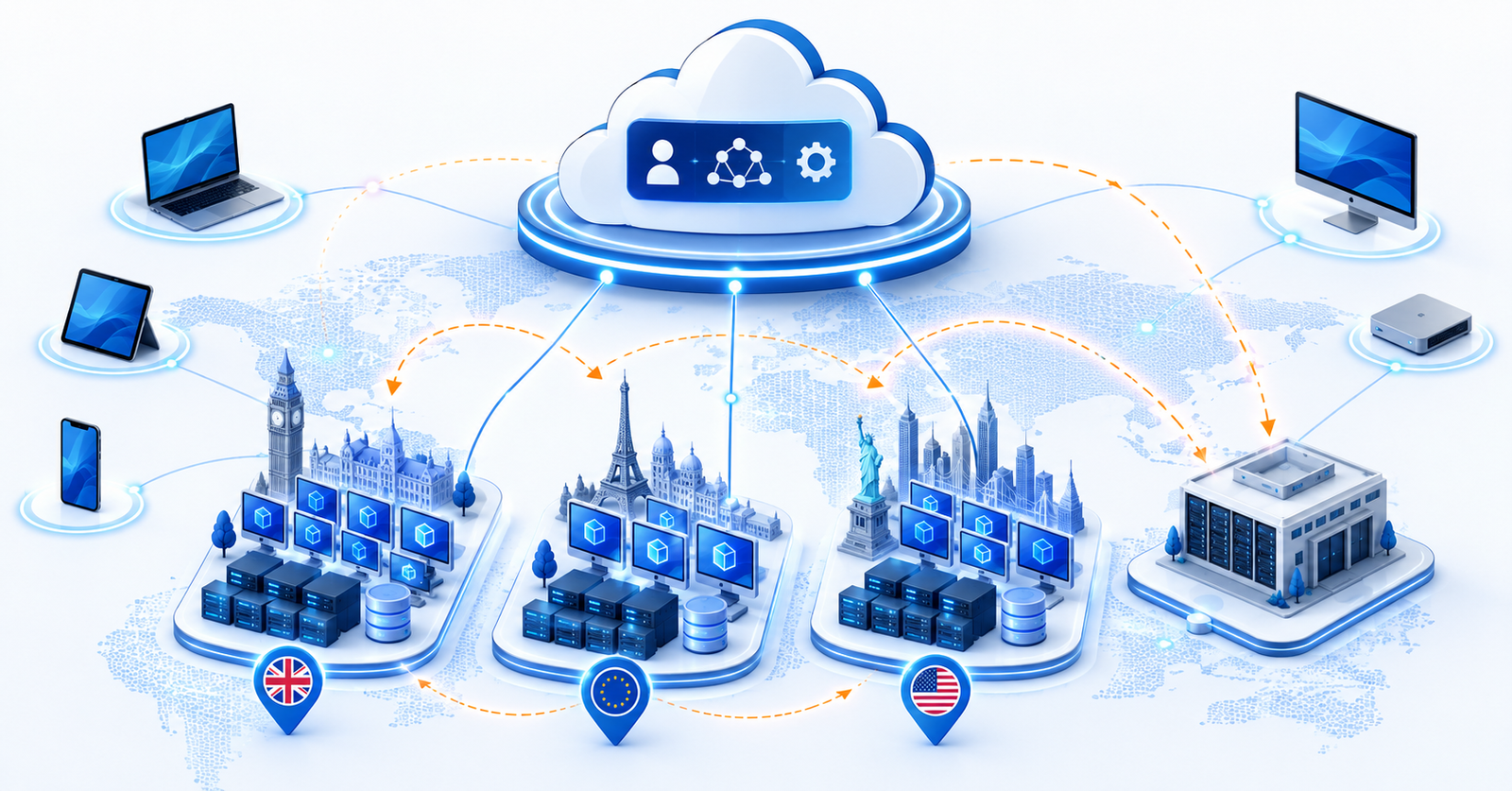
Twenty-eight per cent of working adults in Great Britain were hybrid workers between January and March 2025, according to the Office for National Statistics, and the proportion has climbed steadily since March 2022. That single figure understates the architectural problem it creates. A workforce split across home, office and multiple countries needs a desktop platform that behaves identically wherever the user opens a laptop lid, and most organisations discover, usually during a board-level “why does Tokyo have terrible latency” conversation, that their Azure Virtual Desktop architecture was designed for a single region and a single identity model. Gartner’s August 2025 forecast puts global desktop-as-a-service spending on a path from $4.3 billion in 2025 to $6.0 billion by 2029, and states plainly that net-new desktop virtualisation is now almost exclusively DaaS. The organisations getting this right are not the ones with the biggest Azure spend; they are the ones who treated global and hybrid deployment as a first-class design decision rather than an afterthought bolted onto a successful pilot.
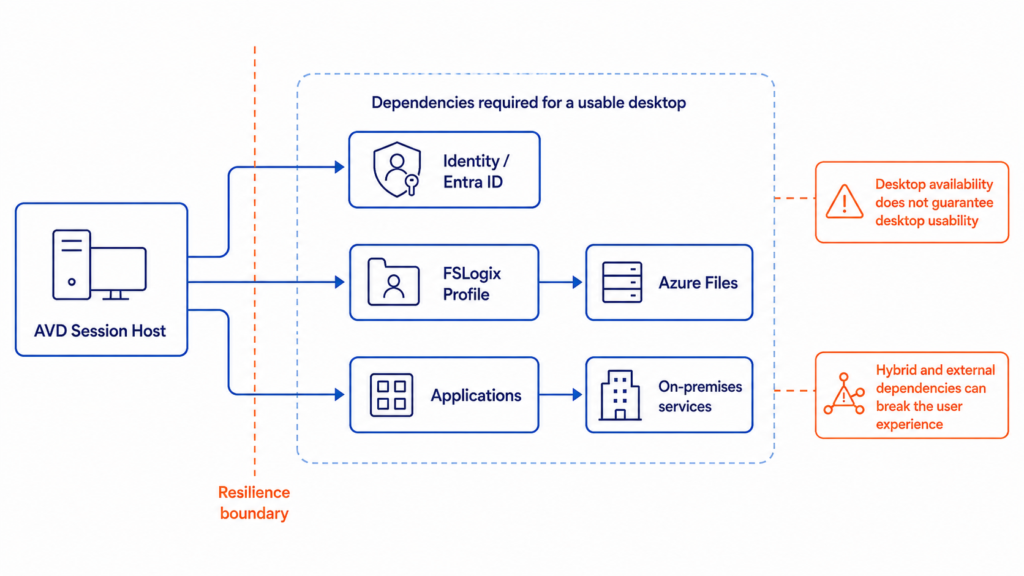
The traditional approach fails in a predictable way. A platform team stands up a single host pool in UK South, proves the concept with a few hundred users, and then tries to scale that same host pool to a global user base by adding more session hosts to the same region. Round-trip latency to session hosts three continents away degrades the experience past the point of usability, FSLogix profile containers become a single point of failure with no cross-region replication, and the moment that region has an outage, every user everywhere loses their desktop at once. None of this is a Microsoft platform failure: Azure Virtual Desktop’s control plane, the brokering, gateway, web access and diagnostics services, is a globally distributed service that is resilient by design. The failure sits entirely in the data plane, the session hosts, storage and identity that the customer owns and that a single-region pilot never had to think about.
The fix is architectural, not a bigger VM. Multiple regional host pools placed near user populations, FSLogix Cloud Cache or per-region profile storage for data locality, RDP Shortpath tuned for the connection type in use, and hybrid identity resolved before it becomes a blocker rather than after. NEC took this approach when it needed to move roughly 90,000 users from strained on-premises VDI to Azure Virtual Desktop in two and a half years, ending up with one of the largest AVD deployments in the world and productising the pattern for its own customers. The rest of this piece works through how to design that architecture properly: the control plane and data plane split that governs every decision, multi-region and hybrid deployment patterns, the networking and identity choices that make or break the user experience, and what it actually costs against the on-premises alternative most organisations are still running.
The Business Case for Global, Hybrid AVD
The shift from on-premises VDI to Azure Virtual Desktop is not primarily a technology refresh; it is a response to hardware, workforce and cost curves that no longer favour capital-intensive infrastructure. Gartner’s August 2025 Magic Quadrant for Desktop as a Service places Microsoft in the Leaders quadrant alongside AWS, Citrix and Omnissa, and is unusually direct about where the market is heading: on-premises VDI revenue growth has flattened to roughly 2% with declining user counts, while net-new desktop virtualisation deployments are landing almost entirely on DaaS. Gartner projects that by 2027, virtual desktops will be cost-effective for 95% of workers, up from 40% in 2019, and will be the primary workspace for 20% of workers, up from 10% in 2019. A newer 2026 edition of this Magic Quadrant published on 5 August 2026; check it directly if you hold a Gartner licence, since the market has kept moving in the year between editions.
What changed is not the concept of virtual desktops, which have existed since the mid-2000s, but the economics and the deployment model. A globally distributed workforce, whether driven by acquisition, contractor scale-up or plain geographic spread, used to mean provisioning physical VDI infrastructure per region, sized for peak demand year-round because hardware cannot be switched off overnight. Azure Virtual Desktop inverts that: compute is provisioned per region on demand, licensing for most enterprises is already sunk into existing Microsoft 365 or Windows Enterprise entitlements, and autoscale means the infrastructure cost curve tracks actual usage rather than provisioned capacity.
The strategic implication is that AVD architecture decisions now sit alongside network topology and identity strategy as core enterprise architecture, not an endpoint-management afterthought. Getting the global and hybrid design right the first time avoids the more expensive alternative: a successful single-region pilot re-architected under pressure once it hits its first international user base or regulatory data-residency requirement.
Current State: From Pandemic-Era VDI to Global-Scale AVD
Most enterprise AVD estates trace their origin to 2020 and 2021, when organisations needed remote access fast and Azure Virtual Desktop, then newly generally available, offered a quicker path than procuring and racking additional VDI hardware during a global supply-chain disruption. NEC’s own account of its migration is instructive: its on-premises VDI environment hit a hard bandwidth ceiling of 40 Gbps between its intranet and the internet, insufficient for the tens of thousands of concurrent VDI users the pandemic created, and its thin-client user base had already grown from roughly 30,000 in 2018 to 70,000 by 2022 before the migration to AVD even began. That pattern, rapid growth outstripping fixed infrastructure, repeats across most large AVD estates.
The space has matured considerably since those early pandemic deployments. Where 2020-era AVD projects were largely tactical and single-region, the current generation of enterprise deployments treats AVD as permanent core infrastructure with the same rigour applied to any other tier-one workload: landing zones, multi-region resilience, hybrid identity and defence-in-depth security. The most consequential recent maturation is on the hybrid side, though it has moved in two different stages. Azure Virtual Desktop on Azure Local, running session hosts on Azure Stack HCI hardware, is generally available, letting organisations with data-residency, sovereignty or latency constraints run session hosts on their own infrastructure while host pools, workspaces and application groups stay under the Azure control plane. A broader capability, Azure Virtual Desktop Hybrid, which extends session hosts to Arc-enabled servers on any on-premises hypervisor or physical Windows Server rather than only Azure Local hardware, remains in public preview at the time of writing and is restricted to validation host pools.
A persistent misconception still causes architectural mistakes: teams assume that because the AVD control plane is Microsoft-managed and globally resilient, the whole platform inherits that resilience automatically. It does not. Microsoft is explicit that responsibility for AVD’s components is divided between Microsoft-managed services (web, broker, gateway, resource directory and diagnostics) and customer-managed or partner-managed components (session hosts, storage, networking, identity and images). A single-region data plane behind a globally resilient control plane is still a single point of failure. Multi-cloud AVD is also not a live pattern worth designing for; AVD is an Azure-native service with no meaningful multi-cloud variant, so the decisions that matter are entirely about how far you distribute and extend the data plane within, and increasingly beyond, Azure regions.
Technical Architecture Deep-Dive
Control Plane and Data Plane: The Boundary That Defines Everything
AVD’s architecture separates a Microsoft-managed control plane from a customer-managed data plane, functionally similar to Windows Server Remote Desktop Services but with Microsoft operating the brokering infrastructure. The control plane comprises the web service (user-facing endpoint), broker service (orchestrates connections), gateway service (websocket-based RDP connectivity), resource directory and diagnostics. Microsoft’s architecture documentation confirms Azure Traffic Manager directs web-service traffic using geographic routing on the user’s source IP, and Azure Front Door directs gateway-service traffic, both Microsoft-managed and invisible to the customer. You don’t need your own global traffic-steering layer between regions; Microsoft already routes each user to their nearest web service instance and handles gateway failover. What you control, and what determines whether a regional outage is invisible or catastrophic, is where your session hosts, storage and identity infrastructure live.
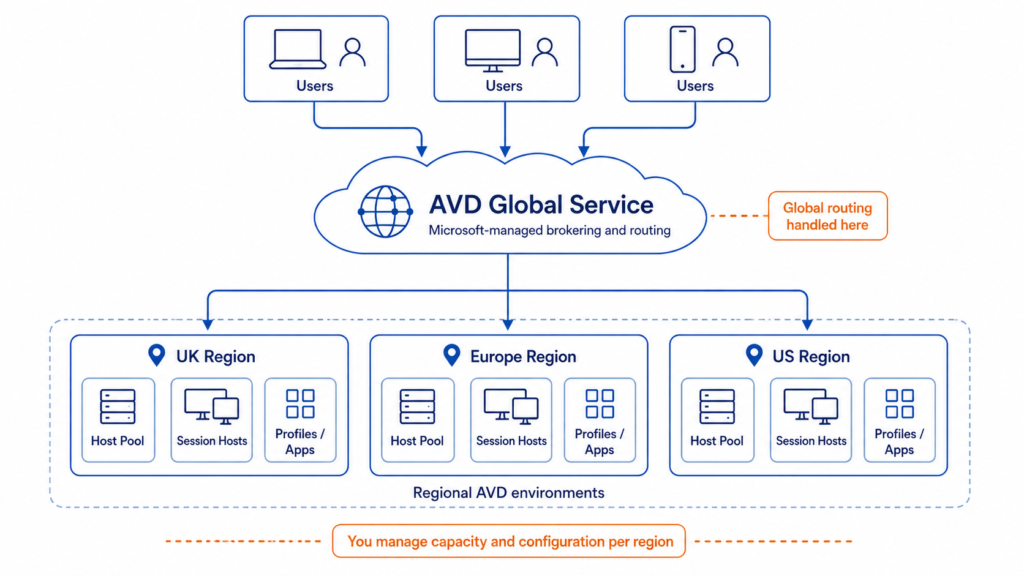
The data plane is everything else: host pools (pooled, Windows Enterprise multi-session for many users per VM, or personal, one VM per user), workspaces and application groups (Desktop or RemoteApp), FSLogix profile containers making profiles portable across non-persistent hosts, and App Attach for delivering applications without baking them into a golden image. MSIX App Attach was deprecated 1 June 2025; its successor, App Attach, supports MSIX, Appx and App-V, and extends to Windows Server 2025 and 2022 session hosts.
Landing-zone guidance under the Cloud Adoption Framework recommends separating this across dedicated subscriptions: an AVD workload subscription for VMs, storage and Key Vaults; a shared-services subscription for Automation, Log Analytics and the Compute Gallery distributing golden images; and platform-level Connectivity and Management subscriptions shared with the rest of the landing zone.
Multi-Region Design Patterns for Global Workforces
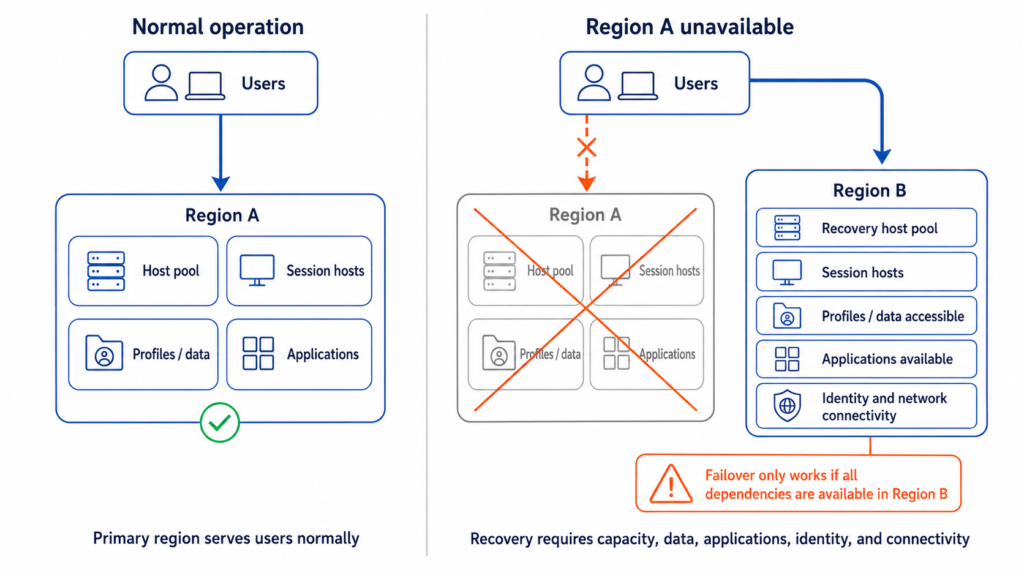
The reference pattern, drawn from Microsoft’s own multiregion BCDR architecture for AVD, deploys separate host pools per region, close to the user populations they serve, each in its own spoke virtual network connected to a regional hub. For each host pool, choose either active-active, where session hosts run continuously in multiple regions and share load, or active-passive, where a secondary region holds standby capacity that activates on failover. Personal host pools typically use Azure Site Recovery for the passive pattern, replicating VMs with crash-consistent recovery points generated, by default, every five minutes, a fixed interval. Pooled host pools generally skip Site Recovery in favour of simply deploying a second, independently-scaled host pool in the target region, simpler than replicating ephemeral session-host state rebuilt from a golden image anyway.
Profile continuity across regions is the part organisations most often get wrong. FSLogix Cloud Cache, which writes profile data to multiple storage locations simultaneously, is Microsoft’s recommended mechanism for near-zero recovery point objectives across regions, chosen specifically because storage-service-specific replication produces too many permutations across storage types, replication modes and regional availability to standardise on. Skipping this step means a failover event technically restores desktop access but strands every user’s profile in the region that just failed.
This multi-region session-host layer sits on top of whatever network topology the rest of the enterprise uses. Our deep-dive on hub-spoke versus Virtual WAN versus Azure Virtual Network Manager covers the trade-offs in detail, but for AVD specifically, each regional hub needs hybrid connectivity to on-premises resources, firewall services, identity infrastructure and Log Analytics, and the hubs need connectivity to each other so that dependent applications remain reachable during a regional failover.
Hybrid Identity and On-Premises Integration
Hybrid identity has historically been the single most common blocker in AVD deployments that otherwise look ready to scale, though this is now easing. FSLogix profile containers stored on Azure Files using Microsoft Entra Kerberos, the mechanism that lets Entra-joined users obtain Kerberos tickets for SMB access without needing line-of-sight to a domain controller, originally required hybrid identities synchronised from on-premises AD via Entra Connect Sync or Cloud Sync. Microsoft Entra Kerberos for cloud-only and external identities is now generally available in Azure Commercial, so a true cloud-only identity model with FSLogix on Azure Files is a supported production pattern rather than a preview caveat, though adjacent capabilities such as share-level Azure RBAC for cloud-only identities remain limited to a subset of regions and are worth confirming before you commit.
For organisations with data-residency or latency requirements that rule out Azure regions entirely, Azure Virtual Desktop on Azure Local, generally available, extends the AVD data plane onto customer-owned Azure Local hardware while host pools, workspaces and application groups stay under the Azure control plane. The broader Azure Virtual Desktop Hybrid pattern, covering Arc-enabled servers on arbitrary on-premises hardware, remains public preview restricted to validation host pools and shouldn’t anchor a production commitment yet. Microsoft’s guidance for large AVD-on-Azure-Local deployments recommends locating FSLogix profile storage on a separate SMB share external to the cluster, on the same network, so storage and compute scale independently.
Connectivity between on-premises identity or file infrastructure and Azure session hosts runs over ExpressRoute or site-to-site VPN, both qualifying as a “managed network” for RDP Shortpath purposes. ExpressRoute buys predictable latency and throughput at enterprise scale; VPN is the lower-cost option where traffic volume doesn’t yet justify a private circuit. DNS resolution for hybrid-joined session hosts needs to reach on-premises AD DNS records, typically via Azure DNS Private Resolver or private zones with conditional forwarding, a pattern covered in more depth in our guide to replacing conditional forwarders with Azure DNS Private Resolver.
Networking and RDP Shortpath
Connection quality for a globally distributed workforce lives or dies on RDP Shortpath, which establishes a direct UDP path between client and session host rather than routing through the standard TCP reverse-connect transport. On managed networks (ExpressRoute or VPN), Shortpath establishes a direct UDP connection, either via STUN with no inbound port requirement or over a listener on UDP 3390. On public networks it uses STUN to attempt a direct UDP path over the internet, falling back to a TURN relay when the client sits behind symmetric NAT, with the relay location selected automatically based on the client’s physical location. UDP Shortpath over Private Link reached GA in February 2026, meaning fully private RDP, both TCP and UDP, is now achievable for regulated or network-isolated environments.
Standard AVD service connectivity is outbound-only, and the ICE/STUN/TURN Shortpath modes don’t require an inbound listener either. The exception is the managed-network Shortpath listener mode: if you enable the RDP Shortpath listener directly on session hosts rather than using STUN discovery, that configured UDP port, 3390 by default, must be permitted inbound from the client network. Microsoft provides both a service tag, still named WindowsVirtualDesktop, and an Azure Firewall FQDN tag to keep rules current without manually tracking IP ranges. A recurring, avoidable failure mode is a user-defined route that forces session-host traffic through a firewall without an explicit allow rule for that service tag, making every host in the affected subnet unreachable. Region-specific agent endpoints also need permitting per region your session hosts occupy, not just globally.
Autoscale and Session Host Sizing
Autoscale is where a well-architected AVD estate and an expensive one diverge most visibly. Native scaling plans move session hosts through four phases, ramp-up, peak, ramp-down and off-peak, using breadth-first load balancing during ramp-up and peak to spread sessions evenly, and depth-first load balancing during ramp-down and off-peak to consolidate sessions and power the rest off. Two scaling methods exist: power-management autoscaling, which starts and stops existing VMs and works with standard host pools including Azure Government, and dynamic autoscaling, which reached GA in June 2026, creating and deleting VMs entirely rather than starting and stopping them, currently limited to pooled host pools using session-host configuration. Because it deletes idle VMs rather than merely deallocating them, dynamic autoscaling removes the compute-reservation charge power-management autoscaling still leaves in place, which is where the larger savings come from. A capacity threshold, expressed as a percentage of used host-pool capacity, triggers each scaling action. Practitioners managing AVD estates at scale commonly report compute cost reductions in the region of 40 to 60% from autoscale, though that figure reflects vendor and practitioner data rather than a Microsoft-published benchmark, and should be validated against your own usage pattern.
Session-host sizing should follow Microsoft’s published guidance of 6 to 24 vCPUs per multi-session VM, then be tuned against three workload profiles: task and light workers (2 vCPU / 8 GB, high user density), knowledge workers on Office, Teams and browser-based applications (roughly double the resources, lower density), and power users on Power BI, CAD or GPU-accelerated workloads (dedicated higher-vCPU instances, often GPU-backed, much lower user-per-VM ratio). These are starting points to validate against Azure Monitor telemetry during a pilot; RAM pressure, not CPU, is what most often forces a resize in production.
Security Architecture
AVD’s security model layers Conditional Access, session-level protections and endpoint security on top of the network controls above. Conditional Access policies enforcing multi-factor authentication, device compliance and location-based restrictions apply to the AVD application itself, and should be validated before rollout rather than discovered as gaps in production; our framework for testing Conditional Access policies before deployment applies directly here. Watermarking overlays a QR code containing connection and device identifiers onto the remote session, useful for tracing the source of a photographed screen rather than preventing capture outright. Screen capture protection blocks OS-level capture APIs, client-side only or client-and-server on Windows 11 22H2 and later, and requires a supported client version; Microsoft is explicit that this is not a DRM mechanism and should sit within a broader data-protection strategy alongside clipboard, drive and printer redirection controls, not as a standalone safeguard.
Onboard session hosts to Microsoft Defender for Endpoint via a script embedded in the golden image so it runs automatically at first boot. Microsoft recommends a single onboarding entry per virtual desktop for multi-session hosts, particularly where hosts are frequently redeployed. FSLogix processes need explicit antivirus exclusions to avoid profile-container corruption or logon latency, and the attack-surface-reduction rule blocking process creations from PSExec and WMI should be avoided on multi-session hosts, since it is incompatible with common multi-session management tooling.
Comparing Deployment Approaches: Pure Cloud, Hybrid and the On-Premises Baseline
Most enterprise AVD decisions are not “AVD versus a competing DaaS platform”; they are a choice between deployment shapes for AVD itself, and the traditional on-premises VDI most organisations are migrating away from.
Pure multi-region cloud is the default for organisations without a specific data-residency or latency constraint tying a workload to a physical location. Every host pool, storage account and identity dependency lives in Azure, distributed across regions matched to user geography. This scales elastically with autoscale and carries the lowest operational overhead, since there is no on-premises hardware lifecycle to manage. Its limitation is real: workloads with strict data-residency requirements, or heavy dependency on on-premises data that cannot be replicated to Azure without unacceptable latency or cost, are poorly served by this pattern.
Hybrid via Azure Local, or the newer Arc-enabled hybrid pattern, places session-host compute on customer-owned hardware, on-premises or at the edge, while host pools, workspaces and application groups stay under the Azure control plane. Azure Local is the production-ready route today; the broader Arc-enabled pattern, extending this to any on-premises hypervisor or physical server rather than only Azure Local hardware, is still public preview limited to validation host pools. Either closes the data-residency and extreme-latency gap pure cloud cannot address, at the cost of taking on hardware lifecycle management again, the exact burden most organisations adopted AVD to escape. It earns its place for a narrow set of workloads: regulated data that cannot leave a specific jurisdiction, or latency-sensitive access to on-premises systems no amount of ExpressRoute tuning fully resolves. Treating it as the default rather than the exception reintroduces the overhead the rest of the migration was designed to remove.
Traditional on-premises VDI, the baseline most large enterprises are migrating away from, requires capacity provisioned for peak demand year-round because physical hardware cannot be switched off overnight the way a cloud session host can, and typically forces a hardware refresh every three to five years regardless of utilisation. NEC’s migration is representative: its on-premises VDI hit a fixed 40 Gbps bandwidth ceiling that could not flex with demand. On-premises VDI retains an edge only where there’s zero tolerance for any cloud dependency, air-gapped or extremely high-security estates where even the AVD control plane’s outbound connectivity is unacceptable; a small and shrinking minority, consistent with Gartner’s assessment that on-premises VDI revenue growth has flattened to roughly 2% while net-new deployment has moved almost entirely to DaaS.
| Dimension | Pure Multi-Region Cloud | Hybrid (Azure Local GA / Arc hybrid preview) | Traditional On-Premises VDI |
|---|---|---|---|
| Feature capability | Full AVD feature set as it ships | Full control-plane feature set; Arc-enabled hybrid limited to validation host pools while in preview | Vendor-dependent; no shared roadmap with Azure services |
| Cost model | Consumption-based compute plus existing M365/Windows entitlements | Azure control-plane cost plus on-premises hardware capital and lifecycle cost | Capital-heavy; hardware refresh every 3-5 years regardless of use |
| Enterprise readiness | Mature; default pattern for most new deployments | Azure Local is GA and production-ready; the broader Arc-enabled hybrid pattern is public preview only | Mature but declining; vendors now prioritise cloud roadmaps |
| Data residency / latency fit | Strong within available Azure regions; gaps where no region meets requirements | Strong; purpose-built for this constraint | Strong by definition |
| Operational overhead | Lowest; no hardware lifecycle | Highest of the three; hardware lifecycle returns | High; full hardware, software and VDI broker lifecycle |
| Elasticity | High; autoscale matches capacity to demand within minutes | Limited by on-premises hardware headroom | Effectively none; capacity fixed at provisioning time |
Real-World Case Studies
Company Name and Industry: NEC Corporation, Electronics and Technology
Scale Context: NEC group employs approximately 110,000 people worldwide with roughly 3.5 trillion yen in FY2023 revenue; its thin-client user base grew from around 30,000 in 2018 to 70,000 by 2022 before the AVD migration began.
Challenge: On-premises VDI infrastructure hit a fixed 40 Gbps bandwidth ceiling between its intranet and the internet, insufficient for the tens of thousands of concurrent VDI users the pandemic created, compounded by degraded desktop performance from high server consolidation and long procurement lead times during global supply-chain disruption.
Solution Implemented: Migrated and modernised its VDI environment to Azure Virtual Desktop, moving users from Windows 10 to Windows 11 in the process, chosen partly for its native Microsoft 365 compatibility.
Measurable Outcomes:
- Migrated approximately 90,000 users in two and a half years, resulting in one of the largest Azure Virtual Desktop deployments in the world
- Delivered a smoother, more flexible user experience that NEC subsequently productised as “NEC Virtual Desktop for Microsoft Azure,” launched October 2022
- Sold tens of thousands of seats of that productised offering to its own customers
Source: https://www.microsoft.com/en/customers/story/20673-nec-azure-monitor
Company Name and Industry: Campari Group, Consumer Goods (Spirits)
Scale Context: Campari operates 22 production plants and in-market companies across 23 countries, and is the world’s sixth-largest player in the premium spirits sector. Challenge: Needed to balance open, flexible access for a large third-party contractor workforce against security requirements, a tension sharpened by a ransomware attack in November 2020.
Solution Implemented: Deployed Azure Virtual Desktop on the Microsoft Cloud, building on an existing SAP-on-Azure migration, using multi-session scalability to bring contractors online without provisioning dedicated physical hardware per contractor.
Measurable Outcomes:
- Scaled to more than 1,000 third-party contractors worldwide reconnected securely through AVD
- Reduced the operational impact of the prior ransomware incident by centralising contractor access through managed virtual desktops
- Maintained continuity of operations across a 23-country footprint during the transition
Company Name and Industry: Apex Group, Financial Services
Scale Context: Apex Group serves more than 6,000 clients and has grown through more than 30 mergers and acquisitions, with its user base expected to double within a year of its AVD deployment.
Challenge: A fast-growing, highly acquisitive financial services business needed secure, compliant, high-performance desktops for employees and vendors spread across multiple countries, absorbing new users from each acquisition without a provisioning lag.
Solution Implemented: Deployed Azure Virtual Desktop alongside Citrix on Azure, using AVD’s elastic scaling to absorb acquisition-driven user growth.
Measurable Outcomes:
- Scales elastically between as few as 20 and as many as 500 virtual machines to match fluctuating demand
- Delivered an immediate cost benefit from matching infrastructure to actual usage rather than provisioning for peak headcount
- Saved its roughly 6,000 users up to a minute per sign-in compared with the prior desktop experience
Cost Analysis and ROI
Licensing is where most AVD cost models go wrong, and the mistake usually runs the opposite direction to what teams expect. Windows 10 and 11 Enterprise access rights for AVD, including the multi-session edition, are included at no additional cost within Microsoft 365 E3, E5, F3, Business Premium, A3, A5, or standalone Windows Enterprise E3/E5 per-user licences, which most enterprises already hold, so the marginal licensing cost of extending AVD to an existing Microsoft 365 estate is frequently zero. Critically, this obligation extends to contractors and external vendors serving the organisation’s own internal purposes, such as Campari Group’s third-party contractors or Apex Group’s external vendors: Microsoft’s licensing terms treat these as “internal commercial purposes” regardless of employment status, and each person needs an eligible licence assigned in the tenant. Per-user access pricing is a distinct model reserved for external commercial purposes, where an organisation resells AVD-hosted desktops to its own customers, and cannot substitute for standard licensing to save cost on a large contractor population.
Compute is the dominant recurring cost and the one autoscale is designed to control. As an indicative reference point, a D8s_v5 instance (8 vCPU / 32 GB, US regions) ran at roughly $0.38 per hour on-demand versus roughly $0.08 per hour on spot at the time of writing, though spot rates move by SKU, region and time, carry no SLA, and can be evicted at any point; check current pricing for your own SKU and region before budgeting against it. That discount makes spot capacity attractive for non-persistent pooled host pools; our guide to spot instance architecture for fault-tolerant workloads covers the patterns that make this viable. For steady baseline capacity, reserved instances or savings plans typically offer better economics; the trade-offs are covered in our decision framework for reserved instance commitments. Three-year reservations for the older D, Ds, Dv2 and Dsv2 series expired in June 2025; one-year reservations on the same series followed from 1 July 2026. Existing reservations run to term either way, but a TCO model still budgeting new commitments on these SKUs needs updating to current-generation instances.
FSLogix profile storage is the cost line most commonly underestimated. Azure Files Premium bills for provisioned capacity regardless of actual usage, easy to budget but easy to over-provision. Azure NetApp Files uses capacity pools with a minimum size of 1 TiB when all volumes use Standard network features (4 TiB only applies where a pool contains volumes on the older Basic network features). Microsoft supports both Azure Files and Azure NetApp Files as FSLogix backends; independent, non-Microsoft benchmarking suggests NetApp Files holds latency more consistent at higher concurrency, with Azure Files Premium cheaper and comparable at lower concurrency, but Microsoft doesn’t publish an official comparative threshold, so validate against your own workload before committing to a tier. A quieter but persistent cost driver on either platform is VHDX “white space”: FSLogix profile containers are dynamic disks that grow but do not automatically shrink, so profile storage tends to bloat over time unless actively managed.
Whole-of-solution economics look favourable in Microsoft-commissioned research, with the appropriate caveat that it is Microsoft-commissioned. Forrester’s Total Economic Impact study, published March 2025, modelled a composite multibillion-dollar global organisation with a 2,000-person distributed workforce, based on four customer interviews and 207 survey respondents. Over a three-year, risk-adjusted horizon at a 10% discount rate, the study projects return on investment of 94% to 217% and net present value of $3.2 million to $7.4 million, with the largest single benefit category, $3.1 million to $6.2 million, coming from reduced end-user latency and outages saving 6 to 12 minutes of productive time per day. The survey breaks results out by product: respondents with Windows 365 experience reported roughly 15% of IT team time saved, and average help-desk ticket reductions were 13.4% for Windows 365 and 16.7% for Azure Virtual Desktop specifically. These are projections based on early implementations, reported as ranges with no payback period given, so they should inform expectations rather than substitute for modelling your own baseline.
Decision Framework
Choose pure multi-region cloud as the default unless a specific, named constraint rules it out. This covers most enterprise deployments: distributed knowledge workers, contractor populations and acquisition-driven growth, none carrying a hard data-residency or data-gravity requirement Azure regions can’t satisfy.
Reach for hybrid, Azure Local today, or the broader Arc-enabled pattern once it exits preview, only when a workload has a regulatory data-residency requirement tying it to a jurisdiction with no suitable Azure region, or when on-premises latency is severe enough that no amount of ExpressRoute tuning resolves it. Treat this as a targeted exception applied to specific host pools, not a blanket decision, since it reintroduces hardware lifecycle overhead across whichever pools adopt it.
Confirm the identity model early, though this is now lower-risk than it used to be. If FSLogix on Azure Files with Entra Kerberos is part of the design, and it usually is, cloud-only identity is now a generally available, supported path alongside hybrid identity; choose based on whether your organisation already runs hybrid AD, not because cloud-only forces a workaround.
Size storage to concurrency, not cost alone. Lower-concurrency, cost-sensitive pools suit Azure Files Premium; pools where logon performance under high concurrent load is business-critical justify Azure NetApp Files.
Build autoscale and reservation strategy together rather than retrofitting either. Model expected usage before choosing the reserved-instance-to-spot ratio, since an accurate usage model drives both the autoscale configuration and the commitment level that minimises total spend.
Implementation Roadmap
Phase 1: Foundation (Months 1-3)
Deploy the platform landing zone first: Connectivity and Management subscriptions, network topology, ExpressRoute or VPN connectivity to on-premises identity and data sources, and DNS resolution between Azure and on-premises. Layer the AVD-specific landing zone on top: dedicated workload and shared-services subscriptions, Compute Gallery for golden image distribution, and Log Analytics for monitoring. Resolve the hybrid identity model during this phase, not later; retrofitting Entra Connect or Cloud Sync onto a live estate is considerably more disruptive than establishing it before the first session host exists. Team composition at this stage typically centres on a small core of platform and identity engineers. Cost implications are modest relative to later phases: landing-zone infrastructure and a handful of pilot session hosts, without the compute volume that arrives once user migration begins.
Phase 2: Expansion (Months 4-9)
Migrate users in waves, typically starting with lower-risk personas before moving to power users with more demanding session-host requirements. Tune autoscale scaling plans against real usage telemetry gathered during the pilot, and expect to revise session-host SKU choices at least once as actual RAM and CPU utilisation diverges from projections. Add regional host pools as international user populations come online, replicating golden images and extending FSLogix Cloud Cache or equivalent profile replication to each new region as it is added, not as an afterthought once users start reporting missing profile data. Onboard Defender for Endpoint via the golden image, apply watermarking and screen-capture protection where data sensitivity warrants it, and validate Conditional Access policies against real user populations. Cost during this phase scales with user volume and is the point at which reserved-instance or savings-plan commitments should be locked in against a clearer usage baseline.
Phase 3: Maturity (Months 10-18)
Extend to full multi-region BCDR coverage, formalising the active-active or active-passive model per host pool based on the criticality of each user population, and test failover procedures rather than assuming the documented design works under real conditions. Evaluate whether any remaining workloads warrant the hybrid Azure Local or Arc pattern, based on evidence gathered during rollout rather than upfront assumption. Adopt dynamic autoscaling and ephemeral OS disks into the standard configuration for stateless pooled host pools, both now generally available rather than preview features to plan around, and pilot Regional Host Pools where your target regions support it, given its direct relevance to this roadmap’s resiliency argument. Revisit storage tier choices against actual concurrency data from a mature deployment. By this stage, the estate should operate under the same change-management discipline as any other tier-one workload, rather than as a project with a defined end date.
Future Trends and Innovation
The clearest near-term trend is the continued closing of the hybrid gap. Azure Virtual Desktop on Azure Local is GA today, and the broader Azure Virtual Desktop Hybrid pattern for Arc-enabled servers on arbitrary on-premises hardware is progressing through public preview; the direction of travel, more control-plane capability extending to on-premises session hosts, is worth tracking rather than building a production plan around yet. RDP Multipath reached GA for UDP-based redundant paths in mid-2025, and redundant TCP paths reached GA in July 2026 (still on a phased rollout, not yet consistently enabled everywhere), extending that resilience model to networks where UDP is restricted, switching automatically on degradation.
The most consequential preview to watch is Regional Host Pools, directly relevant to this piece’s resiliency argument. AVD’s existing model stores host-pool metadata in a database shared across an entire Azure geography, so a database issue in one region can, in principle, affect host pools in an unrelated region within the same geography. Regional Host Pools store metadata per region instead, containing the blast radius to that single region. It’s in public preview, limited to a small number of regions, and Microsoft recommends new host pools adopt it once GA rather than waiting for a forced migration later.
External identity support, which reached general availability in November 2025, reduces the friction of onboarding contractors and partner-organisation users onto AVD as identities, distinct from the licensing question covered above, directly relevant to organisations following the Apex Group or Campari Group pattern of large non-employee user populations.
On the AI and automation front, the practical near-term impact for platform teams is less about AI-driven desktops and more about AI-assisted operations: autoscale models trained on real usage patterns rather than fixed time-of-day thresholds, and anomaly detection applied to FSLogix and session-host telemetry to catch profile corruption or capacity issues before users report them.
Strategic Recommendations
Default to pure multi-region cloud, reserve hybrid for named exceptions, and settle the identity model deliberately rather than by default. That is the core of a defensible AVD architecture for a globally distributed enterprise, and the organisations in the case studies above succeeded largely by getting these fundamentals right rather than by adopting every available feature. Identity remains a high-leverage early decision, less because it forces a particular path than because leaving it unresolved into mid-rollout, whichever way it’s ultimately decided, absorbs friction that a week of upfront architecture work would have avoided.
The biggest risk in most AVD programmes is not technical; it is treating a successful single-region pilot as proof the architecture will scale globally without changes. It will not, because a pilot never exercises the data-plane resilience, cross-region profile replication or regional latency characteristics that only appear once real international users log in. Budget explicitly for a re-architecture step between pilot and global rollout rather than assuming the pilot’s design travels unchanged.
The clearest success factor across NEC, Campari and Apex Group is that none of them treated AVD as a lift-and-shift of existing VDI configuration; each redesigned around AVD’s actual operating model, elastic scaling, centrally managed identity and Microsoft-managed control-plane resilience, rather than replicating on-premises assumptions in the cloud. That is the pattern worth copying, more than any specific SKU choice or scaling-plan configuration.
Useful Links
- Multiregion business continuity and disaster recovery for Azure Virtual Desktop – Microsoft Learn
- Azure Virtual Desktop service architecture and resilience – Microsoft Learn
- Azure Virtual Desktop on Azure Local – Microsoft Learn
- Store FSLogix profile containers on Azure Files using Microsoft Entra ID – Microsoft Learn
- Required FQDNs and endpoints for Azure Virtual Desktop – Microsoft Learn
- Autoscale scaling plans and example scenarios – Microsoft Learn
- Gartner 2025 Magic Quadrant for Desktop as a Service – summary via Argon Systems
- The Projected Total Economic Impact of Windows 365 and Azure Virtual Desktop – Forrester (commissioned by Microsoft)
- NEC enhances user experience with 90,000 Azure Virtual Desktop instances – Microsoft Customer Stories
- Who has access to hybrid work in Great Britain? – Office for National Statistics