The Terraform module that built most enterprise Azure foundations is reaching the end of its life. The legacy enterprise scale module, which serves as the backbone of hundreds of production Azure environments, enters archival in August 2026. Teams evaluating it for greenfield deployments today are making a choice that will require immediate remediation work.
That is not the most common strategic error in enterprise Azure right now, however.
The more prevalent mistake is treating the Azure Landing Zone framework as optional overhead. Too many teams view it as something to revisit once the first workload is live, the team is larger, or the governance backlog clears. Organisations that reason this way spend months firefighting policy drift, inconsistent access controls, and subscription sprawl that compounds with every deployment.
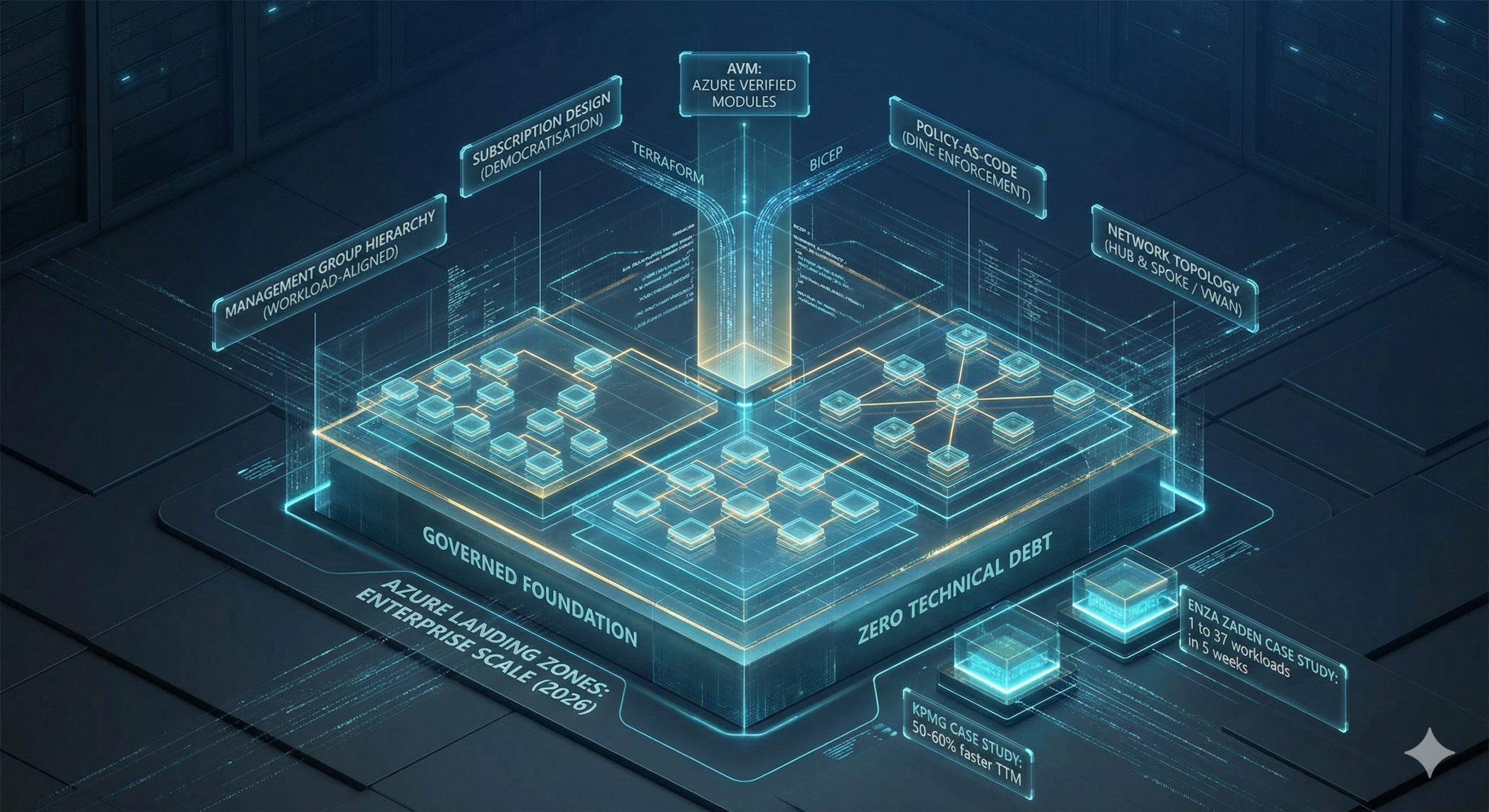
The numbers make the cost tangible. KPMG adopted the framework with a policy as code model and reduced the delivery time for new workloads by over half. Their SQL Server 2012 migration completed in eight days. Baseline infrastructure for a new environment took under a day to provision. These are not outcomes from a bespoke, custom built platform. They are from an opinionated, well governed foundation that removed decisions rather than added them.
Why Greenfield Azure Foundations Fail
Most enterprise Azure environments fail not at the workload level but at the foundation level, and the failure modes are remarkably consistent:
- Misaligned Management Groups: Structures mirror the organisational chart rather than workload archetypes, creating policy inheritance that reflects reporting lines instead of strict security boundaries.
- Policy Drift: Governance decays over time because no dedicated team owns the update and remediation process.
- Inflexible Networks: Network designs built exclusively for the first region cannot accommodate a second without completely rearchitecting the central hub.
- Identity Entanglement: Identity and Access Management that started as individual user role assignments scales into unmanageable complexity as headcount and workloads multiply.
The underlying cause is almost always the same. The foundation was built to get the first workload live, not to govern the hundredth.
The Azure Landing Zone framework exists to address this directly. It is Microsoft’s opinionated, production ready blueprint for enterprise Azure environments, encoding best practices across eight design areas: billing and tenants, identity and access management, network topology, resource organisation, security, governance, management, and platform automation.
For greenfield deployments, it provides a tested starting point that covers the roughly 80% of decisions consistent across enterprise environments. This allows platform teams to focus on the 20% that genuinely differentiates their business requirements.
The Core Architecture: What a Correct Foundation Actually Contains
Management Group Hierarchy
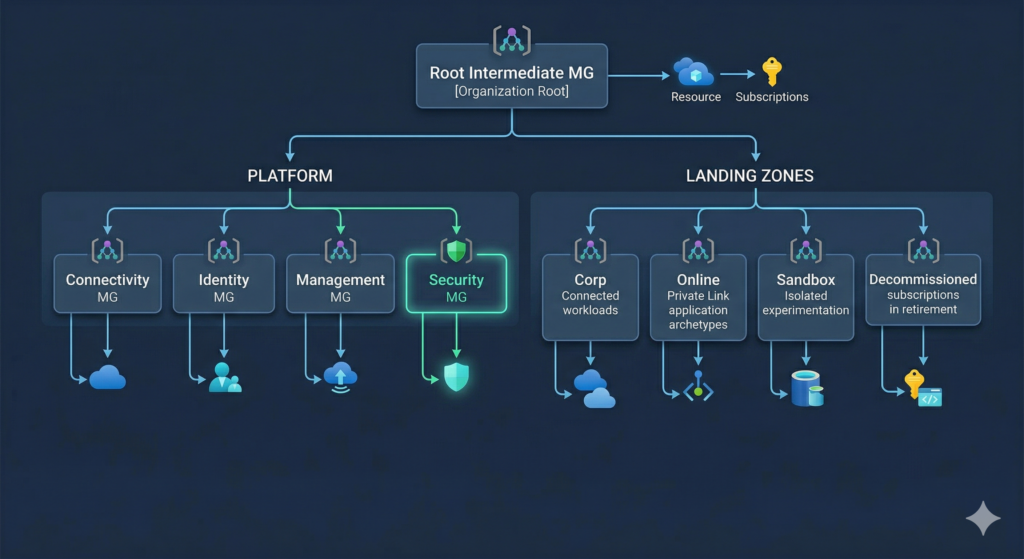
The ALZ reference architecture prescribes a flat, workload-archetype-aligned management group hierarchy. The defining principle is that management groups reflect what policies apply to a workload, not which business unit owns it. An organisational chart structure creates policy inheritance problems that become increasingly expensive to unpick as the estate grows.
The recommended hierarchy for 2026 deployments sits beneath a root intermediate management group named for the organisation. A Platform branch contains four dedicated subscriptions: Management, Connectivity, Identity, and the new Security subscription added in July 2025. A Landing Zones branch contains Corp and Online child management groups for application workloads, plus a Sandbox management group for isolated experimentation and a Decommissioned management group for subscriptions in retirement.
The Security management group represents a meaningful change from previous guidance and is worth adopting from day one on any new deployment. It separates Microsoft Sentinel and dedicated security logging from operational platform logs. Previously, Sentinel shared the central Log Analytics Workspace in the Management subscription. The separation provides cleaner RBAC between SecOps and platform operations and preserves the 31-day Sentinel free trial during initial deployment. The change was driven by community feedback from the January 2025 ALZ Community Call and addresses a friction point that platform teams consistently encountered when SecOps access requirements differed from platform engineering access.
The Sandbox management group warrants attention beyond its obvious experimental purpose. Deploying it from day one with deny policies preventing ExpressRoute, VPN, and cross-subscription peering creates a safe environment for developer experimentation without governance consequences. Teams that omit it in the initial deployment reliably find themselves creating it reactively when a developer provisions resources that should not have had network access, by which point the remediation conversation is considerably more difficult.
Subscription Design: Democratisation at Scale
The platform prescribes four subscriptions at the platform layer: Management, Connectivity, Identity, and Security. Application landing zone subscriptions follow the democratisation principle, meaning one subscription per workload per environment. Production and non-production for the same application are separate subscriptions, not separate resource groups within a shared subscription.
This feels like overhead until the third workload lands. Subscriptions serve as the units of management, billing, and scale boundaries in Azure. Combining unrelated workloads in a single subscription creates blast radius problems when policy changes are needed, complicates cost allocation across business units, and hits Azure subscription limits at scale. The per-subscription overhead is real but consistently lower than the operational cost of consolidation.
The practical pattern for greenfield deployments uses four subscription product lines: Corp Connected for workloads requiring L3 routing to on-premises; Online for internet-facing services using Private Link; Sandbox for isolated experimentation with no hybrid connectivity; and Confidential for organisations requiring Azure confidential computing capabilities. The subscription vending machine pattern automates the entire subscription lifecycle from request through to VNet peering, RBAC assignment, and budget configuration. The avm-ptn-sub-vending module handles this in the Terraform path, with the Bicep equivalent available via the public module registry.
Policy-as-Code: Governance Without Toil
The default ALZ policy set deploys over 100 policy definitions, initiatives, and assignments. Maintaining these manually would represent months of work per year for a platform team. The framework automates governance through DeployIfNotExists (DINE) and Modify policies that enforce correct configuration rather than simply auditing for drift.
Key behaviours in the default policy set include automatically enabling Microsoft Defender for Cloud on all subscriptions as they are onboarded, forwarding Activity Log diagnostics to the central workspace, deploying Azure Monitor Agent to all virtual machines (the Log Analytics Agent is fully deprecated and any policies still referencing it require immediate update), configuring Private DNS records when Private Endpoints are deployed, and denying subnets without NSGs in Corp and Online landing zones.
For greenfield deployments, the correct approach is to deploy all DINE policies in audit-only mode initially. This reveals the compliance state without blocking deployments, allows teams to understand the gap before enforcing it, and prevents policies from blocking legitimate workload activity while the platform is being validated. The alternative, deploying enforcement policies before the platform is properly understood, creates enough blocked deployments that teams develop policy exemption habits that quietly undermine the governance model. Phase the transition to enforcement over the first 90 days, beginning with the highest-risk controls.
Private Endpoint DNS integration is where policy-as-code demonstrates its value most visibly. The private DNS zones initiative automatically creates DNS records when private endpoints are deployed across any PaaS service. Without it, teams must manage private DNS records manually, a process that breaks reliably under operational pressure. Our detailed guide to Azure Private Link and Private Endpoints covers the centralised DNS zone architecture that ALZ policy automates, including the private resolver design and DNS inheritance across spoke VNets.
Network Topology: Hub-and-Spoke vs Virtual WAN
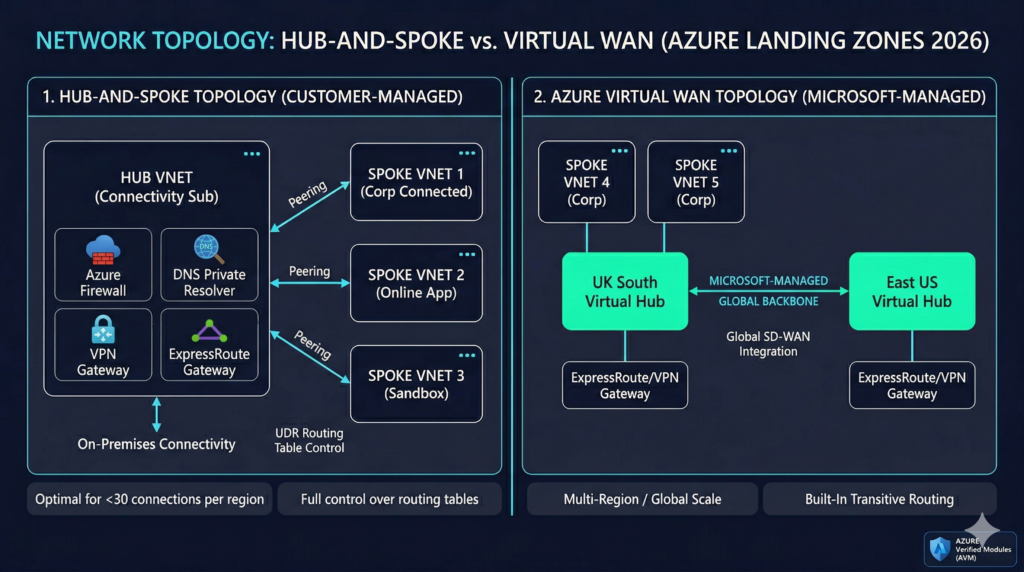
The ALZ framework supports two network topologies: customer-managed hub-and-spoke and Microsoft-managed Azure Virtual WAN. The correct choice depends on scale and operational preference, and the framework is explicit about when each applies.
Hub-and-spoke is recommended for deployments in one or two Azure regions with fewer than 30 branch or IPSec tunnel connections per region and where full control over routing via User Defined Routes is required. The hub VNet sits in the Connectivity subscription containing Azure Firewall, VPN or ExpressRoute gateways, and the DNS Private Resolver. Spoke VNets are peered to the hub, one per application landing zone. Azure Virtual Network Manager can automate the peering configuration and enforce security admin rules across all spokes, removing a significant area of manual operational burden as the estate scales.
Azure Virtual WAN is recommended for more than two Azure regions, more than 30 branch locations, SD-WAN integration requirements, or organisations prioritising minimal network management overhead. Virtual WAN provides built-in transitive routing across regional hubs without manual UDR management, a material operational difference at scale. The limitation is that shared services such as DNS resolution cannot be deployed directly into the VWAN hub; they require a dedicated spoke using the Virtual Hub Extension pattern, with Azure Firewall DNS Proxy enabled as the DNS source for all spokes.
For most UK enterprises starting a greenfield deployment in 2026, hub-and-spoke is the correct default. It is simpler to operate, easier to troubleshoot, and can be migrated to Virtual WAN later if regional expansion requirements change. Organisations with existing SD-WAN investments or global footprints should evaluate Virtual WAN from the outset rather than retrofitting it later.
DNS architecture receives less attention than it deserves in landing zone discussions. Azure DNS Private Resolver has replaced VM-based DNS forwarders entirely. Deployed into two dedicated subnets in the hub VNet, an inbound endpoint subnet receiving queries from on-premises and an outbound endpoint subnet forwarding queries outbound, it provides fully managed, highly available DNS resolution with no virtual machine maintenance burden. The minimum subnet size is /28, though /27 or larger is recommended for operational flexibility. The DINE policy initiative configuring private DNS zones handles Private Endpoint record creation automatically once the resolver and zone architecture are in place.
Identity and RBAC
Entra ID integration is foundational to the ALZ RBAC model. The core principle is assigning roles to Entra ID groups rather than individual users. Application landing zones receive their own groups and role assignments at subscription scope. Platform management groups receive policy assignments that application teams cannot modify, but application teams hold Subscription Owner or Contributor rights within their subscriptions to enable genuine developer autonomy.
Microsoft Entra Privileged Identity Management is recommended for just-in-time elevation of privileged roles. Platform team members should operate with separate cloud-only accounts for privileged operations rather than using standard user accounts for day-to-day work. The Azure Entra ID Masterclass covers the identity architecture in depth, including the Conditional Access baseline the ALZ RBAC model depends upon. Verifying that Conditional Access policies behave correctly under the landing zone configuration requires systematic testing, which our Conditional Access policy testing automation guide covers in detail.
The IaC Landscape in 2026: A Significant Transition
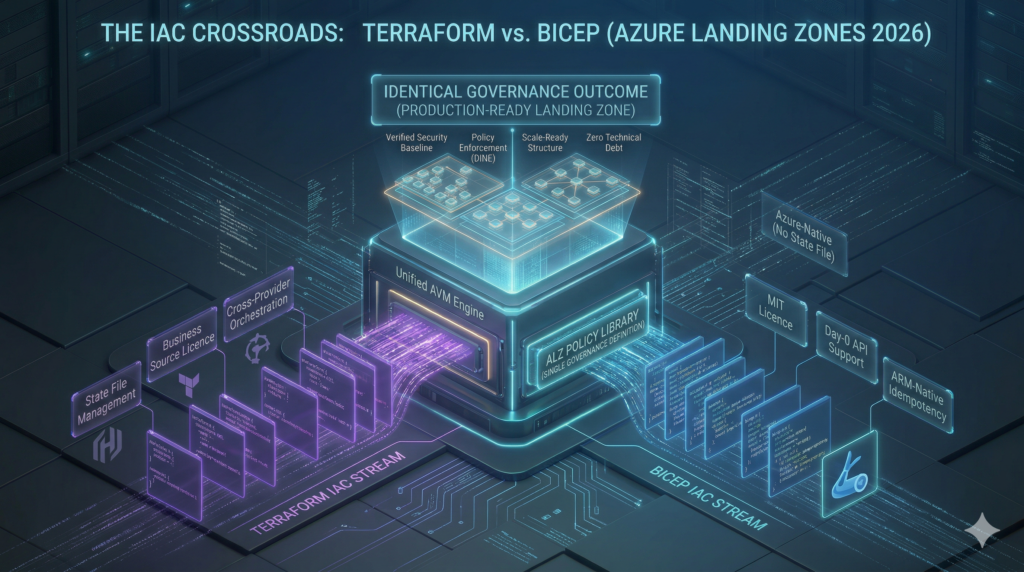
The tooling landscape for Azure Landing Zones has changed more in the past twelve months than in the previous three years, and understanding the current state is essential before any greenfield IaC decision is made.
The first and most consequential change is the archival of the legacy terraform-azurerm-caf-enterprise-scale module. Version 6.3.1 published in July 2025 is now in extended support only, meaning quality and policy updates but no new features. The module will be archived in August 2026. New greenfield deployments should not use it. The replacement is the Azure Verified Modules (AVM) pattern: composable, Microsoft-owned modules including avm-ptn-alz for management groups, policy, and RBAC; avm-ptn-hubnetworking for hub networking; avm-ptn-virtualwan for Virtual WAN; and avm-ptn-sub-vending for subscription lifecycle management. These deploy via the azure/alz Terraform provider and the ALZ Library. The critical architectural improvement is the separation of the policy library from module code, enabling independent update cycles. Bumping the library version reference updates the full policy set without touching module code, eliminating a major source of upgrade friction that plagued the legacy module.
The second development is Bicep AVM reaching general availability. Microsoft announced Bicep Azure Verified Modules for Platform Landing Zone as GA in early 2026, delivered as 19 separate AVM modules (16 resource modules and 3 pattern modules) using Azure Deployment Stacks for lifecycle management with no Terraform state file required. The classic ALZ-Bicep repository was removed from the accelerator on 16 February 2026 with a twelve-month support window running to February 2027.
Bicep AVM vs Terraform AVM: The Practical Choice
The choice between Bicep and Terraform AVM maps directly to existing team expertise and multi-cloud requirements rather than any technical superiority of one approach over the other.
Bicep is Azure-native, requires no state file management (Deployment Stacks handle idempotency natively), provides Day-0 API support for new Azure resources, and uses the MIT licence. Terraform requires state file management and uses the Business Source Licence introduced by HashiCorp in 2023, but provides multi-cloud orchestration, benefits from the broader Terraform ecosystem, and integrates with existing module registries and pipelines. Both paths are fully supported through the ALZ IaC Accelerator and both use the same ALZ Library for policy definitions, meaning the governance outcome is identical regardless of IaC language choice.
Organisations that are Azure-only and want zero state management overhead should choose Bicep. Organisations with multi-cloud IaC requirements, existing Terraform expertise, or cross-provider orchestration needs should choose Terraform AVM. The Terraform enterprise patterns guide covers state management, module design, and CI/CD integration for the production-grade pipelines the Terraform AVM path requires.
ALZ Accelerator vs Custom Build: Making the Right Call
The accelerator versus custom build decision is where enterprise Azure projects waste disproportionate time. Both options are valid for the right teams; the wrong choice for a team’s maturity and timeline creates significant rework.
What the Accelerator Provides
The ALZ IaC Accelerator bootstraps the Platform Landing Zone: the complete management group hierarchy, policy assignments, RBAC definitions, connectivity hub, management resources, and platform subscriptions. The bootstrap process, a single PowerShell Deploy-Accelerator command, creates managed identities with OIDC federated credentials, the VCS project and repository, CI/CD pipelines with proper branch controls, and Terraform state storage. A production-ready platform landing zone can be deployed in hours to days.
What the accelerator does not provide matters equally. Microsoft Sentinel, Defender for Cloud configurations, and Azure Monitor alert rules are not included by design. These are Day-2 operations requiring separate IaC stacks. Teams expecting a complete, all-inclusive deployment consistently discover this gap post-bootstrap and should plan Day-2 configuration explicitly from the start rather than discovering it after the bootstrap phase completes.
VCS support is limited to GitHub.com and Azure DevOps Services. Self-hosted GitLab, Bitbucket, or Azure DevOps Server require the alz_local bootstrap with manual VCS configuration, which removes much of the bootstrap’s value. Application landing zone networking is a persistent friction point: the accelerator deploys the platform hub correctly, but workload VNet peering, routing table configuration, and NSG design typically requires significant platform team involvement before application teams are self-sufficient.
When Custom Builds Make Sense
Custom builds are justified when team maturity is high (three or more years of Azure platform engineering experience), existing Terraform module registries and CI/CD pipelines make the accelerator add friction rather than reduce it, compliance requirements extend beyond the default CAF policy set with genuinely non-standard management group structures, or network topologies are non-standard with multi-hub designs, complex IPAM integrations, or third-party NVAs.
A hybrid approach is increasingly common and often the right answer: using the accelerator for the initial bootstrap and baseline platform, then extending with custom AVM modules or Enterprise Policy as Code (EPAC) for Day-2 operations. EPAC in particular is worth evaluating for organisations needing granular policy lifecycle management. Microsoft positions it as the correct approach for advanced DevOps teams, and it replaces the policy deployment capabilities of the ALZ reference architectures when used. The choice is not binary.
| Criterion | Accelerator | Custom Build |
|---|---|---|
| Team IaC maturity | Junior to intermediate | Senior; 3+ years platform engineering |
| Timeline | Production platform in under 4 weeks | Willing to invest 2-3 months |
| Compliance framework | Standard CAF/Well-Architected alignment | Custom regulatory requirements, non-standard policy |
| VCS platform | GitHub.com or Azure DevOps Services | Self-hosted GitLab, Bitbucket, Azure DevOps Server |
| Network topology | Standard hub-spoke or Virtual WAN | Non-standard designs, complex IPAM, multi-hub |
| Multi-cloud | Azure-only or Azure-primary | Unified IaC across AWS, GCP, and Azure |
| Platform team size | 2-5 engineers | 5+ dedicated platform engineers |
Real-World Implementations
KPMG: 50-60% Faster Time-to-Market Across 145 Countries
Company and Industry: KPMG LLP, Professional Services
Scale: 10,000+ employees operating across 145 countries; multi-subscription enterprise estate with active SQL Server 2012 EOL remediation
Challenge: The Digital Nexus Cloud Engineering team needed to enable developers to build infrastructure rapidly while maintaining security posture within a complex tenant with strict data classification restrictions. The legacy lab environment required constant trade-offs between security policy coverage, flexible access controls, and development velocity.
Solution Implemented: Adopted CAF Azure Landing Zones with Azure Security Benchmark policy-as-code in a DevSecOps model using the ALZ Terraform module. Built a pre-development landing zone with self-auditable security guardrails, elevated developer privileges, and a fast-track promotion path to production. Extended to include a developer-friendly landing zone specifically for AI/ML workloads.
Measurable Outcomes:
- 50-60% reduction in time-to-market for new workloads
- SQL Server 2012 EOL migration completed in 8 days
- Baseline infrastructure deployable in under 1 day
- Developers can provision environments before formal project initiation
Source: https://customers.microsoft.com/en-us/story/1538846357679047248-kpmg-professional-services
Enza Zaden: From 1 Workload to 37 in Five Weeks
Company and Industry: Enza Zaden, Agricultural/Life Sciences
Scale: 2,800+ employees, 45 offices across 25 countries, global multi-region operation
Challenge: Existing IT infrastructure was actively slowing business growth. The organisation required increased self-service and automation without compromising security, and needed to scale capacity without proportional increases in platform team headcount.
Solution Implemented: Microsoft partner Xebia implemented a standardised Azure Landing Zone using ALZ best practices, paired with managed services and DevOps enablement.
Measurable Outcomes:
- Landing zone deployed in 5 weeks
- Estate grew from 1 workload to 37 workloads on the platform
- DevOps enablement achieved for faster business value delivery
- Managed services catalogue established with defined responsibility boundaries
What the Platform Layer Actually Costs
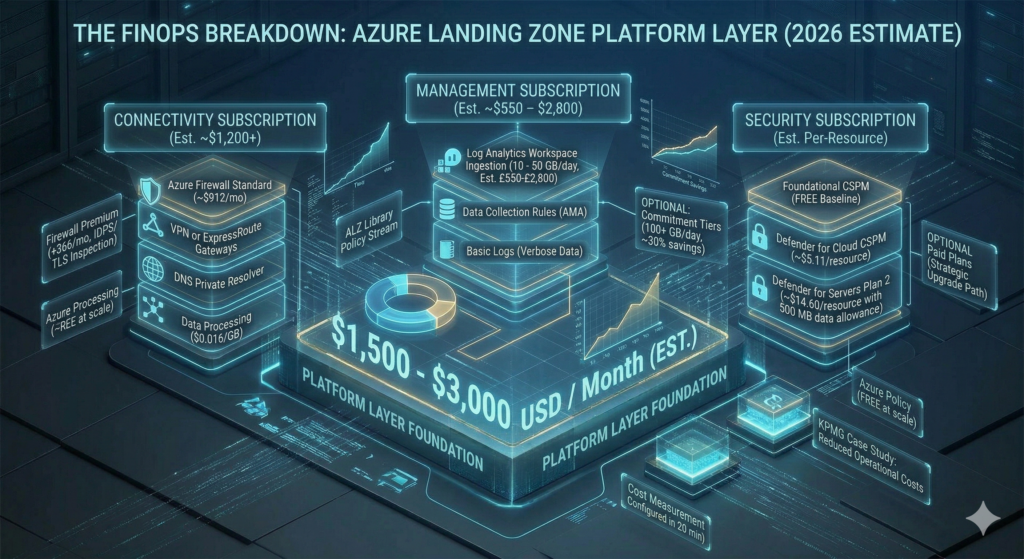
The ALZ platform layer, the infrastructure required before any application workload lands, costs approximately $1,500 to $3,000 per month depending on firewall tier, log ingestion volume, and Defender coverage scope. Understanding the cost structure before deployment prevents the common pattern of provisioning an over-specified connectivity hub that runs at 20% utilisation for the first year.
Azure Policy itself is free at any scale. The cost centres are the Connectivity and Management subscriptions. Azure Firewall Standard, the appropriate tier for most enterprise ALZ deployments, runs approximately $912 per month on continuous operation plus data processing at $0.016 per GB. Azure Firewall Premium adds IDPS and TLS inspection at approximately $1,278 per month and is appropriate for regulated industries, but deploying it speculatively as a starting point inflates costs without delivering corresponding value. Standard with a clear upgrade path is the more defensible initial choice for most organisations.
Log Analytics ingestion at pay-as-you-go rates runs approximately $2.30 per GB in UK South. A mid-size enterprise ingesting 10-50 GB per day should expect approximately £550-£2,800 per month on the Management subscription workspace alone. Commitment tiers starting at 100 GB per day offer up to 30% savings and should be evaluated once ingestion patterns have stabilised. Applying Basic Logs ingestion for verbose, low-value data such as flow logs and debug output reduces workspace cost materially without removing the data from the estate entirely.
Microsoft Defender for Cloud’s foundational CSPM tier is free and should be enabled across all subscriptions during the initial deployment. Defender CSPM at approximately $5.11 per billable resource per month provides advanced features including agentless vulnerability scanning. Defender for Servers Plan 2 costs approximately $14.60 per server per month but includes a 500 MB per server per day Log Analytics data allowance that partially offsets workspace ingestion cost. Starting with foundational CSPM and enabling paid Defender plans selectively, with explicit risk acceptance for what is deferred, is a reasonable cost management approach for initial deployments provided the decisions are documented.
The FinOps Evolution guide covers the financial governance model that should sit alongside this technical cost structure, including how to measure platform cost per workload over time and build the internal business case for continued platform investment. Setting Azure Budgets at subscription scope with alerts at 80%, 90%, and 100% of monthly spend takes under twenty minutes to configure and prevents cost surprises that erode confidence in the platform team. All prices are USD as of March 2026 and change regularly; verify against the Azure Pricing Calculator before committing to any budget figure.
Implementation Roadmap: Four Phases to Production Maturity
Phase 1: Governance Foundation (Weeks 1-4)
The foundation phase establishes the management group hierarchy, core policies, platform subscriptions, and identity baseline. Using the ALZ accelerator bootstrap, the management group structure and base policy assignments can be in place within the first week. Key activities include deploying the management group tree using AVM modules, creating all four platform subscriptions, configuring all DINE policies in audit-only mode, setting up Entra ID groups and PIM, provisioning emergency access accounts with documented access procedures, and establishing Workload Identity Federation for CI/CD pipelines with no client secrets stored in pipelines. The central Log Analytics workspace, diagnostic settings, and Data Collection Rules for Azure Monitor Agent are all configured in the Management subscription during this phase.
Phase 2: Connectivity Layer (Weeks 5-12)
This phase deploys the hub VNet, firewall, DNS infrastructure, and hybrid connectivity. Hub VNet address space requires planning for three to five years of growth; changing the hub CIDR after spoke peering is established demands significant rework. Azure Firewall deploys with Firewall Policy and baseline rule collections covering DNAT, network, and application rules. The DNS Private Resolver is configured with centralised Private DNS Zones linked to the hub and all current spoke VNets. ExpressRoute or VPN gateways are established as the hybrid connectivity design requires. Azure Bastion in the hub provides secure administrative access without exposing management ports. IPAM planning must be documented in full before any VNet is deployed; address space conflicts discovered after peering is established are difficult to resolve without operational disruption.
Phase 3: First Application Landing Zones (Months 4-6)
Phase three proves the platform by onboarding two or three pilot workloads under conditions that reflect production requirements. Spoke VNets are deployed and peered to the connectivity hub, RBAC is assigned to application teams at subscription scope, and workload-specific budgets are applied. The subscription vending pattern is introduced at minimum in documented manual form before automation is available; consistency in the runbook prevents configuration drift that later automation will need to account for. CI/CD pipelines for platform IaC with plan and what-if validation and approval gates are established, using dedicated Terraform state files per landing zone subscription. Structured feedback from application teams should drive iteration on policies, networking, and self-service processes before scaling onboarding to additional workloads.
Phase 4: Self-Service Maturity (Months 7-12)
The maturity phase automates the subscription lifecycle and transitions policies from audit to enforce mode. Full subscription self-service through GitHub Issues, ServiceNow, or a custom portal gives application teams the autonomy the framework is designed to enable. The policy enforcement transition targets a compliance score above 95% across all management groups, with bulk remediation for existing non-compliant resources handled through platform CI/CD pipelines rather than manually. DORA metrics provide the measurement framework for platform team performance: Deployment Frequency, Lead Time for Changes, Change Failure Rate, and Mean Time to Recovery. Supplementing these with developer onboarding time (from subscription request to operational environment) and quarterly application team CSAT scores provides a complete picture of platform health from both the platform team and consumer perspective.
Decision Framework: Sequence Matters as Much as Choice
The sequence of foundational decisions matters as much as the decisions themselves. Teams that attempt to finalise network topology before the management group hierarchy is agreed, or that deploy policies before subscription archetypes are confirmed, reliably redo work.
The correct sequence for greenfield deployments is management group design first, because structural changes after policies are assigned at management group scope create inheritance disruption that is expensive to remediate. Subscription product lines second: defining Corp, Online, Sandbox, and any custom archetypes before vending begins prevents the inconsistent early subscriptions that seed ongoing governance debt. Network topology third, with hub-and-spoke as the correct default and Virtual WAN evaluated only when regional expansion is confirmed rather than anticipated. IaC tooling fourth: Bicep for Azure-only deployments with no existing Terraform investment, Terraform AVM for multi-cloud or teams with established expertise. Policy enforcement timing last: audit before enforce, without exception.
The accelerator versus custom build decision should be made at project initiation based on the criteria above, not deferred to the IaC planning phase. Teams that start with the accelerator and later want to migrate to a fully custom build face state migration complexity. Teams that start custom and later want to align with ALZ can adopt the ALZ Library for policy definitions without adopting the accelerator, making the custom-to-ALZ-aligned direction the easier transition.
Strategic Recommendations
For most enterprise greenfield deployments in 2026, the ALZ accelerator with Terraform AVM or Bicep AVM is the correct starting point. The architecture is sound, the policy library is Microsoft-maintained, and the tooling supports the CI/CD and state management model a mature platform team requires. The platform layer cost of $1,500 to $3,000 per month is material but consistently lower than the operational cost of retrofitting governance onto an ungoverned estate.
Teams using the legacy terraform-azurerm-caf-enterprise-scale module in existing environments should begin migration planning now. August 2026 is not a soft deadline, and extended support means declining community activity and policy library updates that may not keep pace with new Azure service releases.
The new Security management group and subscription is worth adopting from day one on greenfield deployments even where accelerator tooling is still rolling out the change. Deploying it manually during Phase 1 is straightforward and the operational separation of SecOps from platform operations is worth the additional subscription overhead.
AI workloads do not require a separate landing zone architecture. Microsoft’s current guidance is explicit: AI services deploy into existing application landing zones using standard Corp or Online archetypes. The management group hierarchy, governance model, and network design all remain unchanged. Organisations evaluating Azure AI Foundry workloads will find the Azure AI Landing Zones reference architectures useful for service-level configuration, but they do not require a parallel platform foundation.
Key Takeaways
The ALZ framework provides a tested, policy-driven foundation that consistently outperforms bespoke builds on time-to-governance, operational consistency, and policy maintenance burden. The IaC landscape has shifted materially: legacy modules are at end of life and Azure Verified Modules with composable, independently versioned components are the correct path for new deployments. The accelerator is the right choice for most greenfield teams, with custom builds reserved for high-maturity teams with complex compliance requirements or non-standard topologies. Platform layer costs of $1,500 to $3,000 per month represent the governance overhead for running enterprise Azure correctly, and that overhead is consistently cheaper than the remediation cost of running without a foundation.
Useful Links
Azure Landing Zone overview – Cloud Adoption Framework
ALZ IaC Accelerator documentation
New Security Management Group announcement (July 2025)
Legacy Terraform CAF enterprise-scale module
Enterprise Policy as Code (EPAC)