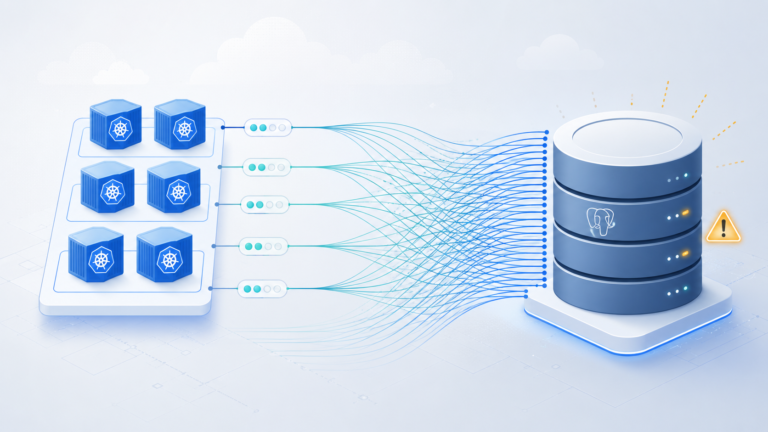
AWS VPC Lattice solves a genuine enterprise problem: service-to-service communication across VPCs and accounts without the CIDR overlap headaches, security group sprawl, or sidecar overhead of a full service mesh. The architecture is elegant on paper. Getting it to work correctly in production is another matter. Most teams deploying Lattice for the first time hit the same cluster of misconfigurations, none of which produce clear error messages, and all of which are easy to avoid once you know what to look for.
The Security Group Mistake Nobody Warns You About
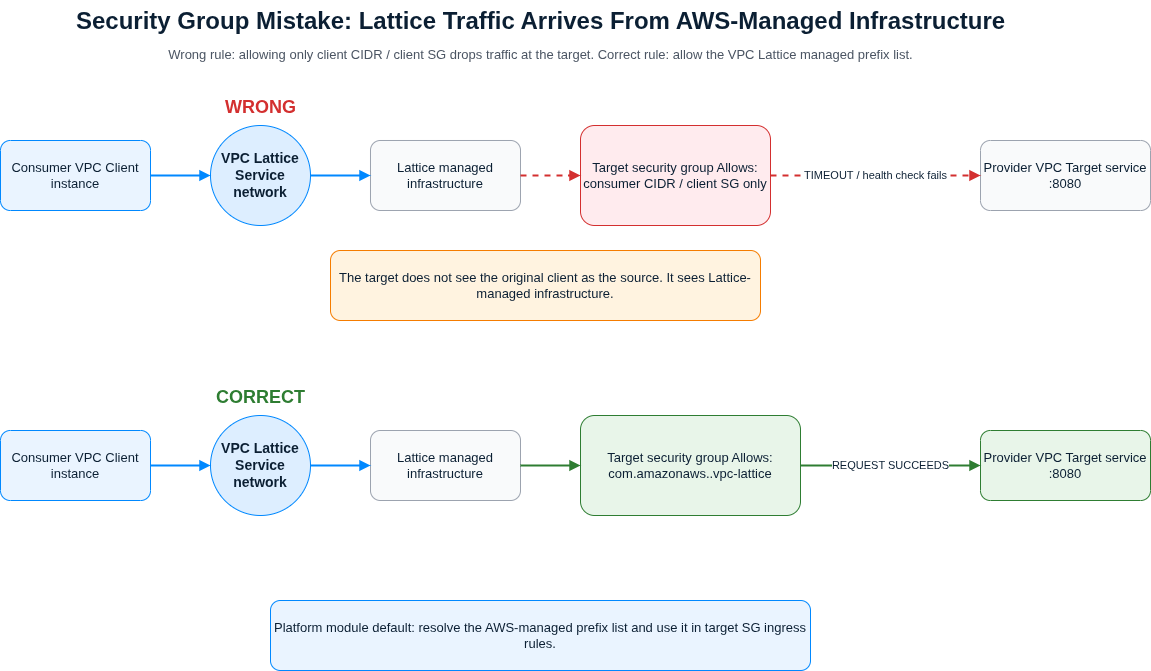
The most common production failure with VPC Lattice has nothing to do with IAM or auth policies. It comes down to security groups on your targets.
When a client calls a Lattice-routed service, the traffic arrives at your target instances from Lattice’s own managed infrastructure, not from the client’s IP range. If your target security group only permits inbound traffic from the consumer VPC’s CIDR or the client security group, every request times out and every health check fails. The connection succeeds at the Lattice layer and fails silently at the target.
The fix is to reference the AWS-managed prefix list rather than a CIDR block. AWS publishes com.amazonaws.<region>.vpc-lattice for IPv4 and com.amazonaws.<region>.ipv6.vpc-lattice for dual-stack deployments.
Reference the prefix list in your target security group:
# Retrieve the Lattice managed prefix list ID for your region
PL_ID=$(aws ec2 describe-managed-prefix-lists \
  --filters Name=prefix-list-name,Values=com.amazonaws.us-east-1.vpc-lattice \
  --query 'PrefixLists[0].PrefixListId' \
  --output text)

# Authorise inbound from Lattice on your target's port
aws ec2 authorize-security-group-ingress \
  --group-id sg-0target1234 \
  --ip-permissions "IpProtocol=tcp,FromPort=8080,ToPort=8080,PrefixListIds=[{PrefixListId=$PL_ID}]"
Client-side, the same logic applies in reverse: if you have custom egress rules on your consumer instances, those instances need egress to the same prefix list or requests will never leave the client.
This pattern belongs in your platform module. Every Lattice deployment should reference the prefix list by default; banning direct CIDR rules for Lattice targets is a reasonable policy check to add to CI. Pair this with the broader VPC security group hygiene covered in our AWS VPC Networking Best Practices tip.
Auth Policies: Two Levels, One Easy Mistake
Lattice evaluates auth policies at two separate layers: the service network and the service itself. Both must permit a request for it to succeed. This is where teams get caught.
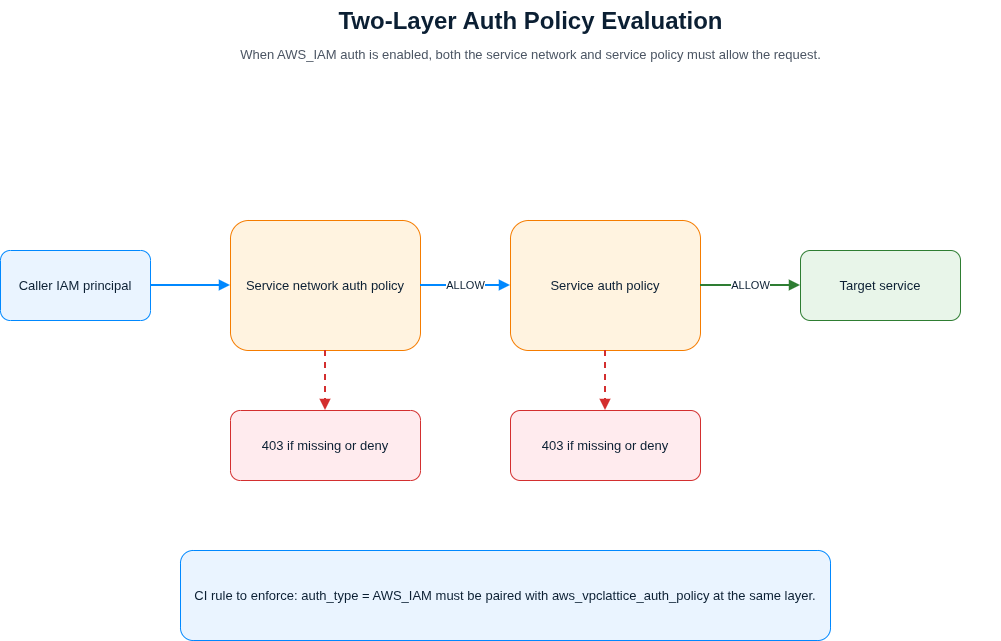
When you set auth_type=AWS_IAM on a service network or a service, the default behaviour is an implicit deny. If you enable IAM auth without attaching an auth policy at that layer, every request returns a 403 immediately, with no indication whether the denial came from the network policy or the service policy.
The second trap is that service network policies do not apply to resource configurations. Teams that assume network-level policies protect TCP resources find those resources wide open. Always verify both layers independently:
# Confirm the auth policy on the service network
aws vpc-lattice get-auth-policy \
  --resource-identifier sn-080ec7dc93EXAMPLE

# Confirm the auth policy on the service itself
aws vpc-lattice get-auth-policy \
  --resource-identifier svc-0123456789EXAMPLE

# Create a service with IAM auth required, then attach a policy immediately
aws vpc-lattice create-service \
  --name orders-api \
  --auth-type AWS_IAM

aws vpc-lattice put-auth-policy \
  --resource-identifier svc-0123456789EXAMPLE \
  --policy file://orders-auth-policy.json
In Terraform, aws_vpclattice_service with auth_type = "AWS_IAM" plans and applies cleanly with no aws_vpclattice_auth_policy resource attached. The API does not validate this at creation time. Treat the two resources as a mandatory pair in any module that touches Lattice; a CI check that flags AWS_IAM without an associated policy resource will save debugging sessions downstream.
SigV4 Signing: Three Specific Ways to Get It Wrong
Once IAM auth is active, callers must sign requests using SigV4. There are three distinct errors, each producing the same 403 and each easy to confuse with the others.
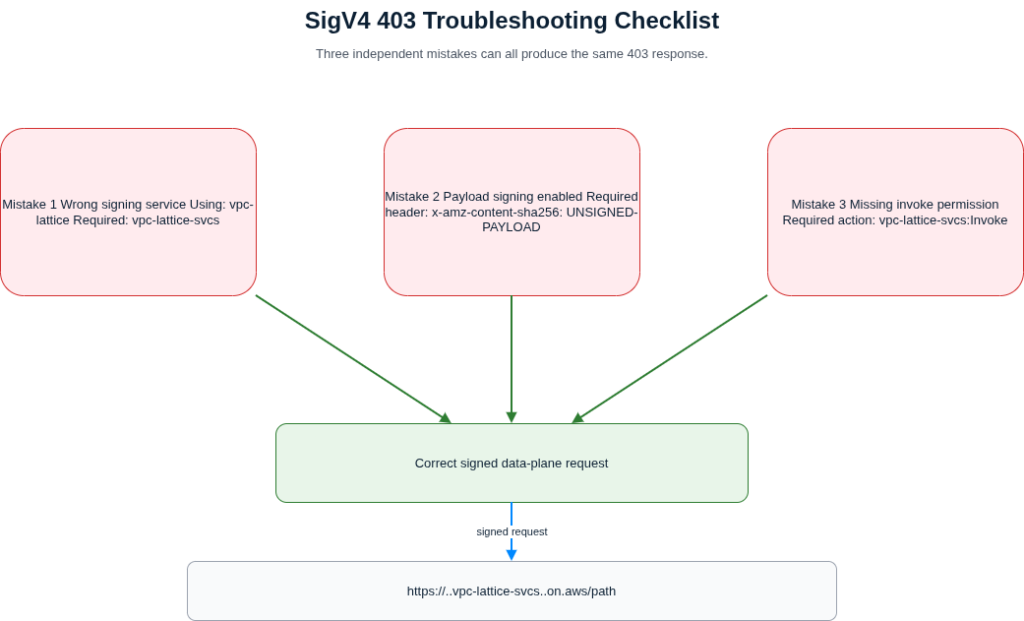
First, the service name for signing is vpc-lattice-svcs (with a trailing s), not vpc-lattice. The latter controls the Lattice API itself; using it to sign data-plane requests produces an authentication failure with no indication you used the wrong service name.
Second, Lattice does not support payload signing. Callers must send x-amz-content-sha256: UNSIGNED-PAYLOAD in the request headers. Most HTTP clients do not add this header automatically.
Third, the IAM principal making the call needs vpc-lattice-svcs:Invoke on the target service ARN. This is separate from the vpc-lattice:* control-plane permissions your platform team likely already has. A caller with full vpc-lattice:* permissions but no Invoke grant will 403 on every data-plane request.
A minimal boto3 signing pattern that handles all three correctly:
import botocore.session
import requests
from botocore.auth import SigV4Auth
from botocore.awsrequest import AWSRequest

session = botocore.session.get_session()
credentials = session.get_credentials()

SERVICE_NAME = "vpc-lattice-svcs"  # note: trailing 's'
REGION = "us-east-1"
LATTICE_URL = "https://my-service-0123.7d67968.vpc-lattice-svcs.us-east-1.on.aws/orders"

req = AWSRequest(
    method="GET",
    url=LATTICE_URL,
    headers={"x-amz-content-sha256": "UNSIGNED-PAYLOAD"}  # required
)
req.context["payload_signing_enabled"] = False
SigV4Auth(credentials, SERVICE_NAME, REGION).add_auth(req)

prepared = req.prepare()
response = requests.get(prepared.url, headers=dict(prepared.headers))
print(response.status_code, response.json())
Health Checks: The Silent Fail-Open
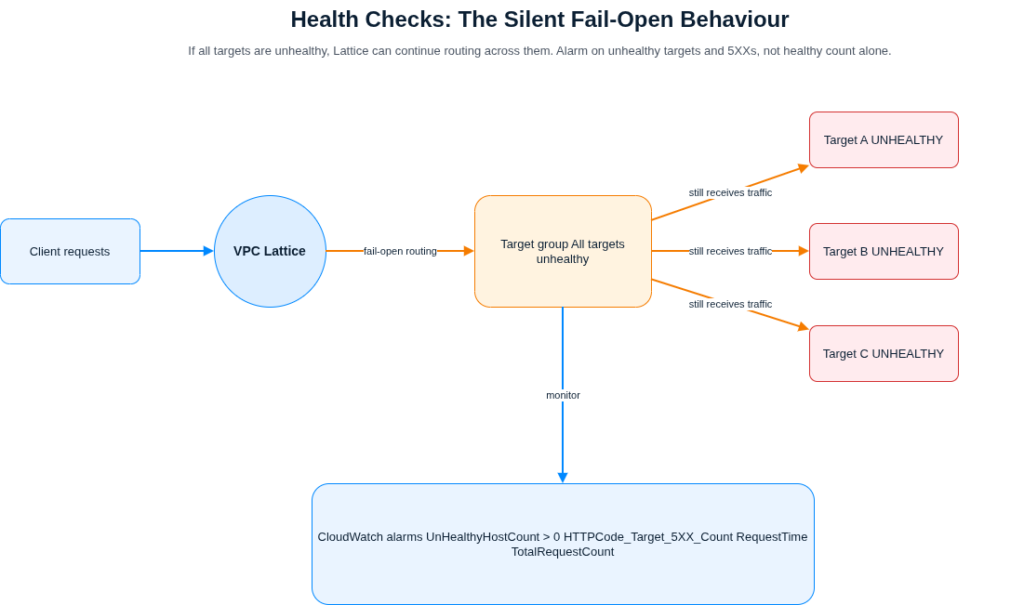
Lattice’s health check behaviour has a production-safety implication worth knowing before you go live. If all targets in a target group are unhealthy, Lattice fails open and round-robins to all of them anyway. Alarms on HealthyHostCount alone will not catch a degraded state; you need to alarm on UnHealthyHostCount > 0 alongside your 5XX rate.
There are also target-type constraints that the console enforces but the CLI does not: Lambda and ALB target groups do not accept a healthCheck block at all. For HTTP/2 target groups, health checks are disabled by default and must be enabled explicitly with a protocolVersion specified. Create target groups with health checks configured from the start rather than enabling them later:
aws vpc-lattice create-target-group \
  --name orders-tg \
  --type INSTANCE \
  --config '{
    "port": 8080,
    "protocol": "HTTP",
    "protocolVersion": "HTTP1",
    "vpcIdentifier": "vpc-0a1b2c3d4e5f",
    "healthCheck": {
      "enabled": true,
      "path": "/healthz",
      "protocol": "HTTP",
      "matcher": {"httpCode": "200"},
      "healthCheckIntervalSeconds": 15,
      "healthyThresholdCount": 3,
      "unhealthyThresholdCount": 2
    }
  }'
Set up CloudWatch alarms against the AWS/VpcLattice namespace from the outset. The key metrics are UnHealthyHostCount, HTTPCode_Target_5XX_Count, and RequestTime. Monitoring TotalRequestCount alongside these gives you the data to distinguish a cold target group from a degraded one.
Cross-Account: Get the Sequence Right
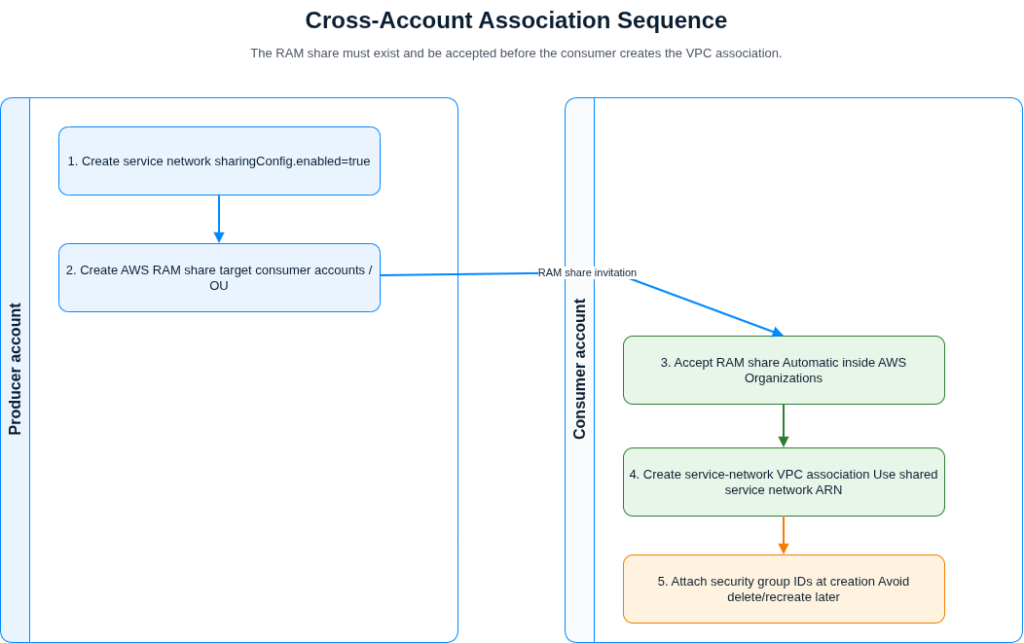
When sharing a service network across accounts via AWS RAM, the association sequence matters. Attempting to create the VPC association before the consumer account has received and accepted the RAM share returns a generic access-denied error. The correct order is: producer creates the service network with sharingConfig.enabled=true, creates the RAM share targeting the consumer accounts, consumer accepts (automatic within an AWS Organisation), then consumer creates the VPC association referencing the service network by ARN:
# Consumer account: associate VPC using the shared service network ARN
aws vpc-lattice create-service-network-vpc-association \
  --service-network-identifier arn:aws:vpc-lattice:us-east-1:123456789012:servicenetwork/sn-0abc \
  --vpc-identifier vpc-0consumer123 \
  --security-group-ids sg-0consumer456
Pass security group IDs at creation time. If you create the association without them and subsequently need to add controls, you must delete and recreate the association since the API requires at least one security group once any are attached. Multi-account governance at scale integrates cleanly with the patterns in our AWS Control Tower enterprise governance post.
When to Use Lattice and When Not To
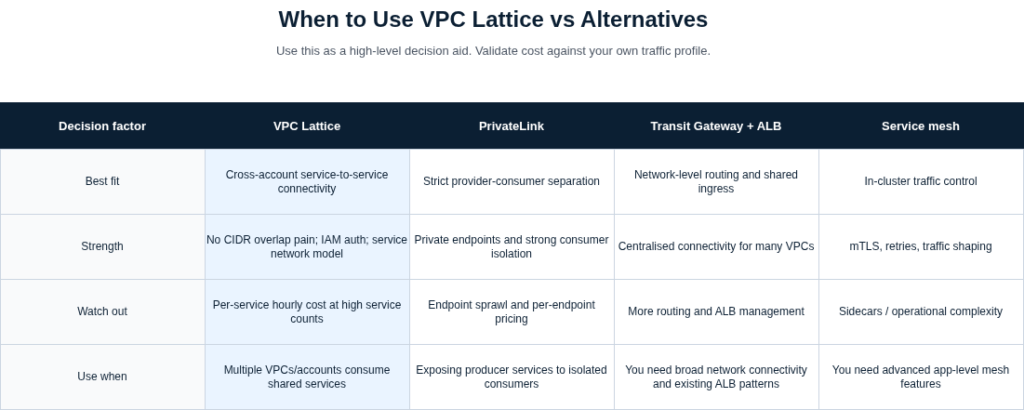
Lattice costs approximately $0.025 per service per hour in us-east-1, around £18 per service per month before any traffic charges. Below 50 services with multiple cross-account consumers each, it compares favourably against per-service ALBs. Above 200 services, the hourly-per-service component becomes the dominant cost driver and warrants a comparison against Transit Gateway plus ALB for your specific traffic profile.
Lattice is not a PrivateLink replacement. PrivateLink remains the right choice for strict provider-consumer separation and per-endpoint pricing. Lattice is not a service mesh: it operates at the AWS networking layer without sidecar processes, which means no mutual TLS between workloads and no traffic shaping beyond weighted routing rules. For teams running Istio or Linkerd across multiple clusters, Lattice is complementary for cross-cluster and cross-account connectivity rather than a replacement for the mesh itself.
App Mesh reached end-of-life on 30 September 2026. AWS recommends Lattice as the successor for EKS workloads; for ECS, the recommended migration target is ECS Service Connect.
Key Takeaways
- Reference the
com.amazonaws.<region>.vpc-latticemanaged prefix list in all target security groups; CIDR-based rules will silently drop every request. - Always attach an auth policy immediately when setting
auth_type=AWS_IAM; the API will not block creation without one. - SigV4 signing requires service name
vpc-lattice-svcs, theUNSIGNED-PAYLOADheader, andvpc-lattice-svcs:Invokein the caller’s IAM policy. - Lattice fails open when all targets are unhealthy; alarm on
UnHealthyHostCountand 5XX rate together.
Useful Links
- VPC Lattice documentation: Security Groups
- VPC Lattice documentation: Auth Policies
- VPC Lattice documentation: SigV4 Authenticated Requests
- VPC Lattice documentation: Target Groups
- VPC Lattice documentation: Health Checks
- VPC Lattice documentation: Service Networks
- VPC Lattice documentation: Custom Domain Names
- AWS Blog: Implement IAM Authentication with VPC Lattice and EKS
- AWS CLI Reference: create-service-network-vpc-association
- AWS Blog: VPC Lattice cross-account TCP connectivity