
The Azure Portal’s Policy compliance blade was built for interactive investigation, not estate-wide reporting. It binds to a single scope per view, re-queries on every click, and offers no cross-management-group roll-up. For teams managing dozens or hundreds of subscriptions, it becomes noise rather than signal. Azure Resource Graph solves the problem directly: the policyresources table exposes every evaluated policy state across your entire tenant, queryable with KQL, paginatable past the portal’s row limits, and scriptable to CSV in under 30 lines of PowerShell. This tip covers the schema you need to know, the query patterns that earn their keep, and the pagination script your weekly compliance report should be running.
Why the Portal Stops Scaling
The compliance blade’s core limitation is scope-binding. You see one management group, subscription, or resource group at a time. There is no cross-tenant roll-up, and the CSV export function has been a long-standing community friction point because it does not dump the full dataset behind the view. Microsoft’s own guidance acknowledges this directly, noting that compliance data should be accessed via Resource Graph queries to produce custom reporting across the scopes and policies of interest.
Resource Graph Explorer does include a “Download as CSV” button, but it caps at 55,000 records and requires manual interaction. For anything scheduled or automated, the CLI or Az.ResourceGraph module is the appropriate tool. The same KQL query that you test interactively in the Explorer runs identically in a runbook or pipeline, which is where it belongs.
The policyresources Schema
The policyresources table is a union of several resource types. For compliance reporting, the one you care about is microsoft.policyinsights/policystates, which contains one row per evaluated resource per assignment. Filter to it with type =~ rather than ==: the =~ operator is case-insensitive, and Microsoft’s own query samples use it consistently for this table.
Within a policystates row, the fields that drive most queries sit under properties and arrive as dynamic type. Cast them with tostring() or todatetime() before using them in summarize, order by, or any aggregation. Omitting this cast is the single most common reason KQL queries against this table return unexpected results. The key properties are complianceState (values: Compliant, NonCompliant, Conflict, Exempt, Unknown, Protected, Error), resourceId, resourceType, policyAssignmentName, policyAssignmentScope, policyDefinitionId, policyDefinitionName, and timestamp.
If you already use Azure Monitor Log Analytics for KQL-based troubleshooting, the syntax carries across directly. Resource Graph KQL is the same language with a different table structure and a few operator restrictions noted in the gotchas below.
The Query Patterns That Matter
The foundational non-compliance list is the starting point for any reporting pipeline:
PolicyResources
| where type =~ 'microsoft.policyinsights/policystates'
| where properties.complianceState == 'NonCompliant'
| project subscriptionId,
          resourceId       = tostring(properties.resourceId),
          resourceType     = tostring(properties.resourceType),
          policyAssignment = tostring(properties.policyAssignmentName),
          policyDefinition = tostring(properties.policyDefinitionName),
          timestamp        = todatetime(properties.timestamp)
For the aggregated view your governance lead actually wants (failures grouped by policy definition and subscription, ordered by volume):
PolicyResources
| where type =~ 'microsoft.policyinsights/policystates'
| where properties.complianceState == 'NonCompliant'
| summarize nonCompliant = count()
    by policyDefinition = tostring(properties.policyDefinitionName),
       subscriptionId
| order by nonCompliant desc
When you need to identify which resource types are driving the most non-compliance across the estate:
PolicyResources
| where type =~ 'microsoft.policyinsights/policystates'
| extend resourceType    = tolower(tostring(properties.resourceType)),
         complianceState = tostring(properties.complianceState)
| summarize nc    = countif(complianceState == 'NonCompliant'),
            total = count()
    by resourceType
| extend percentNonCompliant = round(100.0 * nc / total, 1)
| order by nc desc
The percentage column is worth including. A resource type with 200 failures across 10,000 resources is a different conversation from one with 200 failures across 210 resources. If you use Azure Machine Configuration for VM compliance auditing, filtering this query to microsoft.compute/virtualmachines gives you a clean view of guest policy drift without touching the portal.
The Paginated Export Script
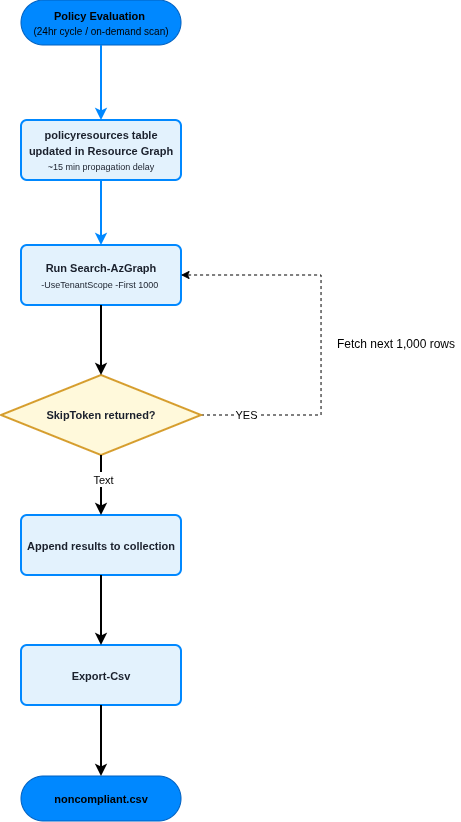
Resource Graph returns a maximum of 1,000 rows per request. Anything above that requires -SkipToken pagination. The script below handles this automatically, queries at tenant scope (not just the subscriptions in your current context), and writes the result to CSV:
# Requires Az.ResourceGraph module
# Install-Module Az.ResourceGraph -Scope CurrentUser
Connect-AzAccount

$query = @"
PolicyResources
| where type =~ 'microsoft.policyinsights/policystates'
| where properties.complianceState == 'NonCompliant'
| project timestamp        = todatetime(properties.timestamp),
          subscriptionId,
          resourceId       = tostring(properties.resourceId),
          resourceType     = tostring(properties.resourceType),
          policyAssignment = tostring(properties.policyAssignmentName),
          policyDefinition = tostring(properties.policyDefinitionName),
          state            = tostring(properties.complianceState)
| order by resourceId asc
"@

$all  = [System.Collections.Generic.List[object]]::new()
$skip = $null

do {
    $params = @{
        Query          = $query
        First          = 1000
        UseTenantScope = $true
    }
    if ($skip) { $params.SkipToken = $skip }

    $result = Search-AzGraph @params
    if ($result.Data) { $all.AddRange($result.Data) }
    $skip = $result.SkipToken

} while ($skip)

$all | Export-Csv -Path noncompliant.csv -NoTypeInformation -Encoding UTF8
Write-Host "$($all.Count) non-compliant resources exported."
The order by resourceId asc clause is not cosmetic. Microsoft’s pagination guidance explicitly requires sorting on a unique or near-unique column, because ordering on a non-unique field such as policyDefinitionName can cause duplicate or missing rows across page boundaries as the skip token loses stable position. Keep resourceId or id in the projection and the order by, and pagination stays reliable.
The -UseTenantScope flag is the other detail that catches teams out. Without it, Search-AzGraph queries only the subscriptions in your current Az context. If you have run Set-AzContext to a specific subscription, you will get a partial picture and no error to tell you so.
For the RBAC requirement: the account or managed identity running this script needs Reader on each subscription it should query. For tenant-wide scope, assign Reader at the tenant root management group. This cannot be done through the portal: use New-AzRoleAssignment -Scope / via PowerShell or the CLI. Teams running governance automation alongside Conditional Access policy frameworks typically assign this as part of the same governance service principal setup.
Enterprise Considerations
Compliance data latency is real and matters for how you use this output. Individual resource state changes take roughly 15 minutes to propagate into Resource Graph after an ARM change. New or modified policy assignments trigger a fresh evaluation cycle after approximately five minutes, and the 24-hour automatic evaluation cycle runs in the background regardless. If you need faster feedback after a manual remediation, Start-AzPolicyComplianceScan or az policy state trigger-scan initiates an on-demand scan; both are asynchronous, return a 202, and not every resource provider supports them.
The KQL engine inside Resource Graph has specific operator limits that differ from Log Analytics: three join operators per query maximum, three mv-expand operators, and no custom join strategies. If you are building initiative-level reports that need to explode nested policy definition arrays, structure queries to stay within these bounds or split them into sequential calls. Aggregated queries (those using summarize) do not paginate the same way raw projections do, so for roll-up reporting, keep aggregation in the query and keep raw projections for the paginated export.
Alternative Approaches
The Az.PolicyInsights module (Get-AzPolicyState) queries the Policy Insights REST API directly and returns the same data with a richer object model. It handles pagination natively and supports filtering by policy set definition, which can simplify initiative-level reporting. The trade-off is query flexibility: you are working with a fixed schema and filter parameters rather than KQL, so cross-referencing policy state data against resource metadata requires post-processing in PowerShell rather than a KQL join. For simple subscription-scoped exports, Get-AzPolicyState is less friction. For tenant-wide, cross-subscription, multi-filter reporting, Resource Graph is the better foundation.
Key Takeaways
- The Portal compliance blade does not support cross-management-group reporting. Resource Graph’s
policyresourcestable does. - All
properties.*fields inpolicystatesrows aredynamictype. Cast totostring()before aggregation or ordering, or queries silently produce wrong results. - Resource Graph caps at 1,000 rows per request. Sort on
resourceId(unique column) and use-SkipTokenpagination; ordering on a non-unique field breaks page stability. -UseTenantScopeonSearch-AzGraphis mandatory for cross-subscription queries. Without it, you query only your current Az context.- Compliance data lags resource changes by roughly 15 minutes. Do not use this data for real-time alerting; use it for scheduled reporting and governance dashboards.
Useful Links
- Azure Resource Graph overview
- policyresources table reference
- Get Azure Policy compliance data
- Azure Policy compliance states
- Work with large data sets in Resource Graph
- Paginate Resource Graph results with PowerShell
- Resource Graph pagination guidance
- Resource Graph query language reference
- az graph CLI reference
- Search-AzGraph cmdlet reference