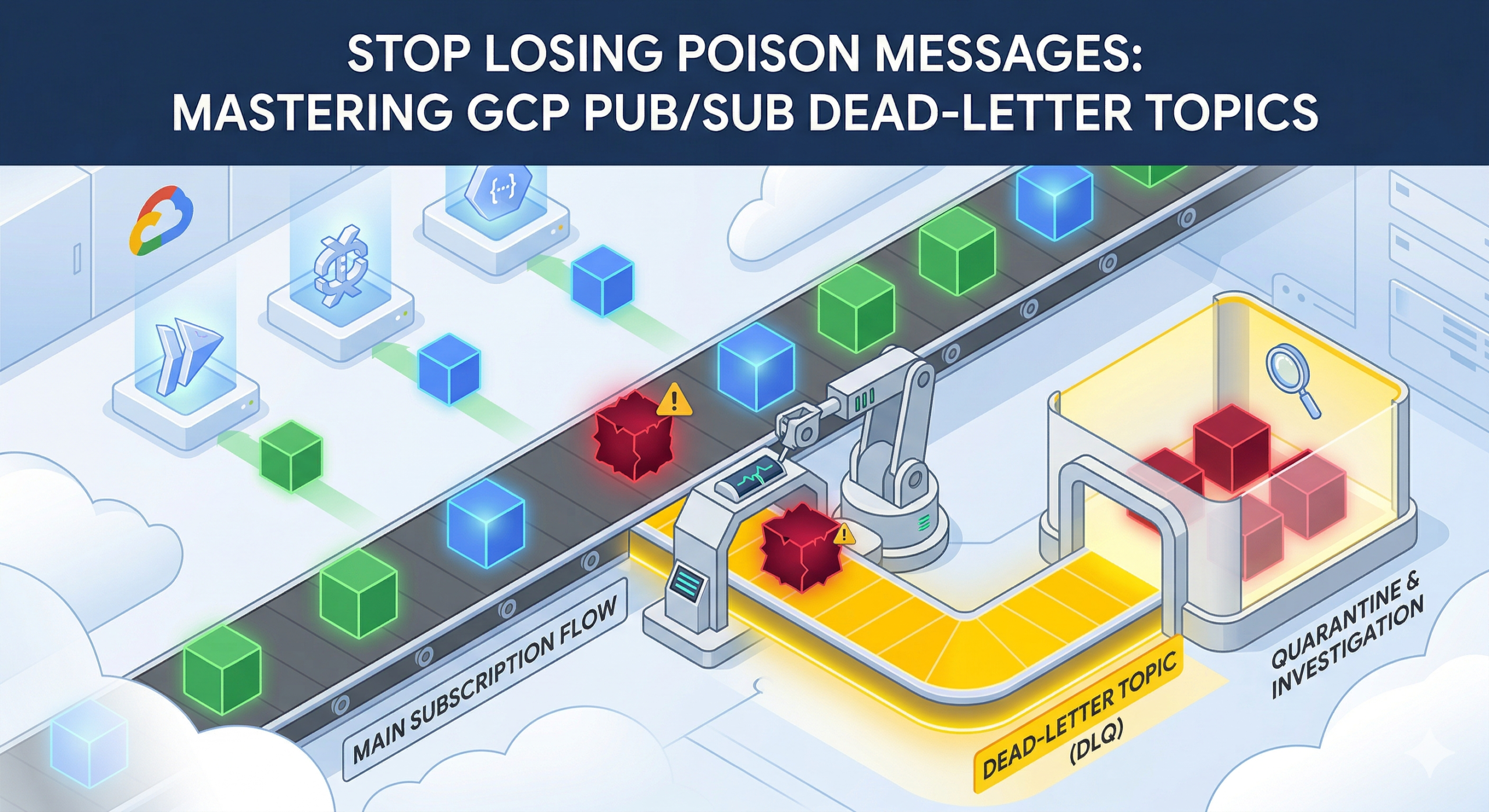
Pub/Sub is a natural fit for event-driven architectures on GCP, but it has a default behaviour that catches enterprise teams off guard. When a subscriber fails to acknowledge a message, Pub/Sub retries delivery indefinitely until the message retention window closes, then discards it without trace. The default retention period is seven days. After that, the message is gone, no log entry, no alert, no record that it ever existed.
For pipelines carrying payment events, order updates, or audit-critical data, silent discard is not an acceptable failure mode. Dead-letter topics (DLTs) solve this by redirecting unprocessable messages to a separate topic after a configurable number of failed delivery attempts, preserving them for investigation and controlled replay.
Why the Default Retry Behaviour Falls Short
Without a dead-letter policy, Pub/Sub has no mechanism to distinguish a message that is fundamentally unprocessable, a poison message from one caught in a transient outage. A malformed JSON payload, a schema mismatch following a publisher upgrade, or a message referencing a resource the consumer lacks permission to access will all trigger the same response: indefinite retry until retention expires.
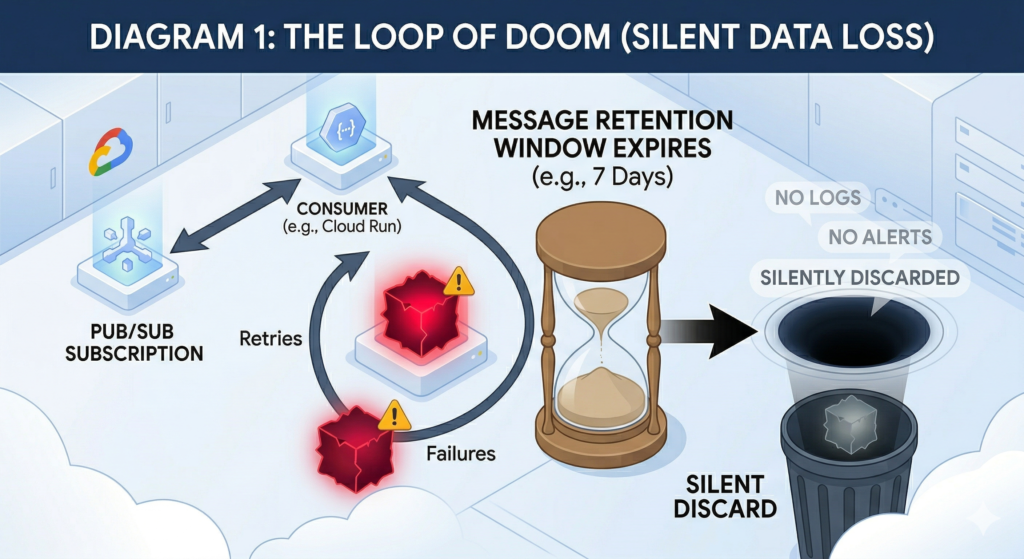
The cost is not just data loss. A poison message consuming retry capacity generates unnecessary compute spend. If your consumer is a Cloud Run service scaling against subscription backlog, a single unprocessable message drives repeated cold starts and wasted invocations. Without delivery attempt tracking, there is no signal to distinguish one genuinely failing message from a downstream outage affecting everything, which degrades incident response significantly.
Configuring a DLT requires no application code changes and takes under ten minutes.

Configuring Dead-Letter Topics with Terraform
Two details trip up most first implementations. First, the IAM bindings: the Pub/Sub service agent needs roles/pubsub.publisher on the dead-letter topic (to forward messages) and roles/pubsub.subscriber on the source subscription (to acknowledge forwarded messages). Missing either binding causes dead-letter forwarding to fail silently, no error is surfaced anywhere, messages simply keep retrying on the source subscription.
Second, GCP does not automatically create a subscription on your dead-letter topic. Messages published to a topic with no subscriptions are permanently lost. You must provision the DLT subscription explicitly.
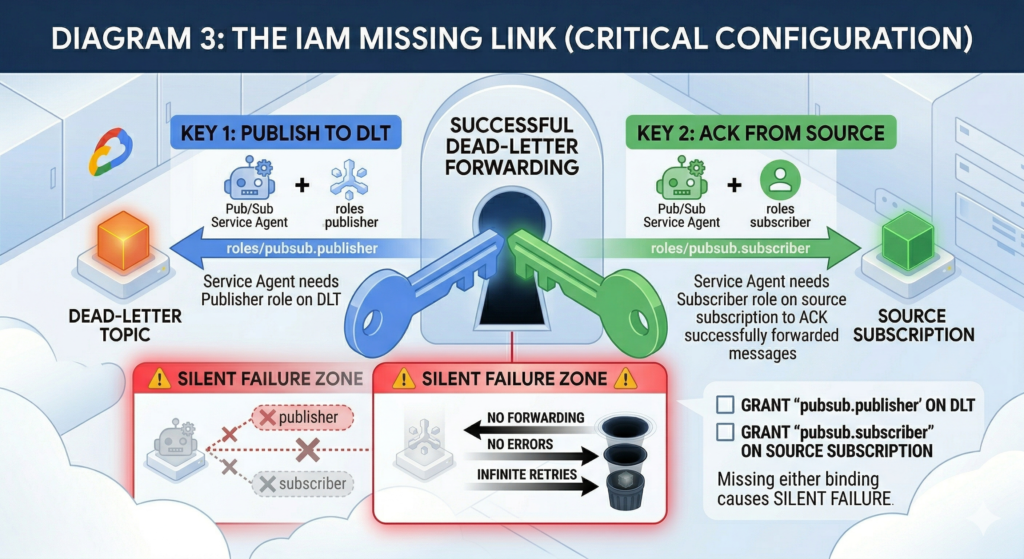
The configuration below handles both requirements correctly:
data "google_project" "current" {}

locals {
  pubsub_sa = "serviceAccount:service-${data.google_project.current.number}@gcp-sa-pubsub.iam.gserviceaccount.com"
}

resource "google_pubsub_topic" "main" {
  name                       = "order-events"
  message_retention_duration = "604800s" # 7 days
}

resource "google_pubsub_topic" "dead_letter" {
  name                       = "order-events-dlq"
  message_retention_duration = "2678400s" # 31 days - max retention for investigation

  labels = {
    purpose = "dead-letter-queue"
    source  = "order-events"
  }
}

resource "google_pubsub_subscription" "main" {
  name  = "order-events-sub"
  topic = google_pubsub_topic.main.id

  ack_deadline_seconds = 60

  dead_letter_policy {
    dead_letter_topic     = google_pubsub_topic.dead_letter.id
    max_delivery_attempts = 10 # Range: 5-100. Default minimum is 5.
  }

  retry_policy {
    minimum_backoff = "10s"
    maximum_backoff = "600s"
  }

  expiration_policy {
    ttl = "" # Never expire
  }

  # IAM must be granted before the subscription is used
  depends_on = [
    google_pubsub_topic_iam_member.dead_letter_publisher,
    google_pubsub_subscription_iam_member.source_subscriber,
  ]
}

# Required: GCP does NOT create this automatically
resource "google_pubsub_subscription" "dead_letter" {
  name  = "order-events-dlq-sub"
  topic = google_pubsub_topic.dead_letter.id

  ack_deadline_seconds       = 120
  message_retention_duration = "604800s"
  retain_acked_messages      = true # Keep for audit trail

  expiration_policy {
    ttl = "" # Never expire
  }
}

# IAM: service agent must publish to the DLT
resource "google_pubsub_topic_iam_member" "dead_letter_publisher" {
  topic  = google_pubsub_topic.dead_letter.name
  role   = "roles/pubsub.publisher"
  member = local.pubsub_sa
}

# IAM: service agent must ack on the source subscription
resource "google_pubsub_subscription_iam_member" "source_subscriber" {
  subscription = google_pubsub_subscription.main.name
  role         = "roles/pubsub.subscriber"
  member       = local.pubsub_sa
}The max_delivery_attempts parameter accepts values between 5 and 100. The default and minimum is 5, appropriate for poison message detection in stable pipelines. For workloads with frequent transient failures, downstream API rate limiting, connection timeouts, intermittent database unavailability. Values between 10 and 20 reduce false positives without letting genuinely bad messages consume excessive retry capacity. Delivery attempt counting is approximate and best-effort; brief Pub/Sub infrastructure disruptions can reset the count, so treat max_delivery_attempts as a floor rather than a hard guarantee.
Each forwarded message carries metadata attributes you can interrogate in your DLT consumer: CloudPubSubDeadLetterSourceSubscription, CloudPubSubDeadLetterSourceDeliveryCount, and CloudPubSubDeadLetterSourceTopicPublishTime. These allow you to route messages to appropriate investigation workflows, emit structured log entries, or conditionally attempt controlled reprocessing. For infrastructure cost visibility across failure patterns, the FinOps Evolution framework provides a useful model for tracking per-event pipeline spend including retry and replay costs.
Monitoring DLT Backlog
The primary metric for dead-letter activity is pubsub.googleapis.com/subscription/dead_letter_message_count, reported on the source subscription. For backlog depth on the DLT itself, track subscription/num_undelivered_messages and subscription/oldest_unacked_message_age – the latter is essential for SLA-critical pipelines where messages sitting unprocessed for more than a few minutes indicate a systemic issue requiring immediate attention.
Alert on a DLT backlog greater than zero with a five-minute evaluation window. Any dead-lettered message warrants investigation. A threshold-based alert that fires only at ten or twenty messages encourages teams to treat early signals as noise – and the messages that accumulate quietly before the threshold is breached are precisely the ones that indicate a systemic failure rather than a one-off anomaly.
Enterprise Considerations
Set DLT topic retention to the maximum 31 days to give operations teams adequate investigation time. Restrict roles/pubsub.subscriber on the DLT subscription to a dedicated ops or SRE service account rather than the same identity running your main consumer. This prevents a misconfigured replay attempt from re-triggering consumer processing mid-incident.
If you are using Pub/Sub message ordering keys, enabling a DLT is not optional, it is essential. A single poison message with an ordering key will block all subsequent messages sharing that key until the retention window expires. The DLT breaks this head-of-line block by removing the failing message from the source subscription after the threshold is reached.
Replay from a DLT back to the main topic requires a safeguard against infinite loops. A message republished to the main topic that fails again returns to the DLT, which republishes it again, and so on. Add a custom x-replay-count attribute before republishing and enforce a maximum replay limit in your DLT consumer before routing unresolvable messages to a final discard topic with a Cloud Logging entry. Note that Dataflow subscriptions do not support dead-letter topic configuration at all; Dataflow pipelines require error handling within the pipeline graph using side outputs.
IAM propagation after terraform apply can take several minutes. During this window, dead-letter forwarding fails silently. For production rollouts, apply IAM changes in a separate run before deploying the subscription update, or build a brief wait into your pipeline validation.
Alternative Approaches
For teams not yet using Terraform, the gcloud CLI equivalent is:
gcloud pubsub subscriptions update SUBSCRIPTION_ID \
  --dead-letter-topic=DEAD_LETTER_TOPIC_ID \
  --max-delivery-attempts=10

# Grant IAM separately - the CLI does not apply these automatically
PUBSUB_SA="service-$(gcloud projects describe PROJECT_ID \
  --format='value(projectNumber)')@gcp-sa-pubsub.iam.gserviceaccount.com"

gcloud pubsub topics add-iam-policy-binding DEAD_LETTER_TOPIC_ID \
  --member="serviceAccount:$PUBSUB_SA" \
  --role="roles/pubsub.publisher"

gcloud pubsub subscriptions add-iam-policy-binding SUBSCRIPTION_ID \
  --member="serviceAccount:$PUBSUB_SA" \
--role="roles/pubsub.subscriber"Rather than a Cloud Function triggered by the DLT subscription, a scheduled Cloud Run job that pulls and inspects accumulated messages in batch suits pipelines where dead-letter volume is low and review is a periodic, manual process. This avoids the operational overhead of managing a continuously running function while still preserving messages for investigation.
Key Takeaways
- Without a DLT, unprocessable messages are silently discarded after the retention window with no record of the failure.
- Both IAM bindings are required; missing either produces no error and causes dead-letter forwarding to silently stop working.
- GCP does not create a subscription on the DLT automatically, you must provision it or dead-lettered messages are immediately lost.
- Set
max_delivery_attemptsbetween 10 and 20 for mixed workloads; use 5 only for pipelines where transient failures are rare and resolve in seconds. - Alert on any DLT backlog, not a threshold – every dead-lettered message is a signal worth investigating.