
If you’ve ever needed to deploy a simple website quickly, you know the pain points – setting up servers, managing web hosting, configuring load balancers, and dealing with unnecessary complexity for what should be straightforward. Today, let’s explore a solution that’s often overlooked but impressively effective: hosting static websites directly from Azure Storage.
What Exactly is a Static Website?
Let’s start with the basics. A static website consists of HTML, CSS, JavaScript, images, and other client-side files that don’t require server-side processing. Unlike dynamic websites that generate content on the fly using server-side code (like PHP, ASP.NET, or Node.js), static sites serve pre-built content directly to visitors.
Static sites are perfect for:
- Company landing pages
- Product documentation
- Portfolio websites
- Marketing microsites
- Event websites
- Simple blogs (using static site generators)
Why Azure Storage for Static Websites?
Having implemented numerous website hosting solutions across enterprises of varying sizes, I’ve found that Azure Storage offers a compelling combination of simplicity, performance, and cost-efficiency for static content. Here’s why:
1. Simplified Infrastructure
The traditional web hosting model involves managing virtual machines, operating systems, web servers, and more. With Azure Storage, there’s no infrastructure to maintain. You simply enable the static website feature on your storage account, upload your files, and you’re live. No patches, no updates, no servers to monitor.
2. Cost-Effectiveness
This is where Azure Storage truly shines for many of my clients. You pay only for:
- Storage used (pennies per GB)
- Bandwidth consumed
- Operations performed (GET/PUT requests)
For a typical small business site with moderate traffic, this often translates to monthly costs under £4. Compare that to a basic VM or App Service, which starts at £10-12/month even when underutilized.
3. Global Scalability
A recent client needed a product launch page that could handle unpredictable traffic spikes. Azure Storage automatically scaled to handle their viral moment without any configuration changes or performance degradation. The service can handle massive concurrent connections and provides content from edge locations when paired with Azure CDN.
4. Enterprise-Grade Security
Azure Storage offers several security features that make it suitable for business applications:
- HTTPS encryption
- Azure Active Directory integration
- Role-based access control for content management
- Private endpoints for internal-only access
- Azure Defender for threat protection
Architecture Overview
Let’s look at how this solution works:
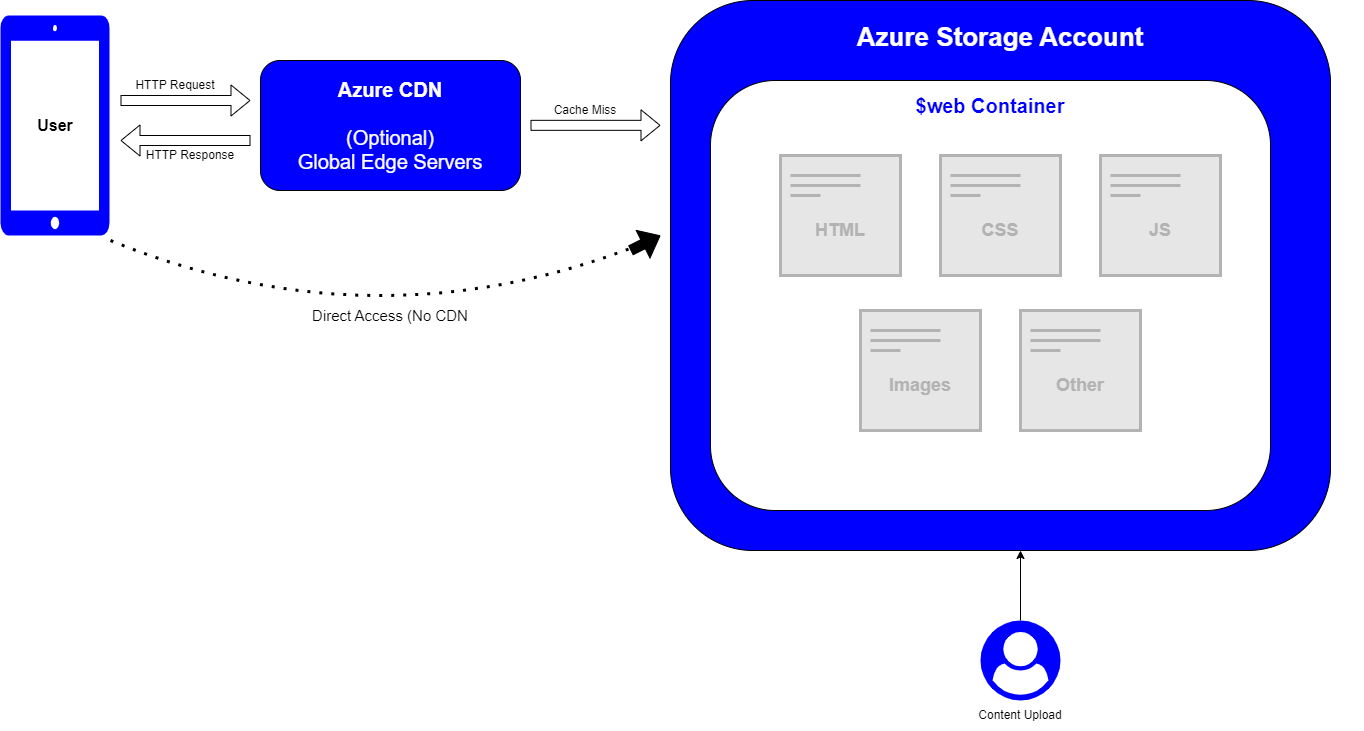
The architecture is elegantly simple:
- You create an Azure Storage account
- Enable the static website feature
- Upload content to the automatically created “$web” container
- Access your site via the provided endpoint URL
For more advanced setups, you can add Azure CDN for edge caching, custom domains, and HTTPS with managed certificates.
Real-World Considerations
While Azure Storage static websites are powerful, they aren’t the right solution for every scenario. In my experience implementing various hosting solutions, here are honest considerations:
When Azure Storage Static Websites Excel
- Simple informational sites
- Sites with predictable, read-heavy traffic patterns
- Content that doesn’t require frequent updates
- Projects with tight budgets
- Microsites that need rapid deployment
When to Consider Alternatives
- Sites requiring server-side processing
- Applications needing database integration
- Websites with authenticated user experiences (though this can be addressed with Azure Static Web Apps or Azure Functions)
- Complex dynamic content requirements
Implementation Approaches
There are several ways to implement Azure Storage static websites, depending on your team’s preferences and existing workflows:
1. Manual Deployment via Azure Portal
Quick and straightforward for simple sites or proof-of-concepts.
2. Infrastructure as Code with Terraform
Perfect for teams practicing DevOps and wanting reproducible environments.
3. Native Deployment with Azure Bicep
Ideal for Azure-focused teams who want cloud-native tooling.
4. Automated CI/CD Pipelines
For professional web development workflows, integrating with GitHub Actions, Azure DevOps, or other CI/CD tools.
In this Saturday’s lab, we’ll explore all three implementation methods with step-by-step instructions, so you can choose the approach that works best for your environment.
Performance Optimization
Here are some tips I have gathered over the years of deploying static websites to maximize performance:
- Enable Azure CDN: This caches your content at edge locations worldwide, dramatically improving load times for global audiences.
- Configure proper caching headers: Set appropriate Cache-Control headers for different content types to optimize browser caching.
- Compress static assets: Minify HTML, CSS, and JavaScript files, and use optimized image formats like WebP.
- Implement progressive loading: Structure your site to load critical content first.
- Use Azure Front Door: For enterprise applications requiring advanced routing and security features.
Cost Breakdown
Let’s look at realistic costs based on actual usage patterns I’ve seen:
For a small business site (~5GB storage, 100GB monthly bandwidth, 1M requests):
- Storage: ~£0.08/month
- Bandwidth: ~£6.75/month
- Operations: ~£0.32/month
- Total: ~£7.15/month
This makes it approximately 40% cheaper than the lowest tier App Service, with better scalability for static content.
Conclusion
Azure Storage for static websites offers a compelling option for many scenarios – it’s simple, cost-effective, and surprisingly powerful for the right use cases. I’ve seen organizations from small start-ups to large enterprises successfully leverage this approach to deliver high-performance websites while minimizing both costs and operational overhead.