Picture this: You’re staring at Azure’s VM pricing calculator, scrolling through dozens of different VM series with cryptic names like Dv5, Fsv2, and Esv5. Each one promises different performance characteristics, and the pricing varies wildly. Sound familiar?
If you’ve ever felt overwhelmed by Azure’s VM options, you’re not alone. With over 15 different VM series and hundreds of individual VM sizes, choosing the right virtual machine can feel like navigating a maze blindfolded. Make the wrong choice, and you’ll either overpay for resources you don’t need or struggle with performance issues that could tank your application.
The stakes are high. According to recent studies, up to 35% of cloud spending is wasted on over-provisioned resources, while another 20% of organizations suffer from performance issues due to under-provisioning. In Azure specifically, choosing the wrong VM series can mean the difference between a £500/month and £2,000/month bill for similar performance.
But here’s the good news: selecting the right Azure VM doesn’t have to be guesswork. With the right framework and decision process, you can confidently choose the optimal VM series for your workload every time.
In this comprehensive guide, you’ll learn:
- A systematic approach to assess your workload requirements
- A clear decision tree that eliminates the confusion
- Specific recommendations for each Azure VM series
- Real-world use cases and cost considerations
- A validation checklist to ensure you make the right choice
- Common pitfalls that can cost you thousands
Whether you’re migrating your first application to Azure or optimizing an existing cloud infrastructure, this workflow will save you time, money, and headaches. Let’s dive in and turn VM selection from a source of stress into a strategic advantage.
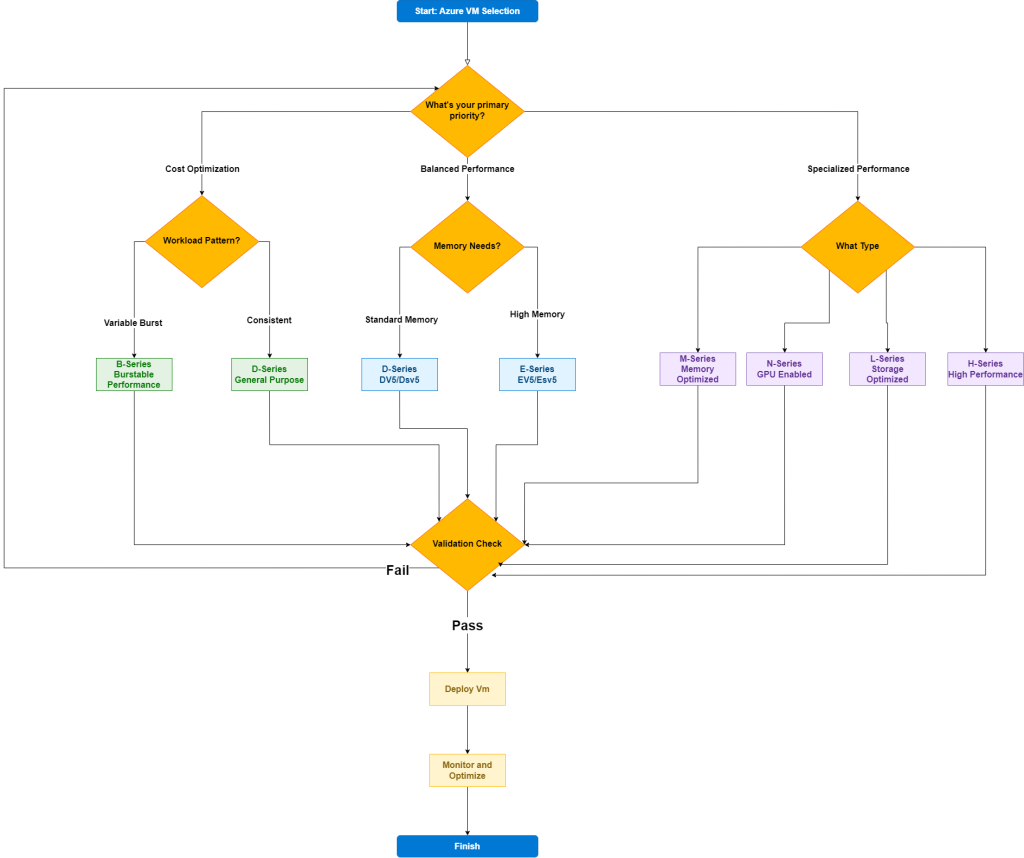
Azure VM Series Selection Workflow
Step 1: Assess Your Workload Requirements
Initial Questions to Answer:
- What type of application are you running? (Web app, database, compute-intensive, etc.)
- What are your performance requirements? (CPU, memory, storage, network)
- What is your budget constraint? (Cost-sensitive vs. performance-critical)
- Is this for development, testing, or production?
- Do you have specific compliance requirements?
Step 2: Performance Requirements Analysis
CPU Requirements
- Low CPU usage (< 25% average): Web servers, small databases, development
- Moderate CPU usage (25-75% average): Business applications, medium databases
- High CPU usage (> 75% average): Compute-intensive apps, large databases, analytics
Memory Requirements
- Low memory (< 8 GB): Basic web apps, small development environments
- Moderate memory (8-64 GB): Standard business applications, medium databases
- High memory (64 GB+): In-memory databases, big data analytics, SAP workloads
Storage Requirements
- Standard storage: General applications with moderate I/O
- High I/O: Databases, data analytics, high-transaction applications
- Temporary storage needs: Batch processing, caching scenarios
Step 3: Decision Tree
🔀 START HERE: What’s your primary need?
Option A: Cost Optimization
“I need the most cost-effective solution”
- Burstable workloads (occasional spikes) → B-series (Burstable)
- B1s, B2s, B4ms for small apps
- B8ms, B16ms for medium workloads
- Consistent, predictable workloads → D-series (General Purpose)
- Dv5 for latest performance
- Dv4 for balanced price/performance
Option B: Balanced Performance
“I need good all-around performance”
- Standard business applications → D-series (General Purpose)
- Dv5: Latest gen, best price/performance
- Dsv5: Premium storage support
- Memory-intensive applications → E-series (Memory Optimized)
- Ev5: Standard memory-optimized
- Esv5: With premium storage
Option C: Specialized Performance
“I have specific performance requirements”
High CPU Performance Needed?
- Yes → F-series (Compute Optimized)
- Fsv2: High CPU-to-memory ratio
- Best for: CPU-intensive apps, web servers, analytics
High Memory Requirements?
- Yes → E-series or M-series
- E-series: Up to 672 GB RAM (Ev5/Esv5)
- M-series: Up to 4 TB RAM (for SAP, large databases)
GPU Requirements?
- Yes → N-series (GPU)
- NCv3: NVIDIA Tesla V100 (AI/ML)
- NDv2: NVIDIA Tesla V100 (HPC)
- NVv4: AMD Radeon Instinct (VDI, visualization)
High Storage I/O?
- Yes → L-series (Storage Optimized)
- Lsv2: NVMe SSD, low latency
- Best for: NoSQL databases, data analytics
High Performance Computing (HPC)?
- Yes → H-series (HPC)
- HBv3: AMD EPYC, InfiniBand
- HCv1: Intel Xeon, high memory bandwidth
Step 4: Series-Specific Recommendations
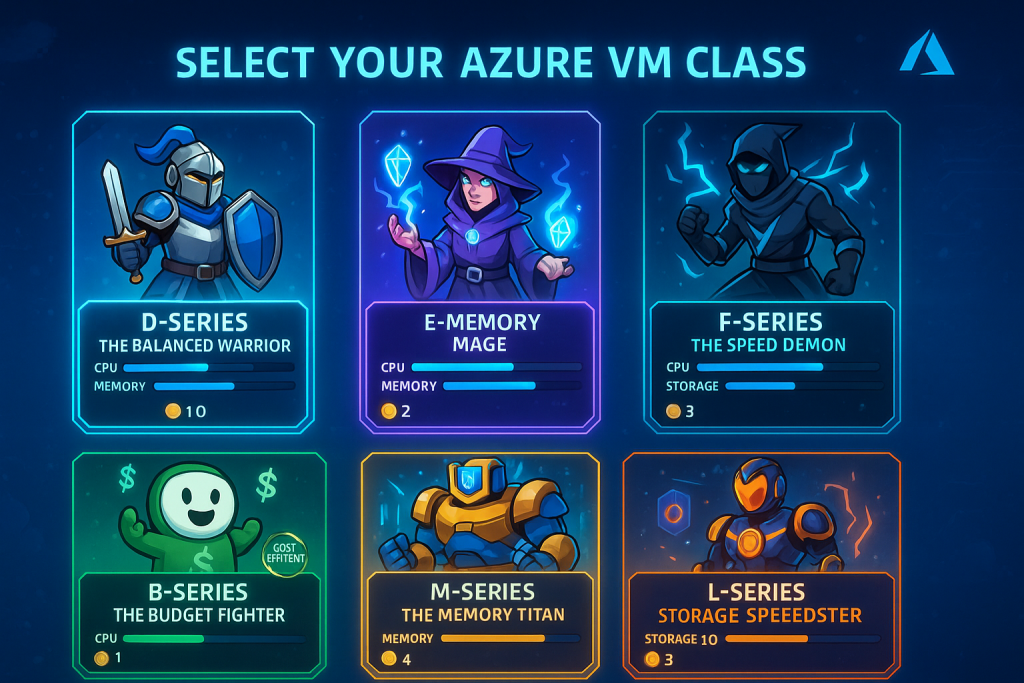
B-Series (Burstable Performance)
Best for: Development, testing, small web apps
- When to choose: Variable workloads, cost-sensitive scenarios
- Key benefit: CPU credits system, pay only for what you use
- Avoid if: Consistent high CPU usage required
D-Series (General Purpose)
Best for: Most production workloads
- Dv5/Dsv5: Latest generation, best overall choice
- When to choose: Balanced CPU/memory ratio needed
- Key benefit: Excellent price/performance for most scenarios
E-Series (Memory Optimized)
Best for: In-memory databases, analytics, SAP
- Ev5/Esv5: Up to 8:1 memory-to-vCPU ratio
- When to choose: Memory > 64 GB required
- Key benefit: High memory capacity with good CPU performance
F-Series (Compute Optimized)
Best for: CPU-intensive applications
- Fsv2: Up to 3.7 GHz turbo frequency
- When to choose: High CPU performance, moderate memory needs
- Key benefit: Highest CPU performance per dollar
M-Series (Memory Optimized – Large)
Best for: SAP HANA, large in-memory databases
- When to choose: Memory requirements > 1 TB
- Key benefit: Massive memory capacity (up to 4 TB)
- Note: Most expensive option
Step 5: Final Validation Checklist
✅ Performance Validation
- [ ] CPU requirements met (cores and frequency)
- [ ] Memory requirements satisfied
- [ ] Storage performance adequate (IOPS, throughput)
- [ ] Network performance sufficient
✅ Cost Validation
- [ ] Monthly cost within budget
- [ ] Consider reserved instances for 1-3 year savings
- [ ] Evaluate Azure Hybrid Benefit if applicable
- [ ] Review spot instances for non-critical workloads
✅ Operational Validation
- [ ] Supported OS and applications
- [ ] Backup and disaster recovery compatibility
- [ ] Monitoring and scaling capabilities
- [ ] Compliance requirements met
✅ Future-Proofing
- [ ] Room for growth (scaling up/out)
- [ ] Migration path to other series if needed
- [ ] Technology roadmap alignment
Quick Reference Table
| Use Case | Primary Choice | Alternative | Reasoning |
|---|---|---|---|
| Web Applications | Dv5 | B-series (dev/test) | Balanced performance, predictable cost |
| Databases (< 64GB) | Dsv5 | Ev5 | Premium storage, good CPU/memory balance |
| Databases (> 64GB) | Esv5 | M-series | High memory, premium storage |
| API Services | Fsv2 | Dv5 | High CPU performance for processing |
| Analytics/Big Data | Esv5 | Lsv2 | High memory or high storage I/O |
| AI/ML Training | NCv3 | NDv2 | GPU acceleration required |
| SAP Workloads | M-series | Esv5 | Certified for SAP, high memory |
| Dev/Test | B-series | Dv5 (small) | Cost optimization, burstable performance |
Common Pitfalls to Avoid
❌ Over-provisioning for “future growth” – Start right-sized, scale when needed
❌ Choosing based on vCPU count alone – Consider memory, storage, and network
❌ Ignoring storage requirements – Premium vs. Standard storage impact performance
❌ Not considering regional availability – Some series limited to specific regions
❌ Overlooking licensing costs – Windows licenses can double the cost
Next Steps
- Prototype and Test: Deploy your chosen VM series in a test environment
- Monitor Performance: Use Azure Monitor to validate your choice
- Optimize: Adjust size up/down based on actual usage patterns
- Consider Automation: Implement auto-scaling for variable workloads
- Review Regularly: Revisit VM selection quarterly as requirements change