
Professional Development Friday: Part 4 of our Infrastructure as Code Mastery Series
Over the past two weeks, we’ve built increasingly sophisticated infrastructure: from a simple web server to a complete multi-environment deployment with auto-scaling, load balancing, and environment-specific configurations. You’ve experienced the fundamental workflow and multi-environment patterns that define professional Infrastructure as Code practice.
Today, we tackle the capability that transforms competent practitioners into architectural leaders: creating reusable infrastructure modules that teams can consume consistently. This shift from writing infrastructure code to designing infrastructure APIs represents the career transition from implementation to strategy, directly influencing advancement to senior technical roles.
The difference in professional value is substantial. According to industry surveys, professionals who design and maintain infrastructure modules earn 25-35% more than those who only consume existing patterns. This premium reflects the strategic thinking required to abstract complex requirements into simple, reliable interfaces that other professionals can use effectively.
The Strategic Value: Why Modules Define Senior Infrastructure Roles
Infrastructure modules solve a fundamental scaling problem that every growing organisation encounters: how to maintain consistency and reliability whilst enabling rapid development across multiple teams. Manual infrastructure processes don’t scale beyond small teams, whilst copy-paste Terraform configurations create maintenance nightmares and security vulnerabilities.
Professional module development requires understanding not just how to write Terraform code, but how to design interfaces that abstract complexity whilst providing necessary flexibility. This capability distinguishes senior practitioners who enable other professionals from individual contributors who implement specific requirements.
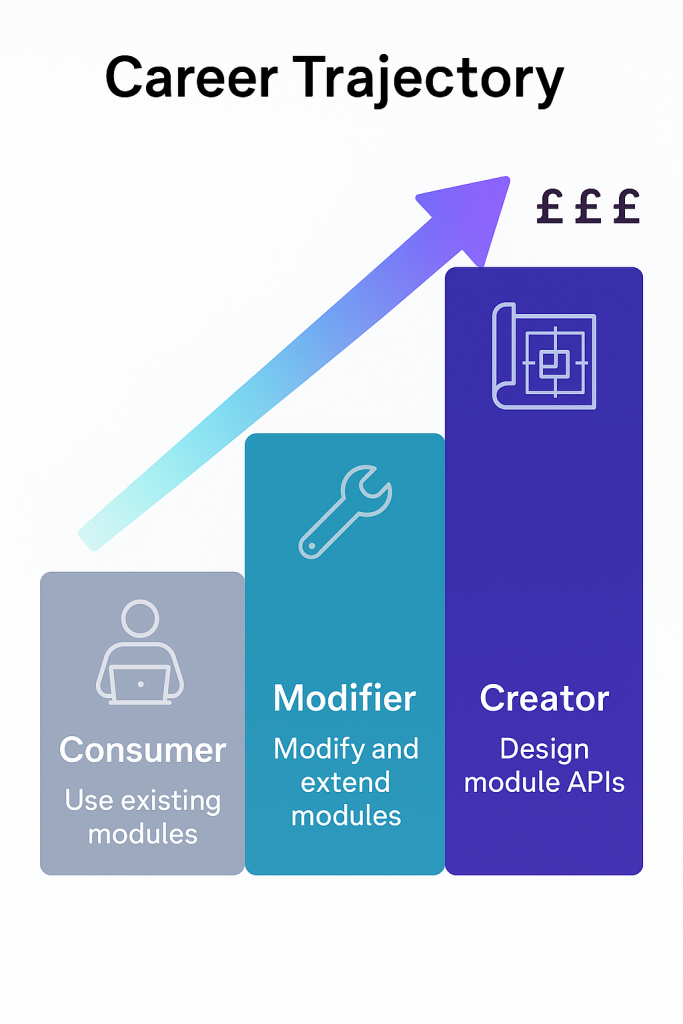
Consider the career trajectory: junior professionals learn to deploy infrastructure using existing modules, mid-level practitioners modify and extend modules for specific requirements, whilst senior professionals design module APIs that serve entire organisations. Each level requires different thinking patterns and commands correspondingly different compensation.
The organisations that invest heavily in Infrastructure as Code—Netflix, GitHub, Airbnb—build their competitive advantages around sophisticated module libraries that enable rapid, reliable deployment across hundreds of applications. The professionals who design and maintain these systems become indispensable strategic assets rather than replaceable operational resources.
Prerequisites: Setting Up for Module Development
Before diving into module creation, ensure your development environment supports the patterns we’ll implement:
Required Tools:
- Terraform >= 1.0
- AWS CLI configured with appropriate permissions
- AWS Provider >= 5.0
- Text editor with HCL syntax support
AWS Permissions: Your AWS credentials need permissions for VPC management, EC2 operations, Auto Scaling Groups, and Application Load Balancers. For learning purposes, PowerUserAccess provides sufficient capabilities whilst maintaining reasonable security constraints.
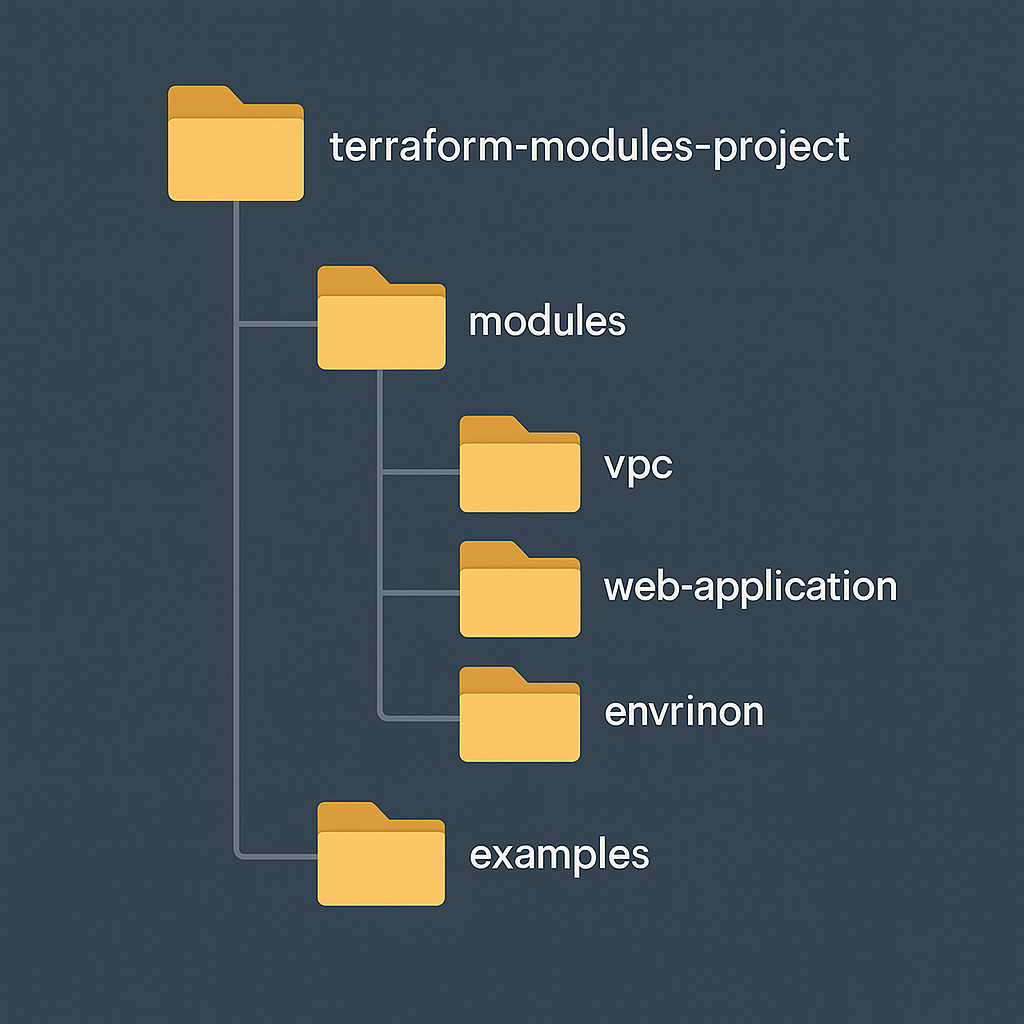
Project Structure: Create a clean project directory that separates modules from root configurations:
terraform-modules-project/
├── modules/
│   ├── vpc/
│   └── web-application/
├── environments/
│   ├── dev/
│   ├── staging/
│   └── prod/
└── examples/
This organisation mirrors professional implementations whilst enabling clear testing and development workflows.
Core Module Concepts: Architecture Through Abstraction
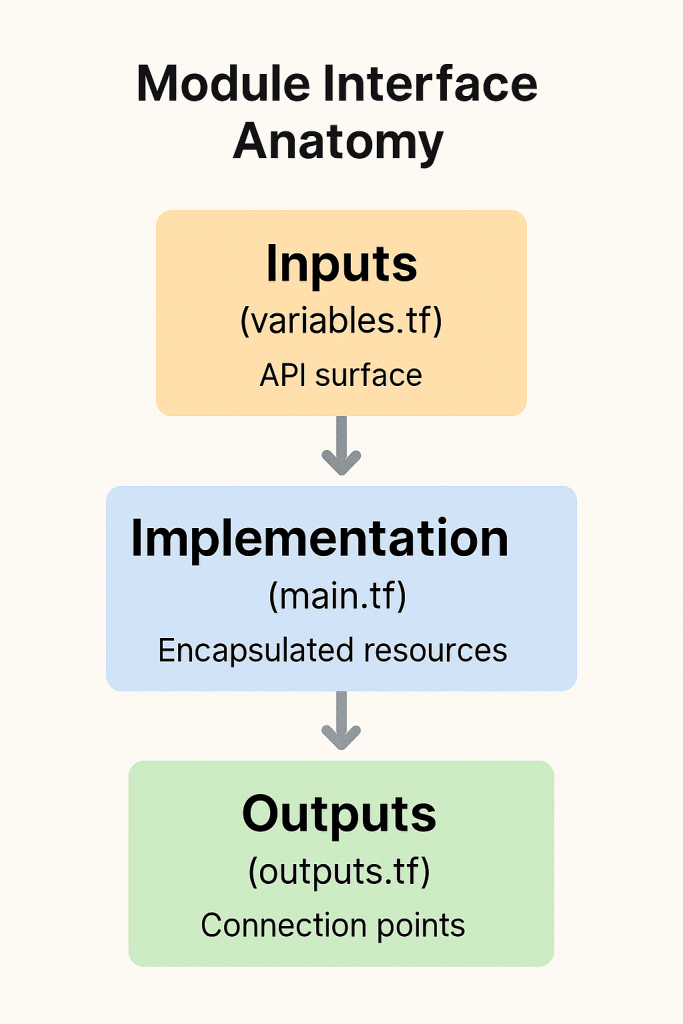
Terraform modules enable infrastructure reuse through well-defined interfaces that hide implementation complexity whilst exposing necessary configuration options. Professional module development requires balancing simplicity with flexibility, creating abstractions that serve diverse requirements without becoming overly complex.
Input Variables define the module’s API, determining what consumers can configure whilst establishing sensible defaults for common use cases. Well-designed modules require minimal input for basic functionality whilst enabling sophisticated customisation when necessary. This balance reflects the product thinking that characterises senior technical roles.
Output Values expose information that consuming code needs for integration with other infrastructure components. Modules should output resource identifiers, connection endpoints, and configuration details that enable seamless composition with other modules. This integration thinking scales infrastructure design beyond individual components.
Resource Encapsulation groups related infrastructure components into logical units that can be managed, versioned, and tested independently. Professional modules implement complete functional capabilities—networking, security, compute, and monitoring—rather than individual resources that require extensive integration work.
Hands-On Implementation: Building Professional Modules
Let’s refactor the multi-environment infrastructure we built into professional modules that demonstrate enterprise patterns. We’ll create two modules: a VPC module for networking foundations and an application module for scalable web hosting.
VPC Module: Networking Foundation
modules/vpc/variables.tf:
variable "name" {
  description = "Name prefix for VPC resources"
  type        = string
}

variable "cidr_block" {
  description = "CIDR block for VPC"
  type        = string
  default     = "10.0.0.0/16"
}

variable "availability_zones" {
  description = "List of availability zones"
  type        = list(string)
  default     = []
}

variable "public_subnet_cidrs" {
  description = "CIDR blocks for public subnets"
  type        = list(string)
  default     = ["10.0.1.0/24", "10.0.2.0/24"]
}

variable "private_subnet_cidrs" {
  description = "CIDR blocks for private subnets"
  type        = list(string)
  default     = ["10.0.10.0/24", "10.0.11.0/24"]
}

variable "enable_nat_gateway" {
  description = "Enable NAT gateway for private subnets"
  type        = bool
  default     = true
}

variable "tags" {
  description = "Additional tags to apply to all resources"
  type        = map(string)
  default     = {}
}
modules/vpc/main.tf:
data "aws_availability_zones" "available" {
  state = "available"
}

locals {
  azs = length(var.availability_zones) > 0 ? var.availability_zones : slice(data.aws_availability_zones.available.names, 0, 2)
}

resource "aws_vpc" "this" {
  cidr_block           = var.cidr_block
  enable_dns_hostnames = true
  enable_dns_support   = true

  tags = merge(
    {
      Name = "${var.name}-vpc"
    },
    var.tags
  )
}

resource "aws_internet_gateway" "this" {
  vpc_id = aws_vpc.this.id

  tags = merge(
    {
      Name = "${var.name}-igw"
    },
    var.tags
  )
}

resource "aws_subnet" "public" {
  count                   = length(var.public_subnet_cidrs)
  vpc_id                  = aws_vpc.this.id
  cidr_block              = var.public_subnet_cidrs[count.index]
  availability_zone       = local.azs[count.index]
  map_public_ip_on_launch = true

  tags = merge(
    {
      Name = "${var.name}-public-${count.index + 1}"
      Type = "public"
    },
    var.tags
  )
}

resource "aws_subnet" "private" {
  count             = length(var.private_subnet_cidrs)
  vpc_id            = aws_vpc.this.id
  cidr_block        = var.private_subnet_cidrs[count.index]
  availability_zone = local.azs[count.index]

  tags = merge(
    {
      Name = "${var.name}-private-${count.index + 1}"
      Type = "private"
    },
    var.tags
  )
}

resource "aws_eip" "nat" {
  count  = var.enable_nat_gateway ? 1 : 0
  domain = "vpc"

  tags = merge(
    {
      Name = "${var.name}-nat-eip"
    },
    var.tags
  )

  depends_on = [aws_internet_gateway.this]
}

resource "aws_nat_gateway" "this" {
  count         = var.enable_nat_gateway ? 1 : 0
  allocation_id = aws_eip.nat[0].id
  subnet_id     = aws_subnet.public[0].id

  tags = merge(
    {
      Name = "${var.name}-nat"
    },
    var.tags
  )

  depends_on = [aws_internet_gateway.this]
}

resource "aws_route_table" "public" {
  vpc_id = aws_vpc.this.id

  route {
    cidr_block = "0.0.0.0/0"
    gateway_id = aws_internet_gateway.this.id
  }

  tags = merge(
    {
      Name = "${var.name}-public-rt"
    },
    var.tags
  )
}

resource "aws_route_table" "private" {
  count  = var.enable_nat_gateway ? 1 : 0
  vpc_id = aws_vpc.this.id

  route {
    cidr_block     = "0.0.0.0/0"
    nat_gateway_id = aws_nat_gateway.this[0].id
  }

  tags = merge(
    {
      Name = "${var.name}-private-rt"
    },
    var.tags
  )
}

resource "aws_route_table_association" "public" {
  count          = length(aws_subnet.public)
  subnet_id      = aws_subnet.public[count.index].id
  route_table_id = aws_route_table.public.id
}

resource "aws_route_table_association" "private" {
  count          = var.enable_nat_gateway ? length(aws_subnet.private) : 0
  subnet_id      = aws_subnet.private[count.index].id
  route_table_id = aws_route_table.private[0].id
}
modules/vpc/outputs.tf:
output "vpc_id" {
  description = "ID of the VPC"
  value       = aws_vpc.this.id
}

output "vpc_cidr_block" {
  description = "CIDR block of the VPC"
  value       = aws_vpc.this.cidr_block
}

output "public_subnet_ids" {
  description = "IDs of the public subnets"
  value       = aws_subnet.public[*].id
}

output "private_subnet_ids" {
  description = "IDs of the private subnets"
  value       = aws_subnet.private[*].id
}

output "internet_gateway_id" {
  description = "ID of the Internet Gateway"
  value       = aws_internet_gateway.this.id
}

output "nat_gateway_id" {
  description = "ID of the NAT Gateway"
  value       = var.enable_nat_gateway ? aws_nat_gateway.this[0].id : null
}
Web Application Module: Scalable Hosting Platform
modules/web-application/variables.tf:
variable "name" {
  description = "Name prefix for all resources"
  type        = string
}

variable "environment" {
  description = "Environment name"
  type        = string
}

variable "vpc_id" {
  description = "VPC ID where resources will be created"
  type        = string
}

variable "subnet_ids" {
  description = "List of subnet IDs for the application"
  type        = list(string)
}

variable "instance_type" {
  description = "EC2 instance type"
  type        = string
  default     = "t3.micro"
}

variable "min_size" {
  description = "Minimum number of instances"
  type        = number
  default     = 1
}

variable "max_size" {
  description = "Maximum number of instances"
  type        = number
  default     = 3
}

variable "desired_capacity" {
  description = "Desired number of instances"
  type        = number
  default     = 1
}

variable "key_name" {
  description = "EC2 Key Pair name for SSH access"
  type        = string
  default     = null
}

variable "enable_monitoring" {
  description = "Enable CloudWatch monitoring and alarms"
  type        = bool
  default     = false
}

variable "tags" {
  description = "Additional tags to apply to all resources"
  type        = map(string)
  default     = {}
}
modules/web-application/main.tf:
data "aws_ami" "amazon_linux" {
  most_recent = true
  owners      = ["amazon"]

  filter {
    name   = "name"
    values = ["amzn2-ami-hvm-*-x86_64-gp2"]
  }
}

data "aws_vpc" "selected" {
  id = var.vpc_id
}

# Application Load Balancer Security Group
resource "aws_security_group" "alb" {
  name_prefix = "${var.name}-alb-"
  vpc_id      = var.vpc_id
  description = "Security group for Application Load Balancer"

  ingress {
    description = "HTTP"
    from_port   = 80
    to_port     = 80
    protocol    = "tcp"
    cidr_blocks = ["0.0.0.0/0"]
  }

  egress {
    from_port   = 0
    to_port     = 0
    protocol    = "-1"
    cidr_blocks = ["0.0.0.0/0"]
  }

  tags = merge(
    {
      Name        = "${var.name}-alb-sg"
      Environment = var.environment
    },
    var.tags
  )

  lifecycle {
    create_before_destroy = true
  }
}

# Web Server Security Group
resource "aws_security_group" "web" {
  name_prefix = "${var.name}-web-"
  vpc_id      = var.vpc_id
  description = "Security group for web servers"

  ingress {
    description     = "HTTP from ALB"
    from_port       = 80
    to_port         = 80
    protocol        = "tcp"
    security_groups = [aws_security_group.alb.id]
  }

  dynamic "ingress" {
    for_each = var.key_name != null ? [1] : []
    content {
      description = "SSH"
      from_port   = 22
      to_port     = 22
      protocol    = "tcp"
      cidr_blocks = [data.aws_vpc.selected.cidr_block]
    }
  }

  egress {
    from_port   = 0
    to_port     = 0
    protocol    = "-1"
    cidr_blocks = ["0.0.0.0/0"]
  }

  tags = merge(
    {
      Name        = "${var.name}-web-sg"
      Environment = var.environment
    },
    var.tags
  )

  lifecycle {
    create_before_destroy = true
  }
}

# Launch Template
resource "aws_launch_template" "web" {
  name_prefix   = "${var.name}-"
  image_id      = data.aws_ami.amazon_linux.id
  instance_type = var.instance_type
  key_name      = var.key_name

  vpc_security_group_ids = [aws_security_group.web.id]

  user_data = base64encode(templatefile("${path.module}/user_data.sh", {
    project_name = var.name
    environment  = var.environment
  }))

  tag_specifications {
    resource_type = "instance"
    tags = merge(
      {
        Name        = "${var.name}-web"
        Environment = var.environment
      },
      var.tags
    )
  }

  lifecycle {
    create_before_destroy = true
  }
}

# Auto Scaling Group
resource "aws_autoscaling_group" "web" {
  name                = "${var.name}-asg"
  vpc_zone_identifier = var.subnet_ids
  min_size            = var.min_size
  max_size            = var.max_size
  desired_capacity    = var.desired_capacity
  health_check_type   = "ELB"
  health_check_grace_period = 300

  launch_template {
    id      = aws_launch_template.web.id
    version = "$Latest"
  }

  target_group_arns = [aws_lb_target_group.web.arn]

  tag {
    key                 = "Name"
    value               = "${var.name}-asg"
    propagate_at_launch = false
  }

  tag {
    key                 = "Environment"
    value               = var.environment
    propagate_at_launch = true
  }

  dynamic "tag" {
    for_each = var.tags
    content {
      key                 = tag.key
      value               = tag.value
      propagate_at_launch = true
    }
  }

  lifecycle {
    create_before_destroy = true
  }
}

# Application Load Balancer
resource "aws_lb" "web" {
  name               = "${var.name}-alb"
  internal           = false
  load_balancer_type = "application"
  security_groups    = [aws_security_group.alb.id]
  subnets            = var.subnet_ids

  enable_deletion_protection = var.environment == "prod"

  tags = merge(
    {
      Name        = "${var.name}-alb"
      Environment = var.environment
    },
    var.tags
  )
}

resource "aws_lb_target_group" "web" {
  name     = "${var.name}-tg"
  port     = 80
  protocol = "HTTP"
  vpc_id   = var.vpc_id

  health_check {
    enabled             = true
    healthy_threshold   = 2
    interval            = 30
    matcher             = "200"
    path                = "/"
    port                = "traffic-port"
    protocol            = "HTTP"
    timeout             = 5
    unhealthy_threshold = 2
  }

  tags = merge(
    {
      Name        = "${var.name}-tg"
      Environment = var.environment
    },
    var.tags
  )
}

resource "aws_lb_listener" "web" {
  load_balancer_arn = aws_lb.web.arn
  port              = "80"
  protocol          = "HTTP"

  default_action {
    type             = "forward"
    target_group_arn = aws_lb_target_group.web.arn
  }
}

# CloudWatch Monitoring (optional)
resource "aws_cloudwatch_log_group" "web" {
  count             = var.enable_monitoring ? 1 : 0
  name              = "/aws/application/${var.name}"
  retention_in_days = 14

  tags = merge(
    {
      Name        = "${var.name}-logs"
      Environment = var.environment
    },
    var.tags
  )
}

resource "aws_cloudwatch_metric_alarm" "high_cpu" {
  count               = var.enable_monitoring ? 1 : 0
  alarm_name          = "${var.name}-high-cpu"
  comparison_operator = "GreaterThanThreshold"
  evaluation_periods  = "2"
  metric_name         = "CPUUtilization"
  namespace           = "AWS/EC2"
  period              = "120"
  statistic           = "Average"
  threshold           = "80"
  alarm_description   = "This metric monitors EC2 cpu utilization"

  dimensions = {
    AutoScalingGroupName = aws_autoscaling_group.web.name
  }

  tags = merge(
    {
      Name        = "${var.name}-cpu-alarm"
      Environment = var.environment
    },
    var.tags
  )
}
modules/web-application/outputs.tf:
output "load_balancer_dns_name" {
  description = "DNS name of the load balancer"
  value       = aws_lb.web.dns_name
}

output "load_balancer_arn" {
  description = "ARN of the load balancer"
  value       = aws_lb.web.arn
}

output "autoscaling_group_name" {
  description = "Name of the Auto Scaling Group"
  value       = aws_autoscaling_group.web.name
}

output "security_group_id" {
  description = "ID of the web server security group"
  value       = aws_security_group.web.id
}

output "application_url" {
  description = "URL to access the application"
  value       = "http://${aws_lb.web.dns_name}"
}
modules/web-application/user_data.sh:
#!/bin/bash
yum update -y
yum install -y httpd

systemctl start httpd
systemctl enable httpd

cat > /var/www/html/index.html << EOF
<!DOCTYPE html>
<html>
<head>
    <title>${project_name} - Infrastructure as Code Demo</title>
    <style>
        body { font-family: Arial, sans-serif; margin: 40px; background: #f4f4f4; }
        .container { background: white; padding: 30px; border-radius: 8px; box-shadow: 0 2px 4px rgba(0,0,0,0.1); }
        .success { color: #28a745; font-weight: bold; }
        .info { background: #e3f2fd; padding: 15px; border-radius: 4px; margin: 20px 0; }
    </style>
</head>
<body>
    <div class="container">
        <h1 class="success">Module-Deployed Infrastructure Success!</h1>
        <div class="info">
            <p><strong>Project:</strong> ${project_name}</p>
            <p><strong>Environment:</strong> ${environment}</p>
            <p><strong>Instance ID:</strong> $(curl -s http://169.254.169.254/latest/meta-data/instance-id)</p>
            <p><strong>Region:</strong> $(curl -s http://169.254.169.254/latest/meta-data/placement/region)</p>
            <p><strong>Deployment Time:</strong> $(date)</p>
        </div>
        <p>This infrastructure was deployed using reusable Terraform modules, demonstrating professional Infrastructure as Code patterns.</p>
    </div>
</body>
</html>
EOF
Using the Modules: Root Configuration
Now create the root configuration that consumes these modules:
main.tf:
terraform {
  required_version = ">= 1.0"
  required_providers {
    aws = {
      source  = "hashicorp/aws"
      version = "~> 5.0"
    }
  }
}

provider "aws" {
  region = var.aws_region
}

locals {
  common_tags = {
    Project     = var.project_name
    Environment = var.environment
    ManagedBy   = "terraform"
  }

  environment_configs = {
    dev = {
      instance_type     = "t3.micro"
      min_size         = 1
      max_size         = 2
      desired_capacity = 1
      enable_monitoring = false
      enable_nat       = false
    }
    staging = {
      instance_type     = "t3.small"
      min_size         = 1
      max_size         = 3
      desired_capacity = 2
      enable_monitoring = true
      enable_nat       = true
    }
    prod = {
      instance_type     = "t3.medium"
      min_size         = 2
      max_size         = 6
      desired_capacity = 2
      enable_monitoring = true
      enable_nat       = true
    }
  }

  config = local.environment_configs[var.environment]
}

# VPC Module
module "vpc" {
  source = "./modules/vpc"

  name               = "${var.project_name}-${var.environment}"
  cidr_block         = "10.0.0.0/16"
  enable_nat_gateway = local.config.enable_nat

  tags = local.common_tags
}

# Web Application Module
module "web_application" {
  source = "./modules/web-application"

  name             = "${var.project_name}-${var.environment}"
  environment      = var.environment
  vpc_id           = module.vpc.vpc_id
  subnet_ids       = module.vpc.public_subnet_ids
  instance_type    = local.config.instance_type
  min_size         = local.config.min_size
  max_size         = local.config.max_size
  desired_capacity = local.config.desired_capacity
  key_name         = var.key_name
  enable_monitoring = local.config.enable_monitoring

  tags = local.common_tags
}
Professional Module Design Patterns
The modules we’ve created demonstrate patterns that appear in enterprise Infrastructure as Code implementations. Notice how each module encapsulates complete functional capabilities rather than individual resources, creating reusable components that teams can consume confidently.
Interface Design reflects product thinking: modules expose the minimum necessary configuration whilst providing sensible defaults for common use cases. The VPC module enables custom CIDR blocks and subnet configurations whilst defaulting to standard patterns. This balance reduces cognitive load for consumers whilst maintaining flexibility for complex requirements.
Composition Patterns enable sophisticated architectures through module combination. The root configuration demonstrates how modules integrate: the VPC module outputs become inputs to the application module, creating dependency relationships that Terraform manages automatically. This composition thinking scales to architectures involving dozens of modules across multiple teams.
Resource Encapsulation groups related components into logical units that can be versioned, tested, and modified independently. Changes to the VPC module don’t affect application logic, whilst application module updates don’t require networking modifications. This separation enables team specialisation whilst maintaining system coherence.
Module Versioning: Enterprise Stability Patterns
Professional module consumption requires version management that balances stability with access to improvements. Terraform supports module versioning through Git tags, registry versions, and local path references that serve different organisational requirements.
# Git tag versioning for shared modules
module "vpc" {
  source = "git::https://github.com/your-org/terraform-modules.git//vpc?ref=v1.2.0"

  name = "my-application"
  # Additional configuration
}

# Registry modules for public consumption
module "vpc" {
  source  = "terraform-aws-modules/vpc/aws"
  version = "~> 3.0"

  name = "my-application"
  # Additional configuration
}
Version constraints prevent unexpected breaking changes whilst enabling security updates and feature improvements. Professional implementations establish module release processes that include testing, documentation updates, and compatibility validation before promoting versions for team consumption.
Module Testing and Documentation
Sophisticated module development includes comprehensive documentation that enables confident consumption by other professionals. Well-documented modules include clear README files, input/output specifications, and usage examples that demonstrate intended patterns.
Professional documentation enables confident module adoption whilst reducing support overhead for module maintainers. Clear examples accelerate implementation whilst comprehensive specifications enable integration planning.
Testing discipline distinguishes professional module development from casual code sharing. While automated testing frameworks like Terratest exist for infrastructure validation, manual testing workflows can provide adequate confidence for team-internal modules. The key principle: validate functionality before sharing modules with other professionals.
Career Progression: From Consumer to Creator
The transition from consuming modules to designing them represents a fundamental career evolution that affects compensation, responsibility, and professional trajectory. Module consumers demonstrate competency with Infrastructure as Code tools, whilst module creators show architectural thinking that enables organisational scaling.
Senior platform engineering roles specifically seek professionals who can design internal developer platforms through sophisticated module libraries. These positions require understanding how to abstract complexity whilst maintaining necessary flexibility—product design skills applied to infrastructure challenges. The combination of deep technical knowledge with user experience thinking creates career opportunities that command executive-level compensation.
The strategic value becomes clear through organisational impact: well-designed modules enable dozens of teams to deploy infrastructure confidently whilst maintaining security and operational standards. The professional who creates these capabilities influences organisational efficiency at scale, positioning them for technical leadership roles with corresponding compensation and influence.
Advanced Patterns: Module Composition and Integration
Professional module implementations often require accessing information from external sources or composing multiple modules into cohesive systems. These patterns demonstrate the sophisticated thinking that characterises senior infrastructure design.
# Data sources for external integration
data "aws_ssm_parameter" "database_password" {
  name = "/${var.project_name}/${var.environment}/database/password"
}

# Module composition with shared data
module "database" {
  source = "./modules/rds"

  vpc_id         = module.vpc.vpc_id
  subnet_ids     = module.vpc.private_subnet_ids
  password       = data.aws_ssm_parameter.database_password.value
  environment    = var.environment
}

module "web_application" {
  source = "./modules/web-application"

  vpc_id           = module.vpc.vpc_id
  subnet_ids       = module.vpc.public_subnet_ids
  database_endpoint = module.database.endpoint
  environment      = var.environment
}
This composition pattern enables sophisticated architectures whilst maintaining module independence and reusability. Each module handles specific concerns whilst integrating seamlessly with related components.
Team Collaboration: Module Governance
Organisational module development requires governance processes that ensure quality whilst enabling innovation. Professional implementations establish module review processes, testing requirements, and documentation standards that maintain reliability whilst encouraging contribution.
Version management becomes critical when multiple teams depend on shared modules. Semantic versioning communicates the impact of changes: patch versions for bug fixes, minor versions for new features, major versions for breaking changes. This communication enables teams to adopt updates confidently whilst planning for compatibility impacts.
Module registries provide centralised discovery and distribution of approved modules. Whether using public registries like the Terraform Registry or private registries for internal modules, centralised distribution enables standardisation whilst providing usage analytics that guide improvement priorities.
Preparing for Automation: CI/CD Integration
Next week’s post, “CI/CD Integration: Automating Infrastructure Deployments,” builds on these module foundations to implement automated deployment pipelines. The modular architecture we’ve created enables sophisticated automation patterns that validate changes, coordinate deployments, and maintain operational stability whilst enabling rapid iteration.
Before then, experiment with the module patterns we’ve implemented. Create additional modules for common infrastructure patterns: databases, monitoring stacks, or networking components. Each module you design reinforces the architectural thinking that distinguishes senior infrastructure professionals whilst building practical capabilities for immediate use.
Consider the organisational implications of module-based infrastructure. How does standardisation affect development velocity? What governance challenges emerge when multiple teams share infrastructure patterns? How do you balance consistency with flexibility? These questions guide the platform engineering thinking that enables career advancement to senior technical roles.
Taking Action: Your Module Development Journey
Start by refactoring existing Terraform code into modules following the patterns we’ve demonstrated. Begin with simple abstractions that group related resources, then progress to sophisticated APIs that enable diverse use cases. Each module you create reinforces architectural thinking whilst building practical assets for immediate professional use.
Practice module consumption patterns by exploring the Terraform Registry and understanding how successful modules design their interfaces. Notice how leading modules balance simplicity with flexibility, providing clear documentation whilst enabling sophisticated customisation. These design patterns apply whether you’re creating internal modules or contributing to open-source infrastructure libraries.
Document your module development process and decisions. This documentation demonstrates the strategic thinking that characterises senior technical roles whilst creating knowledge assets that support career advancement discussions. Module development requires understanding user needs, interface design, and system integration—skills that directly translate to technical leadership responsibilities.
The transition from writing Infrastructure as Code to designing infrastructure APIs represents career evolution that organisations recognise and reward accordingly. Module development demonstrates the systems thinking and product design capabilities that characterise technical leadership roles across the cloud infrastructure landscape.
Module Development Checklist
Design Principles
✅ Single responsibility – Each module handles one functional area
✅ Sensible defaults – Works out-of-the-box with minimal configuration
✅ Clear validation – Input validation with helpful error messages
✅ Comprehensive outputs – Exposes all necessary integration points
✅ Environment-agnostic – Works across dev, staging, and production
Implementation Standards
✅ Consistent naming – Follows organisational conventions
✅ Proper tagging – Supports cost tracking and operational management
✅ Lifecycle management – Handles resource updates safely
✅ Conditional logic – Adapts to different environment requirements
✅ External integration – Uses data sources appropriately
Professional Practices
✅ Documentation – README with examples and specifications
✅ Version management – Clear versioning and compatibility strategy
✅ Testing approach – Validation for reliability and functionality
✅ Security patterns – Implements defence-in-depth principles
✅ Cost optimisation – Environment-appropriate resource sizing
Useful Links
- Terraform Module Development – Official module development guide
- Module Composition Patterns – Advanced module design techniques
- Terraform Registry – Public module discovery and documentation
- Module Versioning Best Practices – Version management strategies
- AWS VPC Module Example – Industry-standard VPC module for reference
- Terratest Testing Framework – Automated infrastructure testing
- Module Documentation Standards – Professional documentation practices
- Local Values and Expressions – Advanced configuration computation
- Module Sources and Versioning – Complete guide to module consumption
- Enterprise Module Patterns – Large-scale implementation strategies