Professional Development Friday: Part 2 of our Infrastructure as Code Mastery Series
Last week, we explored why Infrastructure as Code skills command $185,000+ salaries and represent the fastest-growing segment in cloud careers. The market data painted a clear picture: organisations are desperately seeking professionals who can automate infrastructure at scale, and they’re willing to pay premium compensation for genuine expertise.
Today, we transform that strategic understanding into practical capability. Rather than diving into abstract concepts, we’ll build actual infrastructure that you can deploy, modify, and understand. By the end of this post, you’ll have working Terraform code managing real cloud resources—your first step from knowing about Infrastructure as Code to practising it professionally.
The example we’ll build might seem simple, but it contains the fundamental patterns that scale to enterprise architectures. Every principle you’ll learn here applies whether you’re managing a single application or orchestrating infrastructure for thousands of developers.
Core Concepts: The Foundation of Professional IaC Practice
Infrastructure as Code operates on three fundamental principles that distinguish professional practice from casual automation. Understanding these concepts shapes how you approach every subsequent implementation, making the difference between scripts that work and systems that scale.
Declarative Configuration means describing what you want rather than how to achieve it. Instead of writing step-by-step procedures, you define the desired end state and let Terraform determine the actions needed. This approach eliminates the ordering problems and dependency management that plague imperative scripts whilst creating infrastructure that behaves predictably.
State Management provides the mechanism that makes declarative infrastructure possible. Terraform maintains a record of what resources exist, what configuration applies to them, and how they relate to each other. This state file becomes the source of truth that enables Terraform to understand differences between desired and actual infrastructure, planning changes safely before applying them.
Resource Lifecycle Management governs how infrastructure changes over time. Terraform can create, modify, and destroy resources based on configuration changes, but it does so predictably according to rules that prevent accidental destruction or configuration conflicts. This capability enables continuous infrastructure evolution whilst maintaining operational stability.
These concepts work together to create infrastructure that behaves like well-designed software: predictable, testable, and capable of changing safely in response to requirements. The professional value emerges from applying these principles consistently across increasingly complex environments.
Hands-On Implementation: Building Your First Production-Ready Infrastructure
Let’s build infrastructure that demonstrates professional patterns whilst remaining comprehensible. Our example deploys a simple web application with proper networking, security, and monitoring—the foundational components that appear in every enterprise architecture.
Project Overview: Secure Web Application Infrastructure
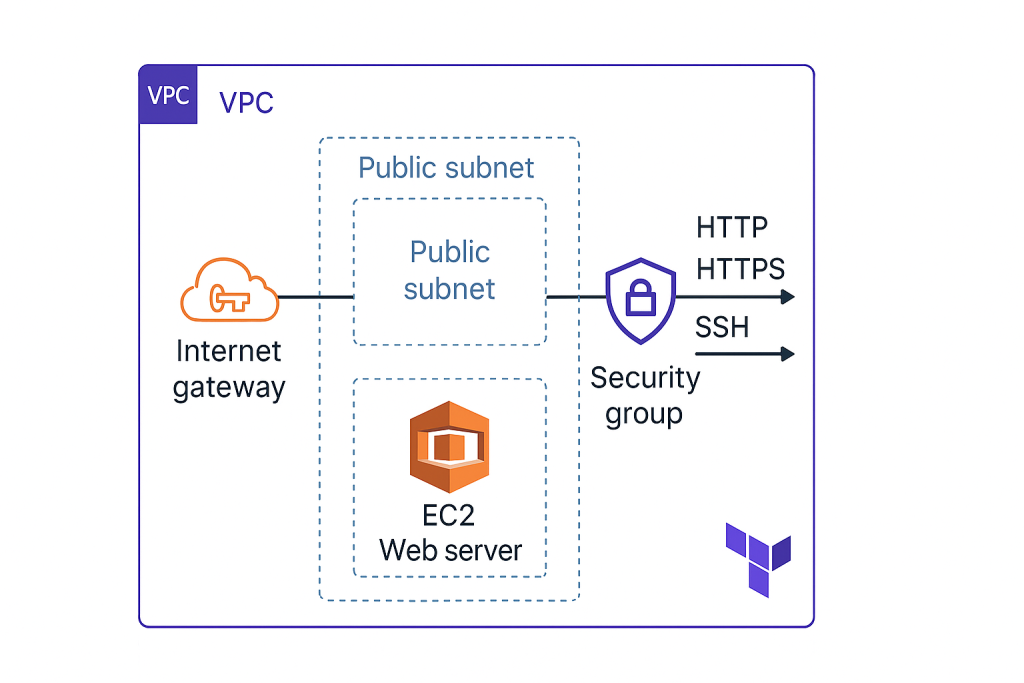
We’ll create:
- A Virtual Private Cloud (VPC) with public and private subnets
- A web server that serves a simple application
- Security groups that implement defence-in-depth principles
- Monitoring and logging capabilities for operational visibility
This architecture reflects real-world requirements whilst teaching fundamental Terraform patterns that scale to complex environments.
Step 1: Project Structure and Provider Configuration
Create a new directory for your project and establish the foundation:
# main.tf
terraform {
  required_version = ">= 1.0"
  required_providers {
    aws = {
      source  = "hashicorp/aws"
      version = "~> 5.0"
    }
  }
}

provider "aws" {
  region = var.aws_region
}

# variables.tf
variable "aws_region" {
  description = "AWS region for resources"
  type        = string
  default     = "eu-west-2"  # London region
}

variable "project_name" {
  description = "Name prefix for all resources"
  type        = string
  default     = "iac-demo"
}

variable "environment" {
  description = "Environment name"
  type        = string
  default     = "dev"
}
This foundation establishes version constraints that prevent compatibility issues whilst defining variables that make the infrastructure reusable across different contexts. Notice how we’re already thinking about multiple environments—a pattern that becomes crucial in professional practice.
Step 2: Network Foundation
# networking.tf
data "aws_availability_zones" "available" {
  state = "available"
}

resource "aws_vpc" "main" {
  cidr_block           = "10.0.0.0/16"
  enable_dns_hostnames = true
  enable_dns_support   = true

  tags = {
    Name        = "${var.project_name}-vpc"
    Environment = var.environment
  }
}

resource "aws_internet_gateway" "main" {
  vpc_id = aws_vpc.main.id

  tags = {
    Name        = "${var.project_name}-igw"
    Environment = var.environment
  }
}

resource "aws_subnet" "public" {
  count                   = 2
  vpc_id                  = aws_vpc.main.id
  cidr_block              = "10.0.${count.index + 1}.0/24"
  availability_zone       = data.aws_availability_zones.available.names[count.index]
  map_public_ip_on_launch = true

  tags = {
    Name        = "${var.project_name}-public-${count.index + 1}"
    Environment = var.environment
    Type        = "public"
  }
}

resource "aws_route_table" "public" {
  vpc_id = aws_vpc.main.id

  route {
    cidr_block = "0.0.0.0/0"
    gateway_id = aws_internet_gateway.main.id
  }

  tags = {
    Name        = "${var.project_name}-public-rt"
    Environment = var.environment
  }
}

resource "aws_route_table_association" "public" {
  count          = length(aws_subnet.public)
  subnet_id      = aws_subnet.public[count.index].id
  route_table_id = aws_route_table.public.id
}
This networking configuration demonstrates several professional patterns: using data sources to discover available zones automatically, implementing consistent tagging strategies, and creating multiple subnets for high availability. The count parameter shows how Terraform handles resource duplication elegantly.
Step 3: Security and Compute Resources
# security.tf
resource "aws_security_group" "web" {
  name_prefix = "${var.project_name}-web-"
  vpc_id      = aws_vpc.main.id
  description = "Security group for web servers"

  ingress {
    description = "HTTP"
    from_port   = 80
    to_port     = 80
    protocol    = "tcp"
    cidr_blocks = ["0.0.0.0/0"]
  }

  ingress {
    description = "HTTPS"
    from_port   = 443
    to_port     = 443
    protocol    = "tcp"
    cidr_blocks = ["0.0.0.0/0"]
  }

  ingress {
    description = "SSH"
    from_port   = 22
    to_port     = 22
    protocol    = "tcp"
    cidr_blocks = ["10.0.0.0/16"]  # Only from VPC
  }

  egress {
    from_port   = 0
    to_port     = 0
    protocol    = "-1"
    cidr_blocks = ["0.0.0.0/0"]
  }

  tags = {
    Name        = "${var.project_name}-web-sg"
    Environment = var.environment
  }
}

# compute.tf
data "aws_ami" "amazon_linux" {
  most_recent = true
  owners      = ["amazon"]

  filter {
    name   = "name"
    values = ["amzn2-ami-hvm-*-x86_64-gp2"]
  }
}

resource "aws_instance" "web" {
  ami                    = data.aws_ami.amazon_linux.id
  instance_type          = "t3.micro"
  subnet_id              = aws_subnet.public[0].id
  vpc_security_group_ids = [aws_security_group.web.id]

  user_data = base64encode(templatefile("${path.module}/user_data.sh", {
    project_name = var.project_name
  }))

  tags = {
    Name        = "${var.project_name}-web-server"
    Environment = var.environment
  }
}
Step 4: Application Deployment Script
Create a user_data.sh file for application deployment:
#!/bin/bash
yum update -y
yum install -y httpd

systemctl start httpd
systemctl enable httpd

cat > /var/www/html/index.html << EOF
<!DOCTYPE html>
<html>
<head>
    <title>${project_name} - Infrastructure as Code Demo</title>
    <style>
        body { font-family: Arial, sans-serif; margin: 40px; background: #f4f4f4; }
        .container { background: white; padding: 30px; border-radius: 8px; box-shadow: 0 2px 4px rgba(0,0,0,0.1); }
        .success { color: #28a745; font-weight: bold; }
    </style>
</head>
<body>
    <div class="container">
        <h1 class="success">Infrastructure as Code Success!</h1>
        <p>This web server was deployed using Terraform.</p>
        <p><strong>Instance:</strong> $(curl -s http://169.254.169.254/latest/meta-data/instance-id)</p>
        <p><strong>Region:</strong> $(curl -s http://169.254.169.254/latest/meta-data/placement/region)</p>
        <p><strong>Deployment time:</strong> $(date)</p>
    </div>
</body>
</html>
EOF
Step 5: Outputs for Operational Visibility
# outputs.tf
output "vpc_id" {
  description = "ID of the VPC"
  value       = aws_vpc.main.id
}

output "web_server_public_ip" {
  description = "Public IP address of the web server"
  value       = aws_instance.web.public_ip
}

output "web_server_url" {
  description = "URL to access the web application"
  value       = "http://${aws_instance.web.public_ip}"
}

output "ssh_connection" {
  description = "SSH connection command (requires key pair)"
  value       = "ssh -i your-key.pem ec2-user@${aws_instance.web.public_ip}"
}
Deployment and Verification: Your First Infrastructure Pipeline
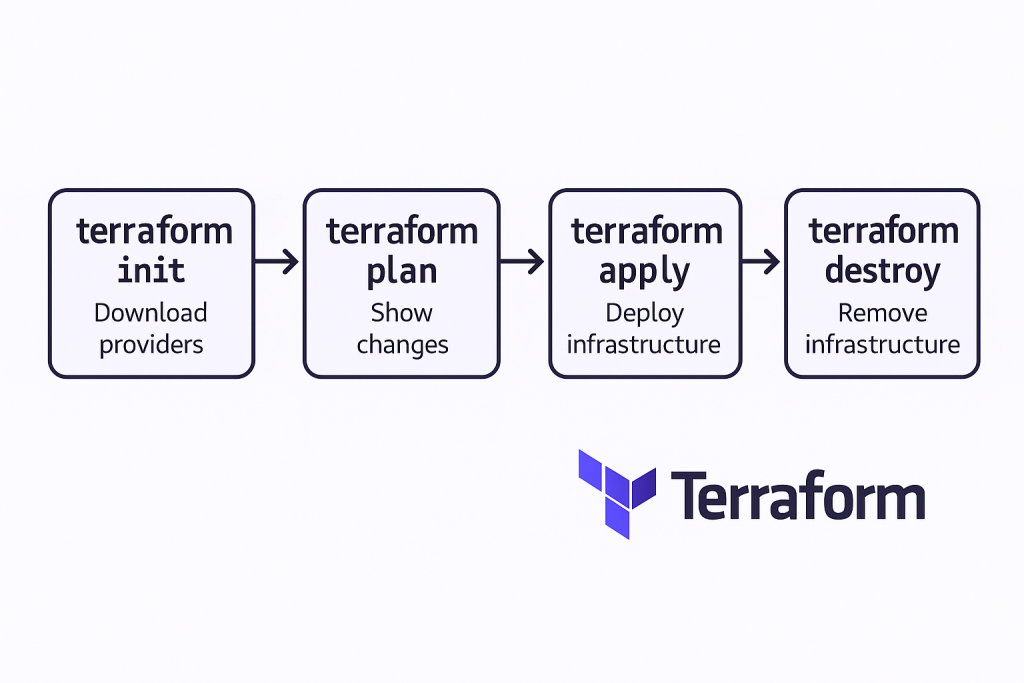
Deploy this infrastructure using Terraform’s standard workflow:
# Initialise Terraform and download providers
terraform init

# Review the execution plan
terraform plan

# Apply the configuration
terraform apply
Terraform will show you exactly what it plans to create before making any changes. This planning phase represents one of the tool’s most valuable features—you can review, approve, and understand every modification before it affects your infrastructure.
After deployment, visit the web server URL from the output to verify your application is running. You’ve just created a complete web infrastructure using code that you can version control, modify, and redeploy consistently.
Professional Patterns: What Makes This Example Career-Relevant
This simple example demonstrates patterns that appear in every enterprise Infrastructure as Code implementation. The variable system enables environment-specific configurations without duplicating code. The tagging strategy provides operational visibility and cost management capabilities that enterprise environments require.
The security group configuration implements defence-in-depth principles: web traffic from anywhere, SSH access only from within the VPC. This thinking—considering security implications of every network decision—characterises professional infrastructure design. The outputs provide operational information that monitoring systems and team members need for ongoing management.
The file organisation separates concerns logically: networking, security, compute, and outputs each have dedicated files. This structure scales to complex environments whilst maintaining readability and collaboration effectiveness. Professional Terraform implementations extend this organisation through modules and shared libraries.
Common Pitfalls: Learning from Others’ Experience
New Terraform practitioners encounter predictable challenges that can derail learning progress. Understanding these pitfalls prevents frustration whilst accelerating competency development.
State file management causes the most confusion for beginners. The terraform.tfstate file contains sensitive information and must be protected appropriately. For learning purposes, local state files work adequately, but professional implementations require remote state storage with proper access controls. We’ll address this in subsequent posts about team collaboration.
Resource dependencies sometimes require explicit definition rather than relying on Terraform’s automatic dependency detection. When resources reference each other through interpolation, Terraform understands the relationships automatically. When dependencies exist outside Terraform’s visibility, use the depends_on argument to ensure proper ordering.
Version constraints prevent unexpected behaviour when providers update. Always specify provider versions in production environments, accepting minor version updates whilst preventing major version changes that might introduce breaking modifications.
Architectural Thinking: Beyond Individual Resources
Professional Infrastructure as Code practice requires thinking in systems rather than individual components. The example we’ve built demonstrates this through consistent naming conventions, logical resource grouping, and configuration that anticipates operational requirements.
Notice how every resource includes environment and project tags—these enable cost tracking, automated policy enforcement, and operational organisation that becomes essential in multi-team environments. The subnet configuration creates multiple availability zones automatically, providing resilience without manual intervention.
The security group rules implement principle of least privilege: only necessary ports are opened, SSH access is restricted to the VPC, and egress rules permit outbound connectivity without creating unnecessary attack surfaces. These decisions reflect security thinking that applies across all infrastructure design.
Career Connection: How This Foundation Scales
The patterns demonstrated in this simple example scale directly to enterprise architectures worth millions in annual cloud spending. The variable system evolves into sophisticated configuration management for different environments, regions, and business units. The networking foundation extends to complex multi-tier applications with databases, load balancers, and microservices.
More importantly, the thinking patterns you’re developing—considering security implications, planning for operational requirements, designing for reusability—characterise the strategic technical roles that command premium compensation. Infrastructure as Code expertise enables participation in architectural decisions that affect entire organisations rather than individual applications.
The code we’ve written demonstrates competency that hiring managers recognise immediately. You can deploy this example during technical interviews, explain the architectural decisions, and modify it to address specific requirements. This practical demonstration carries more weight than theoretical knowledge when competing for positions.
Preparing for Next Week: Multi-Environment Mastery
Next week’s post, “Multi-Environment Mastery: Dev, Staging, Production with Terraform,” builds on this foundation to address one of the most common enterprise requirements: managing identical infrastructure across different environments with appropriate variations.
Before then, experiment with the code we’ve created. Modify the instance type, add additional security group rules, or change the application content. Each modification reinforces understanding whilst building confidence with Terraform’s workflow.
Consider the operational implications of what you’ve built. How would you monitor this infrastructure? What would happen if the instance failed? How would you scale it to handle increased traffic? These questions guide next week’s content whilst developing the systems thinking that characterises senior infrastructure professionals.
The transition from manual infrastructure management to Infrastructure as Code represents more than learning a new tool—it’s developing a different approach to technical problem-solving that opens advanced career opportunities. Each concept you master builds towards expertise that organisations value and compensate accordingly.
Infrastructure as Code mastery isn’t achieved through reading alone—it requires consistent practice with increasingly complex scenarios. The foundation we’ve established today supports the advanced patterns that define professional expertise and career advancement in cloud computing.
Complete Code Repository
For reference, here’s the complete file structure for this week’s example:
terraform-fundamentals/
├── main.tf          # Provider and Terraform configuration
├── variables.tf     # Input variables and defaults
├── networking.tf    # VPC, subnets, routing
├── security.tf      # Security groups and rules
├── compute.tf       # EC2 instances and configuration
├── outputs.tf       # Output values for operational use
└── user_data.sh     # Application deployment script
Useful Links
- Terraform AWS Provider Documentation – Complete reference for AWS resources
- HashiCorp Configuration Language Guide – HCL syntax and functions reference
- Terraform AWS Getting Started – Official tutorial series
- AWS Free Tier Guide – Understanding cost implications for practice
- Terraform State Management – Deep dive into state file concepts
- AWS VPC Best Practices – Security considerations for networking
- Terraform Variable Types – Advanced variable configuration patterns
- Infrastructure as Code Security – Security principles for IaC implementations
- Terraform Resource Lifecycle – Managing resource changes safely
- Common Terraform Mistakes – Practical pitfalls and solutions