Getting Azure Application Gateway running with Web Application Firewall is straightforward enough, most organisations have the basics in place within an afternoon. However, the difference between a functional setup and a robust, production-ready configuration lies in the details that often get overlooked during initial deployments.
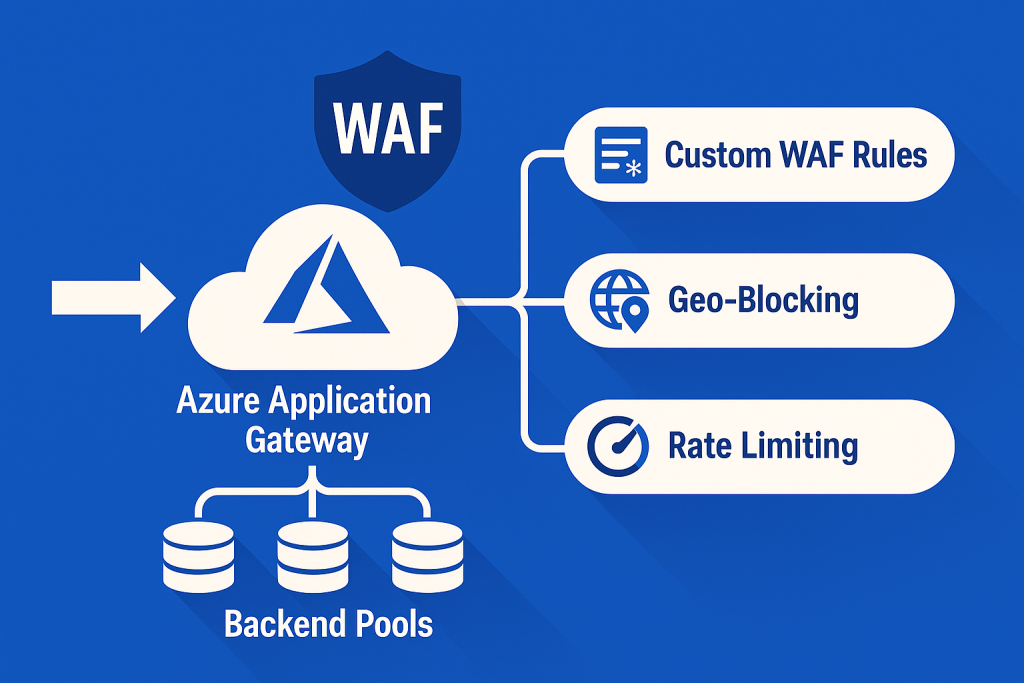
This guide explores three critical areas that transform Application Gateway from a simple load balancer into a sophisticated security and traffic management platform: custom WAF rules tailored to API endpoints, granular rate limiting per backend pool, and health probe optimization that actually reflects application health.
Custom WAF Rules for API Protection
The default OWASP Core Rule Set provides excellent baseline protection, but API endpoints require additional consideration. Modern APIs often use patterns that can trigger false positives, whilst simultaneously being vulnerable to attacks that generic rulesets miss.
Understanding Rule Priorities and Matching
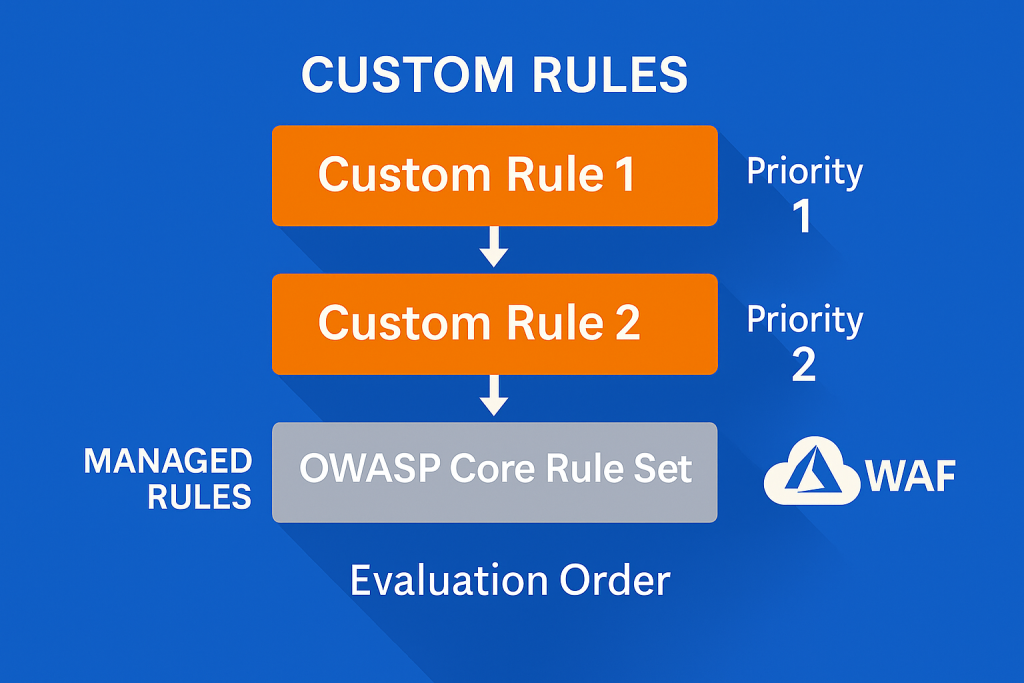
Custom rules in Azure WAF operate on a priority system from 1 to 100, with lower numbers evaluated first. This ordering matters considerably when building layered protection strategies.
resource "azurerm_web_application_firewall_policy" "api_protection" {
  name                = "api-waf-policy"
  resource_group_name = azurerm_resource_group.main.name
  location            = azurerm_resource_group.main.location

  # Custom rule to block suspicious user agents targeting APIs
  custom_rules {
    name      = "BlockSuspiciousAgents"
    priority  = 10
    rule_type = "MatchRule"
    action    = "Block"

    match_conditions {
      match_variables {
        variable_name = "RequestHeaders"
        selector      = "User-Agent"
      }

      operator           = "Contains"
      negation_condition = false
      match_values = [
        "sqlmap",
        "nikto",
        "masscan",
        "nmap"
      ]
    }
  }

  # Rate limit aggressive API consumers
  custom_rules {
    name      = "RateLimitApiCalls"
    priority  = 20
    rule_type = "RateLimitRule"
    action    = "Block"

    match_conditions {
      match_variables {
        variable_name = "RequestUri"
      }

      operator           = "BeginsWith"
      negation_condition = false
      match_values       = ["/api/"]
    }

    rate_limit_duration_in_minutes = 1
    rate_limit_threshold           = 100
    group_by_user_session          = false
  }

  # Protect against JSON payload attacks
  custom_rules {
    name      = "BlockOversizedJsonPayloads"
    priority  = 30
    rule_type = "MatchRule"
    action    = "Block"

    match_conditions {
      match_variables {
        variable_name = "RequestHeaders"
        selector      = "Content-Type"
      }

      operator           = "Contains"
      negation_condition = false
      match_values       = ["application/json"]
    }

    match_conditions {
      match_variables {
        variable_name = "RequestHeaders"
        selector      = "Content-Length"
      }

      operator           = "GreaterThan"
      negation_condition = false
      match_values       = ["1048576"]  # 1MB limit
    }
  }

  managed_rules {
    managed_rule_set {
      type    = "OWASP"
      version = "3.2"
    }
  }

  policy_settings {
    enabled                     = true
    mode                        = "Prevention"
    request_body_check          = true
    file_upload_limit_in_mb     = 100
    max_request_body_size_in_kb = 128
  }
}
Geo-Blocking for Compliance
Organisations subject to data sovereignty requirements often need to restrict traffic by geographic origin. Custom rules make this enforcement explicit and auditable.
resource "azurerm_web_application_firewall_policy" "geo_restricted" {
  name                = "geo-restricted-waf"
  resource_group_name = azurerm_resource_group.main.name
  location            = azurerm_resource_group.main.location

  custom_rules {
    name      = "AllowOnlyEUTraffic"
    priority  = 5
    rule_type = "MatchRule"
    action    = "Block"

    match_conditions {
      match_variables {
        variable_name = "RemoteAddr"
      }

      operator           = "GeoMatch"
      negation_condition = true  # Block if NOT in allowed countries
      match_values = [
        "GB",
        "FR",
        "DE",
        "IE",
        "NL",
        "BE"
      ]
    }
  }
}
Pro Tip: Always test WAF rules in Detection mode first. Monitor blocked requests for at least a week before switching to Prevention mode. False positives in production can be more damaging than the attacks you’re trying to prevent.
Rate Limiting Per Backend Pool
Application Gateway supports sophisticated traffic shaping beyond simple request count limits. Different backend pools often require vastly different rate limiting strategies, administrative endpoints need stricter controls than public content APIs.
Backend-Specific Rate Limiting Strategy
resource "azurerm_application_gateway" "main" {
  name                = "api-gateway"
  resource_group_name = azurerm_resource_group.main.name
  location            = azurerm_resource_group.main.location

  sku {
    name     = "WAF_v2"
    tier     = "WAF_v2"
    capacity = 2
  }

  backend_address_pool {
    name = "public-api-pool"
  }

  backend_address_pool {
    name = "admin-api-pool"
  }

  backend_address_pool {
    name = "internal-services-pool"
  }

  backend_http_settings {
    name                  = "public-api-settings"
    cookie_based_affinity = "Disabled"
    port                  = 443
    protocol              = "Https"
    request_timeout       = 60

    probe_name = "public-api-health-probe"
  }

  backend_http_settings {
    name                  = "admin-api-settings"
    cookie_based_affinity = "Enabled"
    port                  = 443
    protocol              = "Https"
    request_timeout       = 120

    probe_name = "admin-api-health-probe"
  }

  # Frontend configuration
  frontend_ip_configuration {
    name                 = "public-frontend"
    public_ip_address_id = azurerm_public_ip.gateway.id
  }

  frontend_port {
    name = "https-port"
    port = 443
  }

  # Listener with WAF policy
  http_listener {
    name                           = "public-api-listener"
    frontend_ip_configuration_name = "public-frontend"
    frontend_port_name             = "https-port"
    protocol                       = "Https"
    ssl_certificate_name           = "api-ssl-cert"
    firewall_policy_id             = azurerm_web_application_firewall_policy.api_protection.id
  }

  # Routing rules
  request_routing_rule {
    name                       = "public-api-routing"
    rule_type                  = "PathBasedRouting"
    http_listener_name         = "public-api-listener"
    url_path_map_name          = "api-path-map"
    priority                   = 100
  }

  url_path_map {
    name                               = "api-path-map"
    default_backend_address_pool_name  = "public-api-pool"
    default_backend_http_settings_name = "public-api-settings"

    path_rule {
      name                       = "admin-path"
      paths                      = ["/admin/*", "/management/*"]
      backend_address_pool_name  = "admin-api-pool"
      backend_http_settings_name = "admin-api-settings"
    }

    path_rule {
      name                       = "internal-path"
      paths                      = ["/internal/*"]
      backend_address_pool_name  = "internal-services-pool"
      backend_http_settings_name = "public-api-settings"
    }
  }

  # Gateway IP configuration
  gateway_ip_configuration {
    name      = "gateway-ip-config"
    subnet_id = azurerm_subnet.gateway.id
  }

  ssl_certificate {
    name     = "api-ssl-cert"
    data     = filebase64("path/to/certificate.pfx")
    password = var.ssl_certificate_password
  }

  waf_configuration {
    enabled          = true
    firewall_mode    = "Prevention"
    rule_set_type    = "OWASP"
    rule_set_version = "3.2"
  }

  tags = {
    Environment = "Production"
    Purpose     = "API-Gateway"
  }
}
Creating Distinct WAF Policies for Different Pools
Rather than applying uniform rate limits, create separate WAF policies for different security zones:
# Strict policy for administrative endpoints
resource "azurerm_web_application_firewall_policy" "admin_strict" {
  name                = "admin-strict-waf"
  resource_group_name = azurerm_resource_group.main.name
  location            = azurerm_resource_group.main.location

  custom_rules {
    name      = "AdminRateLimit"
    priority  = 1
    rule_type = "RateLimitRule"
    action    = "Block"

    match_conditions {
      match_variables {
        variable_name = "RequestUri"
      }

      operator           = "BeginsWith"
      negation_condition = false
      match_values       = ["/admin/"]
    }

    rate_limit_duration_in_minutes = 1
    rate_limit_threshold           = 10  # Only 10 requests per minute
    group_by_user_session          = true
  }

  policy_settings {
    mode                        = "Prevention"
    request_body_check          = true
    max_request_body_size_in_kb = 32  # Smaller payload limit for admin
  }
}

# Permissive policy for public read APIs
resource "azurerm_web_application_firewall_policy" "public_standard" {
  name                = "public-standard-waf"
  resource_group_name = azurerm_resource_group.main.name
  location            = azurerm_resource_group.main.location

  custom_rules {
    name      = "PublicApiRateLimit"
    priority  = 1
    rule_type = "RateLimitRule"
    action    = "Block"

    match_conditions {
      match_variables {
        variable_name = "RequestUri"
      }

      operator           = "BeginsWith"
      negation_condition = false
      match_values       = ["/api/v1/"]
    }

    rate_limit_duration_in_minutes = 1
    rate_limit_threshold           = 300  # More generous for public APIs
    group_by_user_session          = false
  }

  policy_settings {
    mode                        = "Prevention"
    request_body_check          = true
    max_request_body_size_in_kb = 128
  }
}
Pro Tip: Use group_by_user_session = true for authenticated endpoints and false for public APIs. This prevents a single misbehaving client from consuming your entire rate limit allowance, whilst still protecting backend resources from distributed attacks.
Health Probe Optimization and Monitoring
Default health probes check whether a service responds with HTTP 200, but this often proves insufficient. A service can return 200 whilst experiencing database connection issues, memory leaks, or degraded performance that will impact users.
Intelligent Health Probes
resource "azurerm_application_gateway" "main" {
  # ... previous configuration ...

  probe {
    name                                      = "public-api-health-probe"
    protocol                                  = "Https"
    path                                      = "/health/detailed"
    interval                                  = 30
    timeout                                   = 30
    unhealthy_threshold                       = 3
    pick_host_name_from_backend_http_settings = false
    host                                      = "api.example.com"

    match {
      status_code = ["200"]
      body        = "healthy"  # Require specific response content
    }
  }

  probe {
    name                                      = "admin-api-health-probe"
    protocol                                  = "Https"
    path                                      = "/admin/health"
    interval                                  = 20  # More frequent checking for critical services
    timeout                                   = 20
    unhealthy_threshold                       = 2  # Faster failure detection
    pick_host_name_from_backend_http_settings = false
    host                                      = "admin-api.example.com"

    match {
      status_code = ["200"]
      body        = "database:ok,cache:ok"  # Verify dependencies
    }
  }

  # Probe for services with longer startup times
  probe {
    name                                      = "slow-start-service-probe"
    protocol                                  = "Https"
    path                                      = "/health"
    interval                                  = 60
    timeout                                   = 60
    unhealthy_threshold                       = 5  # More tolerance during deployments
    pick_host_name_from_backend_http_settings = true

    match {
      status_code = ["200", "201"]
    }
  }
}
Example Backend Health Endpoint
The health probe endpoint should verify actual application functionality, not just process liveness:
# Example health check endpoint (Python/FastAPI)
from fastapi import FastAPI, Response, status
import redis
import psycopg2

app = FastAPI()

@app.get("/health/detailed")
async def detailed_health():
    checks = {
        "database": check_database(),
        "cache": check_cache(),
        "disk": check_disk_space()
    }

    all_healthy = all(checks.values())

    if all_healthy:
        return Response(
            content="healthy",
            status_code=status.HTTP_200_OK,
            media_type="text/plain"
        )
    else:
        return Response(
            content=f"unhealthy: {checks}",
            status_code=status.HTTP_503_SERVICE_UNAVAILABLE,
            media_type="text/plain"
        )

def check_database():
    try:
        conn = psycopg2.connect(
            host="db.example.com",
            database="production",
            timeout=5
        )
        conn.close()
        return True
    except:
        return False

def check_cache():
    try:
        r = redis.Redis(host='cache.example.com', socket_timeout=5)
        r.ping()
        return True
    except:
        return False
Comprehensive Monitoring Configuration
Effective monitoring requires capturing both Application Gateway metrics and WAF activity. Azure Monitor provides the telemetry, but the configuration determines whether teams receive actionable alerts.
# Log Analytics Workspace for centralised logging
resource "azurerm_log_analytics_workspace" "gateway" {
  name                = "gateway-logs"
  location            = azurerm_resource_group.main.location
  resource_group_name = azurerm_resource_group.main.name
  sku                 = "PerGB2018"
  retention_in_days   = 90
}

# Diagnostic settings for Application Gateway
resource "azurerm_monitor_diagnostic_setting" "gateway" {
  name                       = "gateway-diagnostics"
  target_resource_id         = azurerm_application_gateway.main.id
  log_analytics_workspace_id = azurerm_log_analytics_workspace.gateway.id

  enabled_log {
    category = "ApplicationGatewayAccessLog"
  }

  enabled_log {
    category = "ApplicationGatewayPerformanceLog"
  }

  enabled_log {
    category = "ApplicationGatewayFirewallLog"
  }

  metric {
    category = "AllMetrics"
    enabled  = true
  }
}

# Alert for unhealthy backend instances
resource "azurerm_monitor_metric_alert" "unhealthy_backends" {
  name                = "gateway-unhealthy-backends"
  resource_group_name = azurerm_resource_group.main.name
  scopes              = [azurerm_application_gateway.main.id]
  description         = "Alert when backend instances become unhealthy"
  severity            = 2
  frequency           = "PT1M"
  window_size         = "PT5M"

  criteria {
    metric_namespace = "Microsoft.Network/applicationGateways"
    metric_name      = "UnhealthyHostCount"
    aggregation      = "Average"
    operator         = "GreaterThan"
    threshold        = 0
  }

  action {
    action_group_id = azurerm_monitor_action_group.ops_team.id
  }
}

# Alert for WAF blocks indicating potential attack
resource "azurerm_monitor_metric_alert" "waf_blocks" {
  name                = "gateway-high-waf-blocks"
  resource_group_name = azurerm_resource_group.main.name
  scopes              = [azurerm_application_gateway.main.id]
  description         = "Alert when WAF blocks exceed threshold"
  severity            = 1
  frequency           = "PT1M"
  window_size         = "PT5M"

  criteria {
    metric_namespace = "Microsoft.Network/applicationGateways"
    metric_name      = "BlockedReqs"
    aggregation      = "Total"
    operator         = "GreaterThan"
    threshold        = 100
  }

  action {
    action_group_id = azurerm_monitor_action_group.security_team.id
  }
}

# Alert for high response times
resource "azurerm_monitor_metric_alert" "high_latency" {
  name                = "gateway-high-latency"
  resource_group_name = azurerm_resource_group.main.name
  scopes              = [azurerm_application_gateway.main.id]
  description         = "Alert when response times exceed 2 seconds"
  severity            = 2
  frequency           = "PT1M"
  window_size         = "PT5M"

  criteria {
    metric_namespace = "Microsoft.Network/applicationGateways"
    metric_name      = "BackendLastByteResponseTime"
    aggregation      = "Average"
    operator         = "GreaterThan"
    threshold        = 2000  # milliseconds
  }

  action {
    action_group_id = azurerm_monitor_action_group.ops_team.id
  }
}
KQL Queries for WAF Analysis
// Top 10 blocked requests by source IP
AzureDiagnostics
| where ResourceType == "APPLICATIONGATEWAYS"
| where Category == "ApplicationGatewayFirewallLog"
| where action_s == "Blocked"
| summarize BlockCount = count() by clientIp_s
| top 10 by BlockCount desc

// WAF rule effectiveness
AzureDiagnostics
| where ResourceType == "APPLICATIONGATEWAYS"
| where Category == "ApplicationGatewayFirewallLog"
| summarize count() by ruleId_s, Message
| order by count_ desc

// Response time trends by backend pool
AzureDiagnostics
| where ResourceType == "APPLICATIONGATEWAYS"
| where Category == "ApplicationGatewayAccessLog"
| summarize avg(timeTaken_d) by backendPoolName_s, bin(TimeGenerated, 5m)
| render timechart
Pro Tip: Create a separate Log Analytics workspace for security-related logs (WAF blocks, access logs) and retain them for longer periods. This supports forensic analysis and compliance requirements whilst keeping operational logs in shorter-retention workspaces to control costs.
Key Takeaways
Transforming Azure Application Gateway from basic load balancer to enterprise-grade security platform requires attention to three critical areas: custom WAF rules that understand application-specific attack vectors, differentiated rate limiting strategies across backend pools, and health probes that verify actual service health rather than simple connectivity.
The investment in proper configuration pays dividends through reduced false positives, faster incident detection, and protection against attacks that generic rulesets miss. Most importantly, these configurations should evolve alongside applications, what protects today’s API endpoints may need refinement as new features deploy or attack patterns emerge.
Organisations serious about API security should review their Application Gateway configurations quarterly, analysing WAF block patterns, health probe false negatives, and rate limit effectiveness. The infrastructure that protects applications deserves the same care as the applications themselves.