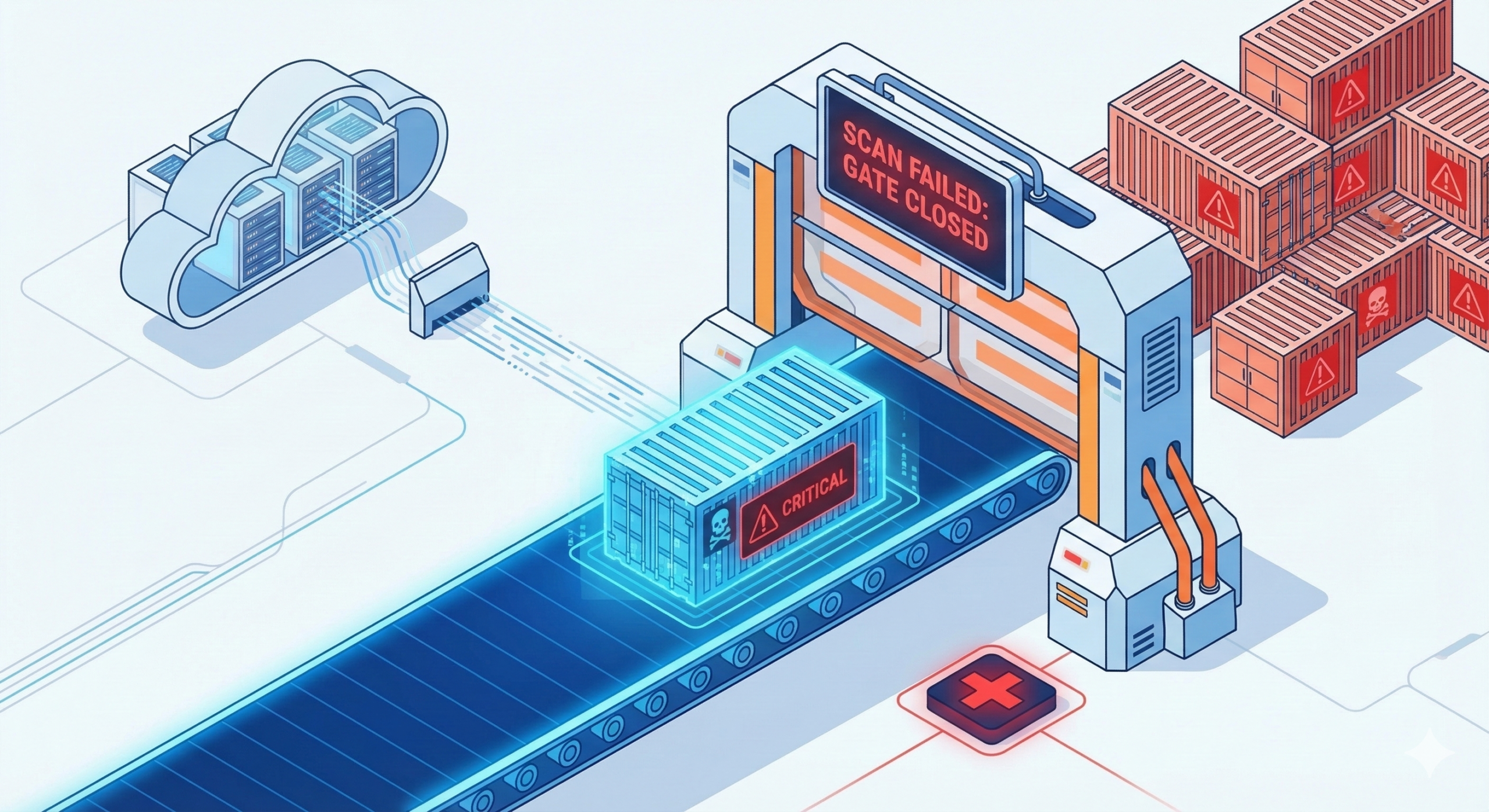
Most GCP teams enable the Container Scanning API, check the Artifact Registry console once, and consider the job done. The scan results sit there, a growing list of CRITICAL and HIGH severity CVEs, while the pipeline keeps pushing images to production regardless. Enabling scanning without wiring it to a pipeline gate is security theatre. This tip closes that gap with a Cloud Build pattern that treats a CRITICAL vulnerability the same way it treats a failed unit test: the build stops, nothing ships.
The default posture is passive. Google’s Artifact Analysis service scans every new image digest pushed to Artifact Registry automatically, updates results continuously as new CVE data arrives, and surfaces findings in the console. What it does not do is stop your deployment. That decision belongs in your pipeline, and it requires about 30 additional lines in your cloudbuild.yaml.
How Artifact Registry Scanning Actually Works
Understanding the mechanics prevents the gotchas that catch enterprise teams out.
Scanning triggers on image digest, not on tags. Pushing myapp:latest over an existing myapp:latest tag does not trigger a new scan if the underlying digest is unchanged. This matters when teams retag images for environment promotion. A myapp:prod tag pointing at a digest scanned three weeks ago will not generate fresh results. The scan is from the original push.
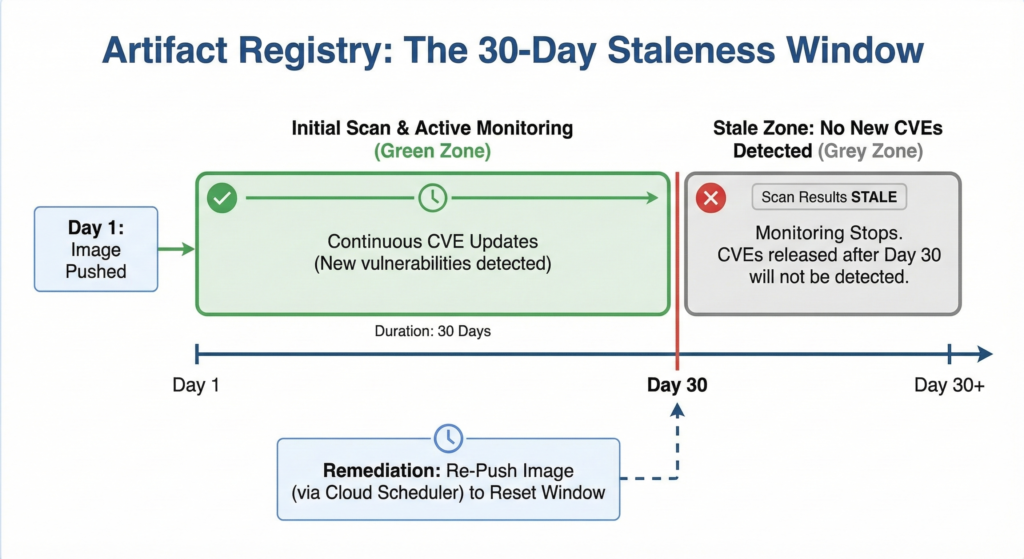
After the initial scan, Artifact Analysis continuously monitors for new vulnerabilities for 30 days from the last time the image was pulled or pushed. After that window, results go stale and stop updating. For long-lived base images (your Istio sidecars and internal tooling images that rarely update), you need a scheduled re-push to keep the monitoring window active. Without it, a CVE published on day 31 produces no alert.
Language package scanning covers Go, Java, Python, Node.js, Ruby, Rust, .NET, and PHP in addition to OS packages, all included in the standard $0.26 per image scan charge. That breadth makes the automatic scan genuinely useful for application containers, not just for OS-level patching awareness.
The Two Scanning Approaches
Artifact Registry offers two scanning modes relevant to a CI/CD pipeline, and the right enterprise pattern uses both.
Automatic scanning fires when you push to the registry. It is the baseline: always on, always updating. The limitation is timing: results typically take 1-5 minutes to complete after push, which means you cannot reliably gate the same push on its own scan results without polling.
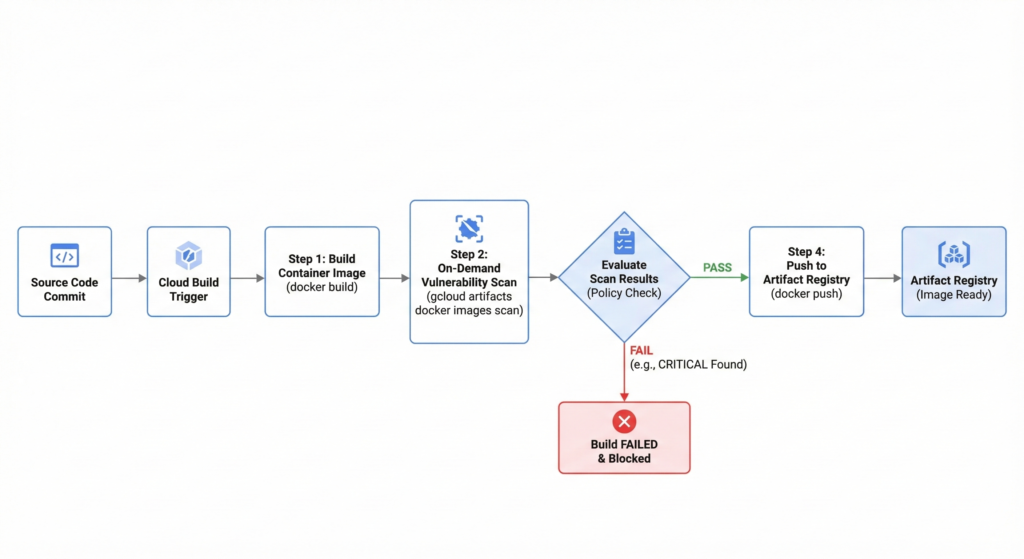
On-demand scanning runs before you push, using the gcloud artifacts docker images scan command against a locally built image. This is the gate you want in Cloud Build: scan the image in the build environment, evaluate results, fail if thresholds are exceeded, and only push to the registry if the image passes. The post-push automatic scan then provides continuous monitoring as new CVEs emerge.
The Cloud Build Pipeline
Enable the required APIs and grant the Cloud Build service account scanning permissions first:
# Enable APIs
gcloud services enable containerscanning.googleapis.com
gcloud services enable ondemandscanning.googleapis.com

# Grant Cloud Build service account scanning permissions
PROJECT_NUMBER=$(gcloud projects describe ${PROJECT_ID} --format="value(projectNumber)")

gcloud projects add-iam-policy-binding ${PROJECT_ID} \
  --member="serviceAccount:${PROJECT_NUMBER}@cloudbuild.gserviceaccount.com" \
  --role="roles/ondemandscanning.admin"
The cloudbuild.yaml below builds the image, runs an on-demand scan before pushing, evaluates results against a severity policy, and only pushes if the image passes. It uses SHORT_SHA for image tagging to ensure each commit produces a unique, scannable digest.
# cloudbuild.yaml
steps:
  # Step 1: Build the container image
  - name: 'gcr.io/cloud-builders/docker'
    args:
      - 'build'
      - '-t'
      - '${_REGISTRY}/${_IMAGE}:${SHORT_SHA}'
      - '.'
    id: 'build'

  # Step 2: Run on-demand vulnerability scan before pushing
  - name: 'gcr.io/google.com/cloudsdktool/cloud-sdk'
    entrypoint: 'bash'
    args:
      - '-c'
      - |
        gcloud artifacts docker images scan \
          ${_REGISTRY}/${_IMAGE}:${SHORT_SHA} \
          --location=europe-west2 \
          --format='value(response.scan)' > /workspace/scan_id.txt
        echo "Scan ID: $(cat /workspace/scan_id.txt)"
    id: 'scan'
    waitFor: ['build']

  # Step 3: Evaluate results - fail build on CRITICAL vulnerabilities
  - name: 'gcr.io/google.com/cloudsdktool/cloud-sdk'
    entrypoint: 'bash'
    args:
      - '-c'
      - |
        SCAN_ID=$(cat /workspace/scan_id.txt)
        echo "Evaluating scan results for: $SCAN_ID"

        # Extract severity counts
        CRITICAL=$(gcloud artifacts docker images list-vulnerabilities $SCAN_ID \
          --format="value(vulnerability.effectiveSeverity)" \
          | grep -c "CRITICAL" || true)

        HIGH=$(gcloud artifacts docker images list-vulnerabilities $SCAN_ID \
          --format="value(vulnerability.effectiveSeverity)" \
          | grep -c "HIGH" || true)

        echo "CRITICAL vulnerabilities: $CRITICAL"
        echo "HIGH vulnerabilities: $HIGH"

        # Policy: zero tolerance for CRITICAL, alert on HIGH > 5
        if [ "$CRITICAL" -gt 0 ]; then
          echo "BUILD FAILED: $CRITICAL CRITICAL vulnerabilities found."
          echo "Resolve all CRITICAL CVEs before this image can be pushed."
          exit 1
        fi

        if [ "$HIGH" -gt 5 ]; then
          echo "BUILD FAILED: $HIGH HIGH vulnerabilities exceed threshold of 5."
          exit 1
        fi

        echo "Vulnerability check passed. Proceeding to push."
    id: 'evaluate'
    waitFor: ['scan']

  # Step 4: Push only if evaluation passed
  - name: 'gcr.io/cloud-builders/docker'
    args:
      - 'push'
      - '${_REGISTRY}/${_IMAGE}:${SHORT_SHA}'
    id: 'push'
    waitFor: ['evaluate']

substitutions:
  _REGISTRY: 'europe-west2-docker.pkg.dev/${PROJECT_ID}/app-images'
  _IMAGE: 'myservice'

options:
  logging: CLOUD_LOGGING_ONLY
The || true after the grep -c commands prevents bash from treating a zero-match result as a non-zero exit code, which would fail the step before the policy check runs.
Enterprise Considerations
Repository-level scanning control. Artifact Registry now supports enabling and disabling scanning per repository rather than project-wide. For a large organisation with dozens of repositories, this prevents scanning costs from accumulating on low-risk internal tooling repos while keeping it active on customer-facing application images. Manage this with:
# Disable scanning on a specific repository
gcloud artifacts repositories update internal-tools \
  --project=${PROJECT_ID} \
  --location=europe-west2 \
  --disable-vulnerability-scanning

# Re-enable when needed
gcloud artifacts repositories update internal-tools \
  --project=${PROJECT_ID} \
  --location=europe-west2 \
  --allow-vulnerability-scanning
Calibrating severity thresholds. Zero tolerance for CRITICAL is the right starting position. HIGH requires judgment. A team with mature patching processes might tolerate up to five HIGH findings with a documented remediation plan, while a regulated environment processing financial data should treat HIGH the same as CRITICAL. The threshold numbers in the evaluate step are intentional policy decisions, not sensible defaults. Set them in consultation with your security team and document the rationale.
The staleness window and long-lived images. For base images that sit in your registry for months without a push (common for approved golden images), create a Cloud Scheduler job that re-pushes the image on a monthly cadence to reset the 30-day monitoring window. A $0.26 monthly scan cost is negligible insurance against a CVE disclosure going undetected in a trusted base layer.
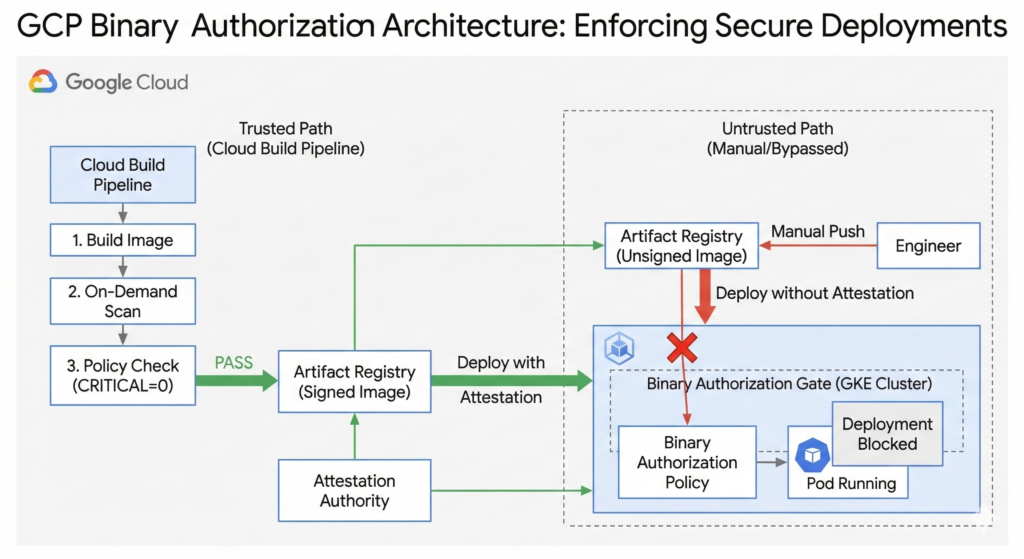
Pairing with Binary Authorization. For teams running GKE, Binary Authorization extends this gate to the deployment layer. Configure an attestation policy that requires a “passed vulnerability scan” attestation before GKE will schedule the pod. This prevents an image that bypassed the Cloud Build pipeline (pushed manually by an engineer with direct registry access) from running in a production cluster. The scanning pattern above and our container security best practices guide cover the configuration in detail.
Cost projection. At $0.26 per image digest, a team pushing 50 unique image digests per day across all services spends roughly $390/month on scanning. For most enterprise teams, that figure is a rounding error against the cost of a single security incident. Where costs do accumulate is in repositories with aggressive CI/CD pipelines generating many unique digests from minor commits. The repository-level control above is the remedy.
This pipeline integrates naturally with the caching strategies covered in our Cloud Build caching guide. Combining layer caching with the scan step keeps total build times under five minutes for most services.
Key Takeaways
Enabling the Container Scanning API without a pipeline gate gives you visibility without enforcement. The pattern above converts scan results into a deployment decision. Three things to implement this week: enable on-demand scanning in your Cloud Build pipeline, set explicit CRITICAL and HIGH thresholds as documented policy, and configure a Cloud Scheduler job for any long-lived base images approaching their 30-day monitoring expiry.