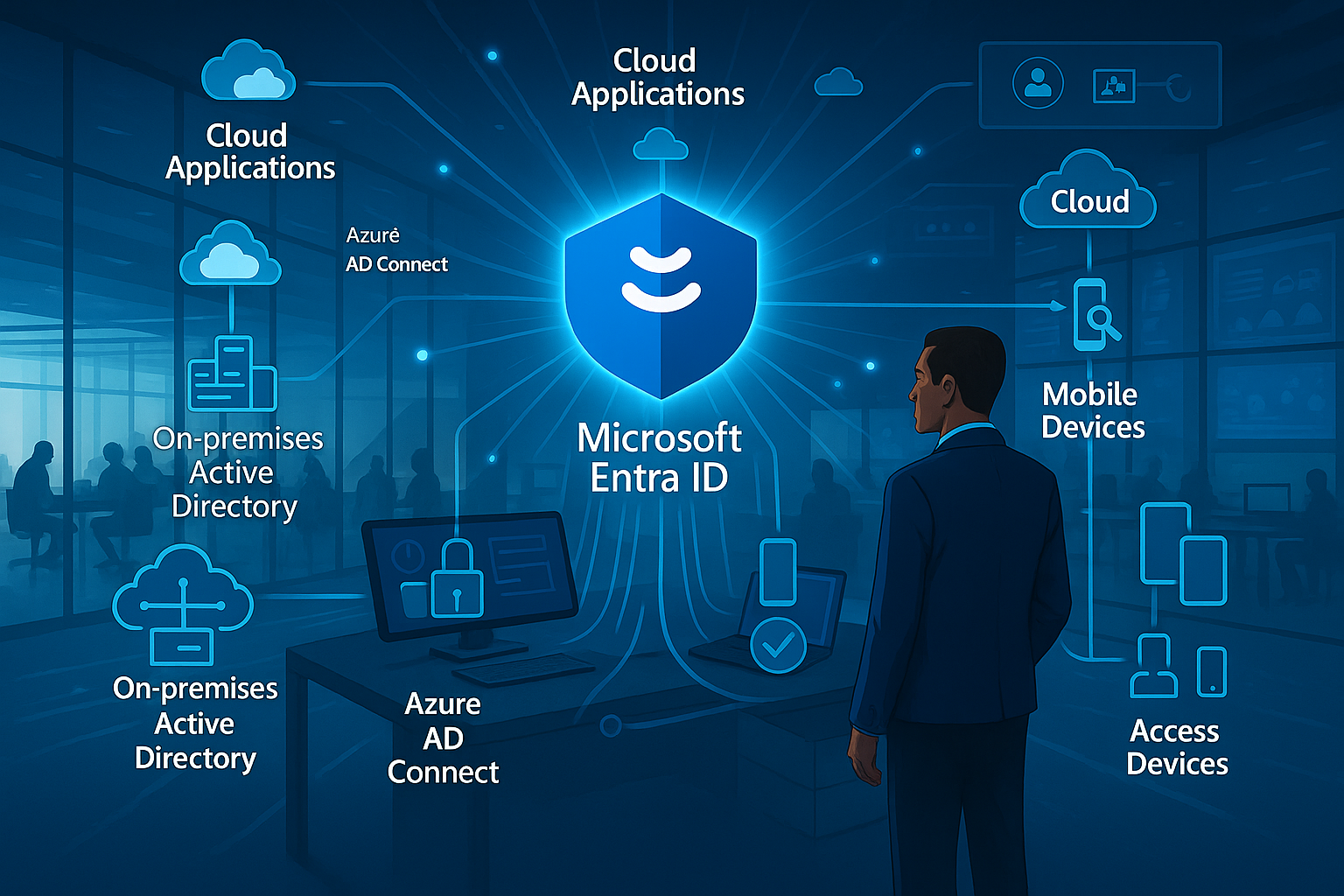
Throughout this masterclass series, we’ve explored Microsoft Entra ID as a foundational platform, a sophisticated authentication service, and a security control plane. In this final instalment, we turn our attention to how identity serves as the connective tissue across your digital ecosystem, binding disparate systems into a cohesive experience for users and administrators alike.
The most successful identity implementations aren’t isolated services but rather integrated components that enhance capabilities across your entire technology landscape. Microsoft Entra ID’s value multiplies when properly connected with your applications, infrastructure, and business processes—transforming from a basic directory into a comprehensive identity fabric.
As organisations navigate complex digital transformation initiatives, hybrid environments, and evolving application portfolios, the ability to implement identity solutions that bridge these worlds becomes increasingly valuable. Let’s explore how Microsoft Entra ID can be integrated across your environment to solve real-world identity challenges.
Hybrid Identity: Bridging Cloud and On-premises
For most established organisations, identity doesn’t begin with cloud services. Decades of investment in on-premises identity infrastructure necessitate thoughtful integration strategies that preserve existing investments whilst enabling cloud transformation. Microsoft Entra ID offers robust hybrid identity capabilities designed for this reality.
Azure AD Connect: The Synchronisation Engine
Azure AD Connect serves as the bridge between your on-premises Active Directory Domain Services (AD DS) and Microsoft Entra ID, providing bidirectional synchronisation of identity objects:
Identity Synchronisation keeps user accounts, groups, and attributes consistent across environments, ensuring users have a single digital identity regardless of where resources reside.
Password Hash Synchronisation enables cloud authentication using the same password both on-premises and in the cloud, without sending actual passwords to Microsoft Entra ID.
Pass-through Authentication validates credentials against on-premises Active Directory directly, ensuring authentication adheres to on-premises policies whilst providing cloud capabilities.
Federation Integration works with AD FS or third-party federation services to enable advanced authentication scenarios whilst maintaining central policy control.
When implementing Azure AD Connect, several architectural decisions shape your hybrid identity model:
Authentication Method Selection determines where and how credentials are validated, balancing security, availability, and operational requirements.
Attribute Flow Direction controls which environment serves as the authoritative source for specific attributes, typically with on-premises AD as primary but with exceptions for cloud-native attributes.
Filtering Scope defines which objects synchronise to the cloud, allowing staged migration or exclusion of service accounts, test users, or other special-case identities.
Topology Considerations account for complex Active Directory forests, multiple domains, or disconnected directories that require custom synchronisation configurations.

Hybrid Authentication Options
The authentication method you select shapes your identity architecture, security posture, and operational requirements:
Password Hash Synchronisation offers the simplest approach with minimal on-premises dependencies. A hashed version of password hashes synchronises to the cloud, enabling cloud authentication without maintaining passwords in Microsoft Entra ID. This method provides cloud authentication resilience even if on-premises infrastructure experiences outages.
Pass-through Authentication validates credentials directly against on-premises Active Directory through lightweight agents, ensuring authentication policies like account lockout or password expiration apply consistently without federation complexity. This method requires connectivity to on-premises authentication endpoints for successful sign-ins.
Federation with AD FS provides advanced authentication scenarios, custom claim transformation, and third-party MFA integration through an on-premises federation service. This approach offers the most customisation but introduces additional infrastructure requirements and complexity.
Federation with Third-Party Providers enables integration with existing investments in federation technologies like Ping, Okta, or other identity providers through standard protocols.
Many organisations begin with Password Hash Synchronisation for its simplicity and resilience, later incorporating Pass-through Authentication for policy consistency or federation for specific advanced scenarios.
Hybrid Access Control
Beyond authentication, hybrid environments require thoughtful access control integration:
Conditional Access for On-premises extends cloud-based policy evaluation to resources accessed through services like Application Proxy, VPN solutions, or Windows Server 2019+ ADFS.
Device Compliance Integration connects Microsoft Intune or third-party endpoint management solutions with identity-driven access policies, ensuring devices meet security requirements before accessing sensitive resources.
Hybrid Role Management aligns administrative permissions across environments, particularly for identity management functions that span cloud and on-premises boundaries.
Certificate-based Authentication provides strong passwordless options that work consistently across environments, particularly valuable for administrative access and sensitive operations.
Implementation Approach for Hybrid Identity
When implementing hybrid identity, consider this phased approach:
Discovery and Assessment – Map your existing identity infrastructure, application authentication dependencies, and business requirements before designing your hybrid model.
Core Infrastructure – Deploy Azure AD Connect with appropriate authentication methods and establish baseline synchronisation before expanding integration.
Progressive Expansion – Extend hybrid capabilities incrementally, starting with user authentication, then application integration, and finally advanced governance across environments.
Monitoring and Optimisation – Continuously review synchronisation health, authentication patterns, and security events across both environments to identify improvement opportunities.
Application Integration Patterns
The true value of identity emerges when applications leverage it for secure, seamless user experiences. Microsoft Entra ID supports diverse application integration patterns suitable for various scenarios, from commercial off-the-shelf solutions to custom development.
Gallery Application Integration
Microsoft Entra ID’s application gallery provides thousands of pre-integrated applications with established authentication patterns:
One-click Configuration simplifies setup for popular SaaS applications through pre-defined integration settings and attribute mappings.
Protocol Variety supports different authentication mechanisms including SAML, OpenID Connect, OAuth, and application-specific integrations.
User Provisioning automates account creation, updates, and deprovisioning in target applications through SCIM protocol or application-specific connectors.
Access Reviews Integration extends governance capabilities to third-party applications, ensuring appropriate access across your entire application portfolio.
When integrating gallery applications, follow these best practices:
Test with Limited Scope – Validate integration patterns with pilot users before broad deployment, particularly for applications with complex provisioning requirements.
Role Mapping Strategy – Establish consistent approaches for mapping Microsoft Entra ID groups or attributes to application-specific roles and permissions.
Break Glass Planning – Ensure administrative access to applications remains available even during identity system maintenance or outages.
License Management – Coordinate application licensing with identity provisioning to prevent access without appropriate entitlements or unnecessary license consumption.
Custom Application Development
For bespoke applications, Microsoft’s identity platform provides developer-friendly integration options:
Microsoft Authentication Library (MSAL) simplifies integration across programming languages and platforms through consistent authentication flows and token handling.
Microsoft Graph API enables applications to access directory data, user profiles, and organisational context through standardised REST endpoints.
Permissions Management provides granular control over what data applications can access and what actions they can perform on behalf of users.
Continuous Access Evaluation allows applications to receive real-time notifications when user access conditions change, enabling immediate session revocation when necessary.
Successful custom application development with Microsoft Entra ID follows these principles:
Security by Design – Incorporate identity considerations from initial architecture rather than retrofitting authentication after development.
Least Privilege – Request only the permissions and scopes necessary for application functionality, reducing potential exposure from compromised applications.
Delegated vs. Application Permissions – Distinguish between actions performed on behalf of users (delegated) and those performed by the application itself regardless of user context.
Cross-platform Consistency – Implement consistent authentication patterns across web, mobile, and desktop experiences to provide seamless user journeys.

Legacy Application Integration
Not all applications support modern authentication protocols natively. Microsoft Entra ID provides several approaches for extending identity to legacy systems:
Application Proxy enables secure remote access to on-premises web applications without VPN requirements, leveraging Microsoft Entra ID for authentication before accessing internal resources.
Header-based Authentication allows integration of applications that rely on HTTP headers for identity information through services like PingAccess for Azure AD.
Password Vaulting securely stores and automatically injects credentials for applications that only support form-based authentication.
API Integration connects custom middleware with Microsoft Graph API to implement bespoke authentication patterns for complex legacy systems.
When integrating legacy applications, consider these architectural approaches:
Layered Modernisation – Implement modern authentication at the access layer while maintaining legacy authentication internally until applications can be updated.
Risk-based Access Policies – Apply additional security controls for legacy applications that may have inherent security limitations due to authentication constraints.
Monitoring Enhancement – Implement additional logging and monitoring for legacy integrations to compensate for potential visibility gaps in native application logs.
Migration Planning – Establish roadmaps for transitioning from stopgap integration methods to native modern authentication support when feasible.
Real-World Implementation Scenarios
Let’s explore how these integration capabilities solve common business challenges through real-world implementation patterns.
Scenario 1: Mergers and Acquisitions
When organisations combine through merger or acquisition, identity integration becomes crucial for enabling collaboration whilst maintaining appropriate boundaries:
Initial Cross-tenant Access establishes limited collaboration between separate Microsoft Entra ID tenants without full integration, allowing immediate basic collaboration.
Identity Evaluation determines long-term integration strategy by assessing both environments’ maturity, policy alignment, and technical compatibility.
Controlled Migration moves users, groups, and resources between environments in phases aligned with business priorities and technical dependencies.
Directory Consolidation eventually combines separate identity environments when appropriate, typically after applications and workloads have been aligned.
Key considerations for M&A identity scenarios include:
Business Timeline Alignment – Identity integration planning must reflect broader business integration goals and communication strategies.
Security Baseline Harmonisation – Address significant security policy differences before deep integration to prevent security regression.
Cultural Change Management – Recognise that identity changes directly impact end-user experience and require thoughtful communication and training.
Application Migration Sequencing – Coordinate identity and application migrations to maintain access continuity throughout transition periods.
Scenario 2: Zero Trust Implementation
Zero Trust security models assume breach and verify explicitly, with identity serving as a cornerstone of the architecture. Microsoft Entra ID enables Zero Trust through:
Continuous Authentication evaluates trust signals throughout user sessions rather than only at initial sign-in, adapting access rights as risk levels or compliance status changes.
Device Trust Integration incorporates endpoint health and compliance status into access decisions, ensuring only managed and compliant devices access sensitive resources.
Least Privilege Access implements just-in-time and just-enough access principles through Privileged Identity Management and granular role definitions.
Network Location Independence shifts security boundaries from network perimeters to identity-based controls that work consistently regardless of connection point.
Implementation strategies for Zero Trust include:
Signal Collection – Deploy monitoring tools that gather authentication, device, network, and behaviour signals for comprehensive risk evaluation.
Policy Implementation – Develop granular Conditional Access policies that evaluate multiple signals before granting resource access.
End-user Enablement – Provide self-service tools for users to remediate common access issues like device compliance or risk detections.
Continuous Improvement – Regularly review effectiveness metrics and user impact, refining policies based on actual usage patterns and threat evolution.

Scenario 3: Remote/Hybrid Workforce Enablement
The shift toward flexible working models requires identity solutions that provide consistent experiences regardless of location:
Location-independent Authentication ensures users can securely access resources without requiring corporate network connections or VPN dependencies.
Passwordless Deployment improves security and user experience simultaneously by eliminating password friction points across work locations.
Cloud Application Consolidation provides a consistent application access portal regardless of user location or device.
Endpoint Management Integration ensures only compliant devices access corporate resources, with streamlined remediation paths for users to resolve issues independently.
Successful remote workforce identity implementations prioritise:
User Experience Focus – Design authentication flows that minimise friction whilst maintaining appropriate security, recognising that remote users lack immediate IT support.
Self-service Capabilities – Provide robust tools for password reset, device remediation, and access requests to reduce helpdesk burden and user downtime.
Connectivity Resilience – Ensure authentication methods work across varied network conditions, including limited bandwidth or unreliable connections.
Contextual Security Controls – Apply appropriate security requirements based on resource sensitivity, recognising that one-size-fits-all policies often frustrate legitimate work.
Scenario 4: B2B Collaboration
Modern organisations rarely operate in isolation. Microsoft Entra ID enables secure collaboration with external partners whilst maintaining security boundaries:
External Identity Management allows partners to use their existing credentials whilst accessing your resources through B2B collaboration capabilities.
Access Packaging creates governed processes for requesting, approving, and provisioning partner access with appropriate lifecycle management.
Conditional Access for Guests applies security policies to external users, potentially with more stringent requirements than internal users.
Cross-tenant Access Settings establish mutual trust relationships between organisations using Microsoft Entra ID, facilitating smoother collaboration experiences.
Key considerations for B2B implementation include:
Governance Automation – Establish automated lifecycle management for external identities to prevent accumulation of stale access rights.
Partner Identity Strength – Assess security practices of collaborating organisations and apply compensating controls when necessary.
Resource Segmentation – Design appropriate boundaries between resources shared with external partners and internal-only systems.
Collaboration Experience Design – Balance security requirements with usability to encourage adoption of secure collaboration channels.
Migration Strategies and Roadmaps
Identity transformation rarely happens overnight. Successful implementations follow structured migration approaches that align with business priorities and risk tolerance.
Assessment and Discovery
Begin your journey with comprehensive understanding of your current state:
Identity Inventory catalogues user accounts, groups, administrative roles, and special-purpose identities across environments.
Application Authentication Mapping documents how each application authenticates users today and what changes modern authentication would require.
Security Posture Evaluation identifies current vulnerabilities, control gaps, and improvement opportunities within your identity ecosystem.
Operational Process Documentation captures existing identity management workflows, approval chains, and governance mechanisms.
Phased Implementation Planning
With baseline understanding established, develop a phased implementation approach:
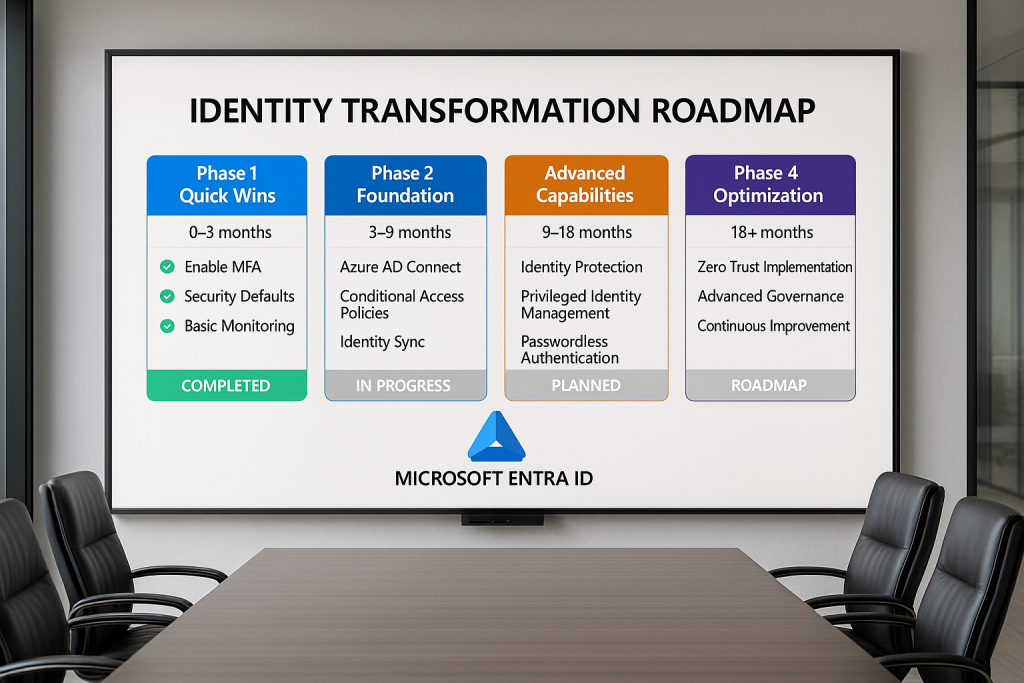
Quick Wins identify high-value, low-risk improvements that demonstrate value whilst building momentum, such as enabling MFA for administrative accounts.
Foundation Building establishes core infrastructure like Azure AD Connect, baseline Conditional Access policies, and essential monitoring.
Use Case Prioritisation sequences implementation based on business impact, security improvement, and technical complexity, often starting with Microsoft 365 access before expanding to broader application portfolio.
End-user Impact Consideration carefully stages changes that affect user experience, with appropriate communication and support resources.
Change Management and Communication
Identity changes affect everyone in your organisation. Effective communication proves crucial for success:
Stakeholder Identification ensures all affected parties participate in planning and remain informed throughout implementation.
User Impact Classification categorises changes based on visibility and workflow disruption, with communication tailored accordingly.
Training Development prepares both technical teams and end users for new processes, interfaces, and security requirements.
Feedback Mechanisms establish channels for users to report issues, ask questions, and provide input on identity experience improvements.
Measuring Success
Define clear metrics to evaluate your implementation’s effectiveness:
Security Improvement Indicators track metrics like MFA adoption, identity-related incidents, and credential compromise rates.
User Experience Measurements monitor authentication success rates, help desk tickets, and user satisfaction scores.
Operational Efficiency Metrics evaluate provisioning speed, governance process completion times, and administrative effort requirements.
Compliance Achievement documents progress toward regulatory requirements or industry standards.
Building Your Identity Center of Excellence
For sustained success beyond initial implementation, consider establishing an Identity Center of Excellence (ICoE) that oversees ongoing strategy, operations, and improvement.
Organisational Structure
Effective identity governance requires clear responsibilities across multiple disciplines:
Executive Sponsorship provides strategic direction and resource allocation to support identity initiatives aligned with business objectives.
Technical Expertise maintains deep knowledge of identity platforms, emerging capabilities, and implementation best practices.
Security Partnership ensures identity controls align with broader security strategy and threat landscape understanding.
Business Representation brings perspective on how identity enables business processes and impacts user productivity.
Compliance Oversight validates that identity governance meets regulatory requirements and organisational standards.
Process Development
Standardised processes ensure consistent identity operations:
Access Request and Approval establishes clear workflows for requesting, evaluating, and provisioning access to resources.
Identity Lifecycle Management defines how user accounts are created, modified, and decommissioned throughout employment changes.
Emergency Access Procedures document break-glass processes for critical scenarios when normal identity systems are unavailable.
Regular Review Cadence schedules recurring evaluation of entitlements, policies, and security configurations.
Capability Advancement
Identity systems and strategies must evolve with business needs and security landscape:
Technology Roadmap outlines planned capability additions, platform updates, and architecture evolution.
Skill Development ensures team members maintain current knowledge through training, certification, and knowledge sharing.
Industry Engagement connects your team with broader identity community through forums, conferences, and vendor relationships.
Innovation Process establishes mechanisms to evaluate and implement emerging identity capabilities that address business challenges.
Conclusion: Identity as a Strategic Asset
As we conclude our Microsoft Entra ID masterclass series, it’s worth reflecting on identity’s evolution from a technical necessity to a strategic business asset. Modern identity platforms like Microsoft Entra ID don’t merely authenticate users—they enable digital transformation, enhance security posture, and create foundations for innovation.
The most successful organisations recognise identity as infrastructure that requires intentional architecture, ongoing investment, and strategic alignment. By implementing the concepts we’ve explored throughout this series—from fundamental principles to advanced governance and real-world integration—you position your organisation to leverage identity as a competitive advantage.
The identity landscape continues to evolve, with passwordless authentication, decentralised identity, and AI-driven security representing frontier capabilities that will further transform how we approach digital identity. By establishing sound foundations today, you prepare your organisation to adopt these emerging technologies when they mature.
As you continue your identity journey beyond this masterclass, remember that successful implementation balances technical excellence with user experience and business enablement. Identity should never be implemented for its own sake but rather to secure your digital estate, empower your workforce, and accelerate your business objectives.
We hope this masterclass series has provided valuable insights for your Microsoft Entra ID implementation journey. By understanding the foundations, mastering authentication mechanisms, implementing advanced security controls, and integrating identity across your digital ecosystem, you’ve gained the knowledge to transform identity from a technical function to a strategic business capability.
This post concludes our Microsoft Entra ID Masterclass series. We hope you’ve found these deep dives valuable for your identity journey. For questions, further exploration, or implementation assistance, please reach out through our contact channel.