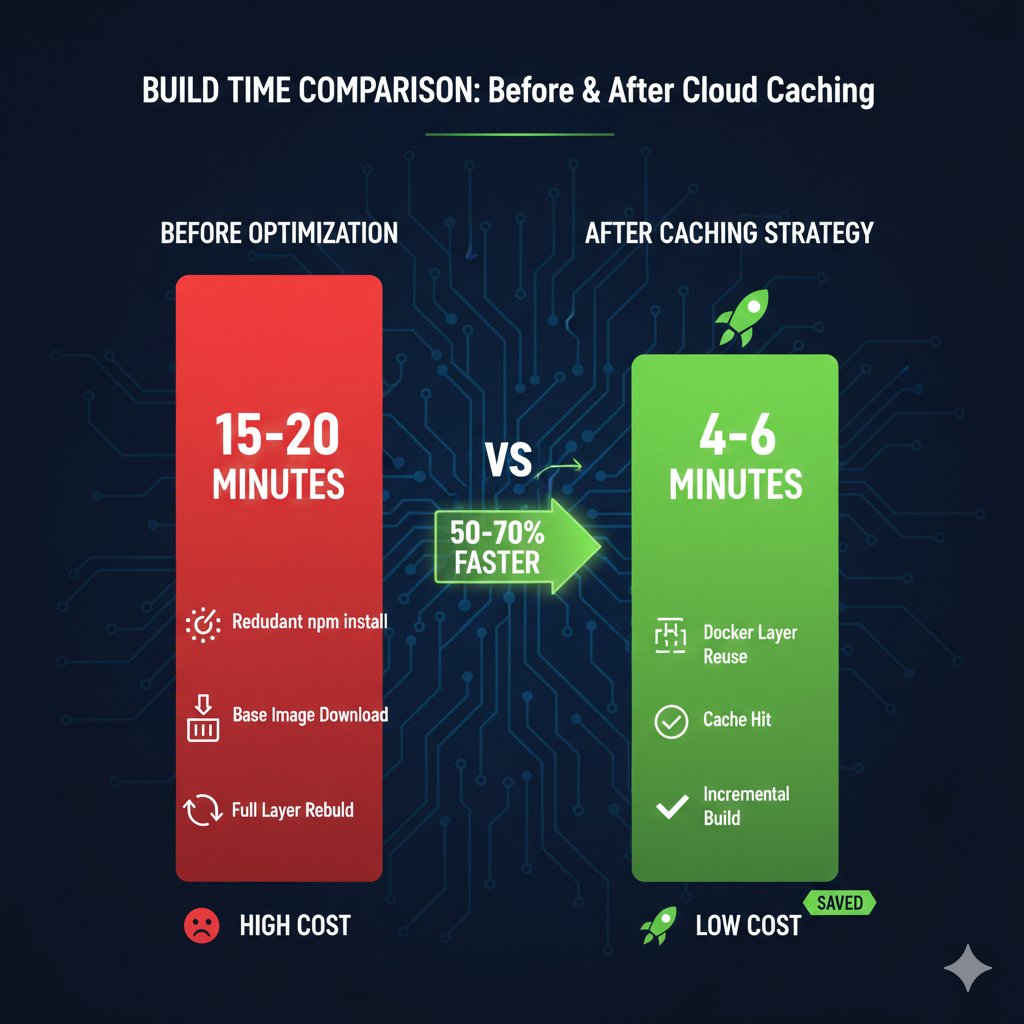
Build times consuming 15-20 minutes drain developer productivity and inflate GCP bills unnecessarily. Teams running 3,000 builds monthly at £0.006 per minute face £270-£360 in compute costs before any optimisation. Docker layer caching with Artifact Registry reduces these times by 50-70%, delivering ROI within the first month through faster deployments and reduced compute charges. This approach works particularly well for container-based workloads where dependency layers change infrequently, though recent Kaniko deprecation means teams must migrate to BuildKit-based strategies.
Why default Cloud Build configurations waste time and money
Cloud Build executes each step in isolation without persistent state between builds. Every Docker build downloads base images, reinstalls dependencies, and rebuilds layers from scratch, even when nothing changed. A typical Node.js application spending 8 minutes on npm install repeats this work on every commit, despite package-lock.json remaining static for days. Python applications face similar delays with pip installs, and Go projects waste time recompiling unchanged modules.
The cost compounds quickly. At 50 builds daily across development teams, those 8 wasted minutes translate to 400 minutes of unnecessary compute. Over a month, that’s 8,800 minutes or £52.80 in completely avoidable charges. For enterprises running CI/CD at scale, implementing proper caching strategies pays back within days. The strategic approach to cloud cost optimisation we covered in our FinOps Evolution framework applies directly here, transforming reactive spending into proactive efficiency gains.
Implement Docker layer caching with –cache-from
The foundational caching strategy uses Docker’s --cache-from flag to reference previously built images stored in Artifact Registry. This two-step approach pulls the existing cache image before building, allowing Docker to reuse unchanged layers.
yaml
# cloudbuild.yaml
steps:
  # Step 1: Pull existing image for cache (fails gracefully if missing)
  - name: 'gcr.io/cloud-builders/docker'
    entrypoint: 'bash'
    args:
      - '-c'
      - 'docker pull europe-west2-docker.pkg.dev/$PROJECT_ID/build-cache/${_IMAGE_NAME}:latest || exit 0'

  # Step 2: Build with cache reference
  - name: 'gcr.io/cloud-builders/docker'
    args:
      - 'build'
      - '-t'
      - 'europe-west2-docker.pkg.dev/$PROJECT_ID/app-images/${_IMAGE_NAME}:$COMMIT_SHA'
      - '-t'
      - 'europe-west2-docker.pkg.dev/$PROJECT_ID/app-images/${_IMAGE_NAME}:latest'
      - '--cache-from'
      - 'europe-west2-docker.pkg.dev/$PROJECT_ID/build-cache/${_IMAGE_NAME}:latest'
      - '.'

  # Step 3: Push both versioned and cache images
  - name: 'gcr.io/cloud-builders/docker'
    args:
      - 'push'
      - '--all-tags'
      - 'europe-west2-docker.pkg.dev/$PROJECT_ID/app-images/${_IMAGE_NAME}'

substitutions:
  _IMAGE_NAME: 'api-service'

options:
  machineType: 'E2_HIGHCPU_8'  # Faster builds at marginally higher cost
Critical implementation notes: The || exit 0 allows builds to succeed when no cache exists (first run or after cache invalidation). Always push the :latest tag separately to maintain cache continuity. Dockerfile layer ordering becomes crucial, place stable dependencies (base images, system packages) early and frequently changing application code late.
Upgrade to BuildKit registry cache for multi-stage builds
For complex multi-stage Dockerfiles, BuildKit’s registry cache backend provides superior cache reuse. Google archived Kaniko on 3 June 2025, making BuildKit the recommended approach going forward. This method exports intermediate build stages, preventing scenarios where builder-stage dependencies rebuild despite unchanged requirements files.
yaml
# cloudbuild.yaml with BuildKit
steps:
  - name: 'gcr.io/cloud-builders/docker'
    args:
      - 'buildx'
      - 'build'
      - '--cache-from=type=registry,ref=europe-west2-docker.pkg.dev/$PROJECT_ID/build-cache/${_IMAGE_NAME}:buildcache'
      - '--cache-to=type=registry,ref=europe-west2-docker.pkg.dev/$PROJECT_ID/build-cache/${_IMAGE_NAME}:buildcache,mode=max'
      - '-t'
      - 'europe-west2-docker.pkg.dev/$PROJECT_ID/app-images/${_IMAGE_NAME}:$COMMIT_SHA'
      - '--push'
      - '.'
    env:
      - 'DOCKER_BUILDKIT=1'

substitutions:
  _IMAGE_NAME: 'web-frontend'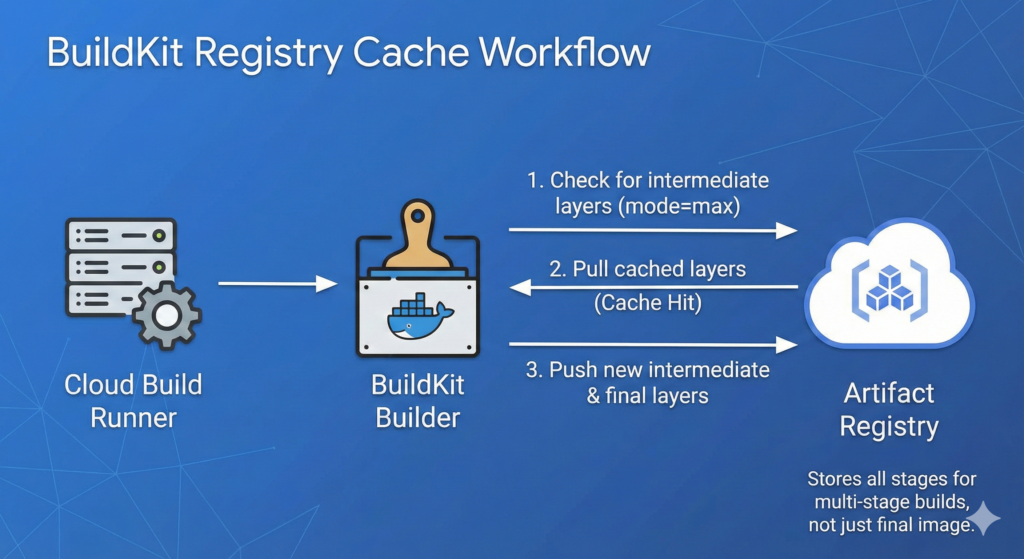
Setting mode=max exports all layers including intermediate stages, not just the final image. This works alongside our CI/CD pipeline automation patterns for Infrastructure as Code, creating comprehensive deployment workflows where both application and infrastructure builds benefit from intelligent caching.
Optimise Dockerfiles for maximum cache effectiveness
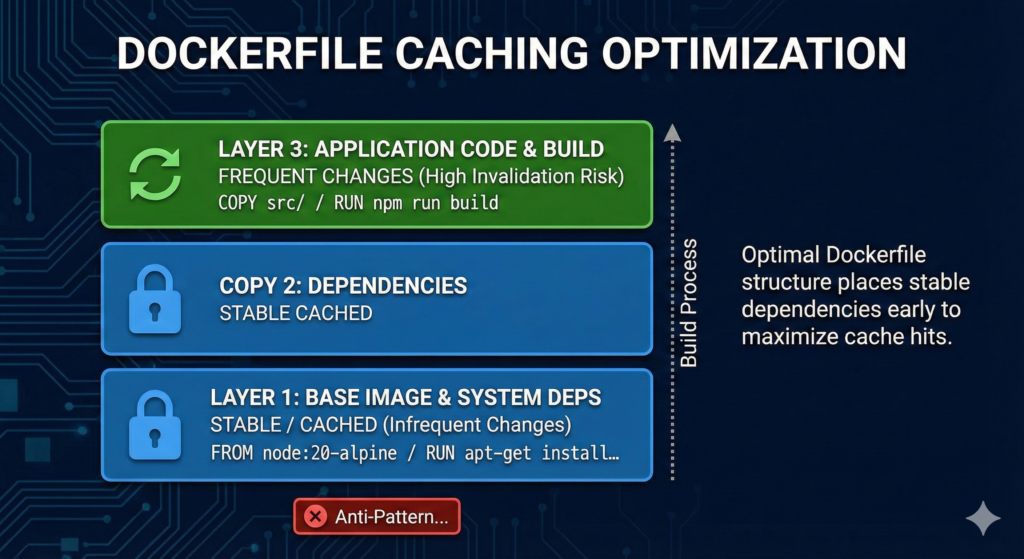
Cache benefits evaporate when early Dockerfile layers change frequently. Restructure Dockerfiles to minimise cache invalidation.
dockerfile
# Optimised for caching
FROM node:20-alpine AS builder

# Layer 1: Dependencies only (changes infrequently)
WORKDIR /app
COPY package*.json ./
RUN npm ci --only=production

# Layer 2: Application code (changes frequently)
COPY src/ ./src/
COPY public/ ./public/

# Layer 3: Build step
RUN npm run build

# Final stage
FROM nginx:alpine
COPY --from=builder /app/dist /usr/share/nginx/html
```
Anti-patterns to avoid: Don’t COPY . . early in the Dockerfile, this invalidates cache on any file change including README updates. Avoid RUN apt-get update && apt-get install combining multiple commands, split system dependencies from application logic. Never modify base images mid-Dockerfile, declare all FROM statements at stage start.
Enterprise considerations and cost analysis
Artifact Registry storage costs £0.10/GB/month after the free 0.5GB tier. Cache images typically consume 500MB-2GB depending on application complexity. For a team running 3,000 builds monthly, investing £2-£4 in cache storage saves 7 minutes per build at £0.006/minute (£0.042 per build), delivering £126 monthly compute savings. The ROI calculation strongly favours caching, with payback achieved within the first week.
Security and compliance requirements remain satisfied as cached layers inherit the same IAM controls as production images. Enable Artifact Registry cleanup policies to limit cache retention, balancing rebuild costs against storage accumulation. Setting 30-day retention provides sufficient cache longevity whilst preventing unbounded growth. For regulated workloads, Cloud Build maintains SLSA Level 3 compliance by default, providing tamper-proof build provenance.
Machine type selection compounds caching benefits. Upgrading from default E2-STANDARD-2 to E2_HIGHCPU_8 reduces builds from 56 seconds to 19 seconds (66% faster). The higher per-minute rate (£0.012 vs £0.006) costs less overall when builds complete in one-third the time. Similar optimisation principles apply across GCP services, as demonstrated in our GCP Active Assist guide for automated resource rightsizing.
Implementation checklist
Configure caching systematically to avoid common pitfalls:
- Create dedicated Artifact Registry repository for cache images (separate from production)
- Add
.gcloudignoreto exclude node_modules, .git, build artifacts from upload - Structure Dockerfile with stable layers first, changing code last
- Implement
--cache-fromfor single-stage builds or BuildKit for multi-stage - Set E2_HIGHCPU_8 or higher machine type for compute-intensive builds
- Configure cleanup policy (30 days recommended for cache repositories)
- Monitor cache hit rates through Cloud Build logs (look for “CACHED” layer messages)
- Validate builds still work without cache (test with
--no-cacheoccasionally)
Key takeaways
Cloud Build caching delivers 50-70% build time reductions through Docker layer reuse, translating to immediate cost savings for teams running hundreds or thousands of builds monthly. The implementation requires two configuration changes: adding --cache-from flags to cloudbuild.yaml and restructuring Dockerfiles to optimise layer ordering. Teams achieve positive ROI within the first month, with ongoing savings scaling proportionally to build volume. For complex multi-stage builds, BuildKit’s registry cache backend provides superior intermediate layer caching, particularly important following Kaniko’s deprecation in mid-2025.