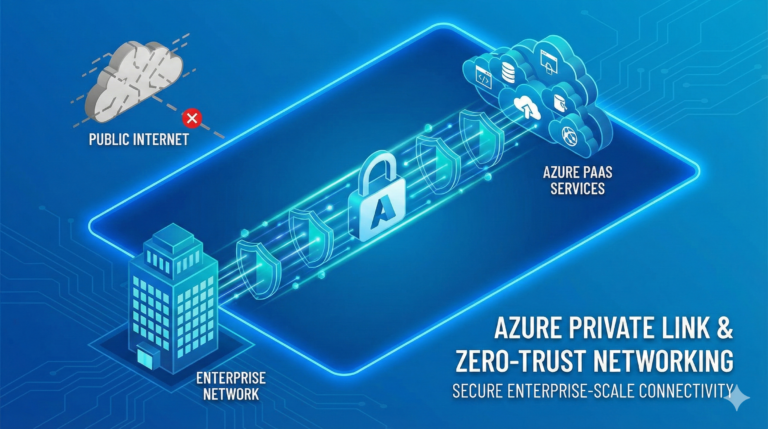
The Authentication Evolution
The concept of proving one’s identity has undergone remarkable transformation throughout human history. From wax seals and handwritten signatures to the digital credentials of today, authentication has always balanced security with convenience. In the cloud era, this balance has never been more critical.
When Microsoft Entra ID (formerly Azure AD) was developed, it was designed from the ground up to address the authentication challenges of a cloud-first, mobile-first world. This second instalment in our masterclass explores the sophisticated authentication and authorisation capabilities that form the core of Microsoft’s identity platform.
Building upon the foundational concepts we explored in our previous post, we’ll now examine how Entra ID authenticates users, evaluates access decisions, and enables secure connectivity across your entire digital estate.
The Modern Authentication Landscape
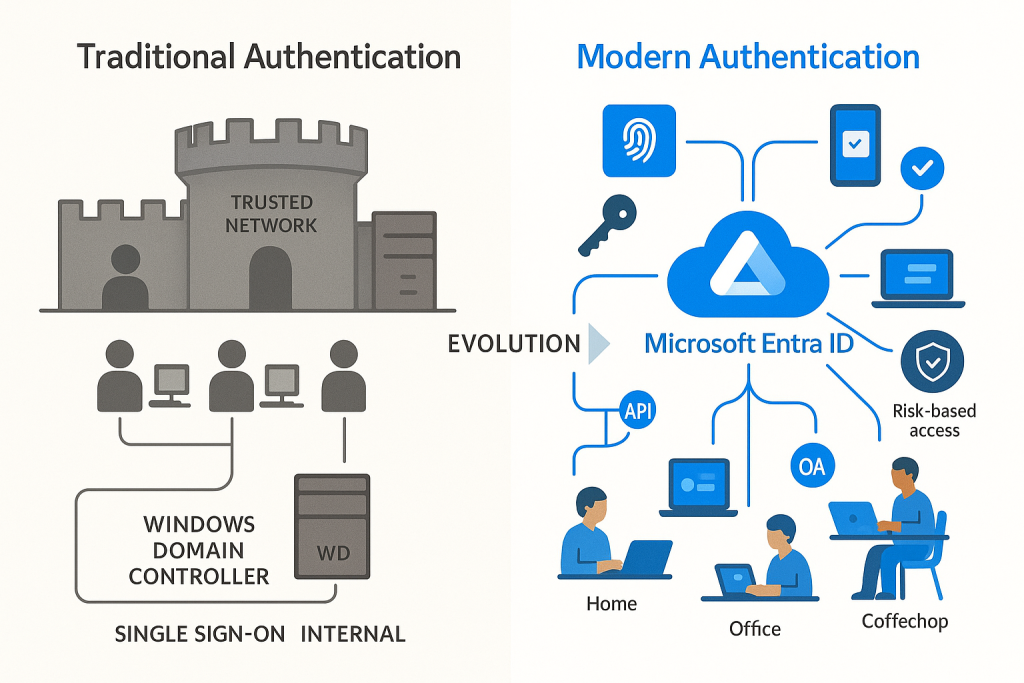
Traditional authentication mechanisms centred around username and password credentials, often complemented by network location as a trust signal. This approach served organisations well in an era when work happened primarily within the corporate network perimeter. However, today’s landscape demands more.
Modern authentication frameworks must accommodate multiple factors, adaptive risk evaluation, and diverse device ecosystems—all whilst ensuring a seamless user experience across applications and platforms. Microsoft Entra ID delivers this through a sophisticated set of protocols, policies, and intelligence systems.
![Visualization of the evolution from traditional to modern authentication showing the shift from simple password-based to multi-factor, risk-based approaches]
Authentication Protocols: The Building Blocks
At the heart of Microsoft Entra ID’s authentication capabilities lies support for modern, standards-based protocols that enable secure communication between identity providers, applications, and services.
OAuth 2.0: The Authorization Framework
OAuth 2.0 serves as the foundation for modern authorisation, enabling applications to obtain limited access to user accounts without exposing credentials. Think of OAuth as a valet key for your digital identity—it provides limited permissions for specific purposes without surrendering full control.
Microsoft Entra ID implements OAuth 2.0 through several grant flows, each suited to particular application scenarios:
Authorization Code Flow handles web applications where code executes on the server side, providing the highest security for confidential clients through a multi-step exchange.
Implicit Flow was designed for single-page applications and mobile clients, though it has largely been supplanted by the Authorization Code Flow with PKCE for security reasons.
Client Credentials Flow enables service-to-service authentication without user involvement, perfect for background processes and API communication.
Resource Owner Password Credentials allows direct exchange of username/password for tokens, but should be used sparingly due to security implications.
OpenID Connect: Identity Layer
Whilst OAuth 2.0 handles authorisation, OpenID Connect (OIDC) provides standardised identity information through an additional token called the ID token. This JWT (JSON Web Token) contains claims about the authenticated user, enabling applications to establish identity without maintaining separate user stores.
OpenID Connect extends OAuth 2.0 with identity verification capabilities, session management, and discovery services that simplify integration. The protocol has become the de facto standard for modern authentication, with Microsoft Entra ID serving as a leading identity provider in the OIDC ecosystem.
SAML: Enterprise Integration
Security Assertion Markup Language (SAML) predates OAuth and OpenID Connect but remains crucial for enterprise environments with established SAML-based applications. Microsoft Entra ID provides robust SAML support through:
- SAML token issuance for authentication to third-party applications
- SAML-based single sign-on for gallery and custom applications
- SAML attribute mapping for identity federation
Whilst newer applications typically leverage OAuth 2.0 and OIDC, SAML serves as a bridge to legacy applications, ensuring your identity modernisation journey can happen at your pace.
Authentication Methods: Beyond the Password
The password paradox has plagued security professionals for decades. Passwords strong enough to resist attacks are typically too complex for users to remember, leading to password reuse, insecure storage, and ultimately, compromised credentials. Microsoft Entra ID addresses this challenge through a comprehensive set of authentication methods.
Multi-factor Authentication: The Security Baseline
Multi-factor authentication (MFA) significantly improves security posture by requiring additional verification beyond passwords. Microsoft Entra ID supports numerous second-factor options:
Microsoft Authenticator App provides push notifications, time-based one-time passwords, and passwordless sign-in capabilities through your mobile device. Its combination of security and convenience makes it the recommended approach for most organisations.
Phone-based Methods include SMS, voice calls, and app passwords, though these are increasingly discouraged due to their vulnerability to interception and social engineering attacks.
FIDO2 Security Keys represent the gold standard for phishing-resistant authentication, leveraging cryptographic attestation through physical keys or platform authenticators.
When implementing MFA, consider these architectural principles:
Default Deny – Require MFA for all users, applications, and locations unless explicitly excluded through carefully considered exceptions.
Phishing Resistance – Prioritise authentication methods that resist credential theft and phishing attacks, particularly for privileged accounts.
Usability Impact – Balance security requirements with user experience to ensure authentication friction aligns with access risk.
Passwordless Authentication: The Future of Identity
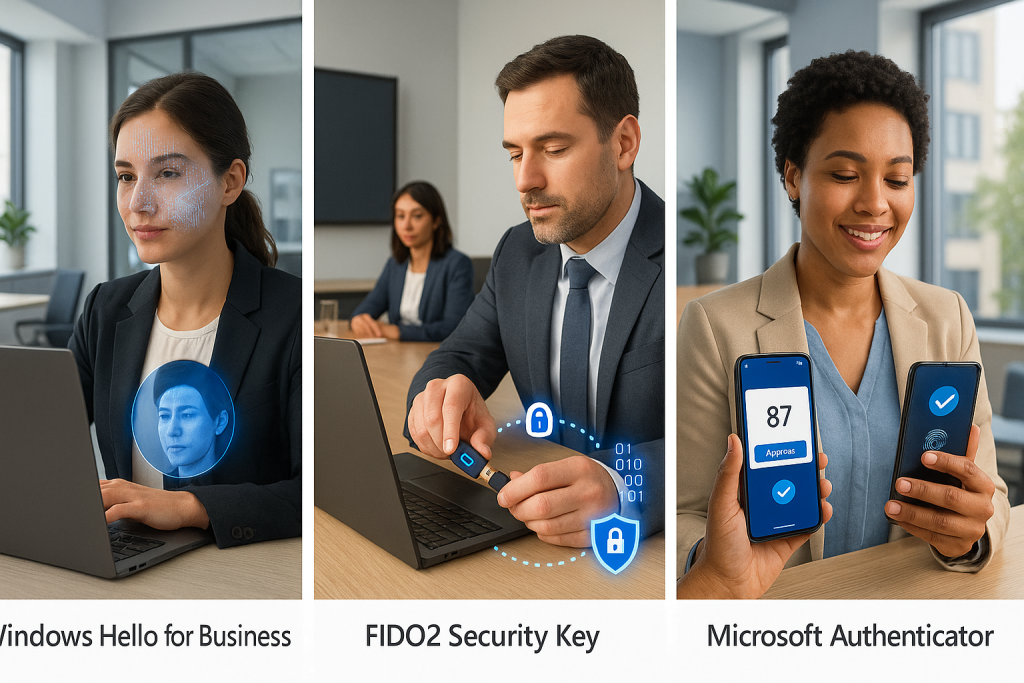
The ultimate solution to password problems is their elimination. Microsoft Entra ID provides several passwordless options designed to enhance both security and user experience:
Windows Hello for Business integrates biometric and PIN-based authentication directly with the Windows operating system, providing seamless access without password entry.
FIDO2 Security Keys extend passwordless capabilities across devices and platforms through standards-based cryptographic credentials stored on physical tokens or trusted platform modules.
Microsoft Authenticator Phone Sign-in transforms your mobile device into a strong credential through public-private key cryptography and biometric verification.
Passwordless authentication represents not just incremental improvement but a fundamental shift in how we approach identity verification. By eliminating passwords, organisations reduce their attack surface whilst simultaneously improving the user experience.
![Visual depiction of different passwordless authentication methods showing how they work]
Conditional Access: The Policy Engine
Authentication alone doesn’t provide sufficient security granularity for modern environments. Microsoft Entra ID’s Conditional Access serves as a sophisticated policy engine that evaluates signals, enforces controls, and enables adaptive access decisions.
Signal Evaluation
Conditional Access analyses numerous signals to inform access decisions:
User and Group Membership serves as the foundation, allowing policies to target specific populations based on directory attributes.
Device State evaluates whether the accessing device is managed, compliant with security policies, or known to the organisation.
Location and Network considers the originating IP address, geographical location, and network characteristics to assess risk.
Application Sensitivity allows different controls based on the resource being accessed and its data sensitivity.
Real-time Risk Detection leverages Microsoft’s security intelligence to identify suspicious patterns indicative of compromise.
Access Controls
Based on signal evaluation, Conditional Access applies appropriate controls:
Block Access prevents authentication completely when unacceptable risk is detected.
Grant Controls include requiring MFA, ensuring device compliance, requiring approved applications, or requiring terms of use acceptance.
Session Controls determine what happens after authentication, including app enforcement, sign-in frequency, or browser persistence limitations.
Common Scenarios and Best Practices
Conditional Access enables sophisticated security scenarios when properly implemented:
Zero Trust Architecture is achieved through policies that continuously validate every access request based on all available signals rather than assuming trust based on network location.
Adaptive Authentication requires stronger verification methods only when risk indicators or access patterns warrant additional scrutiny.
Data Sovereignty can be enforced by restricting access to specific resources based on the user’s geographical location.
When designing your Conditional Access framework, consider these architectural principles:
Policy Layering – Build policies in layers, starting with broad baseline protections and adding targeted controls for specific scenarios.
Emergency Access – Establish break-glass accounts and exemption procedures to handle urgent situations without compromising security.
Change Management – Test policy changes carefully before deployment, as Conditional Access directly impacts user access to critical resources.
Single Sign-On: The User Experience
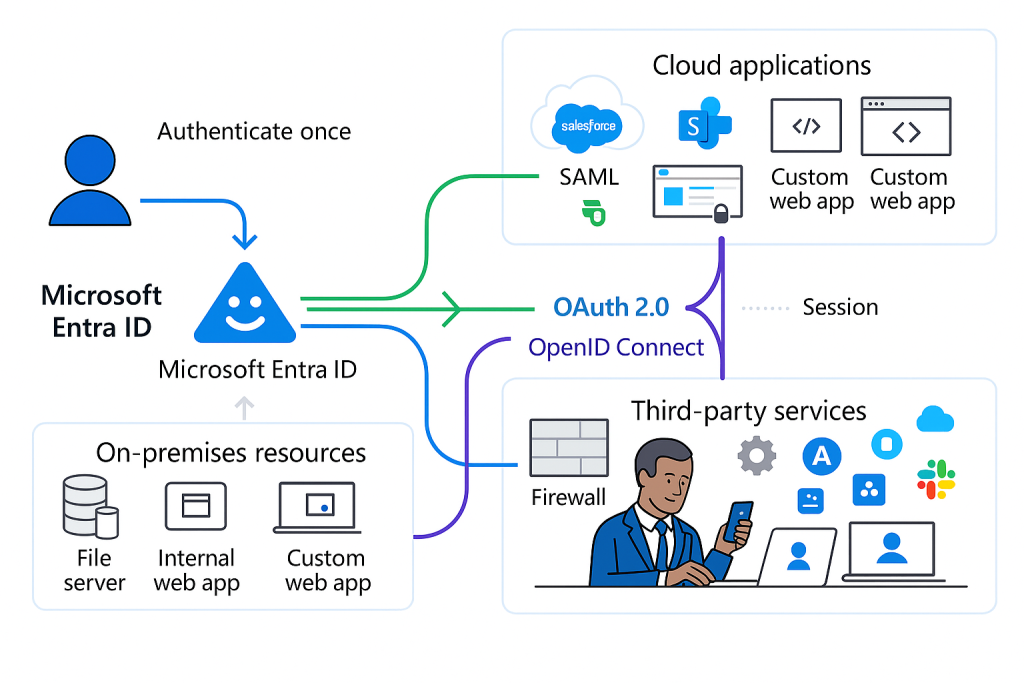
Security and user experience often seem at odds, but Microsoft Entra ID’s single sign-on (SSO) capabilities demonstrate how they can complement each other. SSO reduces the number of authentication prompts users encounter whilst maintaining security boundaries through token issuance and validation.
SSO Architecture
Microsoft Entra ID provides SSO through two primary mechanisms:
Protocol-based SSO leverages OAuth 2.0, OpenID Connect, and SAML to issue security tokens that applications validate without requiring re-authentication.
Password-based SSO securely stores and injects credentials for applications that don’t support modern authentication protocols, extending SSO benefits to legacy systems.
The SSO experience spans various scenarios:
Within the Microsoft Ecosystem – Seamless access across Microsoft 365, Azure resources, and first-party applications.
Gallery Applications – Pre-integrated third-party applications with established trust relationships.
Custom Applications – Developer-registered applications using Microsoft identity platform.
Legacy Applications – Systems integrated through Application Proxy, password vaulting, or header-based authentication.
Implementation Strategies
When implementing SSO, consider these architectural approaches:
Authentication Tiering – Group applications by sensitivity and required assurance level, applying consistent authentication policies to each tier.
Session Lifetime Management – Balance security and convenience by establishing appropriate token lifetimes based on application sensitivity and usage patterns.
Application Integration – Prioritise modern authentication protocols when possible, falling back to password vaulting only when necessary for legacy applications.
![Diagram showing how single sign-on works across different application types and environments]
Authorization Models: Beyond Authentication
Whilst authentication establishes identity, authorization determines what authenticated users can access. Microsoft Entra ID provides several authorization models to support diverse application needs:
Role-Based Access Control (RBAC)
Role-based access control assigns permissions to roles rather than directly to users, simplifying management and improving consistency. Microsoft Entra ID implements RBAC through:
Directory Roles control administrative access to identity management functions, with both built-in and custom roles available.
Azure RBAC manages access to Azure resources through fine-grained role definitions assigned at various scopes.
Application Roles provide authorization within applications integrated with the Microsoft identity platform.
Attribute-Based Access Control (ABAC)
For more dynamic scenarios, attribute-based access control evaluates user attributes, resource properties, and environmental conditions to make authorization decisions. This model enables:
Dynamic Group Membership that automatically updates based on user attributes rather than manual assignment.
Claims Transformation that enriches tokens with additional attributes for downstream authorization decisions.
App Roles Assignments based on directory attributes rather than explicit assignments.
External Authorization
Beyond built-in capabilities, Microsoft Entra ID enables integration with external authorization systems:
Policy Engines like Azure AD PIM, Microsoft Defender for Cloud Apps, or third-party solutions can consume identity data for specialized access decisions.
API Connectors allow custom logic during user journeys, enabling integration with external systems during authentication flows.
Delegated Authorization through OAuth 2.0 scopes enables fine-grained permission models for API access.
Implementing Your Authentication Strategy
As you develop your authentication strategy with Microsoft Entra ID, consider these implementation phases:
Phase 1: Establish Security Baseline
Begin with fundamental security improvements that apply broadly across your organization:
- Enable security defaults or implement baseline Conditional Access policies
- Deploy multi-factor authentication for all users
- Consolidate application access through SSO
- Establish monitoring for identity-related security events
Phase 2: Enhance User Experience
Once baseline security is in place, focus on improving the authentication experience:
- Deploy passwordless authentication methods
- Implement self-service password reset and account recovery
- Streamline application access through MyApps portal customization
- Reduce authentication prompts through appropriate session management
Phase 3: Advanced Security Controls
Build sophisticated security mechanisms based on your risk profile:
- Implement risk-based Conditional Access policies
- Deploy Privileged Identity Management for administrative access
- Establish device compliance requirements through integration with endpoint management
- Develop custom controls for industry-specific compliance requirements
Phase 4: Continuous Improvement
Identity systems require ongoing refinement to address evolving threats:
- Regularly review authentication analytics and security reports
- Update policies based on changing business requirements and threat landscape
- Evaluate new authentication methods as they become available
- Conduct periodic testing of security controls and recovery procedures
Conclusion: Authentication as a Foundation
Authentication and authorization form the foundation of your security strategy in the cloud era. Microsoft Entra ID provides the tools to implement sophisticated identity controls that adapt to your organization’s needs, from basic password management to zero-trust architecture.
In our next masterclass post, we’ll explore advanced security and governance capabilities that build upon this foundation, including Identity Protection, Privileged Identity Management, access reviews, and compliance reporting. These features transform identity from a technical function to a strategic business enabler, providing the governance framework necessary for secure digital transformation.
As you prepare for the next instalment, consider these questions for your organization:
- How might passwordless authentication transform your user experience and security posture?
- What signals should inform your Conditional Access policies based on your risk profile?
- How can you balance security requirements with usability across different user populations?
Remember that identity is not merely a technical discipline but a business enabler that, when properly implemented, simultaneously improves security and user experience.
This post is the second in our Microsoft Entra ID Masterclass series. Don’t miss our upcoming third post, where we’ll delve into advanced security features and governance capabilities that extend your identity infrastructure.