
Your Azure App Service slot swaps are shipping cold code to production. Even with deployment slots configured, Azure’s default warm-up behaviour only pings / and accepts any HTTP response (including 500 errors) as “warmed up.” The result: JIT compilation, dependency connections, and cache hydration all happen on live traffic, creating multi-second latency spikes that defeat the entire purpose of zero-downtime deployments. This production-ready automation eliminates cold starts entirely, reducing first-request latency from seconds to milliseconds.
Azure’s Default Warm-Up Ships Cold Code
When you initiate a slot swap, Azure applies the target slot’s settings to every instance (triggering a restart), waits for the restart to complete, then sends a single HTTP GET to /. Any HTTP response counts as “warmed up” whether it’s 200 OK or 500 Internal Server Error. The VIP swap fires immediately.
This misses critical initialisation work that determines production performance. Database connection pool establishment takes 2-5 seconds. Entity Framework Core model compilation adds another 2-3 seconds. Redis cache hydration can require 5-10 seconds depending on cache size. For Java applications on Spring Boot running on Linux App Service, context initialisation routinely needs 10-20 minutes. All of this happens on your first production requests after swap, creating the exact latency spikes you deployed slots to avoid.
The financial cost appears in monitoring dashboards as degraded user experience and in Application Insights as p95 response time spikes exceeding 5-10 seconds during “successful” deployments. For e-commerce platforms processing hundreds of transactions per minute, even a 30-second degradation window translates to abandoned carts and lost revenue.
Production-Ready Warming Script with Retry Logic
This PowerShell script handles the complete warm-up lifecycle, validating slot health, warming endpoints sequentially with exponential backoff, and executing conditional swaps based on warm-up success:
param(
    [Parameter(Mandatory)][string]$ResourceGroupName,
    [Parameter(Mandatory)][string]$AppName,
    [string]$SlotName = "staging",
    [string[]]$WarmupEndpoints = @("/", "/api/health", "/api/products"),
    [int]$MaxRetries = 5,
    [int]$RetryDelaySeconds = 10,
    [int]$TimeoutSeconds = 120
)

$ErrorActionPreference = "Stop"

# Verify slot is running before warming
$slot = Get-AzWebAppSlot -ResourceGroupName $ResourceGroupName `
    -Name $AppName -Slot $SlotName
$baseUrl = "https://$($slot.DefaultHostName)"

if ($slot.State -ne "Running") {
    Write-Host "Starting stopped slot..."
    Start-AzWebAppSlot -ResourceGroupName $ResourceGroupName `
        -Name $AppName -Slot $SlotName
    Start-Sleep -Seconds 15
}

# Warm each endpoint sequentially with retry logic
foreach ($endpoint in $WarmupEndpoints) {
    $url = "$baseUrl$endpoint"
    $attempt = 0
    $success = $false

    while ($attempt -lt $MaxRetries -and -not $success) {
        $attempt++
        try {
            $stopwatch = [System.Diagnostics.Stopwatch]::StartNew()
            $response = Invoke-WebRequest -Uri $url `
                -TimeoutSec $TimeoutSeconds `
                -UseBasicParsing `
                -ErrorAction Stop
            $stopwatch.Stop()

            if ($response.StatusCode -ge 200 -and $response.StatusCode -lt 400) {
                Write-Host "✓ $url → HTTP $($response.StatusCode) in $($stopwatch.ElapsedMilliseconds)ms"
                $success = $true
            }
        }
        catch {
            Write-Host "✗ $url attempt $attempt/$MaxRetries - $($_.Exception.Message)"
            if ($attempt -lt $MaxRetries) {
                $delay = $RetryDelaySeconds * [Math]::Pow(2, $attempt - 1)
                Start-Sleep -Seconds $delay
            }
        }
    }

    if (-not $success) {
        throw "Failed to warm $url after $MaxRetries attempts"
    }
}

Write-Host "All endpoints validated. Executing swap..."
Switch-AzWebAppSlot -ResourceGroupName $ResourceGroupName `
    -Name $AppName `
    -SourceSlotName $SlotName `
    -DestinationSlotName "production"
Write-Host "Swap completed successfully"
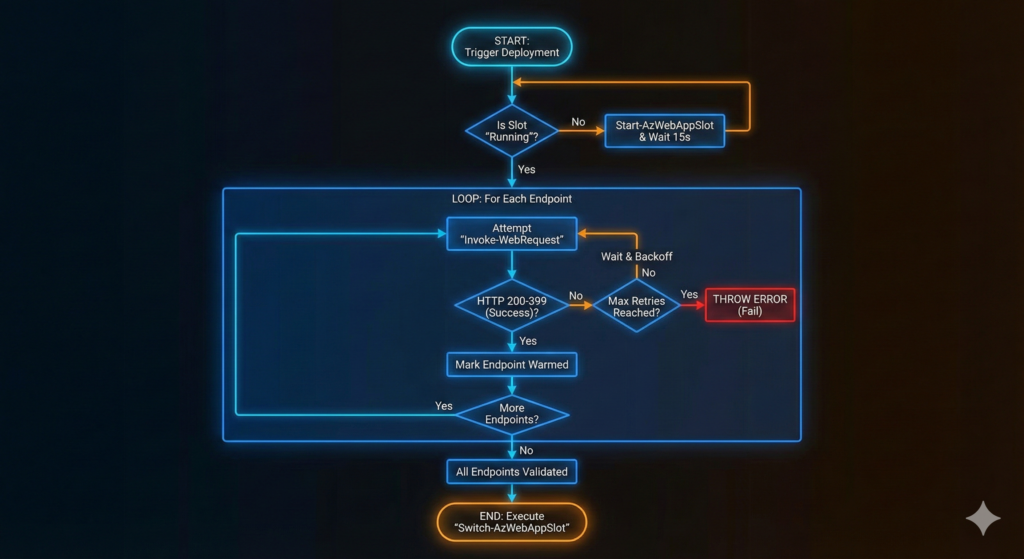
The script validates slot state before warming, measures response times for pipeline visibility, implements exponential backoff for transient failures, and only executes the swap after confirming all endpoints respond successfully. The structured output integrates cleanly with our Azure DevOps pipeline optimisation patterns for comprehensive deployment observability.
Pipeline Integration That Actually Works
Wire the warming script into your Azure DevOps pipeline immediately after artifact deployment and before swap execution:
- stage: WarmAndSwap
  jobs:
  - job: WarmUpSlot
    steps:
    - task: AzurePowerShell@5
      displayName: 'Warm staging slot endpoints'
      inputs:
        azureSubscription: '$(azureSubscription)'
        azurePowerShellVersion: 'LatestVersion'
        ScriptType: 'FilePath'
        ScriptPath: '$(Pipeline.Workspace)/scripts/Warm-Slot.ps1'
        ScriptArguments: >
          -ResourceGroupName "$(resourceGroupName)"
          -AppName "$(appServiceName)"
          -WarmupEndpoints @("/","/api/health","/api/products","/api/orders")
          -MaxRetries 5
          -TimeoutSeconds 120
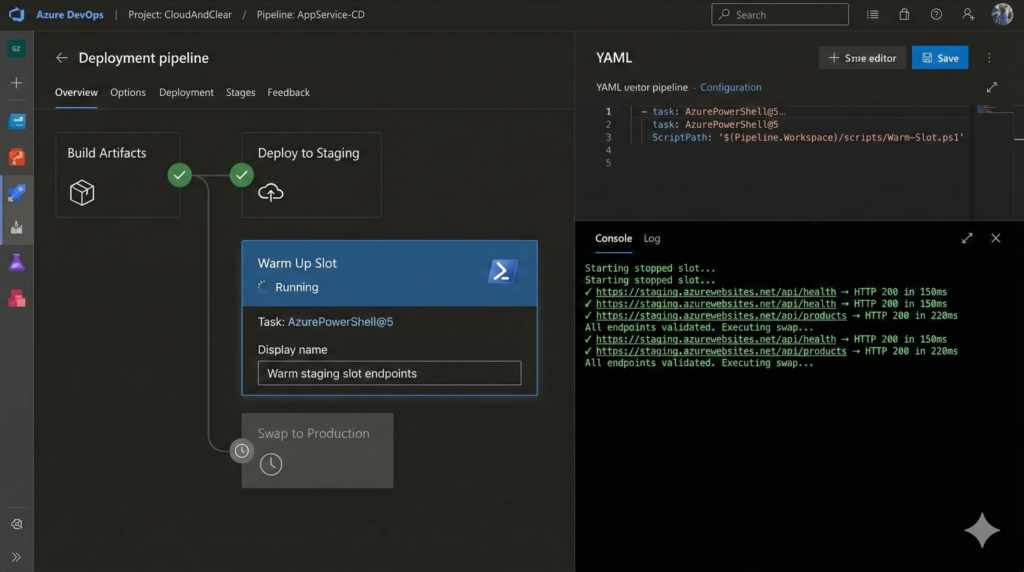
Authentication flows through your Azure Resource Manager service connection. Use Workload Identity Federation instead of service principal secrets for keyless authentication. For VNet-integrated applications behind private endpoints, deploy from a self-hosted agent within the same virtual network, since Microsoft-hosted agents cannot reach private endpoints.
When warming multiple App Services simultaneously, use a strategy: matrix block to parallelise across applications. Be aware that all slots share the same App Service Plan compute resources, so simultaneous warm-up of many slots can cause CPU contention affecting individual swap times.
Enterprise Considerations Beyond the Script
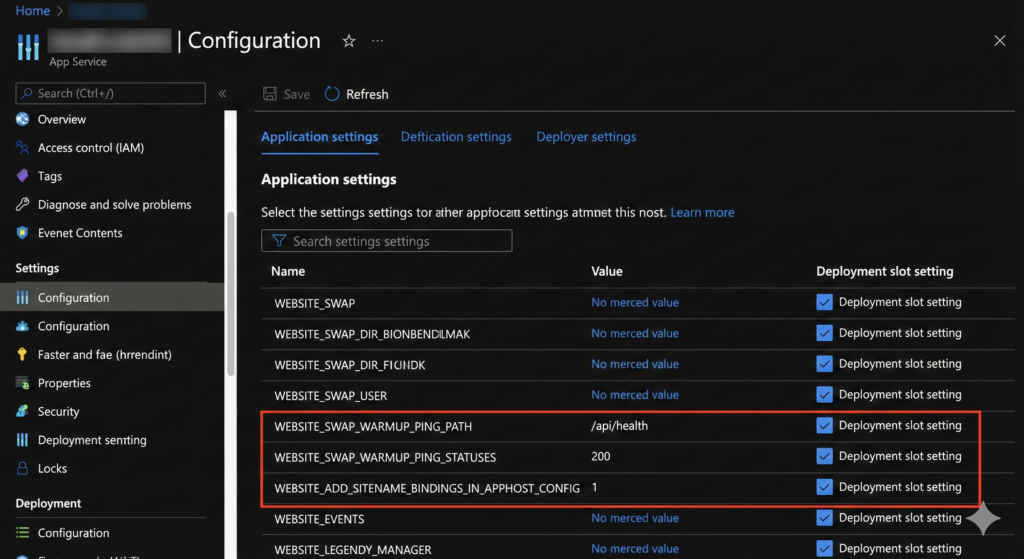
Three platform settings transform slot warming from partial solution to complete production readiness. Set WEBSITE_SWAP_WARMUP_PING_PATH to your actual health check endpoint (like /api/health) rather than accepting the default / root path. Configure WEBSITE_SWAP_WARMUP_PING_STATUSES to 200 so Azure only considers genuine success responses as warmed up, not 301 redirects or 500 errors. Mark both settings as slot-specific so they persist across swaps.
The most critical yet overlooked setting is WEBSITE_ADD_SITENAME_BINDINGS_IN_APPHOST_CONFIG=1. Without this, Azure storage infrastructure changes after swap can trigger random worker process recycles hours after deployment, causing cold starts during peak traffic periods. This setting prevents those recycles entirely.
For Windows App Service, the applicationInitialization module in web.config provides additional control over IIS-level warm-up. However, these requests fire over HTTP on port 80 internally, never HTTPS. If your application has HTTP-to-HTTPS redirect rules, warm-up requests receive 301 redirects and the platform considers initialisation complete without ever executing application code. Add URL rewrite conditions checking {WARMUP_REQUEST} to bypass redirects for initialisation traffic.
Linux App Service and containerised applications have no applicationInitialization equivalent. External warming scripts in your pipeline remain the only reliable option.
Monitoring Warm-Up Effectiveness
Track deployment impact in Application Insights using this KQL query from our Azure Monitor troubleshooting patterns:
requests
| where timestamp > ago(2h)
| summarize avg(duration),
    percentile(duration, 95),
    percentile(duration, 99)
    by bin(timestamp, 1m)
| render timechart
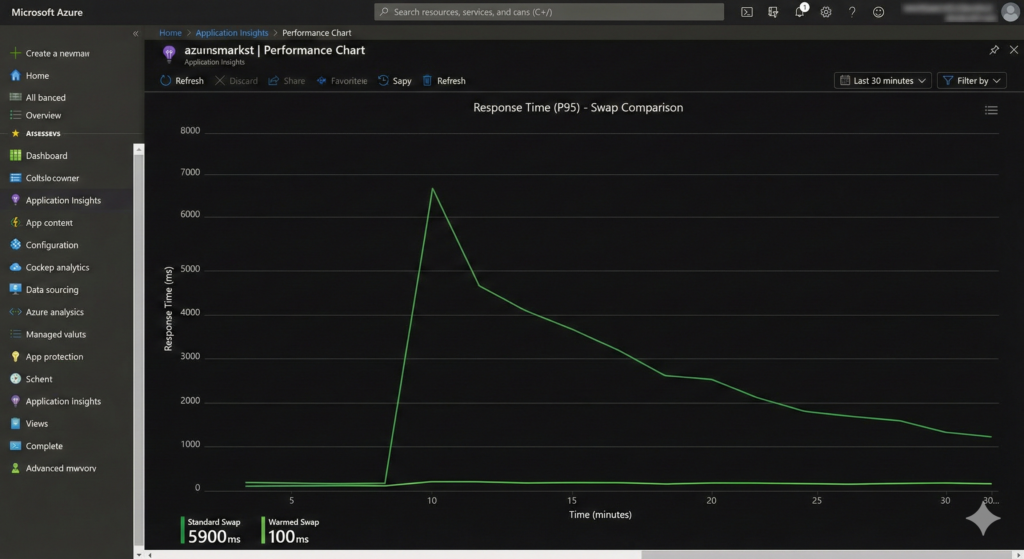
Compare p95 response times in the 10 minutes before and after each swap. Well-warmed deployments show no visible inflection point on this chart. If you observe latency spikes followed by gradual recovery, your warm-up endpoints aren’t covering sufficient application surface area.
Alternative Approaches and Trade-Offs
Azure’s Auto Swap feature eliminates manual swap steps but provides no warm-up control. It executes swaps immediately after successful deployment, shipping cold code to production. Only use Auto Swap for applications with sub-second initialisation times where cold start impact is negligible.
The Always On setting pings / every five minutes to prevent idle timeout but doesn’t warm application code before swaps. It complements slot warming scripts but cannot replace them. Health Check monitors application health on a one-minute interval and removes unhealthy instances from load balancer rotation, but only functions with two or more instances. Enable all three features as they serve distinct purposes.
Scaling out before swap provides additional warm instances but doubles compute cost during deployment windows. For high-traffic applications where even single-digit millisecond latency matters, the cost trade-off justifies temporary scale-out. For most enterprise applications, proper endpoint warming delivers equivalent user experience without cost increases.
Key Outcomes You Can Measure
Proper slot warming automation delivers measurable improvements visible in Azure Monitor within your first deployment. P95 response times during slot swaps decrease from 3-8 seconds to sub-200ms, matching steady-state performance. First-request latency after swap drops from 5-15 seconds to under 100ms. User-visible errors during deployment windows (timeout exceptions, database connection failures) reduce to zero.
Pipeline execution time increases by 2-4 minutes for warming steps, a negligible cost compared to the hours previously spent investigating deployment-related performance degradation. For organisations executing multiple daily deployments, this automation compounds value quickly whilst eliminating the toil of manual warm-up verification.
Useful Links
- Azure App Service Deployment Slots Best Practices
- Application Initialization Module for IIS
- Azure App Service Health Check Feature
- Azure DevOps Pipeline YAML Schema
- Workload Identity Federation for Azure
- Application Insights KQL Query Reference
- Azure PowerShell Az.Websites Module
- Understanding Always On vs Health Check