If you’re looking to validate your cloud skills and boost your earning potential, the AWS Certified Solutions Architect – Associate might be your best investment this year. With exam costs of just $150 but salary potential averaging $125,000-$155,000 annually, this certification delivers exceptional ROI.
The current exam version (SAA-C03) remains the gold standard in cloud certification, held by 54% of AWS-certified professionals. Here’s everything you need to know to pass it on your first attempt.
Why This Certification Matters in 2025
AWS maintains a commanding 32% share of the global cloud market, and organizations are hungry for validated expertise. The Bureau of Labor Statistics projects 13% growth in IT occupations through 2033, with cloud computing as the primary driver.
But this isn’t just about job security. It’s about compensation. Recent data shows:
- Average salaries: $125,000-$155,000 for certified Solutions Architects
- 74% of certified professionals report salary increases attributed directly to AWS certifications
- Average raise of 27% within 6 months of certification (typically $12,000-$30,000)
Current Exam Structure (SAA-C03)
The exam hasn’t changed since launching in August 2022, so all current study materials remain relevant. Here’s what you’re facing:
- 65 questions (50 scored, 15 unscored pilot questions)
- 130 minutes (just over 2 minutes per question)
- Passing score: 720 out of 1,000
- Cost: $150 USD (or $75 with a 50% discount voucher from any prior AWS certification)
- Delivery: Pearson VUE test centers or online proctored
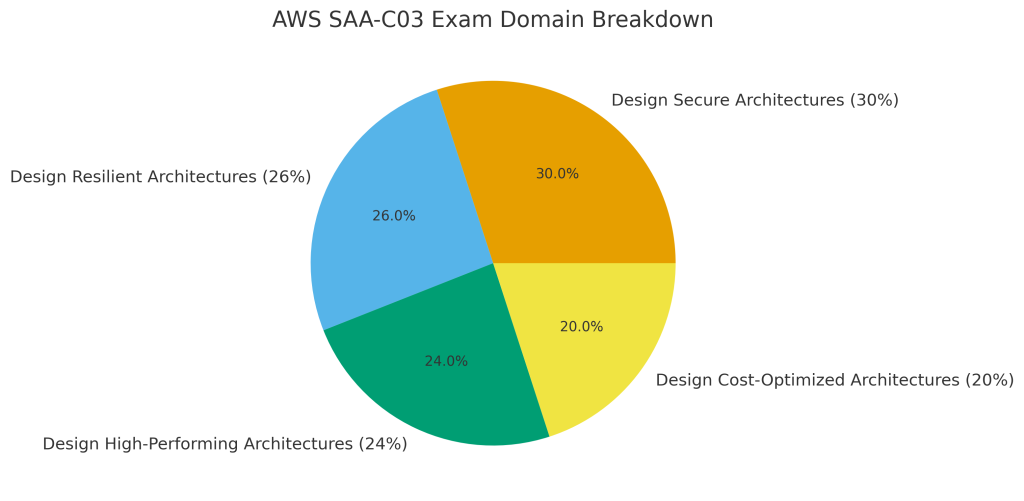
The Four Critical Domains
The exam divides into four weighted domains, and understanding these percentages helps you prioritize your study time:
- Design Secure Architectures (30%) – The heaviest domain, covering IAM, VPC security, encryption with KMS, and data protection
- Design Resilient Architectures (26%) – High availability, disaster recovery, and scalable architectures
- Design High-Performing Architectures (24%) – Storage optimization, compute performance, database selection
- Design Cost-Optimized Architectures (20%) – Rightsizing, lifecycle policies, and cost-effective service selection
The shift to 30% security emphasis (up from 24% in the previous version) reflects real-world enterprise priorities. You can’t skimp on security topics and pass this exam.
Who Should Take This Exam
Official recommendation: One year of hands-on AWS experience designing distributed systems.
Reality: Many candidates pass with 3-6 months of dedicated study and zero prior AWS experience. Others with strong IT backgrounds pass after just 2-4 weeks of intensive preparation.
You don’t need any prerequisites or prior certifications. While AWS Cloud Practitioner provides a helpful foundation, many IT professionals skip directly to Solutions Architect Associate.
You’re a good fit if you:
- Work as a solutions architect, cloud architect, or infrastructure engineer
- Have basic networking knowledge (IP addressing, subnets, DNS)
- Understand server administration (Linux or Windows)
- Know at least one programming/scripting language
- Want to move from on-premises infrastructure to cloud
The Best Study Resources (Proven by 2024-2025 Pass Rates)
After analyzing dozens of recent exam experiences, here are the resources that consistently appear in success stories:
Video Courses (Pick One as Your Foundation)
Stéphane Maarek’s Ultimate AWS SAA-C03 on Udemy ($12-85 depending on sales)
- 27 hours of content
- Perfect balance of depth and conciseness
- Most frequently recommended by recent passers
- Regular updates for service changes
Adrian Cantrill’s SAA-C03 Course ($40)
- 50+ hours of deep-dive content
- Exceptional visual diagrams
- Extensive hands-on demos with GitHub labs
- Best for those wanting mastery beyond just passing
Andrew Brown’s Free Course on FreeCodeCamp (Free)
- 10+ hours comprehensive coverage
- Zero cost option
- Great as primary resource or supplement
A Cloud Guru via Pluralsight ($29-49/month)
- Includes Cloud Playground for safe hands-on practice
- Subscription covers multiple AWS courses
Practice Exams (Non-Negotiable)
Tutorials Dojo (Jon Bonso) ($15-20)
- 401+ unique questions across 6 full practice tests
- Detailed explanations with reference links
- The unanimous recommendation: “If you score 85-90%+ consistently on Tutorials Dojo, you’re ready”
- Available on Udemy or their portal
Stéphane Maarek Practice Exams ($12-15)
- 390+ quality questions
- Slightly easier than actual exam but excellent practice
AWS Official Practice Exam ($20 for 20 questions)
- Familiarizes you with AWS question style
- Free sample questions also available
Official AWS Materials (Essential)
- AWS Well-Architected Framework – Underlies 30% of exam questions
- Official SAA-C03 Exam Guide – Your roadmap
- AWS Skill Builder – Free exam prep plans and Builder Labs
- AWS Free Tier – 12 months of hands-on practice
Free Supplementary Resources
- Tutorials Dojo AWS Cheat Sheets – Excellent quick-reference material
- r/AWSCertifications – 142,000+ members sharing exam experiences
- AWS Documentation and FAQs – Official details for each service
Resources to Avoid (Protect Your Investment)
Before you waste time and money, here are the red flags:
❌ Exam dumps and braindumps – Violates AWS certification agreement, results in permanent ban, and doesn’t build real understanding. AWS actively pursues legal action against dump sites.
❌ Outdated courses for SAA-C02 – The exam changed significantly in August 2022. Verify your course explicitly covers SAA-C03.
❌ YouTube-only preparation – Free videos are great supplements but lack the structured depth and practice questions you need.
❌ Courses promising “pass in 7 days” – These sacrifice deep understanding for memorization. You might pass, but you won’t be job-ready.
Stick with the proven resources above. Every extra dollar spent on quality materials is an investment that pays back thousands in salary.
Realistic Study Timelines
Complete Beginners (3-6 months)
Starting point: Zero AWS or cloud experience
Time commitment: 1-2 hours daily weekdays, 3-4 hours weekends
- Month 1: AWS Cloud Practitioner Essentials + basic Free Tier exploration
- Months 2-4: Complete primary video course with hands-on labs
- Month 5: Practice exams in review mode, detailed notes on mistakes
- Month 6: Timed practice exams targeting 85%+, final review
Intermediate Learners (2-3 months)
Starting point: Some AWS or general IT experience
Time commitment: 2-3 hours daily
- Weeks 1-6: Video courses at 1.5x speed, focus on unfamiliar services
- Weeks 7-8: Practice exams in review mode, identify gaps
- Weeks 9-10: Timed practice exams, concentrated weak area study
- Weeks 11-12: Final review and exam
Experienced Professionals (2-4 weeks)
Starting point: 1+ years AWS experience
Time commitment: 3-4 hours daily
- Week 1-2: Rapid course review at 2x speed
- Week 3: Practice exams revealing knowledge gaps
- Week 4: Intensive practice and targeted weak area study
Critical Services You Must Master
The official exam guide lists 149 in-scope services, but exam questions heavily favour certain services that appear repeatedly across all four domains. These are the services you’ll see in 80-90% of exam questions, based on analysis of recent exam experiences.
I’m focusing on these because mastering them gives you the foundation to reason through almost any scenario the exam throws at you. The remaining 100+ services either appear rarely or are tested at a surface level you can handle with basic familiarity.
Compute
- EC2: Instance families, placement groups, Auto Scaling
- Lambda: Execution context, concurrency limits, event sources
- ECS/EKS: Container orchestration differences
- Elastic Beanstalk: Managed deployments
Storage
- S3: All 7 storage classes, lifecycle policies, replication
- EBS: Volume types (gp3, io2, st1, sc1)
- EFS: Standard vs One Zone storage classes
- FSx: Variants for different workloads
Databases
- RDS: Multi-AZ vs read replicas
- Aurora/Aurora Serverless: Use cases
- DynamoDB: NoSQL with DAX caching
- ElastiCache: Redis vs Memcached
Networking (The Make-or-Break Domain)
- VPC: Subnets, route tables, internet/NAT gateways
- Security Groups vs NACLs: Stateful vs stateless
- Route 53: All routing policies and use cases
- Load Balancers: ALB vs NLB vs GWLB
- CloudFront vs Global Accelerator
Security (30% of Your Exam!)
- IAM: Policies, roles, cross-account access
- KMS: Encryption key management
- AWS WAF, Shield, GuardDuty: Threat protection
- Secrets Manager: Credential management
Exam Success Strategies from Recent Passers
The Practice Exam Method
- Start in review mode (untimed, immediate feedback)
- Take comprehensive notes on every wrong answer
- Progress to timed mode only after scoring 75%+ in review
- Take 5-6 full practice exams, repeating until mastering concepts
- Don’t book your exam until you’re consistently scoring 85-90%+ on Tutorials Dojo
Hands-On Practice (Non-Negotiable)
Create your AWS Free Tier account on day one and practice building:
- VPCs with public/private subnets
- EC2 instances with Auto Scaling
- RDS databases with multi-AZ
- S3 buckets with lifecycle policies
- Security groups and NACLs
Critical warning: Monitor your Free Tier usage carefully. Terminate unused resources, release unattached Elastic IPs, and check your billing dashboard weekly to avoid surprise charges.
Time Management During the Exam
- 2 minutes per question (130 minutes ÷ 65 questions)
- Flag difficult questions (target 12-15 flagged)
- Reserve 20-30 minutes for reviewing flagged questions
- Use elimination technique on uncertain answers
Pattern Recognition
Learn to spot keywords:
- “Most cost-effective” leads to serverless, spot instances, lifecycle policies
- “Highly available” means multi-AZ or multi-region
- “Millisecond latency” points to ElastiCache or DynamoDB
- “Serverless” eliminates EC2-based options
Critical Service Comparisons to Memorize
Understanding when to use one service over another is the key to passing. Here’s how these decisions break down:
- S3 vs EBS vs EFS vs Instance Store
- S3: Object storage accessible via HTTP/HTTPS, perfect for static content, backups, and data lakes. Access from anywhere, unlimited storage.
- EBS: Block storage that attaches to a single EC2 instance. Use for boot volumes, databases requiring consistent IOPS, and application data.
- EFS: File system accessible by multiple EC2 instances simultaneously across AZs. Use for shared application data and content management.
- Instance Store: Ephemeral storage physically attached to the host. Use for temporary data, caches, and buffers that can be lost.
- RDS vs DynamoDB vs ElastiCache
- RDS: Traditional relational databases (MySQL, PostgreSQL, etc.) when you need ACID transactions and complex joins.
- DynamoDB: NoSQL for single-digit millisecond latency, infinite scale, and simple key-value or document data.
- ElastiCache: In-memory caching (Redis or Memcached) for microsecond latency on frequently accessed data.
- Security Groups vs NACLs: Security Groups are stateful (return traffic automatically allowed), NACLs are stateless (must explicitly allow both directions)
- NAT Gateway vs NAT Instance: NAT Gateway is managed and highly available, NAT Instance requires manual management but offers more control
- SQS vs SNS vs Amazon MQ: SQS for decoupling with pull-based queues, SNS for pub/sub push notifications, Amazon MQ for migrating existing message brokers
- Direct Connect vs Site-to-Site VPN: Direct Connect for dedicated, consistent bandwidth, VPN for encrypted connections over internet All S3 storage classes by cost and retrieval time
- All Route 53 routing policies
Total Cost Breakdown
Exam fee: $150 (or $75 with 50% discount from prior certification)
Study materials options:
Budget approach ($40-60 total):
- Adrian Cantrill or Maarek course: $20-40
- Tutorials Dojo practice exams: $15
- AWS Free Tier: Free
- AWS documentation: Free
Standard approach ($60-100 total):
- Maarek course + practice bundle: $30
- Tutorials Dojo exams: $15
- Tutorials Dojo Study Guide: $15
- AWS Free Tier: Free
Premium approach ($100-150 total):
- Adrian Cantrill course: $40
- A Cloud Guru/Pluralsight: $49/month (1-2 months)
- Tutorials Dojo exams: $15
- AWS Free Tier: Free
Most successful candidates invest $200-300 total including exam fee. That’s exceptional value compared to career benefits.
Career Impact and Salary Data
Based on 2024-2025 salary data:
- Average salary: $125,000-$155,000
- Entry-level: $114,000-$138,000
- Senior positions: $148,000-$161,500+
Top employers paying premium salaries:
- Amazon: $152,745 average
- Microsoft: $132,250
- Google: $129,666
- Accenture: $138,862
- J.P. Morgan Chase: $133,286-$147,011
Certification directly impacts compensation:
- 74% report salary increases specifically from AWS certifications
- 69% report higher overall earnings
- Average 27% increase within 6 months ($12,000-$30,000 raises)
Registration Process
- Create AWS Certification Account at aws.training – Use permanent personal email
- Verify your name matches government ID exactly (critical!)
- Select SAA-C03 exam from eligible exams list
- Choose Pearson VUE delivery (test center or online proctored)
- Select date/time – Book 2-4 weeks ahead for motivation
- Pay $150 (or $75 with discount voucher)
For online proctored exams, run the system test beforehand.
Pro tip: Non-native English speakers can request an additional 30 minutes through your AWS Certification Account before scheduling.
Your 12-Week Study Plan
Weeks 1-6: Complete primary video course (40% of study time)
- Take detailed notes on service comparisons
- Focus on “when to use X vs Y” scenarios
Weeks 7-8: Begin practice exams in review mode (30% of study time)
- Take comprehensive notes on every wrong answer
- Identify weak knowledge areas
Weeks 9-10: Switch to timed practice exams
- Simulate real exam conditions
- Study weak areas intensively between attempts
Weeks 11-12: Final preparation (30% of study time)
- Review AWS Well-Architected Framework
- Study Tutorials Dojo cheat sheets
- Achieve consistent 85-90%+ on practice tests
- Schedule and pass exam
Common Pitfalls to Avoid
❌ Only watching videos without hands-on practice
❌ Using exam dumps (violates AWS policy, doesn’t build real understanding)
❌ Booking exam too early (causes stress) or too late (enables procrastination)
❌ Ignoring the r/AWSCertifications community
❌ Not monitoring Free Tier usage (surprise bills!)
❌ Skipping the Well-Architected Framework whitepaper
How This Compares to Other AWS Certifications
AWS Cloud Practitioner (easier)
- $100, 90 minutes, foundational
- Good for complete beginners or non-technical roles
AWS Solutions Architect Associate (moderate)
- $150, 130 minutes, most popular starting point
- Broad coverage, architectural focus
- Held by 54% of AWS-certified professionals
AWS Developer Associate (moderate)
- $150, 130 minutes, requires coding proficiency
- Focus on application development
AWS SysOps Administrator Associate (harder)
- $150, 130 minutes, operations focus
- Generally considered hardest of three associate exams
AWS Solutions Architect Professional (hardest)
- $300, 180 minutes, 75 questions
- Requires deep expertise and complex scenario analysis
- Average salary: $142,000-$156,000
Most professionals start with Solutions Architect Associate. It provides the best foundation and broadest career value.
What Happens After You Pass
Congratulations! You’re now AWS Certified Solutions Architect – Associate. Here’s how to maximize your investment immediately:
Immediate Actions (Within 24 Hours)
- Update LinkedIn – Add certification to your profile and announce your achievement. Use hashtags like #AWSCertified and #CloudComputing
- Update Resume/CV – Add to certifications section and update job descriptions to reflect validated AWS skills
- Download Digital Badge – Available through your AWS Certification account, shareable on social media and email signatures
- Claim Your Benefits – 50% discount on your next AWS certification exam, early access to beta exams, access to AWS Certified community
Within the First Week
- Update Email Signature – Include your AWS Certified Solutions Architect – Associate credential
- Request Salary Review – If currently employed, schedule a meeting to discuss compensation adjustment based on your new certification
- Browse Job Boards – Even if not actively seeking, see what roles you now qualify for at higher salary bands
- Join AWS User Groups – Connect with other certified professionals in your region
Career Progression Paths
If you enjoyed the certification journey, consider these next steps:
- Lateral expansion: AWS Developer Associate or SysOps Administrator Associate to round out your associate-level knowledge
- Vertical progression: AWS Solutions Architect Professional (typically pursued 6-12 months after associate)
- Specialization: Security, Advanced Networking, Database, or Machine Learning specialty certifications
- Multi-cloud strategy: Azure Solutions Architect Expert or Google Cloud Professional Cloud Architect to become cloud-agnostic
Apply Your Knowledge
The certification proves you know AWS – now demonstrate it:
- Migrate a personal project to AWS and document the architecture
- Contribute to open-source projects using AWS services
- Write blog posts or create YouTube content about your AWS learning journey
- Volunteer to help with AWS migrations or cloud initiatives at your current employer
The knowledge you’ve gained isn’t just for passing an exam. It’s immediately applicable to real-world cloud architecture decisions. Use it.
Final Advice
The AWS Certified Solutions Architect – Associate certification delivers exceptional ROI: invest $150-300 and 2-6 months to access roles paying $125,000-$155,000 annually with $12,000-$30,000 average salary increases.
Your action plan:
- Create your AWS Free Tier account today
- Choose your video course (Maarek or Cantrill)
- Buy Tutorials Dojo practice exams
- Join r/AWSCertifications for community support
- Study consistently for 2-6 months depending on your background
- Don’t book your exam until you’re scoring 85-90%+ on practice tests
The cloud computing market continues expanding, AWS maintains market leadership, and certified professionals command premium salaries. This certification proves you can design secure, resilient, high-performing, and cost-optimized architectures. That’s exactly what employers need.
Start your preparation today, and you could be AWS Certified Solutions Architect – Associate in 2-6 months.
Looking for more certification guides? Check out our Friday Professional Development series for other cloud and tech certifications.
Links mentioned in this guide: