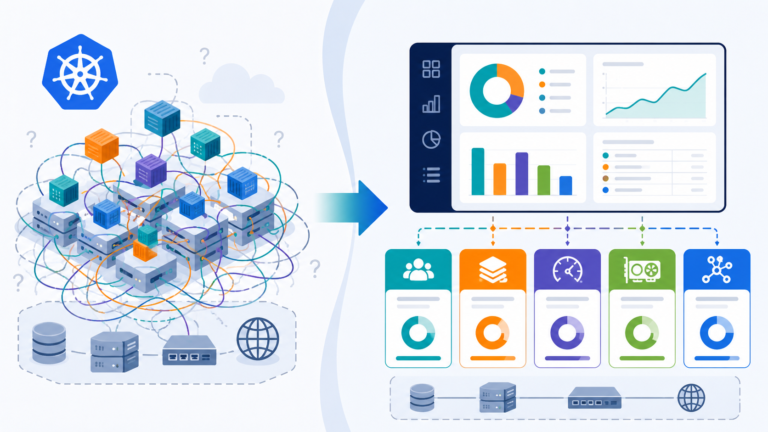
In our increasingly complex digital landscape, simply knowing who users are and what they can access represents only the beginning of a comprehensive identity strategy. Organisations face sophisticated threats that target identity systems, complex compliance requirements that demand rigorous governance, and operational challenges that require advanced management capabilities.
Having explored the foundations of Microsoft Entra ID and its authentication mechanisms in our previous posts, we now turn our attention to the advanced security and governance features that transform identity from a technical function to a strategic business enabler. These capabilities build upon the core identity services, offering protection against emerging threats, governance for regulatory compliance, and visibility into your identity ecosystem.
The most security-mature organisations recognise that identity has become a control plane for security. Microsoft Entra ID Premium capabilities provide the tools to implement this vision through continuous monitoring, risk-based controls, and governance workflows that ensure proper access management throughout the identity lifecycle.
Identity Protection: Detecting and Responding to Threats
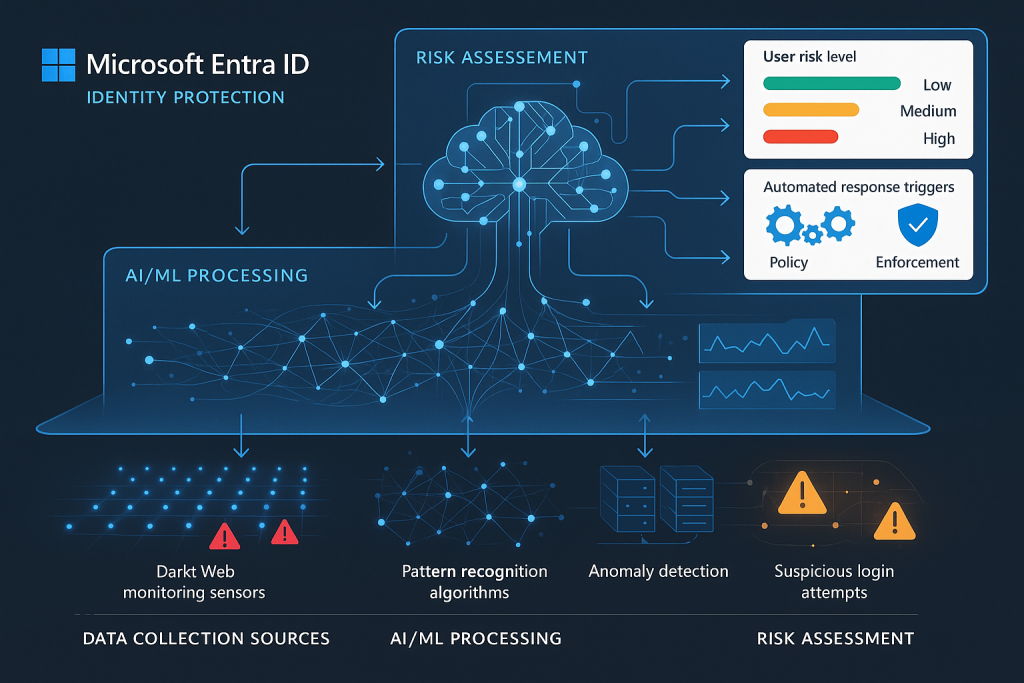
Identity systems have become primary targets for attackers, with credential theft, phishing, and identity fraud forming the foundation of many security breaches. Microsoft Entra ID Protection leverages Microsoft’s vast security intelligence network to detect suspicious activities and respond to potential compromise before damage occurs.
Risk Detection and Intelligence
Microsoft Entra ID Protection employs sophisticated algorithms and machine learning to evaluate authentication activities and flag potentially suspicious events:
User Risk represents the probability that an identity has been compromised. This long-term assessment considers factors like leaked credentials found on the dark web, unusual travel patterns, or sign-ins from anonymous IP addresses. User risk persists until remediated through secure password change or dismissed by an administrator.
Sign-in Risk evaluates each authentication attempt for suspicious characteristics. This real-time assessment identifies unusual behaviours like impossible travel, unfamiliar locations, or suspicious IP addresses. Sign-in risk applies to individual authentication events rather than persisting across sessions.
These risk signals leverage Microsoft’s extensive threat intelligence network, which processes billions of authentications daily across consumer and enterprise services. This scale provides unparalleled visibility into emerging threats and attack patterns.
Risk Remediation Workflows
Detecting risk represents only half the equation; organisations must also respond effectively. Microsoft Entra ID Protection enables automated or manual remediation through several mechanisms:
Risk-based Conditional Access Policies dynamically adjust authentication requirements based on detected risk levels. For example, medium-risk sign-ins might trigger MFA requirements, whilst high-risk attempts might be blocked entirely.
Self-service Remediation allows users to resolve lower-risk situations themselves through guided workflows, such as changing passwords or confirming recent activities.
Administrator Investigation Tools provide detailed forensic information about risk detections, enabling security teams to validate alerts and take appropriate action.
Security Information Integration forwards risk events to SIEM platforms like Microsoft Sentinel for correlation with other security telemetry and orchestrated response through security playbooks.
Implementation Approach for Identity Protection
When implementing Identity Protection, consider this phased approach:
Visibility Mode begins with monitoring risk without enforcing controls, establishing a baseline understanding of your environment’s risk profile and potential false positives.
Selective Enforcement applies risk-based policies to pilot groups or less sensitive applications, validating the impact before broader deployment.
Comprehensive Protection extends policies across your organisation with appropriate exclusions for special-case scenarios like emergency access accounts.
Throughout implementation, regular review of risk detections, policy effectiveness, and user impact ensures your protection strategy remains both effective and operationally sustainable.
Privileged Identity Management: Securing Administrative Access
Administrative accounts represent the keys to your digital kingdom. Their compromise can lead to catastrophic breaches, yet these accounts often receive inadequate protection. Microsoft Entra Privileged Identity Management (PIM) transforms how organisations secure and manage privileged access through just-in-time administration, approval workflows, and comprehensive auditing.
Just-in-Time Access Model
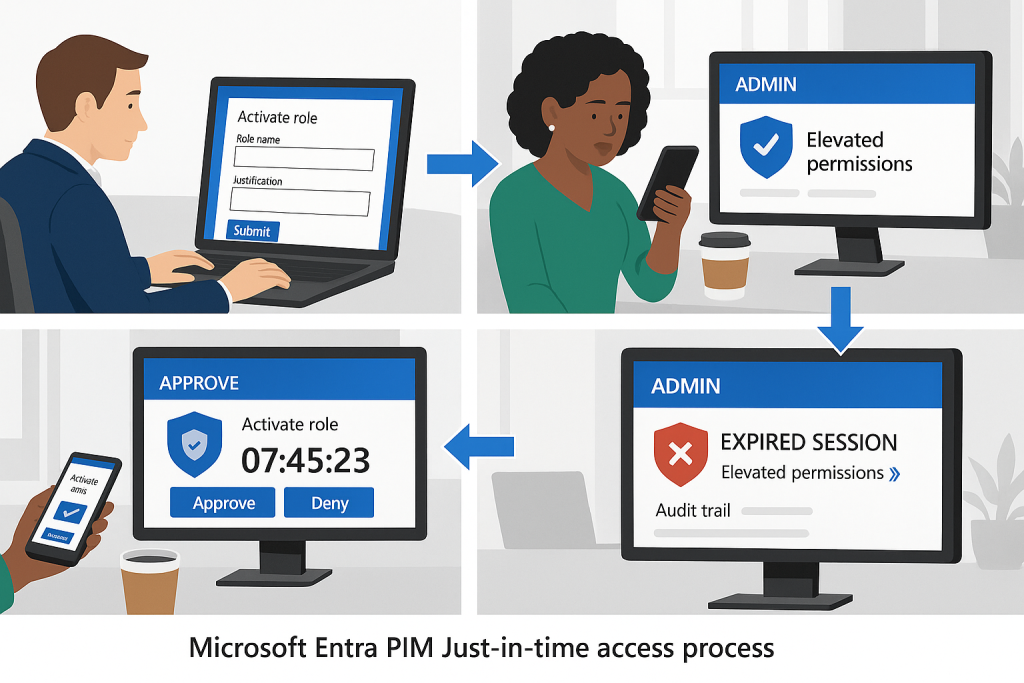
PIM implements the principle of just-in-time access, fundamentally changing the security posture for privileged roles:
Eligible vs. Active Assignments separates potential from actual privilege. Users are assigned eligibility for roles but must explicitly activate them when needed, reducing the persistent attack surface.
Time-bound Activation limits privileged sessions to specific durations, automatically revoking elevated permissions when the time expires or the task is complete.
Approval Workflows require justification and potentially additional authorisation before role activation, ensuring oversight of privileged access.
This model dramatically reduces the attack surface by ensuring administrators operate with standard user privileges most of the time, activating elevated permissions only when required for specific tasks.
Securing Different Privilege Types
PIM extends beyond basic directory roles to secure multiple privilege types:
Microsoft Entra ID Roles control identity management permissions, from Global Administrator to more specific roles like Authentication Administrator or License Administrator.
Azure Resource Roles manage permissions to Azure subscriptions, resource groups, and individual resources through integration with Azure RBAC.
Microsoft 365 Roles protect administrative access to services like Exchange, SharePoint, and Teams through dedicated role groups.
Custom Roles allow organisations to define fine-grained permission sets aligned with specific administrative responsibilities.
Governance Through Access Reviews
Beyond just-in-time access, PIM provides governance mechanisms to ensure appropriate privilege distribution:
Regular Access Reviews prompt stakeholders to validate the continued business need for privileged role assignments, reducing privilege creep.
Activation Insights provide analytics about role usage patterns, helping identify unnecessary privileges or opportunities for role refinement.
Alert Configuration notifies security teams about unusual activation patterns or potential role misuse.
Access History maintains comprehensive logs of all privileged activities for audit purposes and incident investigation.
Implementation Strategies for PIM
When deploying Privileged Identity Management, consider these implementation strategies:
Critical Roles First – Begin with the most powerful roles like Global Administrator and Security Administrator, which represent the highest risk if compromised.
Role Rationalization – Review and refine your privileged roles before implementing PIM, ensuring principle of least privilege through appropriately scoped responsibilities.
Emergency Access Planning – Establish break-glass procedures for situations where normal PIM workflows might impede critical response activities.
Activation Duration Alignment – Set maximum activation periods appropriate to typical administrative tasks, balancing security with operational efficiency.
Access Reviews: Maintaining Least Privilege
The principle of least privilege—ensuring users have only the access rights necessary for their current responsibilities—sounds straightforward but proves challenging to maintain over time. As roles change, projects end, and organisational structures evolve, access rights often accumulate rather than adjust accordingly.
Microsoft Entra ID Access Reviews provide structured processes for periodically validating access rights, ensuring entitlements remain appropriate as organisational needs change.
Review Scopes and Models
Access reviews can target various entitlement types:
Group Membership Reviews validate continued need for inclusion in security groups or Microsoft 365 groups that control resource access.
Application Access Reviews assess whether users should maintain access to specific applications or services.
Role Assignment Reviews evaluate the appropriateness of role memberships, particularly for privileged roles.
These reviews can follow different models based on your governance requirements:
Self-review asks users to certify their own access needs, effective for lower-risk resources but susceptible to rubber-stamping.
Manager Review shifts responsibility to line managers who should understand their team members’ responsibilities and access requirements.
Security Team Review leverages security expertise for evaluating access to sensitive resources or identifying excessive permissions.
Multi-stage Review combines approaches, such as initial user self-attestation followed by manager approval for continued access.
Automating Access Governance
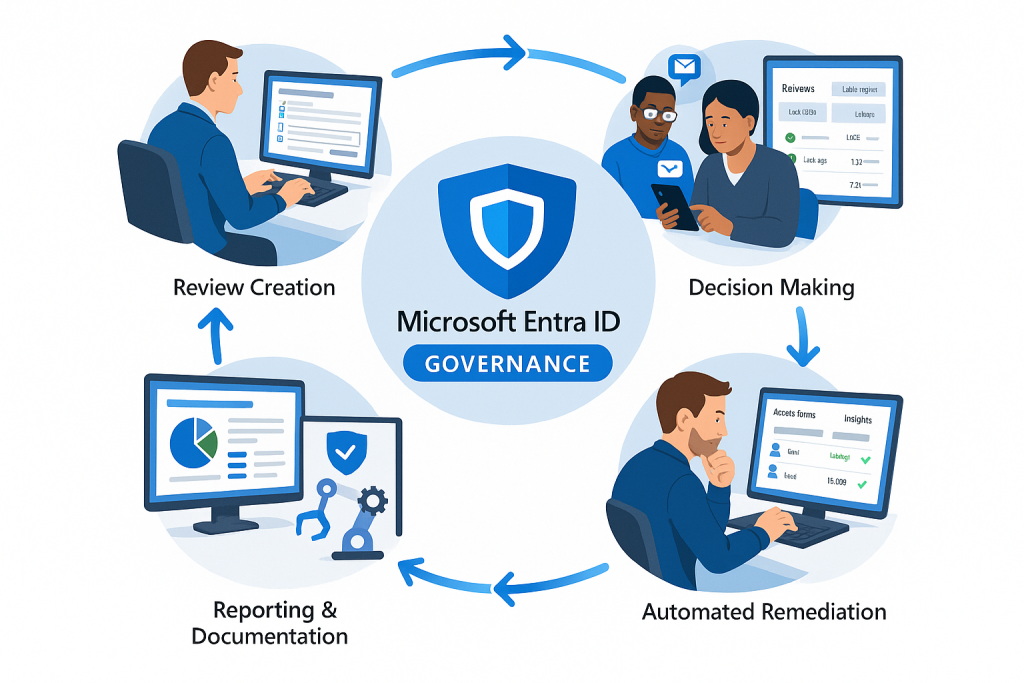
Access reviews become particularly powerful when automated through recurring schedules and policy-driven decisions:
Scheduled Recurrence ensures reviews happen at appropriate intervals—quarterly for sensitive access, annually for standard entitlements.
Decision Assistance provides reviewers with insights like last authentication time or access usage patterns to inform their decisions.
Auto-application of Decisions implements review outcomes without manual intervention, reducing administrative overhead.
Decision Inheritance applies access changes consistently across related resources when appropriate.
![Visualization of the access review lifecycle showing the full governance process]
Implementation Best Practices
When implementing access reviews, consider these best practices:
Start with High-value Targets – Focus initial reviews on sensitive applications, data resources, or privileged groups before expanding to broader access.
Reviewer Education – Ensure reviewers understand the importance of thoughtful evaluation rather than automatic approval of all access.
Reasonable Deadlines – Allow sufficient time for reviews while maintaining momentum—typically 2-4 weeks depending on scope and complexity.
Results Analysis – Look for patterns in review outcomes that might indicate broader access governance issues requiring systemic remediation.
Entitlement Management: Governing Access at Scale
For complex organisations with numerous resources and dynamic access needs, individual access management becomes unsustainable. Microsoft Entra ID Entitlement Management provides a comprehensive solution for packageing access, defining request workflows, and automating access lifecycle management at scale.
Access Packages: Structured Entitlement Delivery
Access packages bundle related resources, roles, and groups into logical collections that can be requested and provisioned together:
Resource Catalogues organize related resources into manageable collections aligned with business functions or compliance boundaries.
Access Bundles combine multiple access rights (group memberships, application roles, SharePoint sites) into coherent packages aligned with job functions or project needs.
Assignment Policies define who can request access packages, what approval workflows apply, and when access expires or requires review.
Lifecycle Management automates provisioning, updates, and deprovisioning based on policy-defined timeframes or organisational changes.
Governance Through Access Workflows
Entitlement Management streamlines access governance through structured workflows:
Self-service Requests allow users to discover and request access packages through a central marketplace, reducing IT overhead.
Multi-stage Approval routes requests through appropriate decision-makers, from direct managers to resource owners or compliance officers.
Terms of Use ensure requestors acknowledge usage policies or compliance requirements before receiving access.
Access Certification schedules periodic reviews to validate continued business need for assigned access packages.
External User Governance
Beyond internal users, Entitlement Management provides structured governance for external collaborators:
Partner Onboarding streamlines provisioning access for external organisations through sponsor-driven invitations.
Lifecycle Management automatically expires external access based on policy-defined durations or inactivity thresholds.
Identity Verification ensures external users meet authentication requirements before accessing sensitive resources.
Cross-tenant Access manages collaboration across Microsoft Entra ID tenants whilst maintaining appropriate security boundaries.
Implementation Considerations
When implementing Entitlement Management, consider these strategic approaches:
Process Alignment – Ensure access packages reflect actual business processes and organisational structures rather than merely technical groupings.
Ownership Clarity – Establish clear resource ownership to determine who should approve access requests and review existing assignments.
Appropriate Lifecycles – Set access durations based on typical project timelines or business relationships, balancing security with operational convenience.
Progressive Implementation – Begin with well-defined scenarios like project access or contractor provisioning before expanding to more complex use cases.
Compliance Reporting and Monitoring
Advanced security controls require continuous monitoring and compliance reporting to validate effectiveness and meet regulatory requirements. Microsoft Entra ID provides comprehensive auditing, reporting, and integration capabilities to support these needs.
Audit Logs and Activity Monitoring
Microsoft Entra ID maintains detailed audit trails across identity-related activities:
Sign-in Logs record all authentication attempts, their outcomes, and contextual information like device, location, and client application.
Audit Logs track administrative activities, policy changes, and resource modifications within the identity system.
Provisioning Logs document user lifecycle events including creation, updates, and deletions across connected systems.
Risk Event Logs capture security alerts and potential compromise indicators for further investigation.
These logs provide the foundation for security monitoring, compliance reporting, and forensic investigation when needed.
Compliance Reporting Capabilities
Microsoft Entra ID offers numerous built-in reports to support compliance needs:
User Access Reviews document periodic certification of appropriate access rights and remediation actions.
Privileged Role Reports track administrative activities and just-in-time access patterns for sensitive roles.
Credential Management monitors password reset activities, authentication method usage, and security policy compliance.
License Utilization tracks service usage to ensure appropriate licensing for security features and compliance requirements.
Integration with Security Ecosystems
Identity signals become particularly valuable when correlated with broader security telemetry:
Microsoft Sentinel Integration forwards identity logs to Microsoft’s SIEM platform for advanced correlation, threat hunting, and orchestrated response.
API Access enables custom integration with third-party security tools, compliance frameworks, or governance platforms.
Workbooks and Dashboards provide customisable visualisations of identity security posture and trending metrics.
Power BI Integration enables advanced analytics and custom reporting for executive dashboards or compliance documentation.

Operational Readiness
Effective monitoring requires operational readiness to detect and respond to identity-related incidents:
Alert Configuration establishes appropriate notification thresholds for abnormal activities requiring investigation.
Response Playbooks define standard procedures for addressing common identity incidents like credential compromise or unusual privileged access.
Regular Review Cadence establishes scheduled evaluation of identity security metrics and compliance status.
Retention Planning ensures audit data remains available for compliance requirements whilst managing storage costs.
Bringing It All Together: Your Identity Security Roadmap
Implementing advanced identity security and governance represents a journey rather than a destination. This progressive approach balances security improvements with operational impact:
Foundation: Identity Baseline Security
Begin with fundamental security improvements that apply broadly across your organisation:
Security Defaults/Baseline CA – Implement foundational security through either Security Defaults or baseline Conditional Access policies.
MFA Enforcement – Require multi-factor authentication for all users, with particular emphasis on administrative accounts.
Identity Protection Monitoring – Enable risk detection in reporting mode to establish visibility into potential threats.
Basic Privileged Access Management – Implement just-in-time access for critical administrative roles.
Intermediate: Enhanced Governance
Build on your security foundation with governance capabilities that ensure appropriate access:
Access Review Programs – Establish regular reviews for sensitive groups, applications, and administrative roles.
Entitlement Management – Deploy access packages for common scenarios like project access or contractor onboarding.
Advanced Conditional Access – Implement risk-based and compliance-focused access policies.
Monitoring Integration – Forward identity logs to security monitoring platforms for correlation and alerting.
Advanced: Comprehensive Identity Security
Achieve mature identity governance through sophisticated controls and automation:
Passwordless Authentication – Eliminate password dependency in favour of phishing-resistant credentials.
Custom Access Workflows – Implement approval chains and context-sensitive access provisioning.
Third-party Identity Governance – Extend governance beyond Microsoft services to your entire application portfolio.
Continuous Access Evaluation – Implement real-time policy enforcement that revokes access when conditions change.
Conclusion: Identity as a Strategic Security Asset
As we conclude this third instalment in our Microsoft Entra ID masterclass, it’s worth reflecting on the transformation of identity from a mere directory service to a strategic security asset. Advanced security and governance capabilities elevate identity to the control plane for your entire security ecosystem, enabling zero-trust architecture whilst maintaining appropriate governance.
The features we’ve explored—Identity Protection, Privileged Access Management, Access Reviews, and Entitlement Management—provide the tools to implement robust security whilst streamlining operations through automation and self-service. When properly implemented, these capabilities simultaneously strengthen security posture and improve user experience—transforming identity from a security roadblock to a business enabler.
In our final masterclass post, we’ll explore integration and real-world scenarios that bring these concepts to life through practical implementation examples, migration strategies, and hybrid identity considerations. We’ll examine how Microsoft Entra ID connects with your broader technology ecosystem to create a cohesive identity fabric across your digital estate.
As you prepare for our final instalment, consider these questions for your organisation:
- How might advanced identity governance transform your security operations and compliance processes?
- What identity-related risks are most relevant to your business model and regulatory environment?
- How would automated access lifecycle management impact your operational efficiency and security posture?
Remember that identity security is not merely a technical implementation but a business enabler that, when properly governed, creates the foundation for secure digital transformation.
This post is the third in our Microsoft Entra ID Masterclass series. Don’t miss our upcoming final post, where we’ll explore integration patterns and real-world implementation scenarios that bring these concepts to life.